
Zavedení
This manual provides detailed instructions for the installation, operation, and maintenance of your ANRAN Q04 Solar 4G LTE Security Camera. Please read this manual thoroughly before using the product to ensure proper functionality and safety. Keep this manual for future reference.

Image: Two ANRAN Q04 white solar security cameras, showcasing the solar panel and antenna design.
Obsah balení
Ověřte, zda jsou v balení přítomny všechny součásti. Pokud některé položky chybí nebo jsou poškozené, kontaktujte zákaznickou podporu.
- ANRAN Q04 Solar 4G LTE Security Camera(s)
- Solární panel (integrovaný nebo samostatný, v závislosti na modelové variantě)
- Montážní držák a šrouby
- USB nabíjecí kabel
- Uživatelská příručka (tento dokument)
- SIM Card (pre-installed or included, depending on region/package)
- MicroSD Card (optional, may be included in some packages)
Konec produktuview
The ANRAN Q04 camera is a wireless outdoor security solution featuring 4G LTE connectivity and solar power. It is designed for continuous surveillance in locations without Wi-Fi access or consistent power supply.

Image: ANRAN Q04 black solar security camera, highlighting the inclusion of a SIM card and a 32GB microSD card.
Klíčové vlastnosti:
- Připojení 4G LTE: Operates independently without Wi-Fi.
- Solární napájení: Integrated solar panel for continuous charging of the built-in 9600mAh battery.
- 100% Wire-Free: Flexible placement without power cables.
- Tři režimy nočního vidění: Smart, Color, and Infrared for clear visibility in low light.
- IP66 Odolnost proti povětrnostním vlivům: Určeno pro venkovní použití, odolné vůči prachu a vodě.
- Lokální a cloudové úložiště: Supports up to 128GB MicroSD card (not included) and offers cloud storage options.
Nastavení
1. Počáteční nabíjení
Before first use, fully charge the camera's internal battery using the provided USB cable and a 5V/2A power adapter (not included). A full charge ensures optimal performance, especially during initial setup or periods of low sunlight.
2. SIM Card & MicroSD Card Installation
- Locate the SIM card slot and MicroSD card slot on the camera (usually under a rubber seal).
- Insert the 4G LTE SIM card (ensure it is activated and has a data plan) into the SIM slot with the gold contacts facing down.
- Insert a MicroSD card (up to 128GB, Class 10 or higher recommended) into the MicroSD slot if local storage is desired.
- Securely close the rubber seal to maintain waterproofing.

Image: ANRAN Q04 white solar security camera with an arrow pointing to the MicroSD card slot, indicating local storage capability up to 128GB.
3. Stažení aplikace a vytvoření účtu
- Download the "ANRAN" app from your smartphone's app store (iOS App Store or Google Play Store).
- Otevřete aplikaci a vytvořte si nový účet nebo se přihlaste, pokud jej již máte.
4. Párování/připojení kamery
- Power on the camera. Wait for the indicator light to show it's ready for pairing (refer to the camera's LED indicator guide in the app or a separate quick start guide).
- V aplikaci ANRAN klepněte na ikonu „+“ pro přidání nového zařízení.
- Select "4G Camera" or the appropriate camera type.
- Follow the on-screen instructions to scan the QR code on the camera or manually enter its device ID.
- Po připojení můžete kameru pojmenovat a nakonfigurovat počáteční nastavení.
5. Montážní pokyny
Vyberte místo, které přijímá ample direct sunlight for the solar panel and provides the desired viewúhel.
- Mark the drilling points on the wall or mounting surface using the mounting bracket as a template.
- Vyvrtejte pilotní otvory a v případě potřeby vložte do nich nástěnné hmoždinky.
- Připevněte montážní držák k povrchu pomocí dodaných šroubů.
- Upevněte kameru k montážnímu držáku.
- Adjust the camera angle and solar panel orientation for optimal sunlight exposure and coverage.

Image: A woman installing an ANRAN Q04 white solar security camera on an outdoor wall, demonstrating simple installation.

Image: An ANRAN Q04 black solar security camera mounted on a tree, illustrating its 100% wire-free and 4G capabilities, powered by an integrated solar panel.
Obsluha fotoaparátu
1. Živě View
Open the ANRAN app and select your camera from the device list. The live view will display the real-time feed from your camera. You can use on-screen controls for pan/tilt (if supported by your model), zoom, and two-way audio.
2. Nahrávání a přehrávání
The camera records video based on motion detection or continuous recording settings (if configured).
- Místní úložiště: Recordings are saved to the installed MicroSD card. Access them via the app's playback section.
- Cloudové úložiště: If subscribed, recordings are uploaded to the cloud. Access them through the app's cloud history.
3. Režimy nočního vidění
The ANRAN Q04 supports three night vision modes, which can be configured in the app settings:
- Inteligentní režim: Automaticky přepíná mezi infračerveným a barevným nočním viděním na základě detekovaného pohybu nebo okolního světla.
- Barevný režim: Utilizes built-in spotlights to provide full-color video in low-light conditions.
- Infračervený režim: Používá infračervené LED diody pro černobílé video v naprosté tmě.
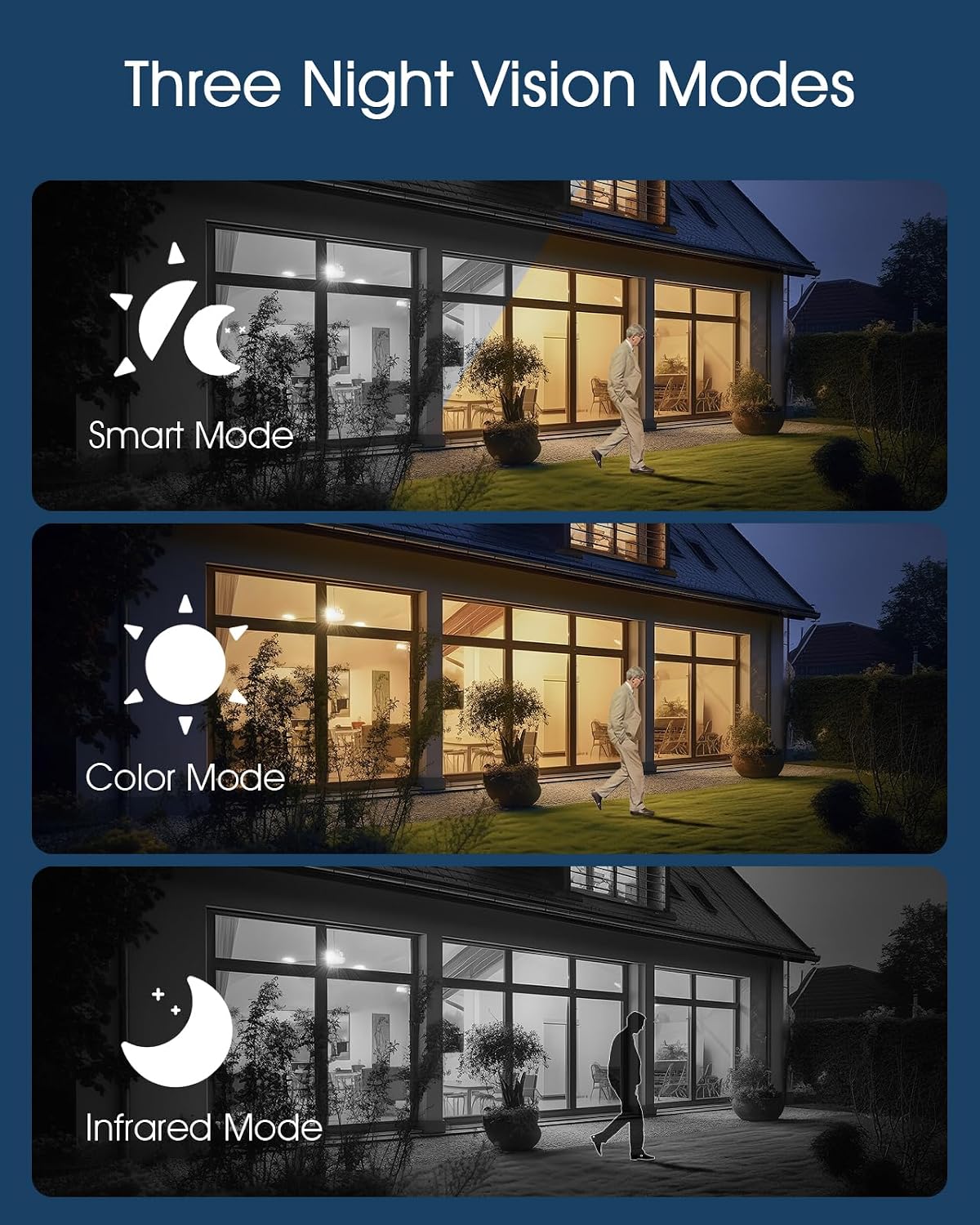
Image: Visual representation of the three night vision modes (Smart, Color, Infrared) available on the ANRAN Q04 camera, showing their distinct appearances.
4. Nastavení detekce pohybu
Configure motion detection sensitivity, detection zones, and notification preferences within the ANRAN app. This allows you to receive alerts only for relevant events.
Údržba
1. Čištění
- Pravidelně otírejte objektiv fotoaparátu a solární panel měkkým hadříkemamp hadříkem k odstranění prachu, nečistot nebo nečistot.
- Ensure the solar panel is clean for efficient charging.
- Nepoužívejte drsné chemikálie ani abrazivní čisticí prostředky.
2. Péče o baterie
- The camera is designed for continuous solar charging. Ensure the solar panel receives adequate direct sunlight daily.
- If the camera is installed in a shaded area or during prolonged periods of low sunlight, occasional manual charging via USB may be required.
- Vyhněte se extrémním teplotám, které mohou snížit výkon baterie.

Image: ANRAN Q04 black solar security camera with its solar panel, illustrating its capability for 365 days of non-stop solar power due to the 9600mAh battery and IP66 waterproof rating.
Odstraňování problémů
| Problém | Možné řešení |
|---|---|
| Fotoaparát se nezapíná. | Ensure the battery is charged. Connect to a USB power source for initial charging. Check the power button. |
| No 4G signal. | Verify the SIM card is correctly inserted and activated with a data plan. Check network coverage in the installation area. Try restarting the camera. |
| Nelze se připojit k aplikaci. | Ensure the camera is powered on and the SIM card has an active data connection. Restart the app and the camera. Follow the pairing steps again. |
| Špatná kvalita videa v noci. | Check night vision settings in the app (Smart, Color, Infrared). Ensure the camera lens is clean and not obstructed. |
| Baterie se nenabíjí přes solární panel. | Ensure the solar panel is clean and receives at least 4-6 hours of direct sunlight daily. Reposition the camera or panel if necessary. |
Specifikace
- Model: Q04
- Konektivita: 4G LTE (vyžaduje SIM kartu)
- Moc: Solar Panel with 9600mAh Rechargeable Battery
- Skladování: MicroSD Card (up to 128GB, not included), Cloud Storage (subscription optional)
- Odolnost vůči počasí: IP66 vodotěsný a prachotěsný
- Provozní teplota: -40 °F až 140 °F (-40 °C až 60 °C)
- Noční vidění: Smart, Color, Infrared Modes
- Zvuk: Obousměrný zvuk

Image: ANRAN Q04 white solar security camera operating outdoors in the rain, demonstrating its IP66 waterproof and dustproof rating and ability to withstand temperatures from -40°F to 140°F.
Záruka a podpora
Výrobky ANRAN se obvykle dodávají s omezenou zárukou. Prostudujte si prosím záruční list, který je součástí balení, nebo navštivte oficiální webové stránky ANRAN. webpodrobné záruční podmínky naleznete na webu.
For technical support, troubleshooting assistance, or warranty claims, please contact ANRAN customer service through their official webwebu nebo kontaktních informací uvedených na obalu produktu.
Webmísto: www.anran-cctv.com (Please verify official webweb)