
1. Úvod
This manual provides comprehensive instructions for the proper use and care of your Casio W220H Illuminator Digital Watch. Please read this manual thoroughly to ensure optimal performance and longevity of your timepiece. Keep this manual for future reference.
2. Konec produktuview
The Casio W220H is a durable digital watch designed for everyday use, featuring an Illuminator backlight, stopwatch, alarm functions, and water resistance. Its robust resin construction ensures reliability.
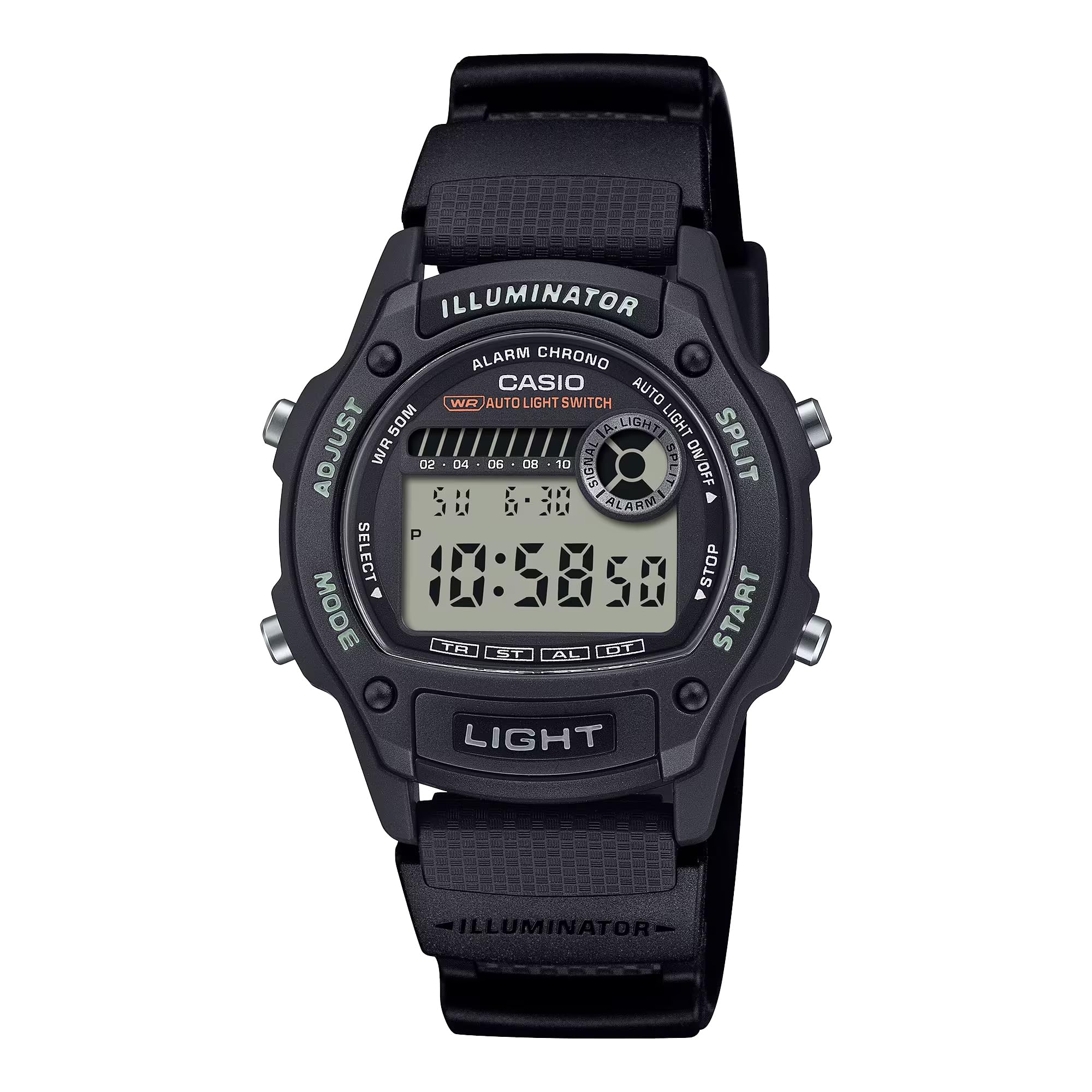
Obrázek 2.1: Přední strana view of the Casio W220H Illuminator Digital Watch. The watch features a black resin case and band, with a clear digital display showing time and date. Buttons are visible on both sides of the case.
Funkce tlačítek:
- ADJUST Button (Top Left): Používá se pro vstup a výstup z režimů nastavení a pro potvrzení výběru.
- Tlačítko MODE (vlevo dole): Cycles through different watch modes (Timekeeping, Stopwatch, Countdown Timer, Alarm, Dual Time).
- LIGHT Button (Bottom Front): Aktivuje podsvícení iluminátoru.
- START Button (Bottom Right): Used to start/stop stopwatch or timer, and to change settings in setting modes.
- SPLIT Button (Top Right): Used for split times in stopwatch mode, and to change settings in setting modes.
3. Počáteční nastavení
3.1 Setting the Time and Date:
- V režimu měření času stiskněte a podržte tlačítko UPRAVIT button until the seconds digits begin to flash, indicating the setting screen.
- Stiskněte tlačítko MODE pro procházení nastavení: Sekundy → Hodina → Minuta → Rok → Měsíc → Den.
- Použijte START or Split buttons to increase or decrease the flashing value.
- Jakmile jsou všechna nastavení správná, stiskněte tlačítko UPRAVIT tlačítko pro opuštění režimu nastavení.
3.2 Auto Light Switch:
The watch features an auto light switch that illuminates the display when you angle the watch towards your face. This feature can be toggled on or off.
- V režimu měření času stiskněte a podržte tlačítko SVĚTLO button for approximately three seconds.
- An indicator (e.g., "AUTO LIGHT ON") will appear or disappear on the display to confirm the change.
- Note that the auto light switch automatically disables after approximately three hours to conserve battery life.
4. Návod k obsluze
This section details the various modes and functions of your Casio W220H watch.
4.1 Mode Navigation:
Stiskněte tlačítko MODE tlačítko pro procházení následujícími režimy:
- Režim měření času
- Režim stopek
- Režim odpočítávání
- Režim alarmu
- Režim duálního času
4.2 Stopwatch/Chronograph:
The stopwatch measures elapsed time, split times, and two finishes. It has a 1/100-second accuracy and can measure up to 23 hours, 59 minutes, 59.99 seconds.
- Vstupte do režimu stopek stisknutím tlačítka MODE tlačítko.
- Stiskněte tlačítko START tlačítko pro spuštění měření času.
- Stiskněte tlačítko START stiskněte znovu pro zastavení měření času.
- Stiskněte tlačítko UPRAVIT tlačítko pro vynulování stopek.
- Chcete-li zaznamenat mezičas, stiskněte tlačítko Split button while the stopwatch is running. The display will show the split time while the internal timer continues. Press Split znovu pro návrat k uplynulému času.
4.3 Daily Alarm & HourlČasový signál:
The watch features a daily alarm and an hourly časový signál.
- Vstupte do režimu alarmu stisknutím tlačítka MODE tlačítko.
- Stiskněte tlačítko UPRAVIT button to enter the alarm setting mode. The hour digits will flash.
- Použijte START or Split tlačítka pro nastavení hodiny.
- Stiskněte tlačítko MODE button to move to the minute digits, then use START or Split nastavit minuty.
- Stiskněte tlačítko UPRAVIT tlačítko pro ukončení režimu nastavení budíku.
- To toggle the alarm or hourly time signal on/off, press the START button in Alarm Mode (without holding UPRAVIT).
4.4 Illuminator Backlight:
The Illuminator backlight provides easy readability in low-light conditions.
- Stiskněte tlačítko SVĚTLO tlačítko pro podsvícení displeje.
- The light will stay on for a few seconds.
Video 4.1: A demonstration of the Casio W220H Illuminator backlight function. The video shows the watch display lighting up with an orange glow when the light button is pressed, enhancing visibility in dark environments.
Video 4.2: Podrobný přehledview of the Casio W220H Series watch, demonstrating various functions including time setting, mode navigation, and the Illuminator backlight. This video provides a comprehensive guide to operating the watch.
5. Klíčové vlastnosti
- Illuminator Backlight: Fully automatic LED backlight for clear visibility in any lighting condition.
- Dlouhá výdrž baterie: Approximately 3 years with the included CR1616 battery.
- Stopwatch/Chronograph: 1/100-second stopwatch functions for precise time measurement.
- Daily Alarm & HourlČasový signál: Convenient alerts and time markers.
- Voděodolnost 50M: Vhodné pro plavání a sprchování, ale ne pro potápění.
- Plně automatický kalendář: Pre-programmed calendar up to the year 2099, automatically adjusting for month lengths and leap years.
6. Údržba
6.1 Voděodolnost:
The Casio W220H is water resistant to 50 meters. This means it is suitable for everyday use and can withstand splashes, rain, and brief immersion in water. However, it is not recommended for prolonged underwater use or high-pressure water activities like diving. Do not operate buttons while the watch is wet or submerged.
6.2 Čištění:
Hodinky otřete měkkým, suchým hadříkem. Na odolné nečistoty použijte měkký hadřík.ampOpláchněte vodou a jemným neutrálním čisticím prostředkem a poté otřete dosucha. Nepoužívejte těkavé látky, jako je ředidlo, benzín nebo líh, protože by mohly poškodit pryskyřičné součásti.
6.3 Výměna baterie:
The watch uses a CR1616 battery. When the display becomes dim or functions become erratic, it is time to replace the battery. Battery replacement should ideally be performed by a qualified technician to ensure proper sealing and water resistance.
7. Řešení problémů
- Displej je prázdný nebo tmavý: Baterie může být slabá nebo vybitá. Vyměňte baterii.
- Čas je nesprávný: Re-set the time and date as described in the "Setting the Time and Date" section. Ensure the correct AM/PM setting is selected.
- Budík se nespustí: Check if the alarm is enabled in Alarm Mode. Ensure the volume is not muted if applicable (this model does not have volume control, but general advice).
- Voda uvnitř hodinek: Immediately take the watch to an authorized service center. Do not attempt to open or dry the watch yourself, as this may cause further damage.
8. Specifikace
| Funkce | Detail |
|---|---|
| Číslo modelu | W220H-1AV |
| Typ zobrazení | Digitální |
| Typ pohybu | Křemen |
| Materiál pouzdra | Pryskyřice |
| Materiál pásku | Nylon |
| Průměr pouzdra | 36.6 milimetrů |
| Tloušťka pouzdra | 10.9 milimetrů |
| Hloubka vodotěsnosti | 50 metrů |
| Zdroj napájení | Battery Powered (CR1616) |
| Přibližná výdrž baterie | 3 roky |
| Vlastnosti | Illuminator Backlight, 1/100-Second Stopwatch, Daily Alarm, Hourly Time Signal, Full Auto-Calendar |
9. Záruka a podpora
Your Casio W220H watch comes with a limited warranty. For specific warranty terms and conditions, please refer to the warranty card included with your product or visit the official Casio webmísto.
For technical support, service, or inquiries regarding your watch, please contact Casio customer service through their official webwebu nebo kontaktních informací uvedených na obalu produktu.
Oficiální Casio Webmísto: www.casio.com