
1. Úvod
Thank you for choosing the New Bee Bluetooth Headset M54. This single-ear headset is designed for clear communication and comfortable wear, featuring advanced ENC environmental noise cancellation and CVC8.0 technology for superior call quality. With its long battery life and multi-device connectivity, it is an ideal companion for commuting, driving, office work, and business chats. Please read this manual carefully before use to ensure proper operation and to maximize your experience.
2. Obsah balení
Zkontrolujte prosím obsah balení, abyste se ujistili, že jsou přítomny všechny položky:
- Bluetooth headset x1
- Nabíjecí kabel typu C x 1
- Eartips (S/M/L sizes) x3 pairs
- Nabíjecí pouzdro x1
- Návod k použití x1
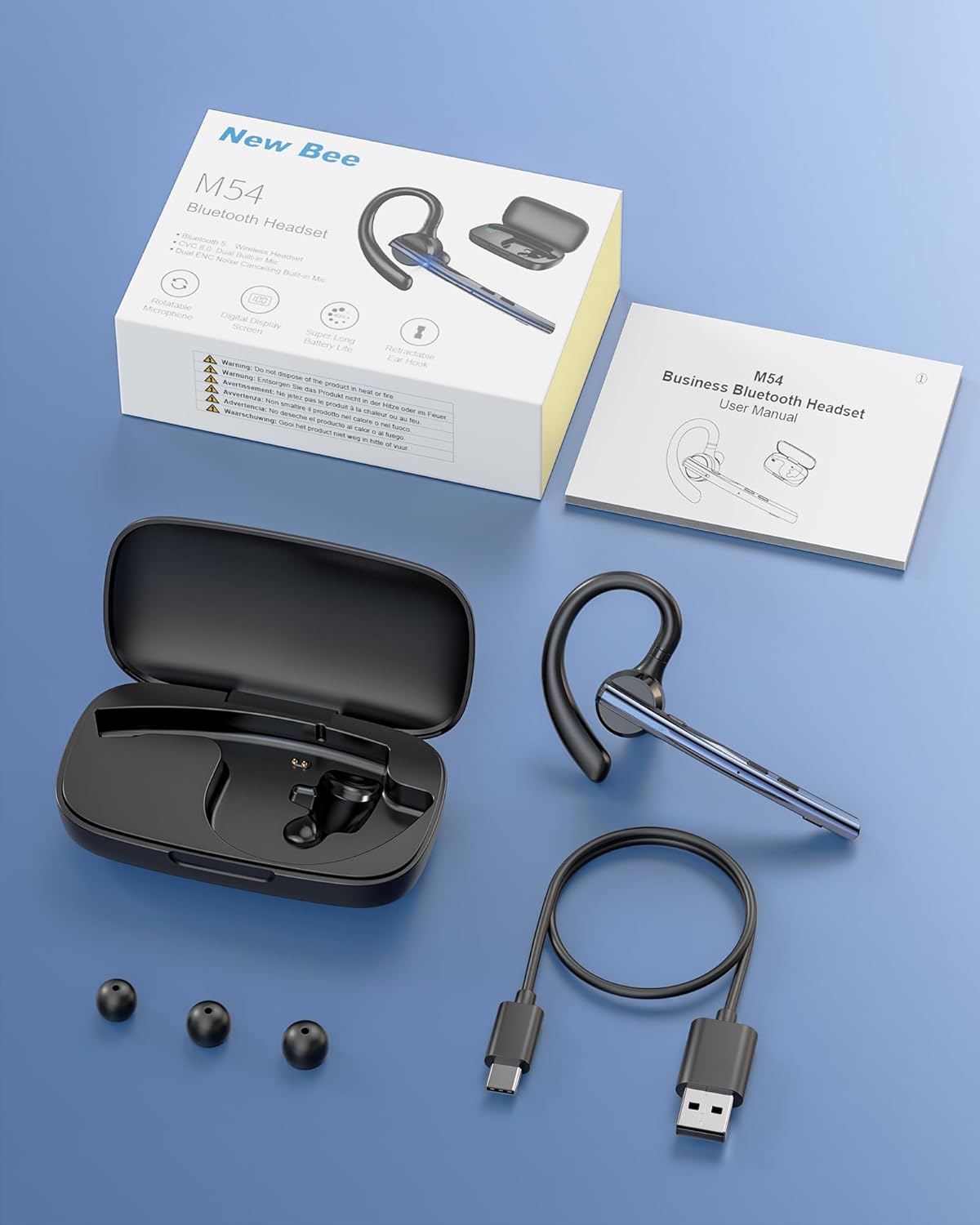
Image: Contents of the New Bee M54 Bluetooth Headset package.
3. Vlastnosti produktu
ENC Dual Microphone for Clear Calls
The headset features a dual microphone array with ENC (Environmental Noise Cancellation) and CVC8.0 technology. The main microphone accurately captures your voice, while the sub-microphone collects ambient noise. The main control chip processes this information to enhance call effects by effectively canceling environmental noise and echoes. Enjoy HIFI sound quality and 360° surround sound for an immersive audio experience.

Image: Man using the headset in a car, highlighting ENC noise cancellation for clear calls.
Flexible Rotation & Comfortable Fit
An innovative balanced ear hook design prevents the headset from falling off and evenly distributes its weight for comfortable wear. The pivot points use elastic soft rubber material, combined with an in-ear design, ensuring comfort even during prolonged use. The microphone arm can rotate 270°, the ear hook rotates 180°, and the earcup front can move 30° left/right. Three sizes of eartips (S/M/L) are included for a customized fit.

Image: Woman wearing the headset, showcasing its lightweight and adjustable features.
Ultra dlouhá životnost baterie
Equipped with a large-capacity charging case and a low-power consumption chip, the headset offers extended usage times. Enjoy up to 15 hours of music playback, 12 hours of talk time, and an impressive 6 months of standby time. The charging case provides 2-3 full charges for the headset, extending the total operating time to approximately 60 hours.

Image: Headset charging in its case, illustrating battery life and charging options.
Bluetooth 5.1 & Strong Compatibility
Featuring the latest QCC3020/Bluetooth 5.1 chip, the headset ensures low power consumption, fast transmission speed, and a stable, smooth signal. It offers a reliable connection distance of up to 15 meters, making it compatible with a wide range of devices including smartphones, tablets, laptops, and PCs.

Image: Man using the headset outdoors, showing the 15m Bluetooth range.
Multi-functional & Easy Operation
The headset includes a multi-function button and an independent mute button for convenient control. One-touch mic off protects your privacy. Double-click the mute button to activate your voice assistant. It supports simultaneous connection to two devices, allowing seamless switching between music and call functions. The unique ear hook design is freely extendable to fit various ear shapes, accommodating more users. It is suitable for diverse environments such as office work, driving, phone conferences, and delivery services.

Image: Headset connected to multiple devices, demonstrating dual device connectivity.
4. Nastavení
4.1 Charging the Headset and Charging Case
Před prvním použitím plně nabijte sluchátka a nabíjecí pouzdro.
- Nabíjení headsetu: Place the headset into the charging case. Ensure the charging contacts align. The indicator light on the headset will show charging status.
- Nabíjení pouzdra: Connect the provided Type-C USB cable to the charging port on the case and plug the other end into a USB power adapter (not included). The digital display on the case will show the battery percentage.
- A full charge for the headset takes approximately 1.5 hours. The charging case can fully charge the headset 2-3 times.
4.2 Zapnutí/vypnutí
- Zapnutí: Press and hold the Multi-function Button for 3 seconds until the indicator light flashes blue.
- Vypnout: Press and hold the Multi-function Button for 5 seconds until the indicator light flashes red and then turns off.
4.3 Párování Bluetooth
- Zkontrolujte, zda je náhlavní souprava vypnutá.
- Press and hold the Multi-function Button for approximately 5-7 seconds until the indicator light flashes red and blue alternately, indicating pairing mode.
- Na svém zařízení (chytrý telefon, tablet, počítač) povolte Bluetooth a vyhledejte dostupná zařízení.
- Select "M54" from the list of found devices.
- Once connected, the headset indicator light will flash blue slowly.
4.4 Nošení headsetu
The M54 headset is designed for comfortable and secure wear on either ear.
- Choose the Right Eartip: Select the S, M, or L eartip that best fits your ear canal for optimal sound and comfort.
- Nastavení háčku za ucho: Place the ear hook over your ear. The ear hook can rotate 180° to fit both left and right ears.
- Umístěte mikrofon: Rotate the microphone arm up to 270° to position it towards your mouth for clear voice pickup. The earcup front can also be adjusted 30° left or right for fine-tuning.
- Ensure a snug fit without discomfort. An improper fit may affect call quality.

Image: Instructions for selecting eartips and wearing the headset.
5. Návod k obsluze
5.1 Funkce tlačítekview

Image: Detailed diagram of headset buttons and their functions.
5.2 Správa hovorů
- Přijmout/ukončit hovor: Single click the Multi-function Button.
- Odmítnout hovor: Stiskněte a podržte multifunkční tlačítko po dobu 2 sekund.
- Znovu vytočit poslední číslo: Double click the Multi-function Button.
- Ztlumit/zapnout mikrofon: Single click the Mute Button.
5.3 Přehrávání hudby
- Přehrát/pozastavit: Single click the Multi-function Button.
- Další skladba: Stiskněte a podržte tlačítko pro zvýšení hlasitosti po dobu 3 sekund.
- Předchozí skladba: Stiskněte a podržte tlačítko pro snížení hlasitosti po dobu 3 sekund.
5.4 Ovládání hlasitosti
- Zvýšit hlasitost: Single click the Volume Up button.
- Snížit hlasitost: Single click the Volume Down button.
5.5 Voice Assistant (SIRI)
- Aktivovat Voice Assistant: Double click the Mute Button.
5.6 Multi-point Connection
The M54 headset can connect to two Bluetooth devices simultaneously.
- Spárujte sluchátka s prvním zařízením, jak je popsáno v části 4.3.
- Disable Bluetooth on the first device. The headset will re-enter pairing mode.
- Spárujte sluchátka s druhým zařízením.
- Enable Bluetooth on the first device. The headset should automatically connect to both devices.
- You can now seamlessly switch between audio and calls from either connected device.
6. Údržba
Správná údržba zajistí dlouhou životnost a optimální výkon vaší sluchátkové soupravy.
- Čištění: Use a soft, dry cloth to clean the headset and charging case. Do not use harsh chemicals or abrasive materials. Regularly clean the eartips and charging contacts to prevent debris buildup.
- Skladování: Store the headset in its charging case when not in use to protect it from dust and damage. Avoid storing in extreme temperatures or high humidity.
- Péče o baterie: To preserve battery life, avoid fully discharging the battery frequently. Charge the headset regularly, even if not used for extended periods.
- Vystavení vodě: Sluchátka nejsou vodotěsná. Nevystavujte je vodě, dešti nebo nadměrné vlhkosti.
7. Řešení problémů
Pokud narazíte na nějaké problémy, podívejte se prosím na následující běžné problémy a jejich řešení:
| Problém | Možná příčina | Řešení |
|---|---|---|
| Nelze zapnout | Slabá baterie | Plně nabijte sluchátka a nabíjecí pouzdro. |
| Nelze spárovat se zařízením | Sluchátka nejsou v režimu párování; Bluetooth na zařízení vypnutý; Zařízení je příliš daleko. | Ensure headset is in pairing mode (flashing red/blue). Turn on Bluetooth on your device. Move device closer to headset (within 15m). Try restarting both devices. |
| Žádný zvuk nebo nízká hlasitost | Volume too low; Headset not connected; Incorrect audio output selected. | Zvyšte hlasitost na sluchátkách i připojeném zařízení. Znovu připojte sluchátka. Zkontrolujte nastavení zvukového výstupu na zařízení. |
| Špatná kvalita hovoru | Weak signal; Microphone obstructed; Improper fit. | Move closer to the connected device. Ensure microphone is clear and positioned correctly. Adjust headset fit and eartip size. |
| Headset disconnects frequently | Mimo dosah; Rušení; Slabá baterie. | Stay within 15m of the connected device. Avoid strong electromagnetic interference. Charge the headset. |
Pokud problém přetrvává i po vyzkoušení těchto řešení, kontaktujte zákaznickou podporu.
8. Specifikace
| Značka | Nová včela |
| Model | M54 |
| Barva | Modrý |
| Verze Bluetooth | 5.1 (QCC3020 Chip) |
| Kontrola hluku | ENC Environmental Noise Cancellation, CVC8.0 Echo Cancellation |
| Přenosová vzdálenost | Až 15 metrů |
| Doba přehrávání hudby | Přibl. 15 hodin |
| Doba hovoru | Přibl. 12 hodin |
| Pohotovostní doba | Přibl. 6 měsíců |
| Total Operating Time (with case) | Přibl. 60 hodin |
| Doba nabíjení | Approx. 1.5 hours (headset) |
| Hmotnost | Přibl. 14.2 g |
| Původ | Čína |
9. Záruka a podpora
9.1 Informace o záruce
The New Bee Bluetooth Headset M54 comes with a 1letá záruka výrobce od data nákupu. Tato záruka se vztahuje na výrobní vady a poruchy při běžném používání. Nevztahuje se na škody způsobené nesprávným použitím, nehodami, neoprávněnými úpravami nebo běžným opotřebením.
9.2 Zákaznická podpora
If you have any questions, require technical assistance, or need to claim warranty service, please contact New Bee customer support through the retailer where you purchased the product or visit the official New Bee website for contact information. Please have your purchase receipt and product model number (M54) ready when contacting support.