
1. Úvod
Thank you for choosing the Azeyou 8.7-inch Android Tablet F68. This manual provides essential information for setting up, operating, and maintaining your device. Please read it carefully to ensure optimal performance and longevity of your tablet.
2. Bezpečnostní informace
- Nevystavujte tablet extrémním teplotám, přímému slunečnímu záření ani vysoké vlhkosti.
- Zabraňte pádu tabletu na zem nebo jeho vystavení silným nárazům.
- Use only the provided charger and accessories to prevent damage and ensure safety.
- Tabletu uchovávejte mimo dosah vody a jiných tekutin.
- Nepokoušejte se tablet rozebírat ani opravovat sami. Požádejte o pomoc zákaznickou podporu.
3. Obsah balení
Ověřte, zda jsou v balení přítomny všechny položky:
- Azeyou 8.7-inch Android Tablet F68
- Nabíjecí kabel USB typu C.
- Napájecí adaptér
- Uživatelská příručka (tento dokument)

Image: Tablet and included accessories.
4. Konec produktuview
The Azeyou F68 tablet features a sleek, all-metal design, making it both durable and portable. It is equipped with essential ports and components for a comprehensive user experience.
Fyzické komponenty
- 8.7palcový IPS displej: High-resolution screen (1340x800) for vivid visuals.
- Přední kamera: 5MP pro videohovory a selfie.
- Zadní kamera: 13MP pro pořizování fotografií a videí.
- Vypínač: Na boku se nachází tlačítko pro zapnutí/vypnutí zařízení a uzamčení obrazovky.
- Tlačítka hlasitosti: Upravte úrovně zvuku.
- Port USB Type-C: Pro nabíjení a přenos dat.
- 3.5mm konektor pro sluchátka: Pro připojení drátových sluchátek.
- Duální reproduktory: Enhanced audio output.
- Slot pro microSD kartu: For storage expansion up to 1TB.
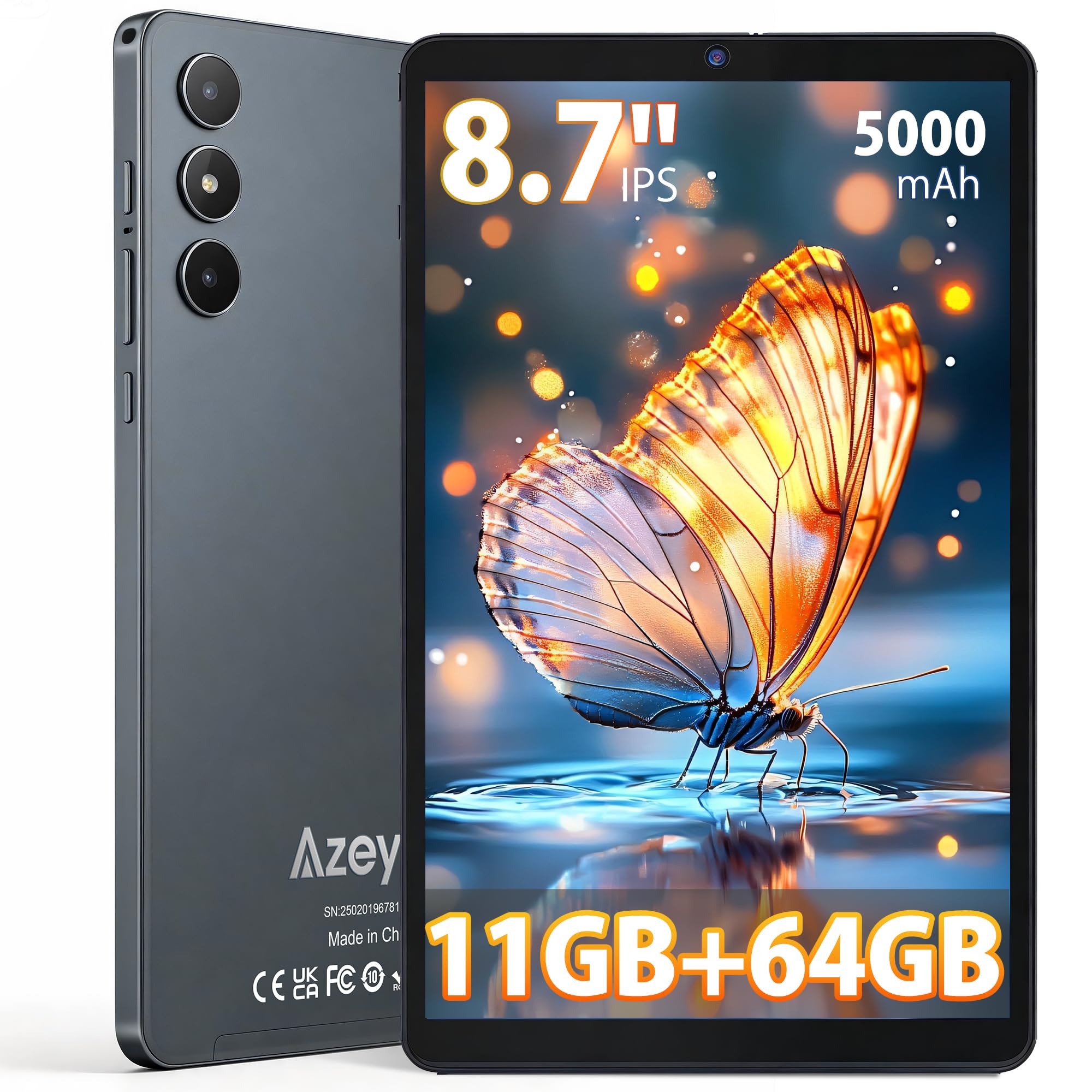
Obrázek: Přední strana view of the Azeyou F68 tablet.

Image: Tablet held in hand, demonstrating portability.

Image: Tablet side profile, highlighting thinness and weight.
5. Nastavení
5.1 Počáteční poplatek
Before first use, fully charge your tablet. Connect the USB Type-C cable to the tablet's charging port and the power adapter to a wall outlet. The battery indicator will show charging status.
5.2 Zapnutí/vypnutí
- Zapnutí: Press and hold the Power button until the Azeyou logo appears on the screen.
- Vypnutí: Stiskněte a podržte tlačítko napájení a poté z možností vyberte možnost „Vypnout“.
- Restartovat: Stiskněte a podržte tlačítko napájení a poté z možností vyberte „Restartovat“.
5.3 Průvodce počátečním nastavením
Po prvním zapnutí vás tablet provede procesem počátečního nastavení. Ten zahrnuje:
- Výběr jazyka.
- Připojování k síti Wi-Fi.
- Setting up your Google account (required for GMS services like Google Play Store).
- Nastavení zámku obrazovky (PIN, vzorec nebo heslo).
5.4 Vložení karty MicroSD
To expand storage, insert a microSD card (up to 1TB) into the designated slot. Ensure the tablet is powered off before inserting or removing the card.
6. Návod k obsluze
6.1 Navigace
The tablet runs on Android 15, offering an intuitive touch interface. Use gestures like tapping, swiping, pinching, and spreading to navigate.
6.2 Připojení Wi-Fi a Bluetooth
Access Wi-Fi settings from the Quick Settings panel (swipe down from the top of the screen) or through the Settings app. The tablet supports dual-band Wi-Fi (2.4G+5G) and Bluetooth 5.0 for stable connections.

Image: High-speed and stable connectivity features.
6.3 Spotřeba médií
The 8.7-inch IPS display with 1340x800 resolution and T-Colour image technology provides a vibrant viewing experience. With Widevine L1 support, you can stream high-definition content from platforms like Netflix, YouTube, and Prime Video.

Image: Tablet display quality for video viewIng.

Image: Widevine L1 support for high-definition streaming.
6.4 Použití kamery
The tablet features a 13MP rear camera and a 5MP front camera. Open the Camera app to capture photos and videos. The AI camera features enhance image quality.

Image: Camera features and examples.
6.5 Funkce OTG
The tablet supports USB On-The-Go (OTG), allowing you to connect external devices such as USB drives, keyboards, or mice using an OTG adapter (sold separately).
6.6 Kids Protection Mode
Utilize the built-in parental control features to manage screen time and content access for children. This helps maintain a balance between learning and entertainment.
6.7 Multitasking and Wireless Projection
The Android 15 operating system supports multitasking, allowing you to run multiple applications simultaneously. The tablet also supports wireless projection for displaying content on compatible screens.

Image: Wireless projection and split-screen multitasking.
7. Údržba
7.1 Čištění tabletu
K čištění obrazovky a těla tabletu používejte měkký hadřík, který nepouští vlákna. Nepoužívejte agresivní chemikálie ani abrazivní materiály, které by mohly poškodit povrch.
7.2 Péče o baterii
To prolong battery life, avoid fully discharging the tablet frequently. Charge the tablet regularly, and if storing for an extended period, ensure it has at least a 50% charge.
7.3 Aktualizace softwaru
Pravidelně kontrolujte a instalujte aktualizace systému, abyste zajistili, že váš tablet má nejnovější funkce, bezpečnostní záplaty a vylepšení výkonu. Přejděte do Nastavení > Systém > Aktualizace systému.
8. Řešení problémů
- Tablet se nezapíná: Ujistěte se, že je tablet nabitý. Připojte jej k nabíječce a před opětovným zapnutím počkejte několik minut.
- Obrazovka nereaguje: Try restarting the tablet by holding the Power button for about 10-15 seconds until it reboots.
- Aplikace padá nebo zamrzávají: Zavřete aplikace na pozadí. Vymažte mezipaměť problematické aplikace (Nastavení > Aplikace > [Název aplikace] > Úložiště > Vymazat mezipaměť). Pokud problém přetrvává, odinstalujte a znovu nainstalujte aplikaci.
- Problémy s připojením Wi-Fi: Restart your Wi-Fi router and the tablet. Forget the network on your tablet and reconnect.
- Pomalý výkon: Close unnecessary background apps. Clear cached data. Consider uninstalling unused apps.
- Rychlé vybíjení baterie: Reduce screen brightness. Turn off Wi-Fi, Bluetooth, and GPS when not in use. Limit background app activity.
9. Specifikace
| Funkce | Popis |
|---|---|
| Model | F68 |
| Zobrazit | 8.7-inch IPS LCD, 1340x800 pixels, 60Hz refresh rate, 300 nits brightness, 16:9 aspect ratio |
| Procesor | Unisoc T310 (1.8 GHz CPU speed, 2 GHz max CPU speed), 12nm process |
| BERAN | 11GB (3GB base + 8GB expansion) |
| Interní úložiště | 64 GB |
| Rozšiřitelné úložiště | MicroSD karta až do 1 TB |
| Operační systém | Android 15 (GMS Certified) |
| Baterie | 5000mAh, up to 6.5 hours continuous use |
| Nabíjecí port | USB Type-C |
| Kamery | Rear: 13MP, Front: 5MP |
| Konektivita | Wi-Fi (802.11a/b/g/n/ac, Dual-Band 2.4G+5G), Bluetooth 5.0 |
| Zvuk | 3.5mm Headphone Jack, Dual Speakers |
| Rozměry | 24.3 cm (L) x 16.2 cm (W) x 0.9 cm (T) |
| Hmotnost | Přibl. 360 g |
| Certifikace | PSE, CE, FCC, TELEC, GMS |
| Speciální funkce | Widevine L1, OTG Support, Wireless Projection, Screen Split, Kids Protection Mode |

Obrázek: Overview of tablet features.

Image: Storage and RAM details.

Image: Battery and connectivity ports.
10. Záruka a podpora
Your Azeyou F68 tablet comes with a Záruka 12 měsíců from the date of purchase. Additionally, a 30-day refund period is offered for eligible returns.
Záruční krytí
This warranty covers manufacturing defects and malfunctions under normal use. It does not cover damage caused by misuse, accidents, unauthorized repairs, or normal wear and tear.
How to Obtain Support
If you encounter any issues or have questions about your product, please contact Azeyou customer support. You can reach us via email (English and Japanese support available). To facilitate the process, please provide your Amazon order number.
You can typically find contact information by navigating to your Amazon purchase history, clicking on the product, and then selecting the seller's name to find the 'Ask a question' option.