
1. Úvod
This manual provides detailed instructions for the proper use and maintenance of your BAOFENG UV-32 10W Ham Radio. The UV-32 is a multi-band two-way radio featuring 10W selectable power, GPS navigation, a 2.0-inch color display, and multiple programming options including wireless app connectivity. Please read this manual thoroughly before operating the device to ensure safe and efficient communication.
2. Bezpečnostní informace
Observe the following safety precautions to prevent injury or damage to the radio:
- Neprovozujte rádio ve výbušném prostředí (např. hořlavé plyny, prachové částice, kovové prášky).
- Do not transmit without an antenna connected.
- Keep the antenna at least 2.5 cm (1 inch) away from your body when transmitting.
- Use only BAOFENG-approved batteries and chargers. Unauthorized accessories may cause damage or fire.
- Rádio nerozebírejte ani neupravujte. Opravy by měli provádět pouze kvalifikovaní technici.
- Vyhněte se dlouhodobému vystavení přímému slunečnímu záření nebo extrémním teplotám.
- Nepoužívejte rádio během řízení nebo provádění jiných činností, které vyžadují plnou pozornost.
3. Obsah balení
Ověřte, zda jsou v balení přítomny všechny položky:
- 1 x Rádio BAOFENG UV-32
- Baterie 1 x 2500 mAh
- 1 x nabíječka USB-C
- 1 x základna pro stolní nabíječku
- 1 x Standard UV Antenna
- 1 x Long Airband Antenna
- 1 x Headset
- 1x Spona na opasek
- 1 x Radio Case Holder

Image: The BAOFENG UV-32 radio shown with its complete set of accessories, including the battery, charger, antennas, headset, belt clip, and case holder.
4. Konec produktuview
Familiarize yourself with the main components of your UV-32 radio.

Obrázek: Přední strana view of the BAOFENG UV-32 radio, highlighting the 2.0-inch color display, alphanumeric keypad, and function buttons.
Klíčové komponenty:
- Anténní konektor: For attaching the standard UV or airband antenna.
- Ovladač napájení/hlasitosti: Zapíná/vypíná rádio a upravuje hlasitost.
- Zobrazit: 2.0palcový barevný displej zobrazující frekvenci, kanál, stav baterie a další indikátory.
- Tlačítko PTT: Tlačítko Push-To-Talk pro vysílání.
- Side Keys (P1, P2): Přizpůsobitelné funkční klávesy.
- Klávesnice: Alphanumeric input for frequencies, channels, and menu navigation.
- Nabíjecí port USB-C: Pro přímé nabíjení baterie.
- Příslušenství Jack: For connecting the headset or programming cable.
5. Nastavení
5.1 Instalace a nabíjení baterie
- Align the 2500mAh Li-ion battery with the grooves on the back of the radio.
- Zasuňte baterii nahoru, dokud nezacvakne na místo.
- To charge, connect the USB-C charger directly to the battery's USB-C port or place the radio with the battery attached into the desktop charging base.
- The charging indicator on the desktop base will show red during charging and green when fully charged.

Image: A close-up of the 2500mAh Li-ion battery for the UV-32, highlighting its integrated USB-C charging port.
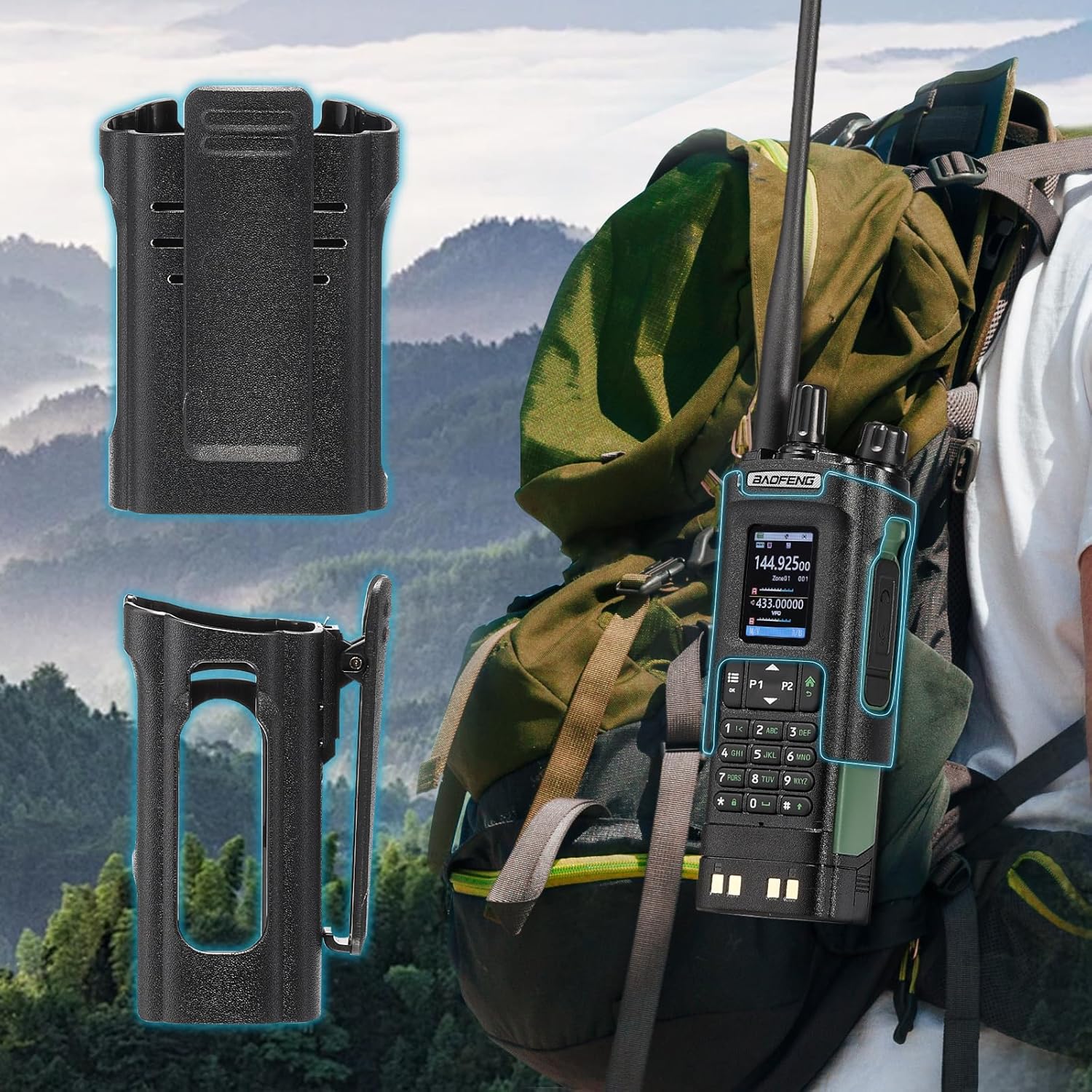
Image: The BAOFENG UV-32 radio demonstrating both direct USB-C charging and charging via its desktop cradle.
5.2 Instalace antény
- Select the appropriate antenna: the standard UV antenna for general VHF/UHF use or the long airband antenna for enhanced aviation signal reception.
- Zašroubujte vybranou anténu ve směru hodinových ručiček na konektor antény v horní části rádia, dokud nebude pevně utažena prsty. Nepřetahujte ji.

Image: The BAOFENG UV-32 radio illustrating the use of two different antennas: a standard antenna for UHF/VHF and a longer antenna specifically designed for airband reception.
5.3 Instalace spony na opasek
- Zarovnejte klip na opasek s otvory pro šrouby na zadní straně rádia.
- Zajistěte sponu na opasek pomocí dodaných šroubů.
- The radio case holder can be used to attach the radio to a backpack or belt for secure carrying.

Image: The BAOFENG UV-32 radio securely mounted to a backpack strap using its belt clip and an additional case holder, demonstrating portability.
6. Ovládání rádia
6.1 Zapnutí/vypnutí a hlasitost
Otočením knoflíku napájení/hlasitosti ve směru hodinových ručiček rádio zapnete a hlasitost zvýšíte. Otočením proti směru hodinových ručiček hlasitost snížíte a rádio vypnete.
6.2 Zobrazení nadview
The 2.0-inch color display provides essential information:
- Frekvence/Kanál: Displays the current operating frequency or channel number.
- Úroveň baterie: Indikuje zbývající nabití baterie.
- Síla signálu: Shows the strength of received signals.
- Indikátory režimu: Icons for various functions like GPS, Bluetooth, power level, etc.

Image: A close-up of the BAOFENG UV-32's 2-inch color display, showing detailed frequency, channel, and status information.
6.3 Channel Mode vs. Frequency Mode
Rádio pracuje ve dvou hlavních režimech:
- Frekvenční režim (VFO): Allows direct input of frequencies for scanning or temporary use.
- Režim kanálu (MR): Uses pre-programmed channels for quick access to stored frequencies.
Stiskněte tlačítko MENU button and navigate to the mode setting to switch between VFO and MR modes.
6.4 Výběr frekvence
- Klávesnice: In Frequency Mode, directly enter the desired frequency using the numeric keypad.
- Quick Channel Knob: Rotate the top knob to quickly scroll through frequencies or channels.
- Šipky nahoru/dolů: Use the arrow keys (P1/P2) to fine-tune frequencies or navigate channels.
6.5 Vysílání a přijímání
- Ensure an antenna is properly connected.
- Select the desired frequency or channel.
- Pro přenos stiskněte a podržte PTT tlačítko na boku rádia. Mluvte jasně do mikrofonu.
- Uvolněte PTT tlačítko pro zastavení vysílání a návrat do režimu příjmu.
- Úrovně výkonu: The UV-32 offers High (H), Medium (M), and Low (L) power settings. Adjust this in the menu to balance range and battery life.
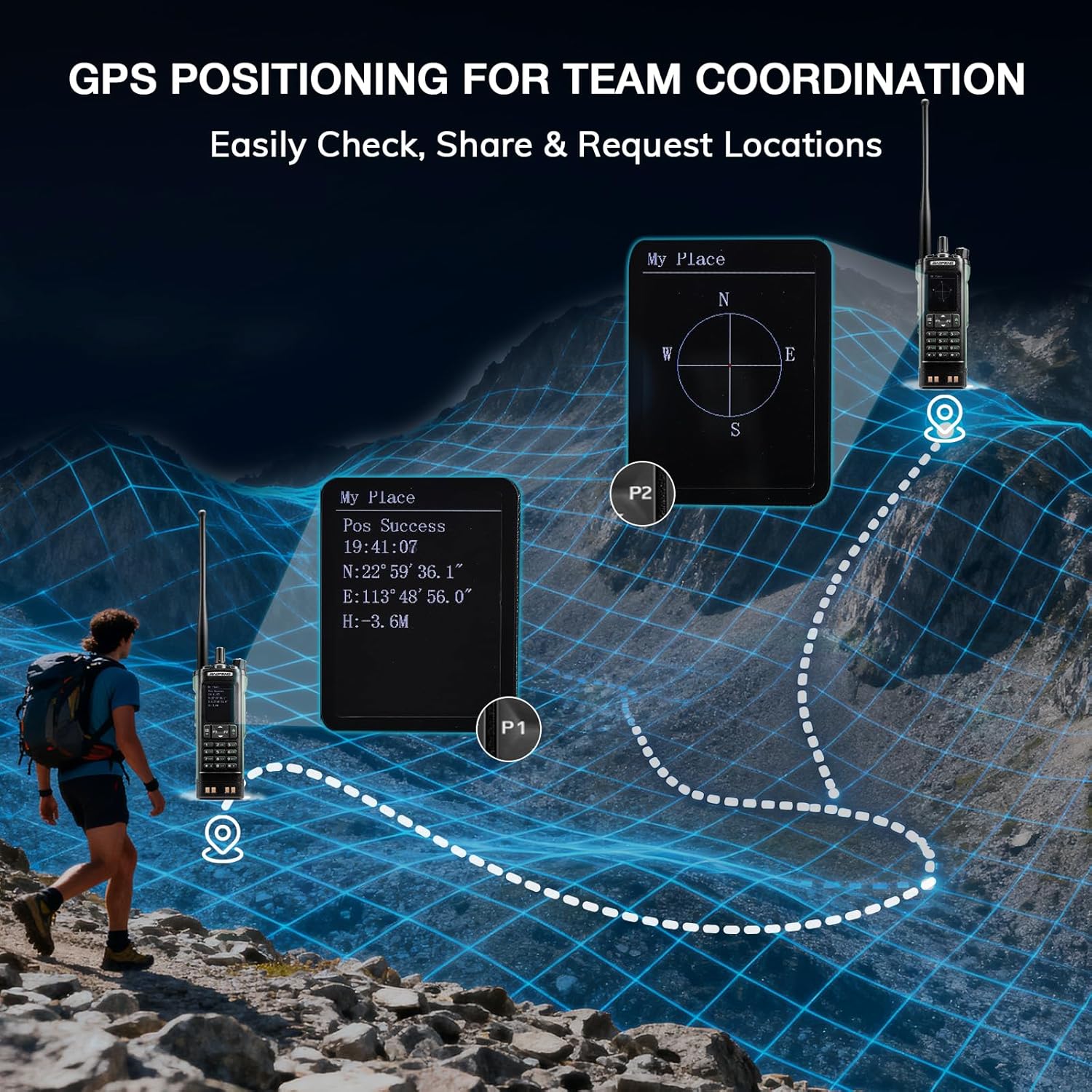
Image: The BAOFENG UV-32 radio's display showing different power output levels (High, Medium, Low) and an external SWR meter for measurement.
6.6 Možnosti programování
The UV-32 offers several methods for programming frequencies and settings:
- Wireless APP Programming: Connect your radio to a smartphone (iOS/Android) via Bluetooth using the dedicated BT app for quick and wireless programming.
- Software CHIRP: For advanced or bulk programming, use CHIRP software on a PC. Select "UV-17ProGPS" as the radio model in CHIRP.
- Programování klávesnice: Basic programming can be done directly on the radio using the keypad and menu system.
- Kopie frekvence jedním klíčem: This feature allows for easy cloning of frequencies from another radio. Refer to the radio's on-screen prompts or full manual for specific steps.

Image: An illustration depicting the various programming methods available for the BAOFENG UV-32, including mobile app (Bluetooth), CPS software, CHIRP software, and direct keypad input.

Image: Two BAOFENG radios illustrating the one-key frequency copy function, allowing for quick and easy channel cloning between devices.
6.7 GPS navigace
The integrated GPS module provides real-time location data:
- Přístup k funkci GPS získáte prostřednictvím nabídky rádia.
- View your current latitude, longitude, and altitude.
- The radio supports sharing your location or requesting coordinates from other team members for improved coordination.

Image: A visual representation of the BAOFENG UV-32's GPS functionality, showing how it displays coordinates and facilitates location sharing for team coordination in outdoor environments.
6.8 Enhanced Airband Reception
For clearer reception of aviation signals, utilize the dedicated AM antenna included with your UV-32. This specialized antenna is designed to provide more accurate and stable airband listening compared to standard UV dual-band antennas.
6.9 Meteorologické rádio NOAA
The UV-32 can receive NOAA weather alerts. Consult the radio's menu for instructions on how to scan for and select NOAA channels in your area.
6.10 Customizable Side Keys
The radio features four customizable side keys (P1, P2, and two others). These can be programmed via the menu or programming software to quickly access frequently used functions such as scan, monitor, or power level adjustment.

Image: A close-up of the BAOFENG UV-32's side, highlighting the customizable P1 and P2 function keys.
7. Údržba
7.1 Čištění rádia
Otřete povrch rádia měkkým hadříkemamp hadříkem. Nepoužívejte agresivní chemikálie ani abrazivní čisticí prostředky. Před použitím se ujistěte, že jsou všechny porty suché.
7.2 Péče o baterii
- Před prvním použitím baterii plně nabijte.
- Vyvarujte se přebíjení nebo úplného vybití baterie.
- Pokud baterii delší dobu nepoužíváte, skladujte ji na chladném a suchém místě.
7.3 Skladování
When storing the radio for a long time, remove the battery and store it separately. Keep the radio in a dry, dust-free environment away from direct sunlight and extreme temperatures.
8. Řešení problémů
| Problém | Možná příčina | Řešení |
|---|---|---|
| Rádio se nezapne | Baterie není správně nainstalována nebo je vybitá. | Ujistěte se, že je baterie bezpečně připojena. Baterii plně nabijte. |
| Nelze vysílat | Antenna not connected. Incorrect frequency/channel. Low power setting. | Attach antenna. Verify frequency/channel. Increase power level. |
| Špatný dosah příjmu/vysílání | Obstructions. Low power setting. Incorrect antenna. | Move to an open area. Increase power. Ensure correct antenna is used and properly connected. |
| Programming errors with CHIRP/APP | Incorrect radio model selected. Connection issues. Outdated software/firmware. | Ensure "UV-17ProGPS" is selected in CHIRP. Re-establish Bluetooth connection. Update software/firmware if available. |
9. Specifikace
| Funkce | Detail |
|---|---|
| Značka | BAOFENG |
| Číslo modelu | UV-32 |
| Počet kanálů | 1000 |
| Frekvenční rozsah | UHF, VHF |
| Výkon | Up to 10W (selectable High, Medium, Low) |
| Zobrazit | 2.0" barevný displej |
| Baterie | 2500mAh Li-ion (součástí balení) |
| Nabíjení | USB-C, Desktop Charger Base |
| Speciální funkce | Digital Display, Dual Band, USB-C Rechargeable, Wireless APP Programming, Wireless Channel Clone, GPS, NOAA Reception |
| Protokol připojení | Bluetooth |
| Rozměry produktu | 1.2"H x 2.2"Š x 4"V |
| Úroveň odolnosti proti vodě | Není odolný vůči vodě |
10. Záruka a podpora
Your BAOFENG UV-32 radio comes with an Záruka 18 měsícůBAOFENG také poskytuje doživotní podpora pro tento produkt.
For technical assistance, warranty claims, or further inquiries, please visit the official BAOFENG website or contact their customer support directly. Keep your purchase receipt as proof of purchase for warranty services.