
Minuteman EN450G
Uživatelská příručka záložního zdroje UPS Minuteman EN450G 450VA
Model: EN450G
1. Úvod
This manual provides essential instructions for the safe and efficient operation of your Minuteman EN450G 450VA Standby Uninterruptible Power Supply (UPS). The EN450G is designed to provide reliable backup power and surge protection for various electronic devices, including gaming consoles, desktop PCs, home office equipment, and network devices. Please read this manual thoroughly before installation and use, and retain it for future reference.
2. Důležité bezpečnostní pokyny
WARNING: To reduce the risk of electric shock, fire, or injury to persons, read all instructions before using this product.
- Tato UPS obsahuje nebezpečné látky.tages. Do not attempt to disassemble the unit. Servicing should be performed by qualified service personnel only.
- K UPS nepřipojujte položky, které nesouvisejí s počítačem, jako jsou lékařské vybavení, vybavení pro podporu života, mikrovlnné trouby nebo vysavače.
- Neblokujte větrací otvory. Zajistěte dostatečné proudění vzduchu kolem jednotky.
- Do not install the UPS in direct sunlight, near heat sources, or in areas with excessive dust, moisture, or flammable liquids.
- Connect the UPS to a properly grounded AC power outlet.
- The battery is hot-swappable. Exercise caution when replacing the battery. Refer to the Maintenance section for instructions.
- In case of emergency, press the power button to turn off the UPS and disconnect the power cord from the AC power outlet.
3. Konec produktuview
The Minuteman EN450G UPS provides comprehensive power protection. Familiarize yourself with its components:
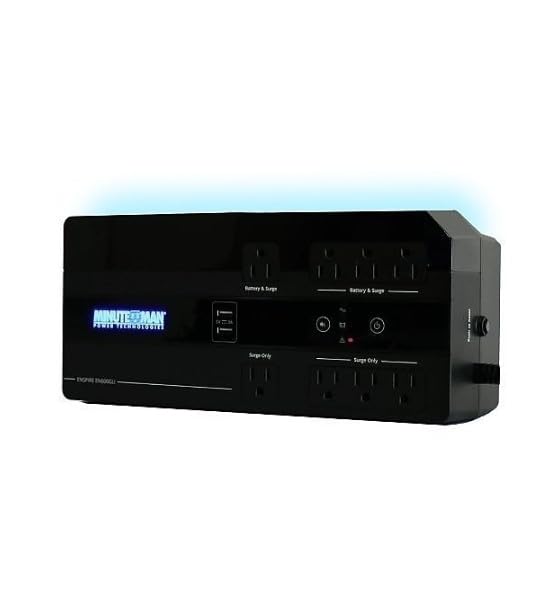
Obrázek 1: Minuteman EN450G UPS Unit. This image displays the Minuteman EN450G UPS unit. The front panel features the 'Minuteman Power Technologies' logo, two USB charging ports, and control buttons. The top surface shows four 'Battery & Surge' protected outlets and four 'Surge Only' outlets, clearly labeled. The unit is black and designed for compact placement.
3.1 Funkce předního panelu
- Vypínač: Zapíná nebo vypíná UPS.
- USB nabíjecí porty: Two ports for charging mobile devices.
- Indikátory stavu: LEDs indicating power status, battery status, and fault conditions.
3.2 Vlastnosti zadního panelu
- Battery & Surge Outlets (x4): Provide battery backup power and surge protection for critical devices.
- Surge Only Outlets (x4): Provide surge protection only for non-critical devices.
- AC vstup: Připojuje UPS k elektrické zásuvce.
- Jistič: Resetovatelná ochrana proti přetížení.
4. Nastavení a instalace
4.1 Vybalení
Carefully unpack the UPS and inspect it for any shipping damage. If damage is found, do not operate the unit and contact your dealer.
4.2 Umístění
The EN450G is designed for versatile placement:
- Desktop: Umístěte jednotku na stabilní, rovný povrch.
- Patro: Position on the floor, ensuring ventilation is not obstructed.
- Montáž na stěnu: The unit can be mounted on a wall using appropriate hardware (not included). Ensure the mounting surface can support the weight of the UPS.
Ensure the installation area is clean, dry, and has adequate ventilation. Avoid placing the UPS near heat-emitting appliances or in direct sunlight.
4.3 Připojení k napájení
- Ujistěte se, že je UPS vypnutá.
- Plug the UPS power cord into a grounded 120V AC wall outlet.
- Allow the UPS to charge for at least 8 hours before initial use to ensure optimal battery runtime.
4.4 Připojení zařízení
- Battery & Surge Protected Outlets: Connect critical devices such as your computer, monitor, router, or other essential electronics that require continuous power during outages.
- Přepěťové zásuvky: Connect non-critical devices like printers, scanners, or desk lamps that only require surge protection.
CAUTION: Do not connect laser printers or shredders to the battery backup outlets, as their high power draw can overload the UPS.
5. Provoz
5.1 Zapnutí/vypnutí UPS
- Zapnout: Press and hold the power button for approximately 2 seconds until you hear a beep and the power indicator illuminates.
- Vypnout: Press and hold the power button for approximately 2 seconds until you hear a beep and the power indicator turns off.
5.2 Stavové indikátory
The front panel LEDs provide information about the UPS status:
- Zelená LED (svítí trvale): UPS is operating normally, providing AC power.
- Green LED (Flashing) & Audible Alarm: Jednotka UPS pracuje na baterii během výpadku proudu.tage.
- Red LED (Solid) & Audible Alarm: Battery low or fault condition. Refer to Troubleshooting.
5.3 Výdrž baterie
The EN450G provides approximately 3 minutes of runtime at full load (450VA/255W) and 11 minutes at half load. Actual runtime may vary based on connected equipment and battery age.
6. Údržba
6.1 Výměna baterie
The EN450G features a hot-swappable Sealed Lead Acid (SLA) battery, allowing replacement without interrupting power to connected devices. Batteries typically last 3-5 years depending on usage and environmental conditions. A flashing red LED or continuous alarm may indicate a need for battery replacement.
- Ensure the UPS is connected to AC power and operating normally.
- Locate the battery access panel (refer to product diagram if available).
- Carefully slide out the old battery pack.
- Insert the new, fully charged replacement battery pack, ensuring correct orientation.
- Zajistěte přístupový panel baterie.
- Allow the new battery to charge for 8-12 hours to reach full capacity.
WARNING: Use only approved replacement batteries. Improper battery replacement can result in fire or explosion. Dispose of old batteries properly at a recycling facility.
6.2 Čištění
Pravidelně čistěte vnější povrch UPS měkkým, suchým hadříkem. Nepoužívejte tekuté ani aerosolové čisticí prostředky. Zajistěte, aby větrací otvory byly čisté od prachu a nečistot.
7. Řešení problémů
This section addresses common issues you may encounter with the EN450G UPS. If a problem persists after attempting the solutions below, contact technical support.
| Problém | Možná příčina | Řešení |
|---|---|---|
| UPS se nezapne. | Baterie není připojena nebo je vybitá. Napájecí kabel není připojen. | Ensure battery is properly connected and charged. Verify power cord is securely plugged into wall outlet and UPS. |
| UPS beeps continuously or red LED is solid. | Battery low or fault condition. Overload on battery outlets. | Allow battery to charge. If problem persists, battery may need replacement. Disconnect non-essential devices from battery outlets. Check circuit breaker. |
| UPS často běží na baterii. | Unstable incoming AC power. UPS sensitivity setting (if applicable, though not specified for this model). | Check the quality of your incoming AC power. Consider connecting to a different outlet. |
| Žádné napájení ze zásuvek s přepěťovou ochranou. | Vypnul se jistič. | Press the circuit breaker reset button on the rear panel. Reduce load if necessary. |
8. Specifikace
| Funkce | Detail |
|---|---|
| Model | EN450G |
| Kapacita | 450 VA / 255 XNUMX W |
| Input/Output Voltage | 120V AC |
| Výstupní průběh | Simulovaná sinusová vlna |
| Vývody | 4 x Battery & Surge Protected, 4 x Surge Only |
| Typ baterie | Sealed Lead Acid (SLA), Hot-Swappable |
| Typical Runtime (Full Load) | Až 3 minut |
| Typical Runtime (Half Load) | Až 11 minut |
| Rozměry (D x Š x V) | 12.8 x 5.7 x 4.1 palce (32.5 x 14.5 x 10.4 cm) |
| Hmotnost | 4.4 libry (2 kg) |
| Možnosti montáže | Desktop, Floor, Wall Mount |
9. Informace o záruce
Please refer to the warranty card included with your product or visit the manufacturer's webPodrobné záruční podmínky naleznete na webových stránkách. Uschovejte si doklad o koupi pro případ reklamace.
10. Technická podpora
If you require technical assistance or have questions regarding your Minuteman EN450G UPS, please contact your dealer or the manufacturer's customer support. Have your model number (EN450G) and serial number ready when contacting support.
For more information, you may visit the official Minuteman webmísto.
Ask a question about this manual
Ask about setup, troubleshooting, compatibility, parts, safety, or missing instructions. Manuals+ will review the question and use this page’s manual context to help answer it.