
Zavedení
The GoPro LIT Hero is a compact, lightweight, and waterproof action camera designed for capturing high-quality video and photos in various environments. It features a built-in light, 4K60 Ultra HD video recording, 12MP photo capabilities, a touch screen, and HyperSmooth stabilization. This manual provides essential information for setting up, operating, maintaining, and troubleshooting your GoPro LIT Hero camera.
Přední view of the GoPro LIT Hero camera, showcasing its compact design and built-in light.
What's Included (Unboxing)
Your GoPro LIT Hero package includes the following items:
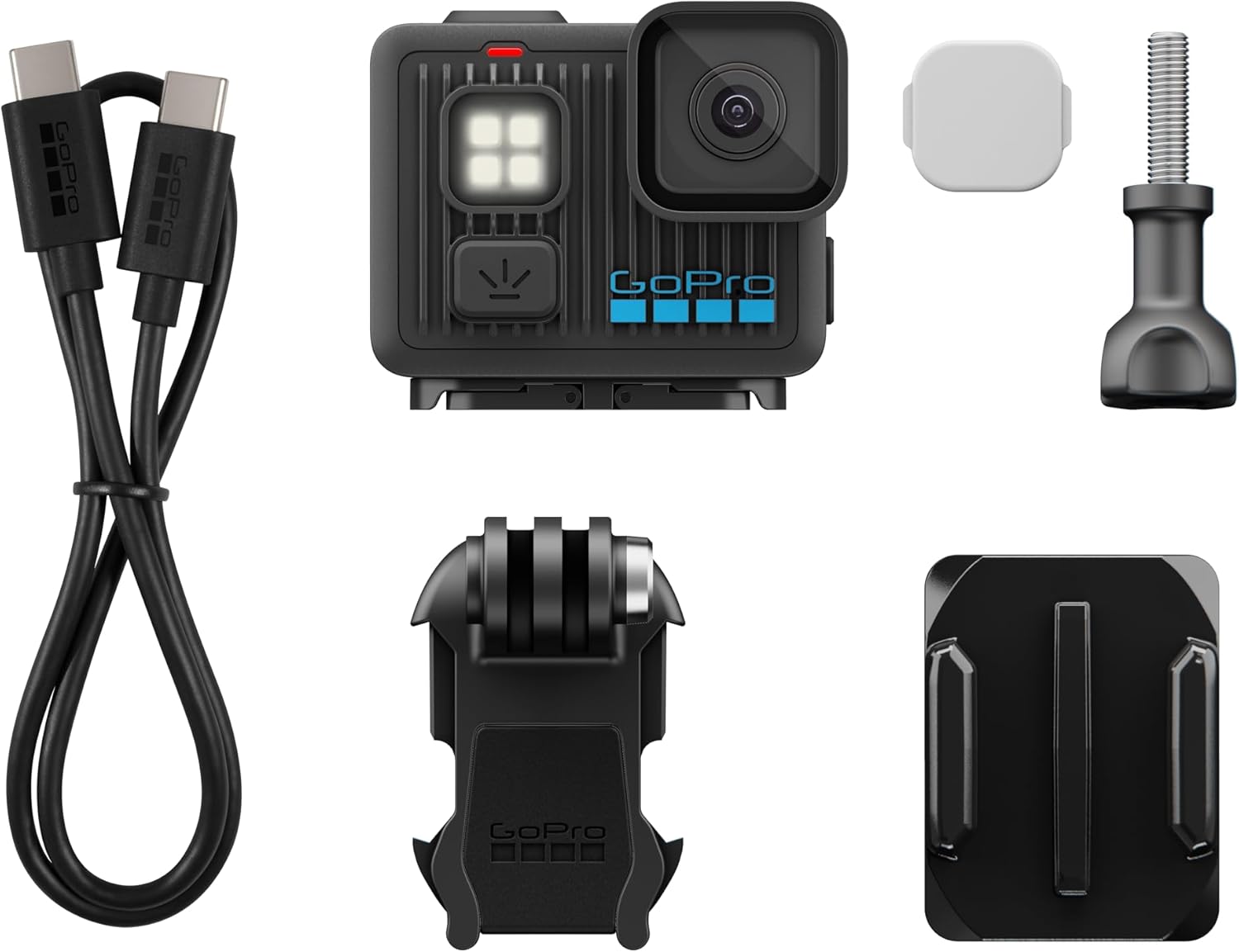
- LIT HERO Camera
- Difuzor světla
- Zakřivený držák na lepidlo
- Montážní přezka + palcový šroub
- USB-C kabel
Video: Unboxing the GoPro LIT Hero, showing all included components.
Image: All components included with the GoPro LIT Hero camera, including the camera, USB-C cable, light diffuser, curved adhesive mount, and mounting buckle with thumb screw.
Nastavení
1. Nabíjení baterie
Connect the supplied USB-C cable to the camera's USB-C port and to a USB power adapter (not included) or a computer. The camera's indicator light will show charging status. Ensure the camera is fully charged before first use.
2. Vložení karty MicroSD
The GoPro LIT Hero requires a MicroSD card (sold separately) to store photos and videos. Open the side door, insert a compatible MicroSD card into the slot until it clicks into place. Close the door securely to maintain waterproofing.
3. Počáteční zapnutí a párování
Press the Power/Mode button to turn on the camera. Follow the on-screen prompts to select your language and pair the camera with the GoPro Quik app on your smartphone for full functionality and updates. Your camera must be updated before you can use it.
Návod k obsluze
Základní ovládací prvky
The LIT Hero features simplified controls. Use the touch screen to easily tap and swipe between video, photo, and slo-mo modes.

Image: The GoPro LIT Hero's touch screen interface, demonstrating the easy swipe functionality to switch between Slo-Mo, Video, and Photo modes.
Nahrávání videa
The camera records 4K video at up to 60 frames per second for smooth motion and 2x slow-motion playback. It utilizes the full 165° lens to shoot 4:3 video, providing a 25% taller field-of-view. For 16:9 video (YouTube) or vertical crops for social media, use the Quik app.

Image: The GoPro LIT Hero capturing a high-resolution 4K video of a person diving into water, demonstrating its video capabilities.
Pořizování fotografií
Capture 12MP photos with a simple point-and-shoot action. You can also extract up to 11MP photos from your videos using the GoPro Quik app.

Image: The GoPro LIT Hero capturing a 12MP photo of people enjoying a sunset from a dock, highlighting its photo quality.
Vestavěné světlo
The LIT Hero features a built-in light with three brightness settings. This light can illuminate scenes in low-light conditions or total darkness. It functions even when the camera is off or charging.
Video: A close-up demonstration of the GoPro LIT Hero's built-in light and its functionality.

Image: The GoPro LIT Hero with its built-in LED light illuminated, demonstrating its capability to brighten scenes.
HyperSmooth Stabilization
HyperSmooth video stabilization is automatically applied to your footage within the GoPro Quik app, ensuring smooth and steady shots even during dynamic activities.

Image: The GoPro LIT Hero capturing a stabilized video of people enjoying a carnival ride, illustrating the HyperSmooth feature.
Vodotěsné provedení
The camera is waterproof up to 16 feet (5 meters), making it suitable for use in wet conditions, including rain, snow, and shallow water activities.

Image: The GoPro LIT Hero being used in water, highlighting its durable and waterproof design.
Možnosti montáže
The LIT Hero features built-in mounting fingers compatible with any GoPro accessory. It also includes a 1/4-20 thread for compatibility with industry-standard tripods and mounts.

Image: Hands attaching the GoPro LIT Hero to a magnetic mount, showcasing jeho všestranné možnosti montáže.
Sdílení obsahu
Easily post your captured content to social media or group chats directly from the Quik app with just a few taps.

Image: A person using a smartphone to share content, illustrating the ease of sharing with the GoPro Quik app.
Údržba
Čištění fotoaparátu
After use, especially in saltwater or dirty environments, rinse the camera with fresh water and dry it thoroughly with a soft cloth. Ensure all ports and doors are closed before rinsing.
Péče o čočky
The camera features a durable and easily replaceable lens cover. If the lens cover becomes damaged, it can be swapped out. The hydrophobic cover helps shed water to keep shots clear. Clean the lens with a soft, lint-free cloth.

Image: Hands demonstrating the replacement of the lens cover on the GoPro LIT Hero, highlighting its user-friendly design.
Životnost baterie
The built-in Enduro battery technology provides long runtimes and improved cold weather performance. For optimal battery life, ensure the camera is fully charged before each use and store it in a cool, dry place.

Image: The GoPro LIT Hero camera displaying its battery life indicator, emphasizing its long-lasting battery.
Odstraňování problémů
Kamera se nezapíná
- Ujistěte se, že je baterie nabitá. Připojte fotoaparát ke zdroji napájení pomocí kabelu USB-C.
- Perform a hard reset by holding down the Power/Mode button for 10 seconds.
Connectivity Issues with Quik App
- Ujistěte se, že je na vašem smartphonu povoleno Bluetooth a Wi-Fi.
- Restartujte fotoaparát i smartphone.
- Check for firmware updates for your camera via the Quik app.
Špatná kvalita videa/fotografií
- Ensure the lens is clean and free from smudges or debris.
- Verify that you are using a compatible and high-speed MicroSD card.
- Check lighting conditions; use the built-in light in dark environments.
Specifikace
| Značka | GoPro |
| Název modelu | LIT Hero (CHDHF-132-AT) |
| Rozlišení záznamu videa | 4K |
| Efektivní rozlišení | 12 MP |
| Snímková frekvence videa | Up to 60fps (4K) |
| Stabilizace obrazu | HyperSmooth |
| Úroveň odolnosti proti vodě | Waterproof (up to 16ft/5m) |
| Vestavěné funkce | Built-in Light, Touch Screen |
| Technologie připojení | USB |
| Typ paměti Flash | Micro SD |
| Hmotnost položky | 93 gramů |
Záruka a podpora
Informace o záruce
The GoPro LIT Hero comes with a 1 Year Manufacturer Warranty. Please retain your proof of purchase for warranty claims.
Zákaznická podpora
For additional support, troubleshooting, or product inquiries, please visit the official GoPro support webmísto na gopro.com. You can also find FAQs and community forums for further assistance.


