
1. Úvod
The Xiaomi Redmi Pad 2 is an 11-inch tablet designed for versatile use, offering powerful performance in a lightweight and durable unibody metal design. It features a sharp 2.5K (2560 x 1600 px) display with 10-bit color depth and 600 nits peak brightness, enhanced by a 90 Hz AdaptiveSync refresh rate and TÜV Rheinland blue light certification for comfortable viewIng.
Equipped with a MediaTek G100-Ultra processor, the tablet ensures fluid multitasking. Its audio experience is enriched by four stereo speakers supporting Hi-Res Audio and Dolby Atmos. The device boasts a 9000 mAh battery with 18W fast charging via USB-C, providing extended autonomy. Running on Xiaomi HyperOS, it offers smart productivity and connectivity with Wi-Fi 5 and Bluetooth 5.3, alongside expandable storage up to 2 TB.

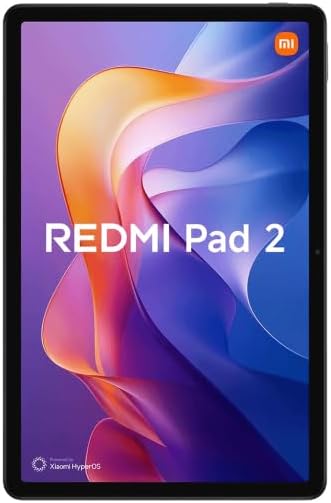
Obrázek 1.1: Přední strana view of the Xiaomi Redmi Pad 2 tablet.
2. Co je v krabici
Upon unboxing your Xiaomi Redmi Pad 2, please verify that all the following items are included:
- Tablet Xiaomi Redmi Pad 2
- Návod k použití (tento dokument)
- USB-C Charging Cable or Connector
3. Nastavení
3.1. Nabíjení zařízení
Before initial use, fully charge your Redmi Pad 2. Connect the provided USB-C cable to the tablet's USB-C port and the other end to a compatible power adapter (not always included) or a computer's USB port. The tablet supports 18W fast charging.
3.2. Zapnutí/vypnutí
- Zapnutí: Press and hold the Power button located on the side of the tablet until the Xiaomi logo appears on the screen.
- Vypnutí: Press and hold the Power button until the power options appear. Select "Power off" from the menu.
- Restartovat: Press and hold the Power button until the power options appear. Select "Restart" from the menu.
3.3. Počáteční nastavení
Po prvním zapnutí vás tablet provede procesem počátečního nastavení. Ten zahrnuje:
- Výběr jazyka: Vyberte preferovaný jazyk.
- Wi-Fi připojení: Connect to a Wi-Fi network to access the internet and complete the setup.
- Účet Google: Sign in with your Google account or create a new one. This is essential for downloading apps from the Google Play Store and syncing data.
- Xiaomi Account: You may be prompted to sign in or create a Xiaomi account for additional services and cloud backup.
- Nastavení zabezpečení: Nastavte si zámek obrazovky (PIN, vzorec, heslo nebo rozpoznávání obličeje).
3.4. Rozšiřitelné úložiště
The Redmi Pad 2 supports expandable storage up to 2 TB via a microSD card. Locate the microSD card slot on the side of the tablet, insert your card carefully until it clicks into place. You can then use this storage for photos, videos, and other files.
4. Návod k obsluze
4.1. Zobrazení a navigace
The 11-inch 2.5K display offers a vibrant visual experience. Navigate the tablet using touch gestures:
- Klepněte na: Vyberte položku nebo otevřete aplikaci.
- Výpad: Scroll through pages, home screens, or menus.
- Přiblížení/zvětšení prsty: Zoom in or out on photos, maps, and web stránky.
- Dlouhé stisknutí: Přístup k kontextovým nabídkám nebo přesun ikon aplikací.
The 90 Hz AdaptiveSync refresh rate provides smooth scrolling and responsiveness. The TÜV Rheinland blue light certification helps reduce eye strain during prolonged use.
4.2. Zvukové funkce
The Redmi Pad 2 is equipped with four stereo speakers, providing an immersive audio experience. It supports Hi-Res Audio and Dolby Atmos for enhanced sound quality when watching movies, listening to music, or playing games.
4.3. Výkon a multitasking
Powered by the MediaTek G100-Ultra processor, the tablet delivers efficient performance for daily tasks and multitasking. Xiaomi HyperOS optimizes system resources for a smooth user experience.
4.4. Konektivita
- Wi-Fi 5: Connect to wireless networks for internet access. Go to Settings > Wi-Fi to manage connections.
- Bluetooth 5.3: Pair with Bluetooth devices such as headphones, speakers, or keyboards. Go to Settings > Bluetooth to manage pairings.
- USB-C: Use the USB-C port for charging, data transfer, and connecting to other peripherals.
Obrázek 4.1: Zpět view of the Xiaomi Redmi Pad 2 tablet.
5. Údržba
5.1. Čištění tabletu
To clean your tablet, power it off and disconnect all cables. Use a soft, lint-free cloth slightly dampened with water or a screen cleaner specifically designed for electronics. Avoid using harsh chemicals, abrasive materials, or excessive moisture.
5.2. Péče o baterie
The Redmi Pad 2 features a 9000 mAh battery with an average life of 12 hours. To prolong battery lifespan:
- Vyhněte se extrémním teplotám.
- Nenechávejte baterii příliš často úplně vybít.
- Use the original charging cable or a certified compatible one.
- Jakmile je baterie plně nabitá, odpojte nabíječku.
5.3. Aktualizace softwaru
Regularly check for and install software updates to ensure optimal performance, security, and access to new features. Go to Settings > About tablet > System update to check for available updates.
6. Řešení problémů
If you encounter issues with your Redmi Pad 2, try the following steps:
- Zařízení nereaguje: Stiskněte a podržte tlačítko napájení po dobu přibližně 10–15 sekund pro vynucení restartu.
- Problémy s připojením (Wi-Fi/Bluetooth): Turn Wi-Fi or Bluetooth off and then on again. If the issue persists, restart the tablet and your router/Bluetooth device.
- Pády/zamrzání aplikací: Close the app and reopen it. If the problem continues, clear the app's cache (Settings > Apps > [App Name] > Storage > Clear cache) or uninstall and reinstall the app.
- Rychlé vybíjení baterie: Zkontrolujte používání aplikací na pozadí (Nastavení > Baterie). Snižte jas obrazovky a vypněte nepotřebné funkce, jako je GPS nebo Bluetooth, když je nepoužíváte.
- Pomalý výkon: Zavřete nepoužívané aplikace, vymažte mezipaměť a zajistěte dostatek úložného prostoru. Obnovení továrního nastavení zvažte jako poslední možnost (nejprve si zálohujte data).
V případě složitějších problémů se obraťte na oficiální podporu Xiaomi. webnebo kontaktujte zákaznický servis.
7. Specifikace
| Funkce | Detail |
|---|---|
| Číslo modelu | VHU5973EU |
| Velikost displeje | 11 palců |
| Rozlišení displeje | 2560 x 1600 pixelů (2.5K) |
| Obnovovací frekvence | 90 Hz AdaptiveSync |
| Procesor | MediaTek G100-Ultra (3.4 GHz max clock speed) |
| BERAN | 8 GB |
| Interní úložiště | 256 GB |
| Rozšiřitelné úložiště | Až 2 TB (microSD) |
| Operační systém | Xiaomi HyperOS (based on Android) |
| Kapacita baterie | 9000 mAh (typické) |
| Výdrž baterie (průměrná) | 12 hodin |
| Nabíjení | 18W rychlé nabíjení (USB-C) |
| Konektivita | Wi-Fi 5 (802.11ac), Bluetooth 5.3 |
| Rozměry (D x Š x V) | 15 x 15 x 20 cm (přibližně) |
| Hmotnost | 890 gramů (přibližně) |
| Zvuk | Quad Stereo Speakers, Hi-Res Audio, Dolby Atmos |
| Camera Resolution (Digital Zoom) | 7 Mpx |
| Jack pro sluchátka | 3.5 mm |
8. Záruka a podpora
8.1. Informace o záruce
The Xiaomi Redmi Pad 2 comes with a tříletá záruka na výrobní vadyTato záruka se vztahuje na vady materiálu a zpracování při běžném používání. Uschovejte si prosím doklad o koupi pro případ uplatnění záruky.
8.2. Zákaznická podpora
Pro další pomoc, technickou podporu nebo reklamace navštivte oficiální podporu Xiaomi website or contact their customer service. You can usually find contact information and FAQs on the official Xiaomi webstránky pro váš region.
Online zdroje: Oficiální podpora Xiaomi