
Zavedení
Děkuji za nákupasing the Anker Soundcore P31i True Wireless Earbuds. This manual provides detailed instructions on how to set up, operate, and maintain your earbuds to ensure optimal performance and longevity. Please read this manual carefully before use and retain it for future reference.
Co je zahrnuto
Your Soundcore P31i package includes the following items:
- Soundcore P31i Earbuds (Left and Right)
- Nabíjecí pouzdro
- Ear Tips (XS, S, M, L - M size pre-installed)
- Nabíjecí kabel USB-C na USB-A
- Rychlý průvodce
- Bezpečnostní příručka
Konec produktuview
The Soundcore P31i earbuds are designed for comfort and high-quality audio. Each earbud features a touch control area and an indicator light. The charging case protects the earbuds and provides additional battery life.
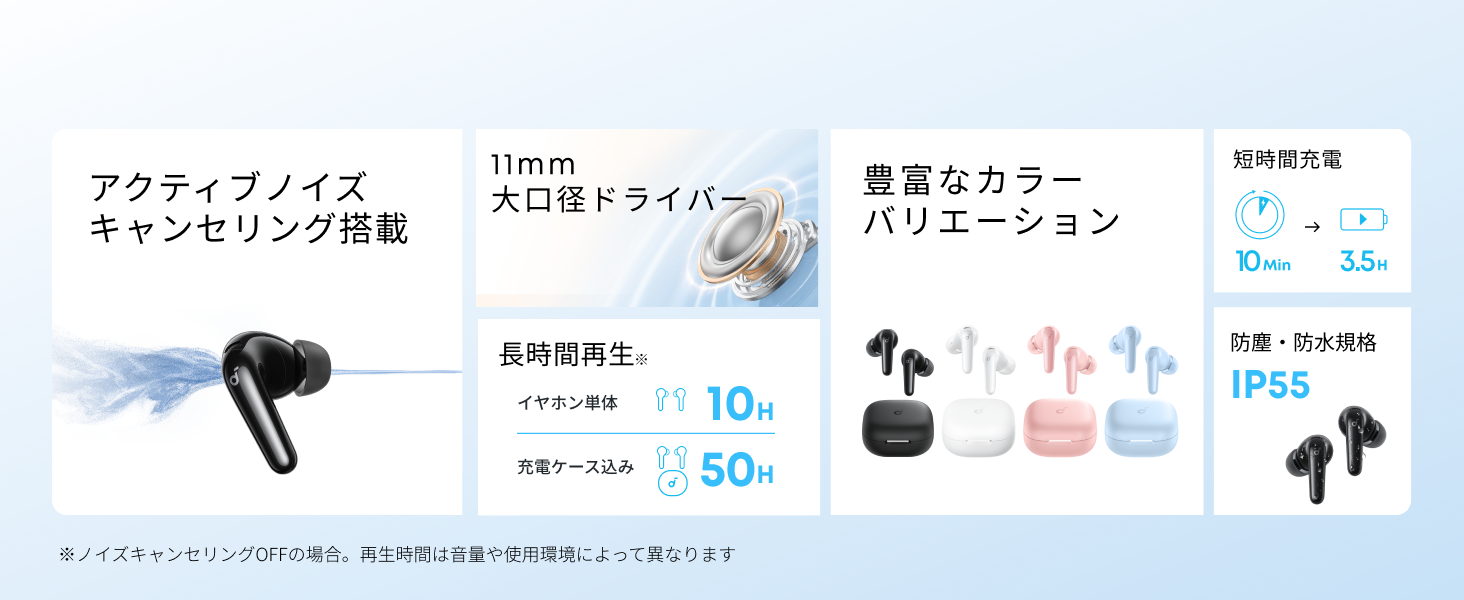
Diagram showing the Soundcore P31i earbuds and charging case with key components labeled.
Sluchátka: Each earbud is equipped with an 11mm dynamic driver for powerful bass and clear sound. They feature active noise cancellation and AI noise reduction for calls. The ergonomic design ensures a secure and comfortable fit.
Nabíjecí pouzdro: The compact charging case not only stores and protects your earbuds but also recharges them on the go. It has a USB-C charging port and a strap hole for portability.
Nabíjení sluchátek a pouzdra
Před prvním použitím plně nabijte sluchátka i nabíjecí pouzdro.
- Nabíjení sluchátek: Place the earbuds into the charging case. The indicator lights on the earbuds will show charging status.
- Nabíjení pouzdra: Connect the charging case to a power source using the provided USB-C to USB-A cable. A full charge for the case and earbuds takes approximately 3 hours.
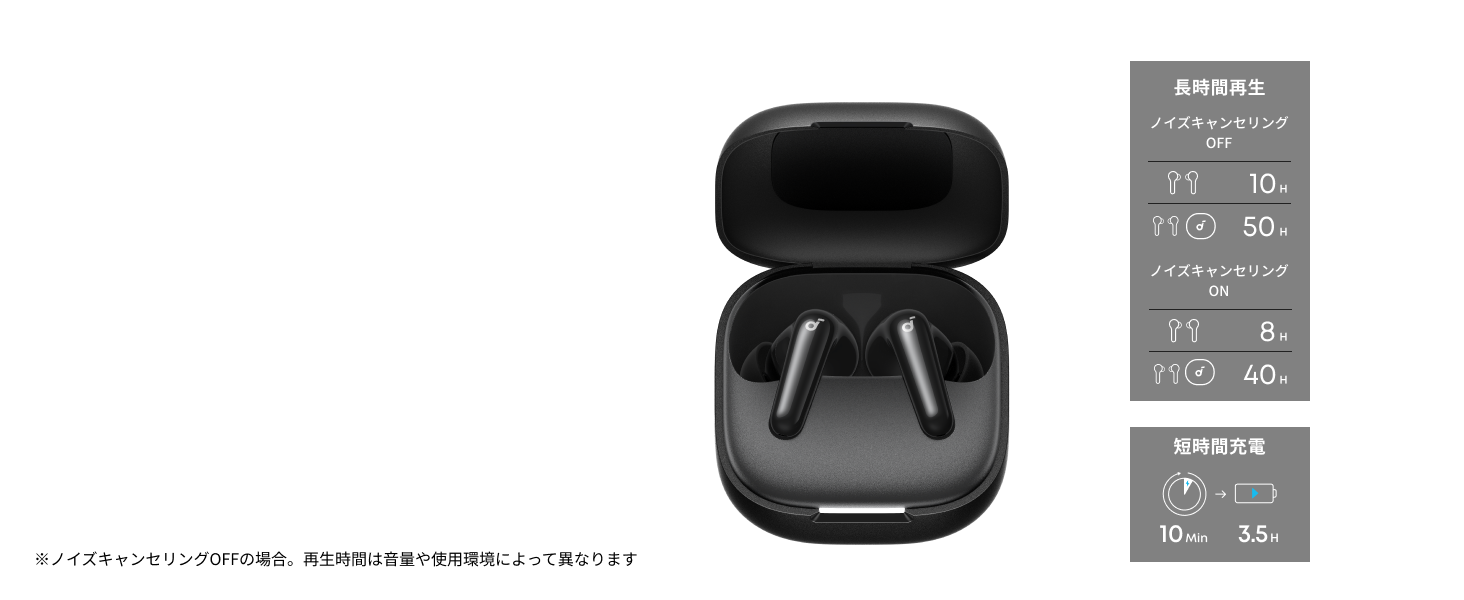
Diagram illustrating charging times and playback duration for Soundcore P31i earbuds.
Životnost baterie:
- Up to 10 hours of playback on a single charge (earbuds only).
- Až 50 hodin celkového přehrávání s nabíjecím pouzdrem.
- A quick 10-minute charge provides up to 3.5 hours of listening time.
Note: Playback time varies depending on volume level and audio content.
Nošení sluchátek
For optimal sound quality and comfort, it is important to wear your earbuds correctly.
- Vyberte si správné ušní nástavce: Select the ear tips that provide the best seal and comfort for your ears. Experiment with different sizes (XS, S, M, L) to find the perfect fit.
- Vložte sluchátka: Jemně vložte sluchátka do zvukovodů.
- Otočením zajistěte: Twist the earbuds slightly until they fit snugly and securely in your ears.

Image showing a person wearing the Soundcore P31i earbuds correctly.
Párování pomocí Bluetooth
Follow these steps to pair your Soundcore P31i earbuds with your device:
- První párování:
- Open the charging case. The earbuds will automatically enter Bluetooth pairing mode. The indicator lights on the earbuds will flash white.
- Na svém zařízení (chytrém telefonu, tabletu atd.) přejděte do nastavení Bluetooth.
- Select "Soundcore P31i" from the list of available devices.
- Once connected, the indicator lights on the earbuds will turn solid white for 1 second and then turn off.
- Spárování s jiným zařízením:
- Vložte sluchátka do nabíjecího pouzdra a nechte víko otevřené.
- Press and hold the button on the charging case for 3 seconds until the earbud indicator lights flash white rapidly.
- Repeat steps 2 and 3 from "First-Time Pairing" on your new device.
Ovládací prvky
The Soundcore P31i earbuds feature touch controls for managing playback, calls, and other functions. Specific control configurations can often be customized via the Soundcore app.
General Touch Controls (Default):
- Přehrát/pozastavit: Klepněte jednou na kterékoli sluchátko.
- Další skladba: Dvakrát klepněte na pravé sluchátko.
- Předchozí skladba: Dvakrát klepněte na levé sluchátko.
- Přijmout/ukončit hovor: Klepněte jednou na kterékoli sluchátko.
- Odmítnout hovor: Stiskněte a podržte jedno ze sluchátek po dobu 2 sekund.
- Aktivovat Voice Assistant: Triple-tap either earbud (may vary).
- Přepnout režim ANC/průhlednosti: Press and hold the right earbud for 2 seconds (may vary).
For detailed and customizable controls, please refer to the Soundcore app or the included Quick Start Guide.
Aktivní potlačení hluku (ANC)
The Soundcore P31i earbuds feature Active Noise Cancelling technology to minimize ambient noise, allowing for an immersive listening experience.

Illustration demonstrating the active noise cancelling feature of the Soundcore P31i earbuds.
ANC detects and reduces various types of noise, such as engine hum on trains or buses, and chatter in cafes. This allows you to enjoy your music or podcasts with greater clarity and fewer distractions.
To switch between ANC, Normal, and Transparency modes, use the touch controls on the earbuds or adjust settings within the Soundcore app.
Kvalita zvuku
The Soundcore P31i earbuds are engineered to deliver a rich audio experience.

Diagram illustrating the 11mm dynamic driver responsible for the audio output.
- 11mm dynamické ovladače: Equipped with large 11mm drivers, these earbuds produce a wide frequency range and detailed sound.
- BassUp™ Technology: Anker's proprietary BassUp™ technology enhances low frequencies, delivering powerful and impactful bass.
You can further customize the sound profile using the equalizer settings within the Soundcore app.
Kvalita hovoru
The Soundcore P31i earbuds ensure clear voice calls and web konference.

Illustration depicting AI noise reduction technology for clear voice calls.
Redukce šumu AI: Integrated AI noise reduction technology effectively filters out background noise, ensuring your voice is transmitted clearly to the person on the other end of the call, even in noisy environments.
Vícebodové připojení
The Soundcore P31i supports multi-point connection, allowing you to connect to two Bluetooth devices simultaneously.

Illustration showing the Soundcore P31i connected to multiple devices simultaneously.
This feature enables seamless switching between devices. For example, you can listen to music on your laptop and instantly switch to answer a call on your phone without manually re-pairing.
To enable multi-point connection, ensure both devices are paired with your earbuds. The earbuds will automatically connect to the last two paired devices when powered on.
Aplikace Soundcore
Download the Soundcore app to enhance your experience with the P31i earbuds. The app offers various features and customization options.

Screenshots of the Soundcore app interface, highlighting customization features.
App Features include:
- Přizpůsobitelné ovládací prvky: Personalize touch controls for playback, calls, and voice assistant.
- Nastavení ekvalizéru: Nastavení zvuku profiles to your preference or choose from preset EQs.
- ANC/Transparency Mode Switching: Easily toggle between noise cancelling and transparency modes.
- Aktualizace firmwaru: Udržujte svá sluchátka aktualizovaná o nejnovější funkce a vylepšení.
- AI Translation Function: (Available from Spring 2026, requires Soundcore app ver 4.0.0 or higher).
The Soundcore app is available for download on both iOS and Android devices.
Konec produktuview Video
Oficiální video s produktemasing the key features and design of the Soundcore P31i True Wireless Earbuds, including active noise cancellation, powerful bass, long battery life, and multi-point connectivity.
Údržba a péče
Proper maintenance ensures the longevity and performance of your Soundcore P31i earbuds.
- Čištění: Pravidelně čistěte sluchátka a nabíjecí pouzdro měkkým, suchým hadříkem, který nepouští vlákna. Nepoužívejte agresivní chemikálie ani abrazivní materiály.
- Tipy do uší: Remove the ear tips and clean them with water and mild soap if necessary. Ensure they are completely dry before reattaching.
- Kontakty pro nabíjení: Udržujte nabíjecí kontakty na sluchátkách i pouzdře čisté a suché, aby se zajistilo správné nabíjení.
- Skladování: Pokud sluchátka nepoužíváte, uložte je do nabíjecího pouzdra, abyste je chránili před prachem a poškozením.
- Voděodolnost: The earbuds are rated IP55 for dust and water resistance. This means they can withstand sweat and light rain, but are not designed for submersion in water. Ensure the earbuds are dry before placing them back in the charging case.

Image showing Soundcore P31i earbuds with water droplets, highlighting their IP55 water resistance.
Odstraňování problémů
If you encounter any issues with your Soundcore P31i earbuds, refer to the following common solutions:
- Sluchátka se nespárují:
- Ujistěte se, že jsou obě sluchátka plně nabitá.
- Place earbuds in the case, close the lid, then open it again to re-enter pairing mode.
- Forget "Soundcore P31i" from your device's Bluetooth list and try pairing again.
- Resetujte sluchátka (konkrétní pokyny k resetování naleznete v Stručné úvodní příručce).
- Only One Earbud Playing Audio:
- Place both earbuds back into the charging case and close the lid for 5 seconds, then open it again.
- Ujistěte se, že obě sluchátka mají dostatečné nabití baterie.
- Resetujte sluchátka.
- Špatná kvalita zvuku:
- Ujistěte se, že ušní nástavce dobře přiléhají k zvukovodu. Vyzkoušejte různé velikosti.
- Vyčistěte trysky sluchátek od nečistot.
- Přesuňte se blíže k připojenému zařízení, abyste předešli rušení.
- Problémy s nabíjením:
- Zkontrolujte nabíjecí kabel a adaptér, zda nejsou poškozené.
- Ujistěte se, že jsou nabíjecí kontakty na sluchátkách a pouzdře čisté.
- Zkuste jiný nabíjecí kabel nebo zdroj napájení.
Specifikace
| Funkce | Detail |
|---|---|
| Značka | Soundcore |
| Název modelu | P31i |
| Číslo modelu | D1202 |
| Barva | Černá (tato konkrétní varianta) |
| Form Factor | In-Ear |
| Technologie připojení | Bezdrátové připojení (Bluetooth 6.1) |
| Kontrola hluku | Aktivní potlačení hluku |
| Velikost ovladače | 11mm dynamické ovladače |
| Doba přehrávání (sluchátka) | Až 10 hodin |
| Celková doba přehrávání (s pouzdrem) | Až 50 hodin |
| Rychlé nabíjení | 10 minut nabíjení pro 3.5 hodin přehrávání |
| Charging Time (Full) | Přibližně 3 hodiny |
| Voděodolnost | IP55 |
| Vícebodové připojení | Podporováno |
| UPC | 194644251543 |
| Země původu | Čína |
Záruka a zákaznická podpora
Soundcore provides a comprehensive warranty for your P31i earbuds.

Image detailing the warranty period and extension for Soundcore P31i.
- Standardní záruka: An 18-month warranty is provided for products purchased from authorized retailer AnkerDirect.
- Prodloužená záruka: Anker members can extend their warranty up to a maximum of 24 months.
- Důležitá poznámka: Purchases from unauthorized sellers may not be covered under warranty.
For product inquiries, delivery questions, or technical support, please contact Soundcore customer support. Contact details can typically be found on the official Soundcore webwebu nebo ve vaší Stručné úvodní příručce.
Bezpečnostní informace
Přečtěte si prosím a dodržujte tyto bezpečnostní pokyny, abyste předešli poškození zařízení nebo zranění:
- Nerozebírejte ani neupravujte sluchátka ani nabíjecí pouzdro.
- Chraňte zařízení před extrémními teplotami, přímým slunečním zářením a otevřeným ohněm.
- Avoid exposing the device to excessive moisture or liquids, beyond its IP55 rating.
- Do not use the device at high volume levels for extended periods to prevent hearing damage.
- Uchovávejte mimo dosah dětí a domácích zvířat.
- Výrobek zlikvidujte zodpovědně v souladu s místními předpisy.