
1. Úvod
This manual provides detailed instructions for the installation, operation, and maintenance of your Antec GSK750 V2 ATX3.1 750W Full Modular Power Supply. This power supply unit (PSU) is designed to deliver stable and efficient power to your computer system, featuring ATX3.1 and PCIe 5.1 compatibility, 80 PLUS Gold certification, and a full modular cable design for optimized cable management.

Image: The Antec GSK750 V2 750W Full Modular Power Supply, showcasinjeho kompaktní design a modulární konektory.
2. Bezpečnostní informace
Please read and follow all safety instructions carefully before installing or operating the power supply. Failure to do so may result in personal injury or damage to your equipment.
- Před instalací nebo údržbou se ujistěte, že je zdroj napájení odpojen od síťové zásuvky.
- Neotevírejte napájecí zdroj casing. Vysoký objemtagUvnitř se nacházejí žádné části a neobsahují žádné součásti, které by mohl uživatel opravit.
- Nainstalujte napájecí zdroj v dobře větraném prostoru, mimo dosah zdrojů tepla, přímého slunečního záření a vlhkosti.
- Používejte pouze modulární kabely dodané s tímto napájecím zdrojem. Použití nekompatibilních kabelů může poškodit napájecí zdroj nebo připojené komponenty.
- Před zapnutím systému se ujistěte, že jsou všechny kabely bezpečně připojeny.
3. Obsah balení
Ověřte, zda jsou v balení přítomny všechny položky:
- Antec GSK750 V2 ATX3.1 750W Full Modular Power Supply Unit
- Modulární sada kabelů (včetně kabelu 12V-2x6 PCIe 5.1)
- AC napájecí kabel
- Montážní šrouby
- Uživatelská příručka (tento dokument)
4. Nastavení a instalace
Follow these steps to install your Antec GSK750 V2 power supply:
4.1 Fyzická instalace
- Ujistěte se, že je počítač vypnutý a odpojený od zásuvky.
- Otevřete skříň počítače.
- Mount the Antec GSK750 V2 PSU into the designated power supply bay in your PC case using the provided mounting screws. Ensure the fan is oriented correctly for optimal airflow (typically facing down if there's a bottom vent, or up if not).

Image: The compact size of the Antec GSK750 V2 power supply, illustrating its smaller dimensions compared to larger PSUs, allowing for easier installation in various PC cases.
4.2 Připojení kabelů
The GSK750 V2 is a full modular PSU, meaning you only connect the cables you need, which helps improve airflow and cable management within your case.
- Connect the necessary modular cables to the power supply unit. Refer to the labels on the PSU and the cables to ensure correct connections.
- Připojte 24pinový ATX kabel k základní desce.
- Connect the 8-pin (4+4) EPS/CPU cables to your motherboard's CPU power connectors.
- For graphics cards, use the appropriate PCIe cables. The GSK750 V2 supports PCIe 5.1 with a dedicated 12V-2x6 (450W) cable for modern GPUs. Connect these securely to your graphics card(s).
- Připojte napájecí kabely SATA k úložným jednotkám (SSD, HDD) a dalším zařízením napájeným SATA.
- Connect Molex cables for any peripherals that require them.
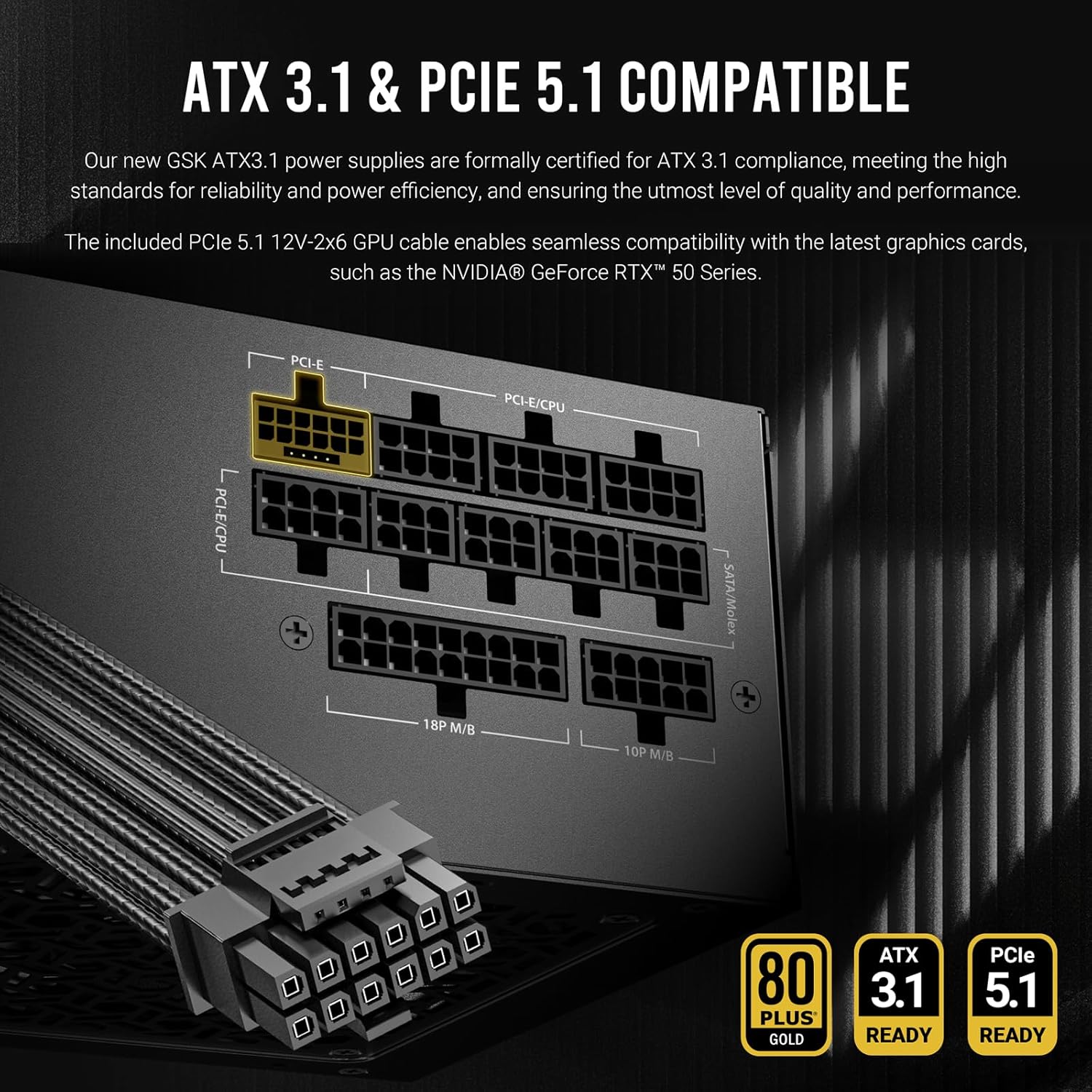
Obrázek: Podrobný view of the Antec GSK750 V2's modular cable ports, highlighting the ATX3.1 and PCIe 5.1 compatibility and the various connection types available for system components.

Image: Illustration of the full modular cable design, demonstrating how only necessary cables are connected to the PSU, reducing clutter and improving airflow within the PC case.
4.3 Počáteční zapnutí
- Jakmile jsou všechna vnitřní připojení provedena, zavřete skříň počítače.
- Připojte napájecí kabel k napájecímu zdroji a poté do zásuvky ve zdi.
- Přepněte vypínač na zadní straně zdroje do polohy „ON“.
- Zapněte počítač.
5. Návod k obsluze
The Antec GSK750 V2 PSU is designed for reliable and efficient operation with minimal user intervention.
5.1 Zero RPM Manager
This power supply features a Zero RPM Manager mode. In this mode, the 120mm silent fan remains off under low to moderate loads to provide silent operation. The fan will automatically activate when the power load increases, ensuring optimal cooling while minimizing noise levels.

Image: Diagram illustrating the Zero RPM Manager's fan speed curve relative to power load, alongside a visual of the 120mm silent fan designed for quiet and efficient cooling.
5.2 PhaseWave Design
The PSU incorporates Antec's PhaseWave Design, which utilizes an LLC + DC-DC topology for server-class power delivery. This design ensures high efficiency, stable voltage regulation, and reliable performance for your system.

Image: Explanation of PhaseWave Design for power delivery efficiency and CircuitShield, a suite of industrial-grade protections including OCP, OVP, UVP, SCP, OPP, OTP, SIP, and NLO.
6. Údržba
To ensure the longevity and optimal performance of your Antec GSK750 V2 power supply, follow these simple maintenance guidelines:
- Udržujte průduchy volné: Ujistěte se, že vstupní a výstupní otvory napájecího zdroje nejsou zakryty prachem nebo jinými předměty. Správné proudění vzduchu je pro chlazení zásadní.
- Pravidelný úklid: Periodically clean the exterior of the power supply and its fan grille using compressed air to remove dust buildup. Always disconnect the PSU from the AC power before cleaning.
- Správa kabelů: Maintain tidy cable management within your PC case to prevent cables from obstructing airflow to the PSU and other components.
7. Řešení problémů
If you encounter issues with your Antec GSK750 V2 power supply, refer to the following common problems and solutions:
7.1 Systém není napájen
- Zkontrolujte napájení střídavým proudem: Ensure the AC power cord is securely connected to both the PSU and the wall outlet. Verify the wall outlet is functional.
- Přepínač zdroje: Confirm the power switch on the back of the PSU is in the 'ON' position.
- Vnitřní připojení: Double-check all modular cable connections to the PSU and to your components (motherboard, CPU, GPU). Ensure the 24-pin and 8-pin CPU cables are fully seated.
- Motherboard Stand-offs: Ensure your motherboard is properly installed with stand-offs to prevent short circuits.
7.2 System Instability or Random Shutdowns
- Přetížení: Ujistěte se, že požadavky na napájení vašeho systému nepřekračují výkon zdroje 750 W.
- Přehřívání: Check for proper airflow within your case and ensure the PSU fan is operating when under load. Clean any dust buildup.
- CircuitShield Protection: The Antec GSK750 V2 includes comprehensive industrial-grade protections (OCP, OVP, UVP, SCP, OPP, OTP, SIP, NLO). If the PSU detects an unsafe condition, it may shut down to protect your components. If this occurs repeatedly, consult a professional.
7.3 Ventilátor se netočí
- Režim nulových otáček: Under low loads, the fan will not spin. This is normal operation. The fan will activate automatically as the system load increases.
- Obstrukce: Ensure nothing is physically blocking the fan blades.
If problems persist after following these steps, please contact Antec customer support.
8. Specifikace
Detailed technical specifications for the Antec GSK750 V2 ATX3.1 750W Full Modular Power Supply:
| Funkce | Detail |
|---|---|
| Název modelu | GSK750 V2 US |
| Wattage | 750 wattů |
| Form Factor | ATX |
| Certifikace účinnosti | Certifikace 80 PLUS Gold |
| Standard ATX | ATX3.1 |
| Podpora PCIe | PCIe 5.1 (s kabelem 12V-2x6) |
| Modularita | Plně modulární |
| Způsob chlazení | Air (120mm Silent Fan with Zero RPM Manager) |
| Design | PhaseWave Design (LLC + DC-DC) |
| Ochrany | OCP, OVP, UVP, SCP, OPP, OTP, SIP, NLO (CircuitShield) |
| Rozměry produktu | 5.51 x 3.38 x 5.9 palce (140 x 86 x 150 mm) |
| Hmotnost položky | 5.29 libry |
| Kompatibilní zařízení | Osobní počítač |
8.1 Input and Output Ratings

Image: Table detailing the input voltage ranges and the output voltage, proud a wattage for each rail (+3.3V, +5V, +12V, -12V, +5VSB) of the Antec GSK750 V2 power supply.
| Vstup | |||||
|---|---|---|---|---|---|
| 100-240V~, 50Hz-60Hz, 10A Max 200-240V~, 50Hz-60Hz, 10A Max / for China and Korea | |||||
| Výstup | |||||
| +3.3V | +5V | +12V | -12V | +5VSB | |
| 20A | 20A | 62.5A | 0.3A | 3.0A | |
| 100W | 750W | 3.6W | 15W | ||
| 750W (Combined) | |||||
9. Informace o záruce
The Antec GSK750 V2 ATX3.1 750W Full Modular Power Supply comes with a 10-letá záruka from the date of purchase. This warranty covers defects in materials and workmanship under normal use. Please retain your proof of purchase for warranty claims. For full warranty terms and conditions, please visit the official Antec webwebu nebo kontaktujte zákaznickou podporu.
10. Zákaznická podpora
For technical assistance, troubleshooting, or warranty inquiries, please contact Antec customer support through their official webmísto:
You may also find helpful resources, FAQs, and driver downloads on their support page.