
1. Úvod
Thank you for choosing the Antec VCX300 ARGB ATX/M-ATX PC Case. This manual provides detailed instructions for the installation, operation, and maintenance of your new computer chassis. Please read this manual thoroughly before installation to ensure proper setup and optimal performance.
2. Bezpečnostní informace
- Před instalací nebo demontáží jakýchkoli součástí vždy odpojte napájení.
- Handle components with care to avoid damage from electrostatic discharge. Use an anti-static wrist strap if available.
- Keep the case away from water, moisture, and direct heat sources.
- Zajistěte dostatečné větrání kolem skříně, abyste zabránili přehřátí.
- Do not attempt to open or repair the power supply unit inside the case. Refer to qualified service personnel.
3. Obsah balení
Prosím, ověřte, zda jsou v balení přítomny všechny položky:
- Antec VCX300 ARGB ATX/M-ATX PC Case
- Accessory Box (Screws, standoffs, cable ties)
- Uživatelská příručka (tento dokument)
4. Konec produktuview
Familiarize yourself with the various parts of your Antec VCX300 ARGB PC Case.
4.1 I/O předního panelu
- Tlačítko napájení
- Tlačítko Reset
- Porty USB 3.0
- Porty USB 2.0
- Audio konektory (sluchátka/mikrofon)
- LED Control Button (for ARGB lighting)
4.2 Internal Layout
The VCX300ARGB case supports ATX and Micro-ATX motherboards. It features multiple drive bays for storage and ampprostor pro chladicí řešení.
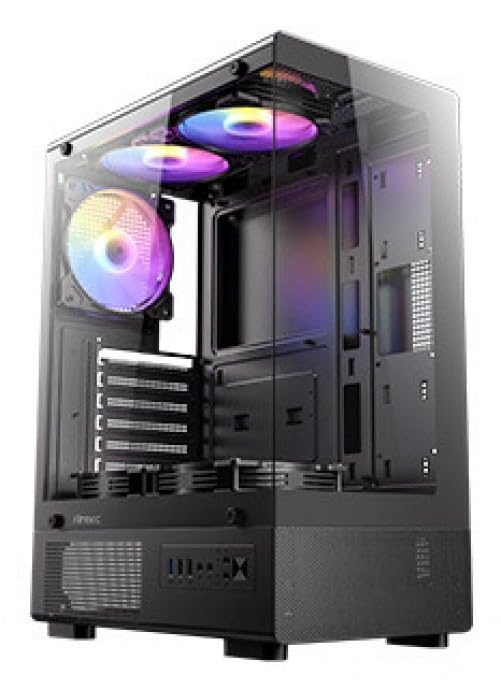
Obrázek 1: Přední strana view of the Antec VCX300 ARGB PC Case, showcasing the ARGB lighting elements and front panel I/O ports.
5. Nastavení a instalace
Follow these steps to install your components into the Antec VCX300 ARGB PC Case.
5.1 Příprava případu
- Umístěte pouzdro na rovný a stabilní povrch.
- Odstraňte boční panely odšroubováním šroubů s křídlovou hlavou na zadní straně skříně a posunutím panelů dozadu.
5.2 Instalace základní desky
- Nainstalujte kryt I/O do zadního otvoru skříně.
- Zarovnejte základní desku s předinstalovanými distančními sloupky. Ujistěte se, že otvory pro šrouby na základní desce odpovídají distančním sloupkům.
- Secure the motherboard with the provided screws from the accessory box.
5.3 Instalace napájecího zdroje
- Position the power supply unit (PSU) in the designated compartment at the bottom rear of the case.
- Secure the PSU with screws from the outside rear of the case.
5.4 Instalace úložného disku (HDD/SSD)
- Locate the drive bays. The VCX300ARGB typically features dedicated bays for 3.5" HDDs and 2.5" SSDs.
- For 3.5" HDDs, slide the drive into the bay and secure it with screws or tool-less clips if available.
- For 2.5" SSDs, mount the drive onto the designated brackets or trays and secure with screws.
5.5 Expansion Card Installation (GPU, etc.)
- Odstraňte potřebné kryty rozšiřujících slotů ze zadní strany skříně.
- Insert the expansion card (e.g., graphics card) into the appropriate PCIe slot on the motherboard.
- Kartu zajistěte šroubem.
5.6 Správa kabelů
Pro vedení kabelů využijte výřezy pro vedení kabelů a úchyty za přihrádkou základní desky. Zlepší se tím proudění vzduchu a estetika.
- Connect all power cables from the PSU to the motherboard and components.
- Connect front panel I/O cables (USB, audio, power/reset switches, LED) to the corresponding headers on the motherboard.
- Connect ARGB cables from the case fans/strips to the motherboard's ARGB header or the integrated ARGB controller.
6. Provoz
6.1 Zapnutí
- Ensure all components are correctly installed and cables are connected.
- Zavřete a zajistěte boční panely.
- Připojte napájecí kabel k napájecímu zdroji a do zásuvky ve zdi.
- Flip the power switch on the PSU to the "ON" position.
- Press the Power Button on the front panel of the case.
6.2 Ovládání osvětlení ARGB
The Antec VCX300 ARGB case features customizable ARGB lighting. You can control the lighting effects in two ways:
- Ovládací tlačítko LED: Press the dedicated LED control button on the front panel to cycle through various pre-set ARGB lighting modes and colors. Hold the button for a few seconds to turn off/on the lighting.
- Software základní desky: If the ARGB cables are connected to a compatible motherboard ARGB header, you can synchronize and customize lighting effects using your motherboard's proprietary software (e.g., ASUS Aura Sync, MSI Mystic Light Sync, Gigabyte RGB Fusion, ASRock Polychrome Sync). Refer to your motherboard manual for specific instructions.
7. Údržba
Pravidelná údržba pomáhá zajistit optimální výkon a dlouhou životnost komponent vašeho počítače.
- Prachové filtry: The VCX300ARGB includes dust filters. Regularly remove and clean these filters to prevent dust buildup inside the case, which can impede airflow and cooling performance. Use compressed air or a soft brush.
- Vnitřní čištění: Periodically open the case and use compressed air to remove dust from fans, heatsinks, and other components. Ensure the system is powered off and unplugged before cleaning.
- Čištění exteriéru: Otřete vnější část pouzdra měkkým hadříkemamp hadříkem. Vyhněte se agresivním chemikáliím nebo abrazivním materiálům.
8. Řešení problémů
| Problém | Možná příčina | Řešení |
|---|---|---|
| Počítač se nezapne. | Power cable disconnected, PSU switch off, front panel power button not connected, faulty PSU. | Check power cable connections. Ensure PSU switch is ON. Verify front panel power button cable is correctly connected to motherboard. Test PSU if possible. |
| ARGB lighting not working. | ARGB cables disconnected, incompatible motherboard header, LED control button issue. | Ensure ARGB cables are securely connected to the motherboard or controller. Try cycling modes with the LED control button. Verify motherboard ARGB header compatibility. |
| Špatné proudění vzduchu/přehřátí. | Dust buildup, incorrect fan orientation, obstructed vents. | Clean dust filters and internal components. Ensure fans are oriented correctly for optimal airflow (intake/exhaust). Check for any obstructions. |
9. Specifikace
| Funkce | Detail |
|---|---|
| Název modelu | VCX300ARGB |
| Typ pouzdra | Střední věž |
| Podpora základní desky | ATX, Micro-ATX |
| Rozměry (D x Š x V) | 14.57"H x 8.07"Š x 17.72"V (přibližně 370 mm x 205 mm x 450 mm) |
| Hmotnost položky | 3.6 kg |
| Vnitřní pozice pro disky | 5 (combination of 3.5" HDD and 2.5" SSD) |
| Přední I / O porty | USB 3.0, USB 2.0, Audio In/Out, Power, Reset, LED Control Button |
| Speciální funkce | Built-In Fan, Dust Filter, LED Control Button, Noise Reduction Technology, Partition Plate Cooling Technology, ARGB Lighting |
| Barva | Černý |
10. Záruka a podpora
Antec products come with a limited warranty. Please refer to the official Antec website or your regional distributor for specific warranty terms and conditions applicable to your product.
For technical support, product registration, or further inquiries, please visit the official Antec support page: www.antec.com/support
Kontaktní informace dovozce: Ariisto House, 5th Floor, Junction of N.S.Phadke Road, Telli Gali, Andheri (E), Mumbai- 400 069 Maharashtra, India