
1. Konec produktuview
The blafili 6dot35 is a versatile 1/4" Jack TRS Bluetooth v5.1 Music Receiver designed to integrate wireless audio streaming into professional and home audio setups. It supports high-quality audio codecs including aptX HD, aptX Low Latency, AAC, and SBC, ensuring superior sound. With a built-in rechargeable battery offering over 10 hours of playtime and USB-C DAC functionality, it provides flexible connectivity for mixing consoles, PA systems, DJ equipment, and computers. Its True Wireless Stereo (TWS) feature allows two units to be paired for immersive stereo sound.

Image: The blafili 6dot35 Bluetooth Receiver shown with its 1/4 inch TRS plug, connecting wirelessly to a laptop, smartphone, and tablet, and wired to a live sound mixer and active loudspeaker.
2. Co je v krabici
- blafili 6dot35 Bluetooth Music Receiver
- Rychlý průvodce
- Power Cable (USB-C to USB-A)

Image: The blafili 6dot35 receiver, a USB-C charging cable, and the quick start guide are displayed as the package contents.
3. Klíčové vlastnosti
- Špičková kvalita zvuku: Utilizes Qualcomm QCC3034 Bluetooth chipset with aptX HD, aptX Low Latency, aptX, AAC, and SBC codecs.
- Snadné připojení: 1/4" TRS output for direct connection to audio mixing consoles, PA systems, and active DJ speakers.
- Mono and Stereo Modes: Supports mono audio with one unit, or True Wireless Stereo (TWS) playback by connecting two blafili 6dot35 receivers.
- Funkce USB DAC: Plug-and-play USB DAC supports up to 16bit / 48kHz audio input from a computer via USB-C.
- Dlouhá výdrž baterie: Built-in rechargeable battery provides 10+ hours of runtime. USB Type-C port for charging or continuous DC power.
- Tichý provoz: No beeps produced during pairing or unpairing.
- Customizable Bluetooth Name: Option to customize the Bluetooth broadcast name.
- Kompatibilita: Compatible with mixers, PA systems, and active speakers. Not compatible with Bluetooth headphones, speakers, or microphones.
4. Ovládací prvky a indikátory
The blafili 6dot35 features intuitive controls and clear LED indicators for easy operation.
- Tlačítko PAIR: Power ON/OFF, Play/Pause, Reconnect.
- Tlačítko TWS: True Wireless Stereo pairing mode.
- CHG (Charge) Button: Indikátor stavu baterie.
- Port USB-C: For charging and USB DAC audio input.
- 1/4" TRS Plug: Zvukový výstupní konektor.

Image: A detailed diagram of the blafili 6dot35 highlighting its 1/4 inch TRS output, USB-C charging port/audio input, PAIR button, TWS button, and CHG button with corresponding LED indicators.
5. Průvodce nastavením
5.1 Počáteční nabíjení
- Connect the provided USB-C cable to the blafili 6dot35's USB-C port.
- Zapojte druhý konec kabelu USB-C do kompatibilního zdroje napájení USB (např. portu USB počítače, adaptéru do zásuvky).
- The CHG LED will illuminate solid red during charging. It will turn off when fully charged.
- A full charge takes approximately 2 hours and provides over 10 hours of runtime.
5.2 Powering On/Off & Bluetooth Pairing
- Zapnutí: Stiskněte a podržte PÁR button for approximately 3 seconds until the PAIR LED flashes blue and red alternately, indicating pairing mode.
- Párování: On your Bluetooth-enabled device (smartphone, tablet, laptop), search for available Bluetooth devices and select "blafili 6dot35".
- Potvrzení připojení: Once successfully paired, the PAIR LED will become a solid color (blue for SBC, cyan for aptX, pink for AAC, green for aptX HD, white for aptX LL).
- Vypnout: Stiskněte a podržte PÁR tlačítko po dobu přibližně 3 sekund.
5.3 Připojení k audio zařízení
- Insert the 1/4" TRS plug of the blafili 6dot35 directly into an available 1/4" input on your audio mixer, PA system, or active DJ speaker.
- Ensure the input level on your audio equipment is set appropriately to avoid distortion.
- Důležitá poznámka: The blafili 6dot35 is not designed to operate with 48V phantom power. Use with standard line-level or non-phantom-powered 1/4" TRS inputs for optimal performance.
5.4 True Wireless Stereo (TWS) Pairing (Requires two blafili 6dot35 units)
- Ensure both blafili 6dot35 units are powered on and not connected to any Bluetooth device.
- On the first unit, press and hold the TWS button for approximately 3 seconds to enter TWS pairing mode. The TWS LED will flash blue.
- Repeat the previous step for the second unit.
- Once successfully paired in TWS mode, the TWS LEDs on both units will illuminate solid blue. One unit will act as the primary (left channel) and the other as the secondary (right channel).
- Connect your Bluetooth device to the primary blafili 6dot35 unit as described in section 5.2.
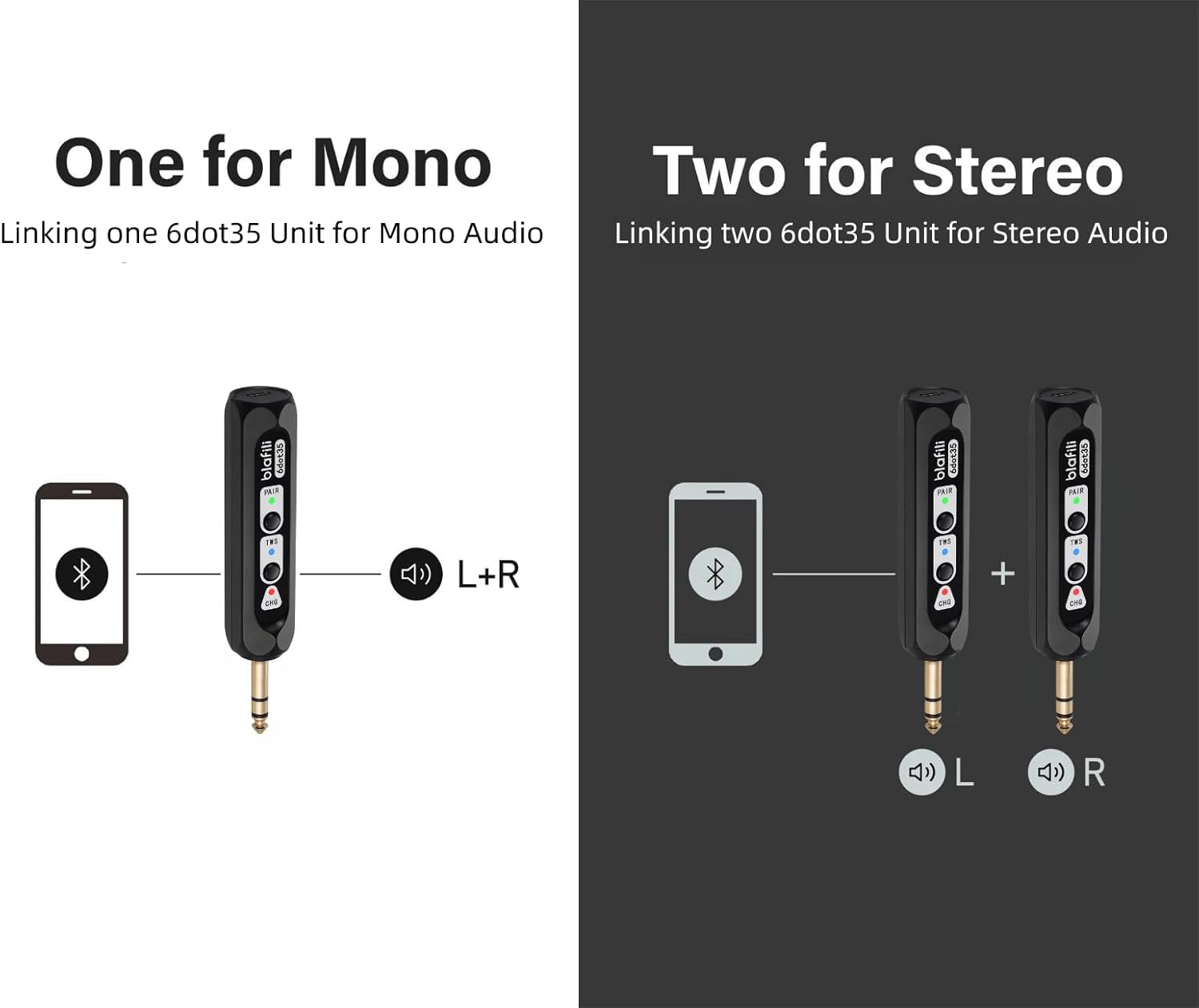
Image: Illustration of single blafili 6dot35 for mono output (L+R) and two blafili 6dot35 units paired for True Wireless Stereo (L and R channels).
5.5 USB DAC Audio Input
- Connect a computer to the blafili 6dot35 using a USB-C to USB-A cable.
- The blafili 6dot35 will be recognized as an audio output device by your computer.
- Select the blafili 6dot35 as your audio output device in your computer's sound settings to stream audio.
6. Návod k obsluze
6.1 Základní ovládací prvky přehrávání
- Přehrát/pozastavit: Krátce stiskněte PÁR button when music is playing.
- Znovu připojit: Krátce stiskněte PÁR button when out of connection to re-establish the last paired device.
6.2 Customizing Bluetooth Broadcast Name
The blafili 6dot35 allows you to customize its Bluetooth broadcast name. Refer to the detailed instructions in the full user manual or contact blafili support for guidance on this advanced feature.
7. Údržba
7.1 Nabíjení
- Charge the device using the provided USB-C cable and a 5V USB power source.
- The CHG LED indicates charging status (solid red for charging, off for fully charged).
- The CHG LED will flash 5 times every minute when the battery is low and needs recharging.
- For continuous use, the device can remain plugged into a USB power source.
7.2 Péče a manipulace
- Uchovávejte zařízení v suchu a mimo dosah extrémních teplot.
- Čistěte měkkým, suchým hadříkem. Nepoužívejte agresivní chemikálie.
- Zabraňte pádu zařízení nebo jeho vystavení silným nárazům.
8. Řešení problémů
- Obtížnost párování:
Ensure the blafili 6dot35 is in pairing mode (PAIR LED flashing blue/red). Turn off Bluetooth on other devices to prevent interference. The blafili 6dot35 is a receiver, not a transmitter, so it cannot pair with Bluetooth headphones, speakers, or microphones. - Žádný audio výstup:
Check if the blafili 6dot35 is correctly plugged into a line-level or non-phantom-powered 1/4" TRS input on your audio equipment. Verify that the volume levels on both the receiver and your audio equipment are adjusted correctly. Ensure your Bluetooth device is successfully connected to the blafili 6dot35. - Problémy s připojením TWS:
Ensure both blafili 6dot35 units are powered on and not connected to any other Bluetooth device before initiating TWS pairing. Follow the TWS pairing steps carefully. - USB DAC Not Working:
Confirm the USB-C cable is securely connected to both the blafili 6dot35 and your computer. Ensure the blafili 6dot35 is selected as the audio output device in your computer's sound settings. The blafili 6dot35 supports USB-C audio input from a computer, not USB-C output. - Unexpected Beeps/Tones:
The blafili 6dot35 is designed for silent operation during pairing and unpairing. If you hear unexpected tones, check for external interference or consult the full manual.
9. Specifikace
| Rozměry produktu | 1 x 1 x 1 palce (2.54 x 2.54 x 2.54 cm) |
| Hmotnost položky | 2.39 unce (67.75 gramů) |
| Číslo modelu položky | blafili 6dot35 |
| Baterie | Jsou vyžadovány 1 lithium-iontové baterie (součástí balení) |
| Značka | blafili |
| Technologie připojení | 1/4" TRS plug, Bluetooth v5.1, USB-C |
| Typ ovladače | Stiskněte tlačítko |
| Speciální funkce | Hi-Res Audio, LED Light, Portable, Stereo Pairing (TWS), USB Port |
| Kompatibilní zařízení | Home Theater, Karaoke Machine, Smartphone, Streaming Device, Tablet |
| Typ konektoru | 1/4" TRS |
| Režim zvukového výstupu | Stereo |
| Konfigurace kanálů prostorového zvuku | 2.0 |
| Barva | Černý |
10. Záruka a podpora
10.1 Zásady vrácení
This product is eligible for a 30-day refund/replacement return policy when purchased from Amazon.
10.2 Plány rozšířené ochrany
Optional extended protection plans are available for purchase:
- Dvouletý ochranný plán
- Dvouletý ochranný plán
- Kompletní ochrana (měsíční fakturace)
Please refer to the product listing or contact your retailer for details on purchasintyto plány.
10.3 Podpora výrobce
For further assistance, technical support, or warranty claims, please contact blafili inc. directly. Contact information can typically be found in the full user manual or on the manufacturer's official webmísto.
11. Oficiální video produktu
Video: An official product video from BLAFILI demonstrating the blafili 1/4" Bluetooth Audio Receiver for Mixers, showcasinjeho funkce a konektivitu.