
1. Úvod
This manual provides instructions for the XHGTJK Universal Replacement Remote Control. This remote is designed to be compatible with various Kenwood audio systems, including models KRF-V5100D, KRF-V5090D, KRF-V6090, KRF-V6100D, RC-R0517, KRF-V5200D, KRF-V6300D, KRF-V6200D, KRF-V7200D-S, and RC-R0518. It operates using infrared (IR) technology and requires no programming or pairing for initial use.
2. Nastavení
2.1 Instalace baterie
Dálkový ovladač vyžaduje dvě (2) baterie typu AAA (nejsou součástí balení). Pro instalaci baterií postupujte takto:
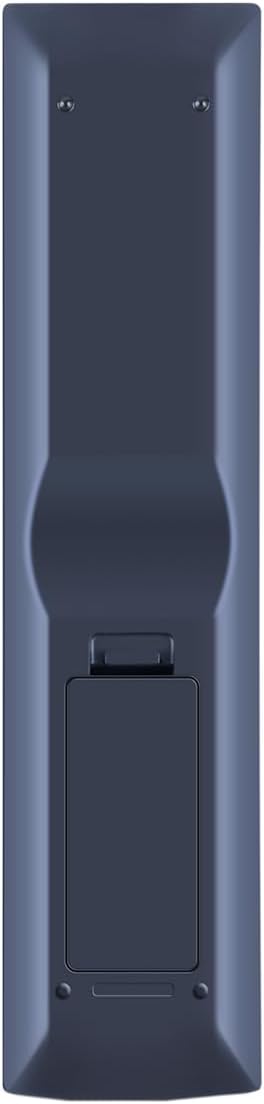
- Najděte přihrádku na baterie na zadní straně dálkového ovladače.
- Stiskněte západku a posuňte kryt baterie dolů, abyste jej otevřeli.
- Vložte dvě baterie typu AAA a ujistěte se, že kladný (+) a záporný (-) pól správně shodují s označením uvnitř přihrádky.
- Zasuňte kryt baterie zpět na místo, dokud bezpečně nezapadne.
Once batteries are installed, the remote is ready for use. No programming or pairing is required.
3. Návod k obsluze
This replacement remote control functions as an infrared (IR) device. For optimal performance, ensure a clear line of sight between the remote control and your Kenwood audio system. Point the remote directly at the system's IR receiver.
3.1 Základní funkce
While this remote is designed to operate the main functions of compatible Kenwood units, it may not support every feature available on the original remote control. Key functions include:
- Zapnutí/vypnutí: Použijte MOC tlačítko pro zapnutí nebo vypnutí systému.
- Výběr vstupu: Tlačítka jako DVD, VIDEO, CD, TUNER, HDMI 1, HDMI 2a AUX allow you to switch between different audio/video sources.
- Ovládání hlasitosti: Použijte OBJEM + a OBJEM - buttons to adjust the sound level. The ZTLUMIT button silences the audio.
- Navigace: The central directional pad (UP, DOLŮ, VLEVO, PRÁVO) a ENTER button are used for menu navigation and selection.
- Ovládání přehrávání: Tlačítka jako např PLAY/PAUSE, ZASTÁVKA, RYCHLE VPŘEDa ZPĚT jsou k dispozici pro přehrávání médií.
- Numerická klávesnice: Use the number buttons (0-9, +10) for direct track selection or input.

4. Údržba
4.1 Výměna baterie
Vyměňte baterie, když dálkový ovladač reaguje pomalu nebo přestane fungovat. Vždy vyměňte obě baterie současně za nové baterie AAA. Nekombinujte staré a nové baterie ani různé typy baterií.
4.2 Čištění
Dálkový ovladač otřete měkkým, suchým hadříkem. Nepoužívejte tekuté čisticí prostředky, spreje ani abrazivní materiály, protože by mohly poškodit povrch dálkového ovladače nebo jeho vnitřní součásti.
4.3 Skladování
Pokud dálkový ovladač nebudete delší dobu používat, vyjměte baterie, abyste zabránili jejich vytečení a možnému poškození zařízení.
5. Řešení problémů
- Dálkové ovládání nereaguje:
- Zkontrolujte, zda jsou baterie vloženy správně se správnou polaritou.
- Vyměňte staré baterie za nové baterie typu AAA.
- Ensure there is a clear line of sight between the remote control and the Kenwood audio system's IR receiver. Remove any obstructions.
- Confirm that the remote control is compatible with your specific Kenwood model. Refer to the compatibility list in the Introduction.
- Některé funkce nefungují:
- This replacement remote may not support all advanced or specific functions of your original Kenwood remote. It is designed for main operational features.
Pokud kroky pro řešení potíží problém nevyřeší, obraťte se na zákaznickou podporu s žádostí o další pomoc.
6. Specifikace
| Značka | XHGTJK |
| Speciální funkce | Není vyžadováno žádné programování |
| Barva | Černý |
| Maximální počet podporovaných zařízení | 1 |
| Kompatibilní zařízení | Kenwood KRF-V5100D, KRF-V5090D, KRF-V6090, KRF-V6100D, RC-R0517, KRF-V5200D, KRF-V6300D, KRF-V6200D, KRF-V7200D-S, RC-R0518 |
| Technologie připojení | Infračervený (IR) |
| Typ ovladače | Ovládání tlačítkem |
| Maximální dosah | 10 stop (přibližně 3 metry) |
| Počet požadovaných baterií | 2 AAA baterie |
7. Informace o záruce
This XHGTJK remote control comes with a 6-month warranty from the date of purchase. This warranty covers manufacturing defects. It does not cover damage caused by misuse, accidents, unauthorized modifications, or normal wear and tear. Please retain your proof of purchase for warranty claims.
8. Zákaznická podpora
For any questions, concerns, or technical assistance regarding your XHGTJK Universal Remote Control, please contact our customer support. We are committed to providing satisfactory solutions for any issues you may encounter.


