
1. Konec produktuview
The FNIRSI 2C53T is a versatile 3-in-1 handheld device combining the functionalities of a dual-channel digital oscilloscope, a 4.5-digit 19999-count multimeter, and a DDS signal generator. This compact instrument is designed for professionals, students, and hobbyists requiring a portable solution for electronic testing and waveform analysis.
Klíčové vlastnosti:
- Dvoukanálový osciloskop: 50 MHz analog bandwidth, 250 MSa/s real-time sampling rate, 1 Kpts record depth, automatic measurement functions, maximum input voltage of 400V, vertical sensitivity from 10 mV/div to 10 V/div. Supports waveform image storage and export.
- 4.5-Digit, 19999-Count Multimeter: Measures AC Voltage (0-750 V), DC Voltage (0-999.9 V), DC/AC Current (0-9.999 A), Resistance (0-19.99 MΩ), and Capacitance (0-99.99 mF). Includes continuity measurement.
- Generátor signálu DDS: Generates 13 types of waveforms with a maximum output frequency of 50 kHz and a 1 Hz interval.
- Data Saving Function: One-click saving and screening of data. Connects to PC via Type-C for saved image upload. Allows comparison of reference and measured waveforms on the same screen.
- Robustní design: Features an FPGA+MCU+ADC hardware architecture, integrated high-voltage protection module, 2.8-inch LCD display, and a built-in 3000 mAh lithium-ion battery providing up to 6 hours of standby time. Type-C interface supports 5V/1A charging.

Image 1.1: The FNIRSI 2C53T device showcasing its 3-in-1 capabilities as an oscilloscope, multimeter, and signal generator.
2. Bezpečnostní informace
Please read all safety information carefully before using the device to prevent electric shock, injury, or damage to the instrument. Keep this manual for future reference.
- Pro měření vždy používejte správné vstupní svorky, funkci a rozsah.
- Neaplikujte voltage or current that exceeds the maximum rated values specified for the device.
- Před každým použitím zkontrolujte měřicí kabely, zda nejsou poškozené. Nepoužívejte, pokud je izolace poškozená nebo je odkrytý holý kov.
- Nepoužívejte zařízení ve vlhkém prostředí ani s mokrýma rukama.
- Ensure the device is turned off and disconnected from any circuits before changing functions or connecting/disconnecting test leads.
- Refer to the specifications section for maximum input ratings for each function.
- Nepokoušejte se zařízení opravovat ani upravovat. Servis svěřte kvalifikovanému personálu.
3. Komponenty produktu
The FNIRSI 2C53T package typically includes the following items:
- FNIRSI 2C53T 3-in-1 Device
- Osciloskopické sondy (x2)
- Měřicí kabely pro multimetr (červený a černý)
- Kabel USB typu C
- Uživatelská příručka (tento dokument)
- Přenosné pouzdro (může se lišit v závislosti na balení)
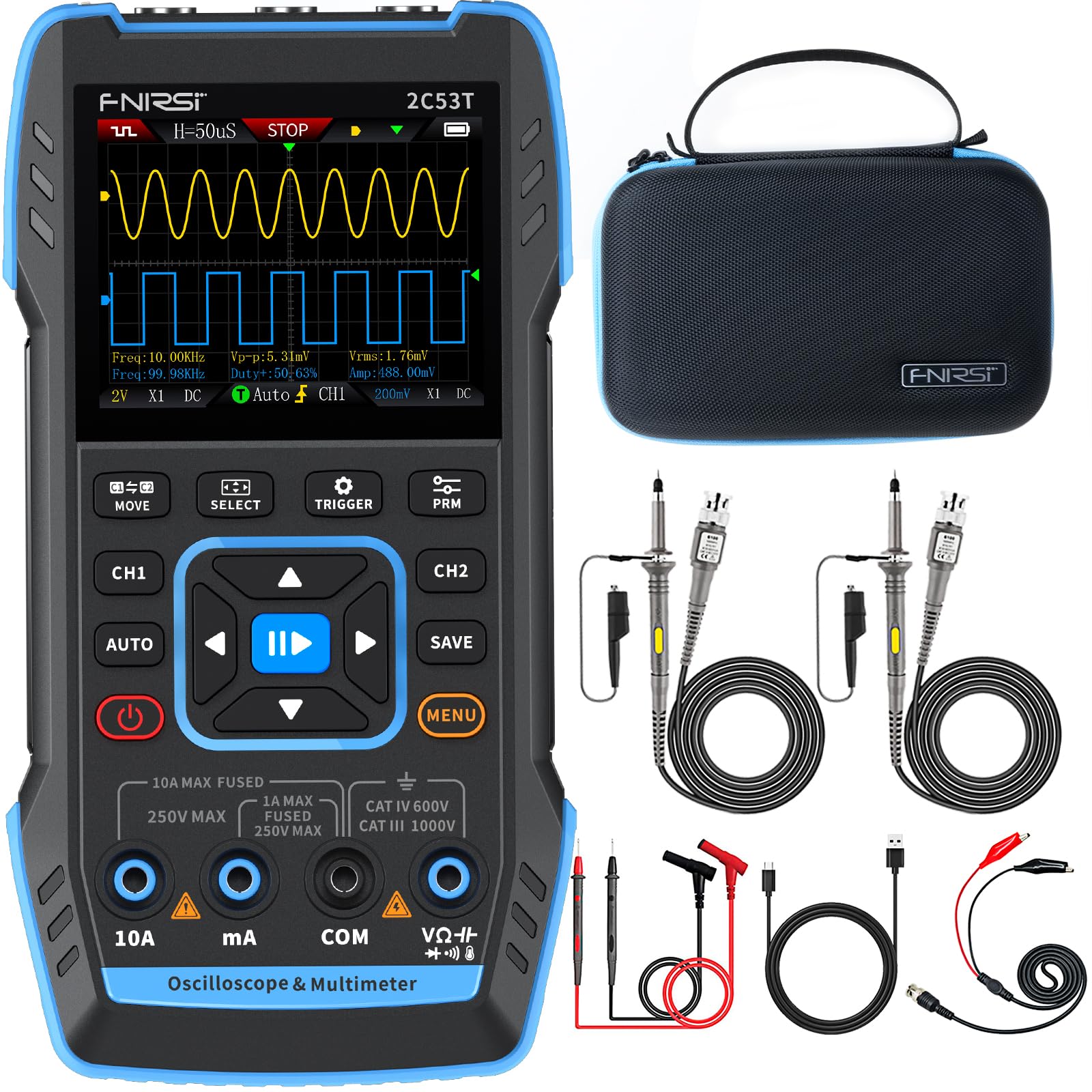
Image 3.1: The FNIRSI 2C53T device along with its standard accessories, including oscilloscope probes and multimeter test leads.
4. Nastavení a první použití
4.1 Nabíjení zařízení
Before first use, fully charge the internal lithium-ion battery. Connect the supplied Type-C USB cable to the device's Type-C port and to a 5V/1A USB power adapter (not included). The charging indicator on the screen will show the charging status.
4.2 Zapnutí/vypnutí
Press and hold the power button (usually marked with a power symbol) for a few seconds to turn the device ON or OFF.
4.3 Connecting Probes and Test Leads
The device features dedicated input ports for oscilloscope channels (CH1, CH2) and the signal generator (DDS), as well as multimeter input jacks (10A, mA, COM, VΩ+). Ensure correct connections for the desired function.

Obrázek 4.1: Detail view of the FNIRSI 2C53T's input ports, including CH1, CH2 for oscilloscope, and DDS for signal generator output.
5. Návod k obsluze
The FNIRSI 2C53T features a user-friendly interface with a central navigation pad and dedicated function buttons (MOVE, SELECT, TRIGGER, PRM, AUTO, SAVE, MENU, CH1, CH2).
5.1 Režim osciloskopu
To enter Oscilloscope mode, ensure the device is powered on. The default screen often displays the oscilloscope interface. Use the CH1 and CH2 buttons to enable or disable channels.
- Nastavení parametrů: Use the navigation pad (up/down/left/right) to select and adjust parameters like vertical sensitivity (V/div), horizontal time base (s/div), and trigger level. The 'SELECT' button confirms selections.
- Nastavení spouštění: Press the 'TRIGGER' button to access trigger settings, including trigger mode (Auto, Normal, Single), trigger type (Edge, Pulse, Video), and source.
- Automatické měření: Press 'AUTO' for automatic waveform scaling and measurement display.
- Analýza tvaru vlny: The device supports various analysis functions. Access these through the 'MENU' button or dedicated options. These include Math Operations, Cursor Functions for precise measurements, Infinite Afterglow for observing signal changes over time, X-Y Mode for phase relationship analysis, and FFT Spectrum for frequency domain analysis.
- Ukládání průběhů: Press the 'SAVE' button to store the current waveform display. Saved images can be transferred to a PC via the Type-C connection.

Image 5.1: The FNIRSI 2C53T displaying various waveform analysis features, including Math Operations, Cursor Functions, Infinite Afterglow, and X-Y Mode.
5.2 Režim multimetru
To switch to Multimeter mode, press the 'MENU' button and navigate to the Multimeter option, or use a dedicated button if available. Connect the test leads to the appropriate input jacks (COM and VΩ+ for voltage/resistance/capacitance, 10A or mA for current).
- svtagMěření (AC/DC): Select ACV or DCV. Connect test leads in parallel with the circuit or component.
- Měření proudu (AC/DC): Select ACA or DCA. Connect test leads in series with the circuit. Ensure the correct current input jack (10A or mA) is used.
- Měření odporu: Select Ω. Connect test leads across the component when the circuit is de-energized.
- Měření kapacity: Select F. Connect test leads across the capacitor when the circuit is de-energized.
- Test kontinuity: Select the continuity symbol. The device will emit an audible beep if continuity is detected.

Image 5.2: The FNIRSI 2C53T displaying its multimeter interface, showing voltage measurement and input jack labels.
5.3 Režim generátoru signálu
To access the Signal Generator, press the 'MENU' button and select the Signal Generator option. Connect the DDS output to the circuit where the signal is needed.
- Výběr tvaru vlny: Use the navigation pad to choose from 13 available waveforms (e.g., Sine Wave, Square Wave, Sawtooth Wave).
- Úprava parametrů: Adjust frequency, amplitude, and duty cycle (for certain waveforms) using the navigation pad and 'SELECT' button.

Image 5.3: The FNIRSI 2C53T displaying the various waveforms available from its DDS signal generator function.
6. Údržba
6.1 Čištění
Otřete zařízení měkkým, damp cloth. Do not use abrasive cleaners or solvents. Ensure the device is powered off and disconnected from all circuits before cleaning.
6.2 Péče o baterii
Chcete-li prodloužit životnost baterie, vyvarujte se častého úplného vybíjení. Pokud zařízení skladujete delší dobu, nabijte jej přibližně na 50 % a dobíjejte jej každé několik měsíců.
6.3 Skladování
Store the device in a cool, dry place, away from direct sunlight and extreme temperatures. Use the provided carrying case for protection during transport and storage.
7. Řešení problémů
- Zařízení se nezapne: Ensure the battery is charged. Connect the Type-C cable to a power source and try again.
- V režimu osciloskopu se nezobrazuje žádný průběh: Check probe connections. Ensure the trigger settings are appropriate for the signal being measured. Adjust vertical and horizontal scales.
- Nesprávné hodnoty multimetru: Verify test lead connections to the correct input jacks and ensure the correct measurement function is selected. Check if the circuit is de-energized for resistance and capacitance measurements.
- Generátor signálu negeneruje výstup: Confirm the DDS output is connected correctly and the signal generator function is active with appropriate parameters set.
- Obrazovka zamrzla nebo nereaguje: Zkuste restartovat zařízení podržením tlačítka napájení. Pokud problém přetrvává, kontaktujte zákaznickou podporu.
8. Specifikace
| Funkce | Specifikace |
|---|---|
| Model | FNIRSI 2C53T |
| Kanály osciloskopu | 2 |
| Analogová šířka pásma | 50 MHz |
| Sampsazba ling | 250 MSa/s |
| Hloubka záznamu | 1 kpt |
| Max. Vstupní objemtage | 400 V |
| Vertikální citlivost | 10 mV/dílek - 10 V/dílek |
| Multimeter Digits | 4.5 |
| Počet multimetrů | 19999 |
| AC svtage Dosah | 0-750 V |
| DC svtage Dosah | 0-999.9 V |
| Rozsah stejnosměrného/střidavého proudu | 0 9.999- |
| Rozsah odporu | 0-19.99 MΩ |
| Rozsah kapacity | 0–99.99 mF |
| Signal Generator Max Freq. | 50 kHz |
| Generátor signálu - průběhy | 13 typů |
| Zobrazit | 2.8palcový LCD |
| Baterie | 3000 mAh Li-ion |
| Pohotovostní doba | Až 6 hodin |
| Nabíjecí rozhraní | Typ-C (5V/1A) |
| Rozměry | 21.3 x 14.1 x 9.9 cm |
| Hmotnost | 890 g |
9. Záruka a podpora
The FNIRSI 2C53T comes with a standard manufacturer's warranty. For warranty claims, technical support, or service inquiries, please contact your point of purchase or the official FNIRSI customer support channels. Keep your purchase receipt as proof of purchase.