
1. Úvod
The Glocusent N15 Stereo Sunrise Alarm Clock is designed to enhance your sleep and wake-up experience. It features a sunrise simulation light, multiple white noise tracks, various color light options, Bluetooth speaker functionality, FM radio, and TF card support. This manual provides detailed instructions for setting up and operating your device.
2. Obsah balení
- 1x Glocusent N15 Sunrise Alarm Clock
- 1x napájecí adaptér
- 1x 59-inch USB-C Cable
- 1x Uživatelská příručka
3. Konec produktuview
3.1 Ovládací prvky na předním panelu

Obraz: Přední view of the Glocusent N15 Sunrise Alarm Clock, highlighting the touch-sensitive control buttons around the digital display.
- Alarm Clock 1 Setting: Set or adjust Alarm 1.
- Nastavení hodin: Set or adjust the current time.
- Decrease Brightness/Time (-): Decrease light brightness or adjust time/duration.
- Přepínač světelného režimu: Cycle through light modes (warm white, RGB colors).
- Increase Brightness/Time (+): Increase light brightness or adjust time/duration.
- Sleep Mode Setting: Activate or adjust sleep aid mode.
- Alarm Clock 2 Setting: Set or adjust Alarm 2.
- Odložit: Temporarily pause the alarm.
3.2 Rear Panel Controls and Ports

Obraz: Zadní view of the Glocusent N15 Sunrise Alarm Clock, showing the various ports and control buttons.
- Next Track/Volume Up (V+): Přeskočit na další skladbu nebo zvýšit hlasitost.
- Přehrát/pozastavit: Přehrát nebo pozastavit zvuk.
- Previous Track/Volume Down (V-): Go to the previous track or decrease volume.
- Power On/Off/Audio Mode Switch (MODE): Power the device on/off or switch between audio modes.
- USB slot: Pro připojení USB zařízení.
- Slot na kartu TF: Pro vložení TF (MicroSD) karty.
- Nastavení jasu displeje: Adjust the brightness of the digital time display.
- Vstupní port typu C: Vstupní napájení zařízení.
4. Nastavení
4.1 Počáteční zapnutí
Connect the provided USB-C cable to the Type-C input port on the rear of the alarm clock and plug the power adapter into a wall outlet. The device will power on automatically.
4.2 Nastavení času
Chcete-li nastavit aktuální čas:
- Stiskněte tlačítko Nastavení hodin button once. The hour display will start blinking.
- Použijte + or - tlačítka pro nastavení hodiny.
- Stiskněte tlačítko Nastavení hodin button again. The minute display will start blinking.
- Použijte + or - tlačítka pro nastavení minut.
- Stiskněte tlačítko Nastavení hodin button a third time to confirm and exit time setting mode.
- To switch between 12-hour and 24-hour format, long press the Nastavení hodin tlačítko.
Poznámka: When connected via Bluetooth, the clock's time will automatically update.
4.3 Alarm Setting (Alarm 1 & Alarm 2)
The device supports two independent alarms. To set an alarm:
- Stiskněte tlačítko Nastavení budíku 1 (nebo Nastavení budíku 2) button once. The hour display will blink.
- Použijte + or - tlačítka pro nastavení hodiny budíku.
- Stiskněte tlačítko Nastavení budíku 1 (nebo Nastavení budíku 2) button again. The minute display will blink.
- Použijte + or - tlačítka pro nastavení minut budíku.
- Stiskněte tlačítko Nastavení budíku 1 (nebo Nastavení budíku 2) button again to set the alarm duration (10, 20, 30, or 40 minutes for sunrise simulation). Use + or - vybrat.
- Stiskněte tlačítko Nastavení budíku 1 (nebo Nastavení budíku 2) button again to select the alarm tone (14 white noise tracks). Use + or - vybrat.
- Stiskněte tlačítko Nastavení budíku 1 (nebo Nastavení budíku 2) button one more time to confirm the alarm settings. The alarm icon will appear on the display.
- To turn an alarm off, long press its respective Nastavení budíku button. Long press again to turn it back on.
5. Návod k obsluze
5.1 Sunrise Simulation Alarm

Obraz: The Glocusent N15 Sunrise Alarm Clock showing its light gradually increasing in brightness over time, simulating a natural sunrise.
The sunrise alarm gradually brightens over your chosen duration (10, 20, 30, or 40 minutes) before your set alarm time. The selected white noise track will also gradually increase in volume, providing a gentle wake-up experience.
Video: This video demonstrates the sunrise simulation feature of the Glocusent N15 Alarm Clock, showing how the light gradually brightens to gently wake the user.
5.2 Sleep Aid Mode (Sunset Simulation)

Obraz: The Glocusent N15 Sunrise Alarm Clock displaying a white noise option (rain) and a softly dimming light, indicating its sleep aid function.
The sleep aid mode allows you to wind down with gradually dimming light and softening sound over 30, 60, 90, or 120 minutes. Choose from 14 white noise tracks or play audio via Bluetooth, FM radio, or TF card. To activate, press the Nastavení režimu spánku tlačítko a použijte + or - to select the desired duration. The light will dim and sound will fade until it turns off. Long press the Nastavení režimu spánku button to exit anytime.
5.3 Funkce světla

Obraz: The Glocusent N15 Sunrise Alarm Clock showcasing its ability to display various RGB colors and warm white light, with stepless dimming indicated.
The device offers 1800–3400K warm white light and 7 RGB color options. Press the Přepínač světelného režimu button to cycle through warm white and RGB colors. Use the + or - buttons to adjust the brightness (10 levels) of the light. Long press + or - to continuously adjust brightness.
5.4 režimů zvuku

Obraz: The Glocusent N15 Sunrise Alarm Clock shown as an audio hub, indicating support for Bluetooth, FM Radio, and TF Card playback.
The N15 features dual 5W stereo speakers and supports multiple audio input modes:
- Built-in White Noise: 14 professionally recorded sounds (e.g., birdsong, rain, ocean waves). Select during alarm or sleep aid setup.
- FM rádio: Long press the rear MODE button to switch to FM radio. Long press the Přehrát/Pozastavit button to auto-scan and save stations (up to 15). Short press Previous Track/Volume Down (V-) or Next Track/Volume Up (V+) to switch between saved stations.
- TF Card Play: Insert a TF (MicroSD) card into the TF Card Slot on the rear. Long press the rear MODE button to switch to TF Play mode.
- Bluetooth reproduktor: Long press the rear MODE tlačítko pro přepnutí do režimu Bluetooth. Hledat "N15" on your phone's Bluetooth settings to connect.
In any audio mode, long press Previous Track/Volume Down (V-) or Next Track/Volume Up (V+) to adjust the volume (16 levels, 0–75dB). Short press Přehrát/Pozastavit pro spuštění nebo pozastavení přehrávání.
5.5 Dual Alarms & Snooze
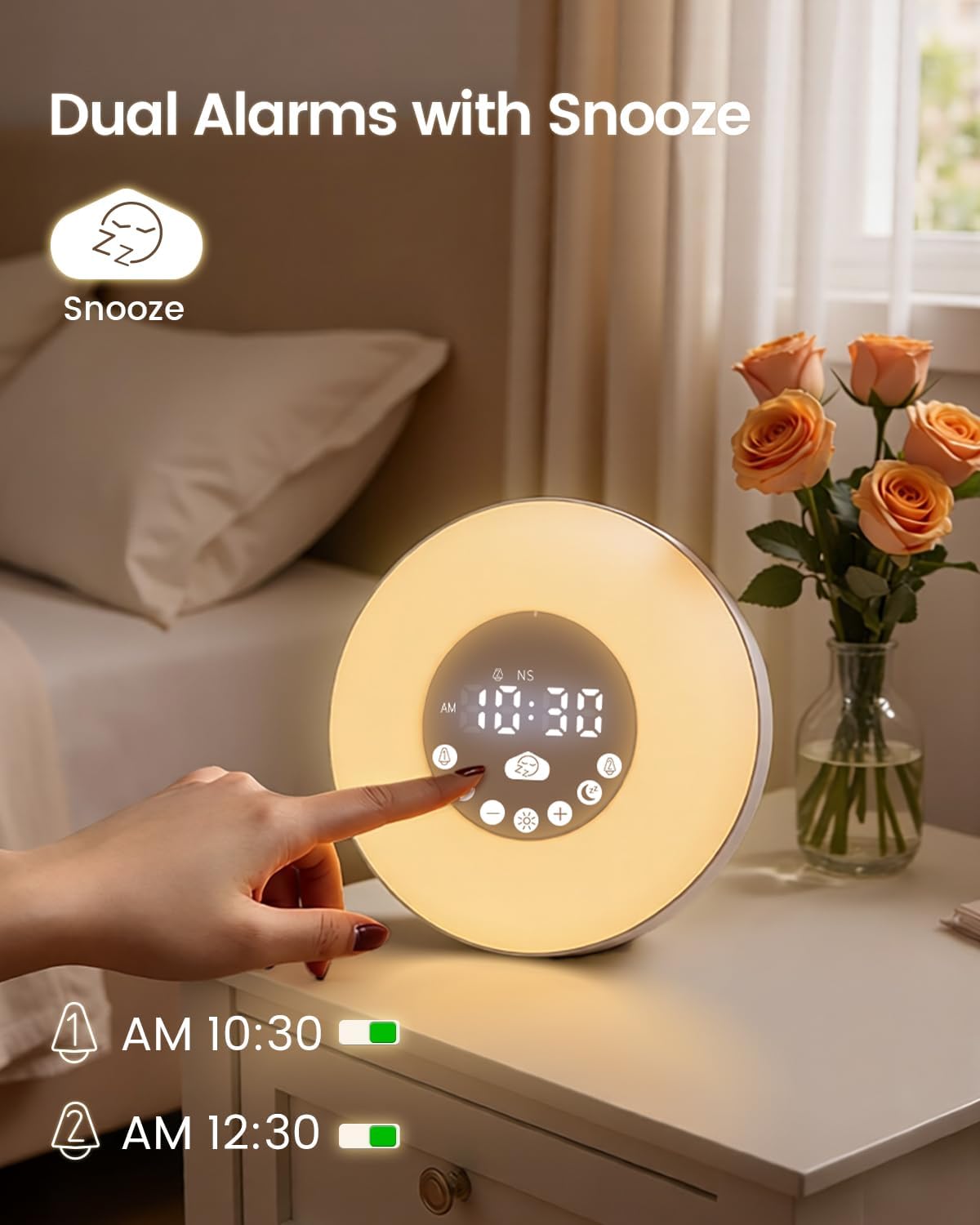
Obraz: The Glocusent N15 Sunrise Alarm Clock displaying two active alarms and the snooze icon, indicating its dual alarm and snooze capabilities.
The N15 allows setting two independent alarms. When an alarm sounds, press the large Podřimovat button to activate snooze. The snooze function provides 9-minute cycles, up to 3 times (total 27 minutes).
6. Údržba
To ensure the longevity and optimal performance of your Glocusent N15 Sunrise Alarm Clock, follow these maintenance guidelines:
- Čištění: Use a soft, dry cloth to wipe the surface of the device. Avoid using abrasive cleaners, solvents, or strong chemicals, as these can damage the finish.
- Skladování: Pokud zařízení delší dobu nepoužíváte, skladujte jej na chladném a suchém místě mimo dosah přímého slunečního záření a extrémních teplot.
- Zacházení: S přístrojem zacházejte opatrně, abyste předešli pádům nebo nárazům, které by mohly poškodit vnitřní součásti.
- Moc: Always use the provided power adapter and USB-C cable. Do not attempt to use incompatible power sources.
7. Řešení problémů
| Problém | Možné řešení |
|---|---|
| Zařízení se nezapne. | Ensure the power adapter is securely connected to the device and a working power outlet. Check if the outlet is functional. |
| Budík nezvoní ani nesvítí. | Verify that the alarm is set and activated (alarm icon visible). Check the alarm volume and light brightness settings. |
| Připojení Bluetooth se nezdařilo. | Ensure the device is in Bluetooth mode. Turn off and on Bluetooth on your phone, then search for "N15" and try pairing again. Make sure the device is within range. |
| Příjem FM rádia je špatný. | Ensure the USB-C cable is connected, as it acts as an antenna. Try repositioning the device or the cable for better reception. Perform an auto-scan for stations again. |
| Time display is too bright/dim. | Použijte Nastavení jasu displeje on the rear panel to adjust the brightness of the digital time display. |
8. Specifikace
- Značka: Glocusent
- Číslo modelu: N15
- Rozměry produktu: 5.3 cm Š x 6.7 cm V
- Hmotnost položky: 1.19 libry
- Materiál: Akrylonitrilbutadienstyren (ABS)
- Typ displeje: Digitální
- Speciální vlastnosti: Adjustable Brightness, Adjustable Volume, Alarm, Bluetooth, Noise Machine, Sunrise Simulation, Sunset Simulation, Dual Alarms, Snooze, FM Radio, TF Card Support, 7 Color RGB Light, Warm White Light (1800-3400K)
- Zvukový výstup: 2x5W Stereo Sound
- Příkon: 5V-2A
- Baterie: 1 Nonstandard Battery (included for backup)
9. Záruka a podpora
Glocusent offers a 30-day return policy and a 24-month warranty for your purchase. For any questions or assistance, please contact our Customer Experience Team, available 24/7.
For further support, please visit the official Glocusent webwebu nebo se podívejte na kontaktní informace uvedené na obalu produktu.