
1. Bezpečnostní opatření
Before using the VILTROX AF 9mm F2.8 E Mount Lens, please read and understand the following safety precautions to ensure safe and proper operation:
- Do not look directly at the sun or strong light sources through the lens, as this can cause permanent eye damage.
- Chraňte objektiv před vodou a vlhkostí, abyste zabránili poškození vnitřních elektronických součástek.
- Avoid dropping or subjecting the lens to strong impacts, which can cause optical or mechanical damage.
- Nepokoušejte se objektiv rozebírat ani upravovat. Opravy by měl provádět pouze autorizovaný servisní personál.
- Čočku skladujte na chladném a suchém místě, mimo dosah přímého slunečního záření a extrémních teplot.
- Uchovávejte mimo dosah dětí.
2. Obsah balení
Verify that all items are present in your VILTROX AF 9mm F2.8 E Mount Lens package:
- Čočka
- Krytky objektivu (přední a zadní)
- Sluneční clona objektivu
- Pouzdro na objektiv
- Záruční list
- Návod k použití

Image: Contents of the VILTROX AF 9mm F2.8 E Mount Lens package.
3. Konec produktuview
The VILTROX AF 9mm F2.8 E is an APS-C prime wide-angle lens designed for Sony E-mount cameras. It features a 13.5mm equivalent focal length (on APS-C) and a bright F2.8 aperture, making it suitable for landscapes, architecture, and vlogging.
3.1 Lens Features
- Ultra-Wide Field of View: Delivers a 113.8° field of view, ideal for expansive scenes.
- Pokročilý optický design: Comprises 13 elements in 11 groups, including 3 High Refractive (HR), 3 Extra-low Dispersion (ED), and 2 Aspherical (ASPH) elements for sharp, clear images.
- Close Focusing Capability: Minimum focusing distance of 0.13 meters (13cm) for detailed close-up shots.
- Lehký a kompaktní: Weighs approximately 175g, enhancing portability.
- Reliable Autofocus: Equipped with an STM motor for fast and accurate autofocus performance.
- USB-C Upgrade Port: Allows for easy firmware updates to maintain optimal performance.
3.2 Součásti objektivu

Obrázek: Přední strana view objektivu.
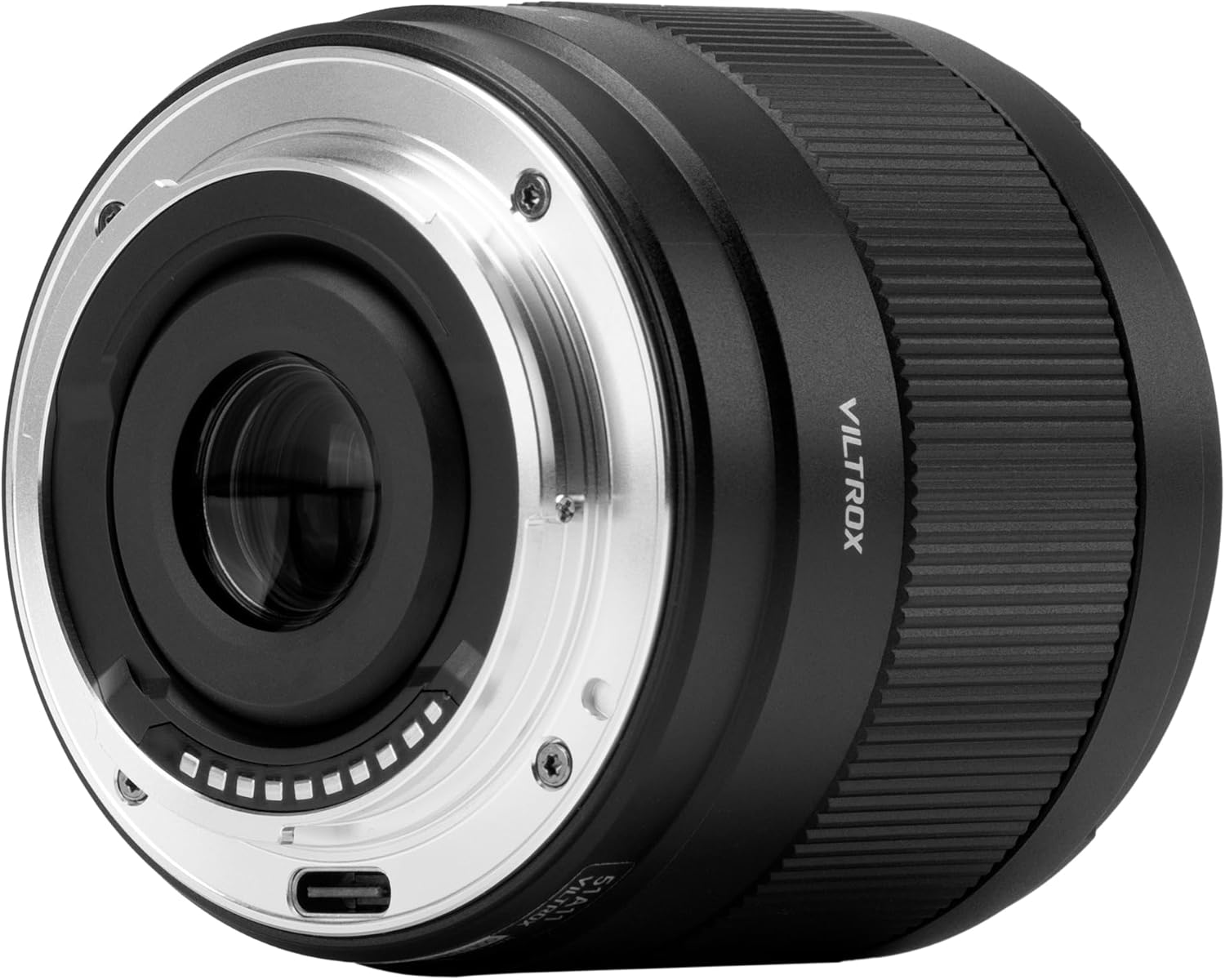
Obrázek: Zadní view of the lens, highlighting the E-mount and USB-C port.

Image: Optical design diagram.

Image: MTF (Modulation Transfer Function) chart.
4. Nastavení
4.1 Nasazení objektivu
- Ujistěte se, že je fotoaparát vypnutý.
- Sejměte zadní krytku objektivu z objektivu a krytku těla z fotoaparátu.
- Zarovnejte bílou indexovou značku na tubusu objektivu s bílou indexovou značkou na bajonetu objektivu fotoaparátu.
- Vložte objektiv do bajonetu fotoaparátu a otáčejte jím ve směru hodinových ručiček, dokud nezacvakne. Netlačte na objektiv silou.
4.2 Sejmutí objektivu
- Ujistěte se, že je fotoaparát vypnutý.
- Stiskněte tlačítko uvolnění objektivu na fotoaparátu a otáčejte objektivem proti směru hodinových ručiček, dokud se nezastaví.
- Carefully remove the lens from the camera mount.
- Nasaďte přední a zadní krytku objektivu, abyste ochránili optické členy objektivu.

Image: Lens attached to a Sony camera.
5. Ovládání objektivu
5.1 Automatické ostření (AF)
The VILTROX AF 9mm F2.8 E lens features an STM motor for fast and accurate autofocus. To use autofocus, ensure your camera's focus mode is set to AF (Autofocus). The lens will automatically adjust focus when the shutter button is half-pressed.
5.2 Manuální ostření (MF)
For precise control over focus, switch your camera's focus mode to MF (Manual Focus). Rotate the focus ring on the lens barrel to adjust the focus manually. Your camera's focus peaking or magnification features can assist with accurate manual focusing.
5.3 Ovládání clony
The lens has a fixed maximum aperture of F2.8. Aperture control is managed through your camera's settings. Adjusting the aperture (f-stop) will affect the depth of field and the amount of light entering the lens.
5.4 aktualizací firmwaru
The lens is equipped with a USB-C port for firmware updates. Regularly checking for and installing the latest firmware ensures optimal performance and compatibility with new camera models. Visit the VILTROX official webstránky pro stahování firmwaru a návody.

Image: USB-C port for firmware updates.
5.5 Using the Lens Hood
The included lotus-shaped lens hood helps to block stray light, reducing flare and ghosting, and provides physical protection for the front element. Attach the lens hood by aligning it with the front of the lens and twisting until it locks into place.

Image: Lotus-shaped lens hood.
5.6 Oficiální video produktu
Video: Official VILTROX video showcasing the AF 9mm F2.8 Air E lens, highlighting its ultra-wide field of view and stunning results.
6. Údržba
6.1 Čištění objektivu
- K odstranění prachu a uvolněných částic z povrchu čočky použijte ofukovací kartáč.
- For smudges or fingerprints, use a clean, soft microfiber cloth specifically designed for optical lenses. Breathe lightly on the lens surface before wiping gently in a circular motion.
- Do not use organic solvents such as paint thinner or benzene to clean the lens.
6.2 Skladování
- Vždy nasaďte přední a zadní krytku objektivu, když objektiv nepoužíváte.
- Store the lens in a dry, well-ventilated area, preferably in the included lens pouch, to protect it from dust and scratches.
- Avoid storing the lens in areas with high humidity or extreme temperature fluctuations.
7. Řešení problémů
If you encounter issues with your VILTROX AF 9mm F2.8 E lens, refer to the following common problems and solutions:
- Fotoaparát nerozpoznál objektiv: Ensure the lens is securely mounted and the camera is turned on. Check for any firmware updates for both the lens and camera.
- Nefunguje automatické ostření: Verify that the camera's focus mode is set to AF. Clean the lens and camera contacts. Ensure there is sufficient light and contrast in the scene for the autofocus system to operate effectively.
- Image quality issues (e.g., blur, softness): Check if the lens is properly focused. Ensure the lens elements are clean. If using a filter, ensure it is clean and correctly attached.
- Objektiv se nenasazuje/neodsazuje hladce: Ensure the index marks are aligned correctly when attaching. When detaching, press the lens release button firmly. Do not force the lens.
If problems persist, contact VILTROX customer support or an authorized service center for assistance.
8. Specifikace
| Funkce | Specifikace |
|---|---|
| Značka | VILTROX |
| Číslo modelu | AF 9/2.8 E |
| Ohnisková vzdálenost | 9 mm (ekvivalent 13.5 mm u APS-C) |
| Maximální clona | F2.8 |
| Minimální clona | F16 |
| Typ objektivu | Širokoúhlý objektiv s pevnou ohniskovou vzdáleností |
| Kompatibilní montáže | Sony E-mount |
| Lens Elements/Groups | 13 prvků v 11 skupinách |
| Minimální zaostřovací vzdálenost | 0.13 m (0.43 stop) |
| Motor automatického ostření | STM (krokový motor) |
| Velikost filtru | 55 mm |
| Hmotnost | 175 g (6.2 uncí) |
| Rozměry produktu | 2.22 x 2.56 x 2.56 palce |
| Port pro aktualizaci firmwaru | USB-C |
9. Záruka a podpora
VILTROX products are covered by a limited warranty. Please refer to the warranty card included in your package for specific terms and conditions, including the warranty period and coverage details.
For technical support, troubleshooting assistance, or warranty claims, please contact VILTROX customer service through their official webstránky nebo kontaktní informace uvedené na vaší záruční kartě.
Uschovejte si doklad o koupi pro ověření záruky.