
1. Úvod
This manual provides detailed instructions for the safe and efficient use of your DOOGEE U12 Android 16 Tablet. Please read this manual thoroughly before operating the device to ensure optimal performance and longevity. Keep this manual for future reference.
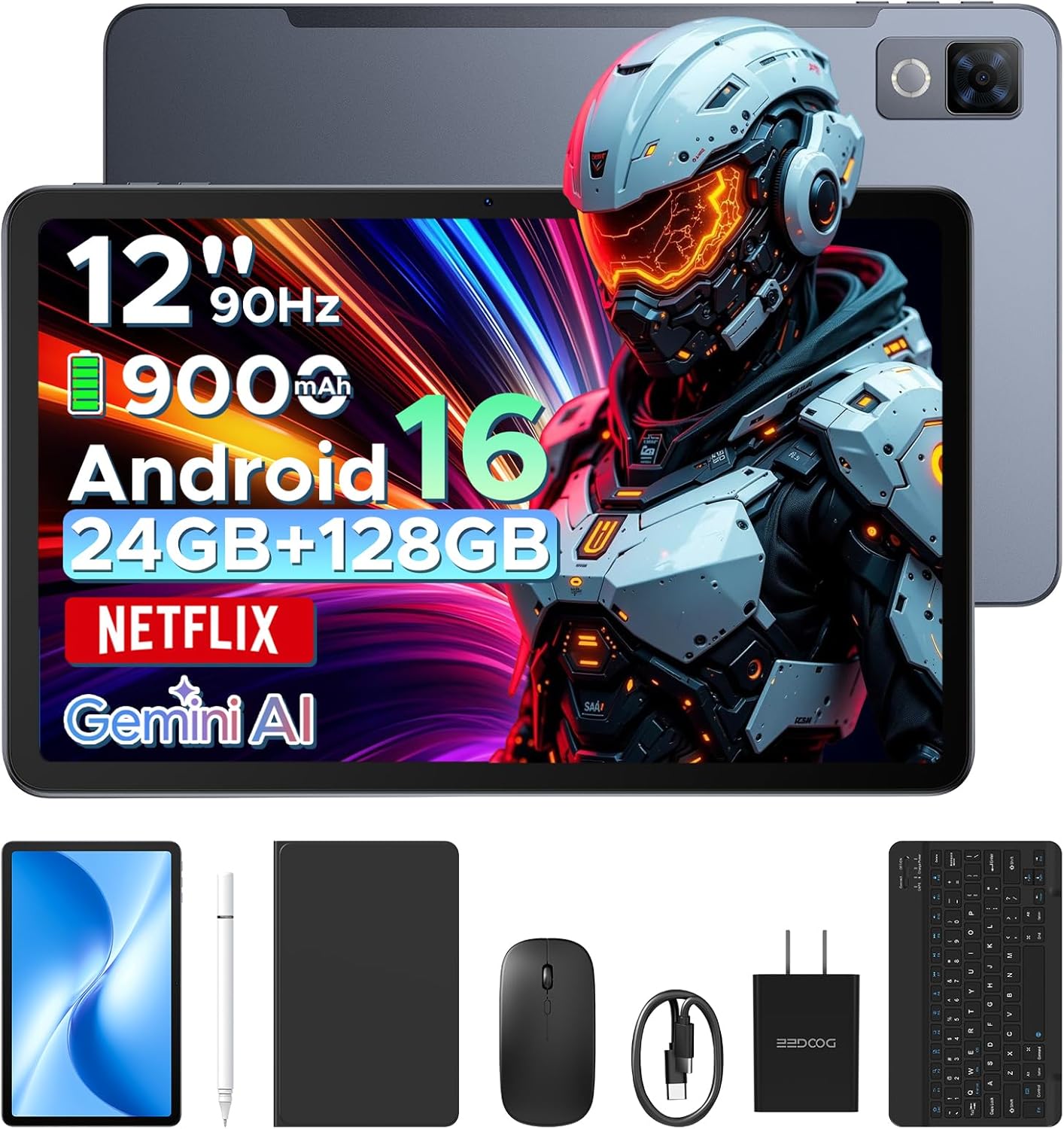
Image: The DOOGEE U12 tablet shown with its accompanying accessories, including a keyboard, mouse, and stylus.
2. Obsah balení
Ověřte, zda jsou v balení přítomny všechny položky:
- Tablet DOOGEE U12
- Bluetooth klávesnice
- Myš
- Stylus Pen
- Ochrana obrazovky
- Ochranné pouzdro
- Nabíječka (napájecí adaptér)
- Kabel USB typu C
- Uživatelská příručka (tento dokument)
- Servisní karta

Image: An organized display of all items included in the DOOGEE U12 tablet package.
3. Průvodce nastavením
3.1 Počáteční nabíjení
Before first use, fully charge the tablet using the provided charger and USB Type-C cable. Connect the cable to the tablet's charging port and the adapter to a power outlet. The charging indicator will show the charging status.
3.2 Zapnutí/vypnutí
- Zapnutí: Stiskněte a podržte tlačítko napájení, dokud se na obrazovce nezobrazí logo DOOGEE.
- Vypnutí: Press and hold the Power button, then select 'Power off' from the options displayed on the screen.
- Restartovat: Stiskněte a podržte tlačítko napájení a poté z možností vyberte „Restartovat“.
3.3 Počáteční konfigurace
Po prvním zapnutí postupujte podle pokynů na obrazovce a nastavte tablet. To zahrnuje výběr jazyka, připojení k síti Wi-Fi a přihlášení k účtu Google.
3.4 Připojení příslušenství
- Bluetooth klávesnice/myš: Turn on the keyboard/mouse and enable Bluetooth on your tablet (Settings > Connected devices > Bluetooth). Select the accessory from the list of available devices to pair.
- Stylus Pen: Stylus je obecně pasivní a nevyžaduje párování. Stačí ho používat přímo na obrazovce.
- Ochranné pouzdro: Install the tablet into the protective case for enhanced protection and to use it as a stand.
4. Návod k obsluze
4.1 Funkce displeje
The DOOGEE U12 features a 12-inch FHD+ IPS display with a resolution of 2000x1200 pixels and a 90Hz refresh rate. This provides clear visuals and smooth interaction.
- Podpora Widevine L1: Stream high-definition content from platforms like Netflix, YouTube, and Amazon Prime Video.
- Ochrana očí: Utilize Eye Comfort Mode, Dark Mode, and Auto Brightness Adjustment for reduced eye strain.
- Multitasking na rozdělené obrazovce: Run two applications simultaneously by using the split-screen feature.

Image: The 12-inch 2K Ultra-Clear Big Display of the DOOGEE U12, highlighting its visual clarity.

Image: The tablet's eye protection display features, including Eye Comfort Mode, Dark Mode, and Auto Brightness Adjustment.
4.2 Výkon a úložiště
The tablet is powered by an Unisoc T7255 Octa-Core processor, ensuring smooth operation for various tasks.
- BERAN: 24GB (6GB physical + 18GB virtual) for efficient multitasking.
- Interní paměť (ROM): 128GB for applications and files.
- Rozšiřitelné úložiště: Podporuje až 2 TB přes TF (microSD) kartu (prodává se samostatně).

Image: A visual representation of the powerful Unisoc T7255 Octa-Core Processor.

Image: Details on the tablet's memory configuration, including 24GB RAM and 128GB ROM with expansion capabilities.
4.3 Správa baterie
The DOOGEE U12 is equipped with a 9000mAh high-capacity battery.
- Rychlé nabíjení: Supports 18W fast charging for quick power replenishment.
- Zpětné nabíjení: Features 5W reverse charging, allowing the tablet to charge other compatible devices via OTG.

Image: An illustration of the tablet's 9000mAh battery and its charging capabilities.
4.4 Kamery
Capture photos and videos with the integrated cameras:
- Zadní kamera: 13 megapixelů
- Přední kamera: 8 megapixelů

Obrázek: Podrobný view of the tablet's camera modules, indicating the 13MP main camera and 8MP front camera.
4.5 Konektivita
- Wi-Fi: Dual-band (2.4G/5G) for stable internet connection.
- Bluetooth: Version 5.0 for wireless accessory pairing.
- Navigace: Supports GPS, BDS, GLONASS, and Galileo for accurate positioning.
- Audio jack: Standardní 3.5mm jack pro sluchátka.

Obrázek: Overview of additional features including facial recognition, navigation system, Widevine L1, and WiFi 5.
4.6 Android 16 OS and Gemini AI
The tablet runs on the Android 16 operating system, offering enhanced performance and features.
- Umělá inteligence Blíženců: Integrated AI for tasks such as summarizing documents, setting meetings, and providing intelligent tips.
- Systém pro více uživatelů: Vytvořte samostatného uživatele profiles for different individuals.
- Rodičovská kontrola: Manage and restrict access for children's profiles.
- Režim před spaním: Schedule screen time and notifications for better sleep.
- Živé titulky: Real-time captioning for audio content.
- Nástroje digitálního zdraví: Monitor and manage your digital well-being.
- Kancelář WPS: Pre-installed office suite for productivity tasks.

Obrázek: Overview of the built-in Gemini AI features designed to enhance work and daily life.

Image: Various functions of the Android 16 operating system, including user management and digital well-being tools.
4.7 zvuk
The tablet is equipped with dual speakers for clear audio output.

Image: The tablet's audio capabilities, featuring premium dual speakers and a 3.5mm audio jack.
4.8 Fyzický návrh
The DOOGEE U12 features a sleek 7.8mm ultra-thin metal body, balancing portability with durability.

Image: The ultra-thin 7.8mm metal-integrated body of the DOOGEE U12 tablet.
5. Údržba
- Čištění: K čištění obrazovky a těla přístroje používejte měkký hadřík, který nepouští vlákna. Nepoužívejte abrazivní materiály ani agresivní chemikálie.
- Skladování: Tabletu skladujte na chladném a suchém místě mimo dosah přímého slunečního záření a extrémních teplot.
- Ochrana: Use the provided protective case and screen protector to guard against drops and scratches.
- Aktualizace softwaru: Pravidelně kontrolujte a instalujte aktualizace systému, abyste zajistili optimální výkon a zabezpečení.
6. Řešení problémů
6.1 Tablet se nezapne
- Ujistěte se, že je baterie nabitá. Připojte nabíječku a před opětovným zapnutím počkejte několik minut.
- Stiskněte a podržte tlačítko napájení po dobu alespoň 10–15 sekund, abyste vynutili restart.
6.2 Obrazovka nereaguje
- Restartujte tablet.
- Ujistěte se, že je obrazovka čistá a bez nečistot.
- Pokud je nainstalována ochranná fólie na displej, ujistěte se, že je správně nalepena a neomezuje citlivost dotyku.
6.3 Problémy s připojením k Wi-Fi
- Zapněte a vypněte Wi-Fi v Nastavení.
- Restartujte Wi-Fi router.
- Forget the network and reconnect (Settings > Network & internet > Internet > Saved networks).
- Ujistěte se, že je tablet v dosahu signálu Wi-Fi.
6.4 Příslušenství se nepřipojuje
- Ensure the accessory is powered on and in pairing mode (if applicable).
- Ověřte, zda je v tabletu povoleno rozhraní Bluetooth.
- Remove any previously paired instances of the accessory from the tablet's Bluetooth settings and attempt to re-pair.
- Zkontrolujte stav baterie příslušenství.
7. Specifikace
| Funkce | Detail |
|---|---|
| Model | DOOGEE U12 |
| Operační systém | Android 16 |
| Velikost displeje | 12 palce |
| Rozlišení displeje | 2000x1200 pixelů |
| Obnovovací frekvence | 90 Hz |
| Procesor | Osmijádrový Unisoc T7255 |
| BERAN | 24 GB (6 GB fyzické + 18 GB virtuální) |
| Interní úložiště (ROM) | 128 GB |
| Rozšiřitelné úložiště | Až 2 TB (TF karta) |
| Kapacita baterie | 9000 XNUMX mAh |
| Rychlé nabíjení | 18W |
| Zpětné nabíjení | 5W |
| Zadní kamera | 13 megapixelů |
| Přední kamera | 8 megapixelů |
| Wi-Fi | Dual-band (2.4G/5G) |
| Bluetooth | Verze 5.0 |
| Navigace | GPS/BDS/GLONASS/Galileo |
| Audio Jack | 3.5 mm |
| Rozměry (DxŠxV) | 11.11 x 7 x 0.31 palce |
| Hmotnost | 1.48 libry |
| Materiál těla | Kov |
| Barva | Šedá |
8. Záruka a podpora
Your DOOGEE U12 tablet comes with comprehensive support:
- Záruka: A two-year limited warranty covers manufacturing defects.
- Technická podpora: Je poskytována doživotní technická podpora.
- Služby zákazníkům: Expect 24-hour responses to your inquiries for worry-free use.
- For support, please refer to the contact information on the included Service Card or visit the official DOOGEE webmísto.