
1. Úvod
Thank you for choosing the NEWFAST NF-RE516 WiFi Range Extender. This device is designed to expand your existing wireless network coverage, eliminate Wi-Fi dead zones, and provide a stable internet connection throughout your home or office. With its easy setup and reliable performance, you can enjoy seamless streaming, gaming, and browsing.
This manual provides detailed instructions on how to set up, operate, and maintain your NEWFAST NF-RE516 WiFi Range Extender. Please read it carefully before using the device.
2. Bezpečnostní informace
Dodržujte prosím následující bezpečnostní pokyny, abyste předešli poškození zařízení nebo zranění sebe sama:
- Nevystavujte zařízení vodě, ohni, vlhkosti ani horkému prostředí.
- Nepokoušejte se zařízení rozebírat, opravovat nebo upravovat.
- Používejte pouze napájecí adaptér dodaný se zařízením.
- Udržujte zařízení mimo dosah dětí.
- Zajistěte dostatečné větrání kolem zařízení, aby nedošlo k přehřátí.
3. Konec produktuview
The NEWFAST NF-RE516 WiFi Range Extender is a compact and powerful device designed to seamlessly integrate into your existing network. It features multiple antennas for enhanced signal strength and coverage.
3.1 Obsah balení
- NEWFAST NF-RE516 WiFi Range Extender
- Průvodce rychlou instalací
3.2 Rozložení zařízení
Familiarize yourself with the ports and indicators on your extender:
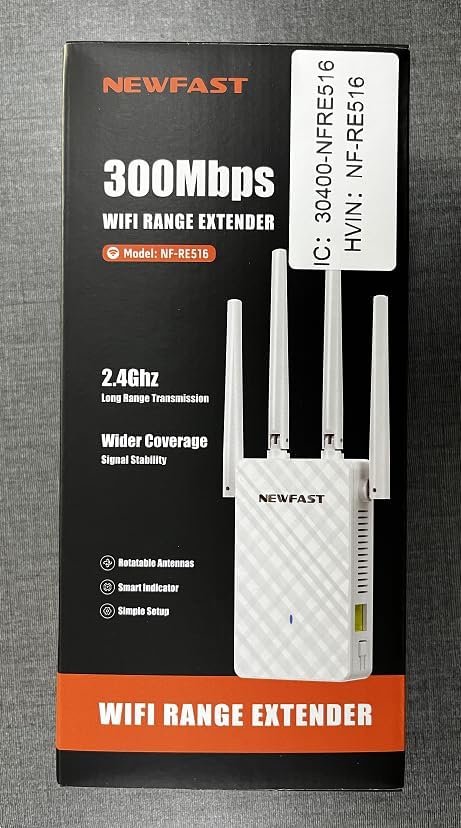
Obrázek: Přední strana view of the NEWFAST NF-RE516 WiFi Range Extender, showing its compact design and four adjustable external antennas.

Obrázek: Zadní view of the NEWFAST NF-RE516 WiFi Range Extender, displaying the power prongs and regulatory labels.

Image: A visual representation of the NEWFAST WiFi Extender providing signal to various devices within a multi-room home, highlighting its ability to boost WiFi coverage.
4. Pokyny k nastavení
Follow these steps to set up your NEWFAST NF-RE516 WiFi Range Extender:
4.1 Zapnutí
- Plug the extender into a power outlet near your existing Wi-Fi router.
- Wait for the Power LED to turn solid blue.
4.2 Connect to Your WiFi Router (WPS Method)
Metoda WPS (Wi-Fi Protected Setup) je nejrychlejší způsob připojení extenderu k routeru.
- Stiskněte tlačítko WPS na vašem stávajícím Wi-Fi routeru.
- Within 2 minutes, press the WPS button on your NEWFAST NF-RE516 extender.
- The Wi-Fi LED on the extender should change from blinking to solid, indicating a successful connection.
If your router does not support WPS, or if you encounter issues, please refer to the Web UI/App setup method in the Quick Installation Guide.
Video: A seller-provided video demonstrating the setup process for the NEWFAST NF-RE516 WiFi Range Extender, including connection to the router and initial power-on steps.
5. Provozní režimy
The NEWFAST NF-RE516 typically operates in Repeater Mode, extending the range of your existing Wi-Fi network. It can also function as an Access Point (AP) if connected to your router via an Ethernet cable, creating a new Wi-Fi hotspot.
5.1 Režim opakovače
In Repeater Mode, the extender wirelessly connects to your router and amplifies its signal, extending coverage to areas with weak or no Wi-Fi. This is the default and most common operating mode.
5.2 Režim přístupového bodu (AP)
To use AP Mode, connect the extender to your router using an Ethernet cable. The extender will then create a new wireless network, converting your wired connection into a Wi-Fi hotspot.
6. Údržba
To ensure optimal performance and longevity of your NEWFAST NF-RE516 WiFi Range Extender, follow these maintenance tips:
- Čištění: K čištění zařízení používejte měkký, suchý hadřík. Nepoužívejte tekuté ani aerosolové čisticí prostředky.
- Větrání: Ensure the device is placed in a well-ventilated area and that its ventilation holes are not blocked.
- Aktualizace firmwaru: Regularly check for and install firmware updates from the NEWFAST official website to ensure the best performance and security.
- Přemístění: If you need to move the extender, ensure it is powered off before unplugging and replugging it into a new location.
7. Řešení problémů
If you encounter issues with your NEWFAST NF-RE516, try the following solutions:
- Bez napájení: Ensure the extender is securely plugged into a working power outlet. Check if the Power LED is solid blue.
- Žádné internetové připojení: Verify that your main router has an active internet connection. Restart both your router and the extender.
- Slabý signál: Relocate the extender closer to your main router. Ensure there are no major obstructions (e.g., thick walls, large metal objects) between the extender and your devices.
- Výpadky připojení: Check for interference from other electronic devices. Try changing the Wi-Fi channel on your router if possible.
- Zapomenuté heslo: If you forget the extender's Wi-Fi password, you may need to reset the device to factory defaults and set it up again.
- Obnovit výchozí tovární nastavení: To reset the extender, use a paperclip to press and hold the Reset button (usually a small pinhole) for about 5-10 seconds until the LEDs flash.
8. Specifikace
| Funkce | Detail |
|---|---|
| Značka | NEWFAST |
| Model | NF-RE516 (also known as 1111111) |
| Bezdrátové Standardní | Rádiová frekvence 2.4 GHz |
| Rychlost přenosu dat | Up to 300 Mbps (as per product title) |
| Třída frekvenčního pásma | Tri-Band (Note: Wireless Standard only mentions 2.4GHz, please verify with product packaging) |
| Rozsah | Up to 98,000 cubic feet |
| Barva | Bílý |
| Zdroj napájení | AC zástrčka |
| Antény | Multiple external antennas (adjustable) |
9. Záruka a podpora
NEWFAST products come with a standard manufacturer's warranty. For specific warranty terms and conditions, please refer to the warranty card included in your product packaging or visit the official NEWFAST webmísto.
If you require technical assistance or have any questions about your NEWFAST NF-RE516 WiFi Range Extender, please contact our customer support team:
- E-mail: shenhuadianzi@outlook.com
- Online podpora: Visit the NEWFAST official webweb s nejčastějšími dotazy a zdroji podpory.
Our support team is dedicated to providing prompt and helpful assistance.