
1. Úvod
Thank you for choosing the DazzlingStage 60W 9LED RGBW Stage Wall Wash Bar Light. This manual provides essential information for the safe and effective operation of your lighting fixture. Please read it thoroughly before installation and use, and retain it for future reference.
Tato stage light bar features 9 high-power RGBW LEDs, offering a wide spectrum of colors and dynamic lighting effects suitable for various events and venues.

Obrázek 1.1: Konecview of the DazzlingStage 60W 9LED RGBW Stage Wall Wash Bar Lights in various colors.
2. Bezpečnostní pokyny
- Elektrická bezpečnost: Zajistěte napájení objtage matches the specifications of the fixture. Always disconnect power before cleaning, servicing, or moving the unit.
- Instalace: Install the fixture in a well-ventilated area, away from heat sources. Ensure secure mounting to prevent accidental falls.
- Operace: Do not look directly into the light source when the fixture is operating, as it can cause eye damage. Avoid operating the unit in wet or damp podmínky.
- Údržba: Veškerý servis svěřte kvalifikovanému personálu. Nepokoušejte se jednotku opravovat sami.
- Děti: Udržujte zařízení mimo dosah dětí.
3. Obsah balení
Po vybalení se prosím ujistěte, že jsou všechny níže uvedené položky obsaženy a v dobrém stavu:
- Oslňujícítage 60W 9LED RGBW Stage Wall Wash Bar Light (x1 per pack)
- Power Cord (x1 per pack)
- Remote Control (x1 per pack)
- Mounting Bracket (x1 per pack)
- Knobs (x2 per pack)
- Black Gaskets (x2 per pack)
- Instruction Manual (x1 per pack)

Obrázek 3.1: Obsah balení produktu.
4. Komponenty produktu
Familiarize yourself with the main components of the light bar:
- LED pole: 9 RGBW LEDs for color mixing.
- Ovládací panel: Features a 4-digit LED display and control buttons (MENU, UP, DOWN, ENTER) for mode selection and parameter adjustment.
- DMX IN/OUT Ports: For connecting to a DMX controller or linking multiple units.
- Power IN/OUT: For power connection and daisy-chaining power to other units.
- Montážní držák: Adjustable bracket for floor standing or truss mounting.
- Chladič: Integrated cooling system to maintain optimal operating temperature.

Image 4.1: Key components and dimensions of the light bar.
5. Nastavení a instalace
The DazzlingStage Wall Wash Bar Light offers flexible installation options:
5.1 Montáž držáku
Attach the included mounting bracket to the light bar using the provided knobs and gaskets. Ensure the bracket is securely fastened.
5.2 Možnosti umístění
- Stání na podlaze: The bracket allows the light bar to stand upright on a flat surface. Adjust the angle as needed.
- Montáž na příhradový nosník: Použijte vhodný třamps (not included) to attach the bracket to a lighting truss. Ensure the truss and clamps can support the weight of the fixture.
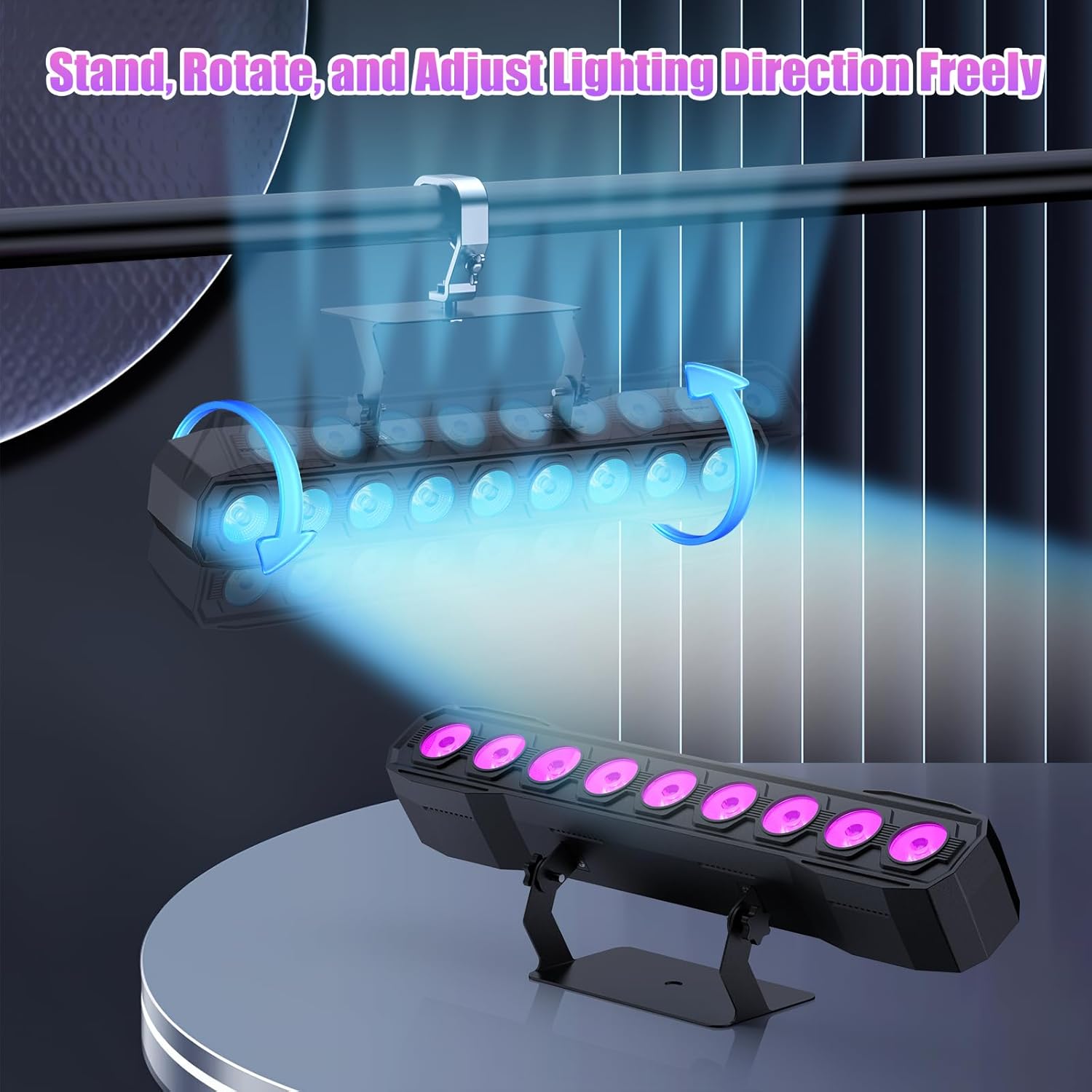
Image 5.1: Illustration of mounting and angle adjustment options.
5.3 Připojení napájení
Connect the power cord to the Power IN port on the back of the fixture and then to a suitable power outlet. Multiple units can be daisy-chained using the Power OUT port to simplify wiring for larger setups.
6. Provozní režimy
The DazzlingStage Wall Wash Bar Light supports several control modes:
- Ovládání DMX512: For professional control via a DMX console.
- Automatický režim: Pre-programmed lighting sequences.
- Sound-Activated Control: Světla reagují na okolní zvuk.
- Dálkové ovládání: Convenient wireless control using the included remote.
- Režim Master-Slave: Link multiple units where one acts as a master and others as slaves, synchronizing effects.
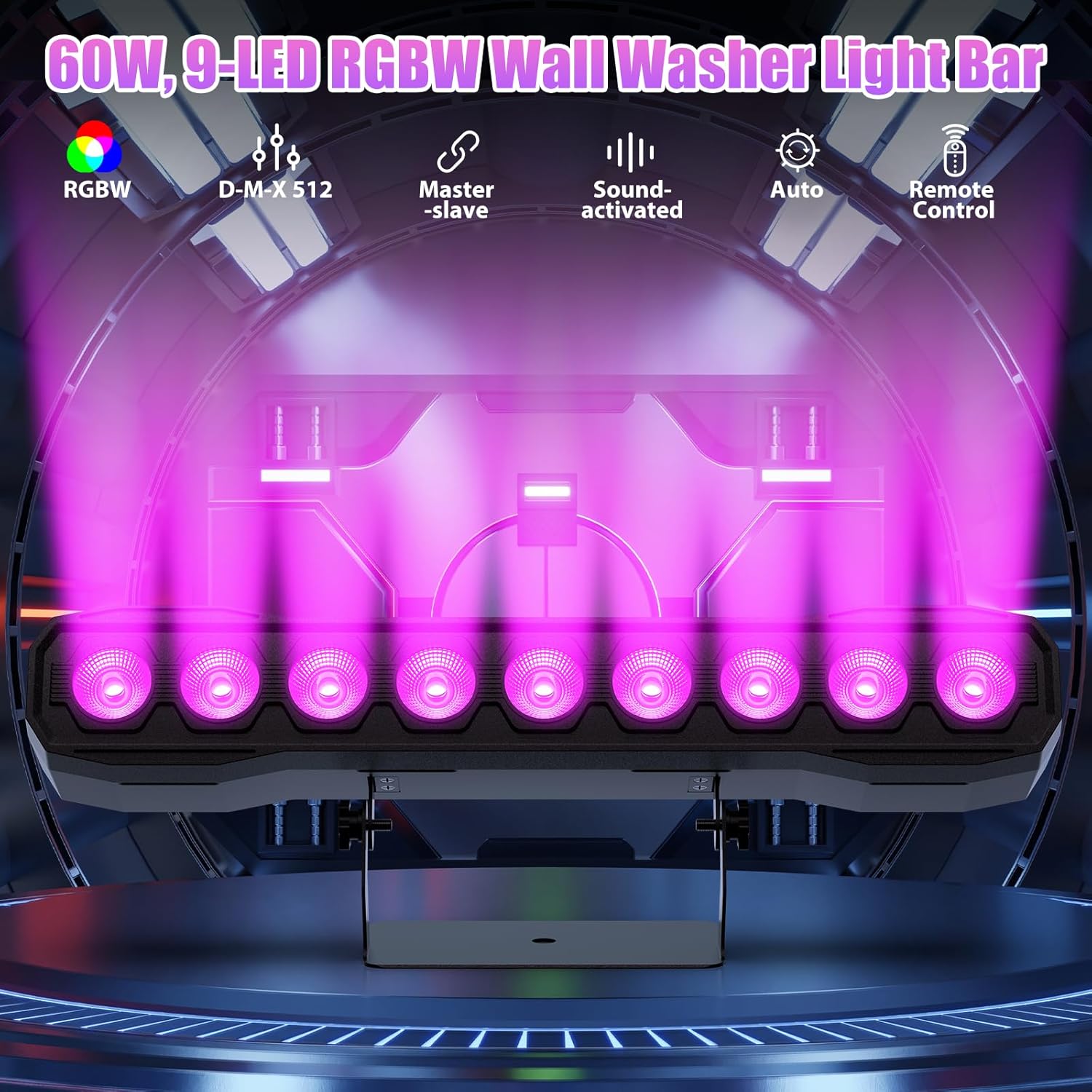
Obrázek 6.1: Konecview of available control modes.
6.1 Display Panel Operation
Use the buttons on the back of the fixture to navigate the menu and select modes:
- JÍDELNÍ LÍSTEK: Prochází možnosti hlavní nabídky.
- NAHORU / DOLŮ: Adjusts values or navigates sub-menus.
- ZADEJTE: Potvrdí výběr.
6.2 Světelné efekty
The fixture supports various dynamic effects:
- Míchání barev: Over 16.7 million color combinations with 0-100% linear dimming.
- Strobe: Flashing effect.
- Skok: Instant color changes.
- Slábnout: Hladké přechody mezi barvami.
- Puls: Gradual changing effects.
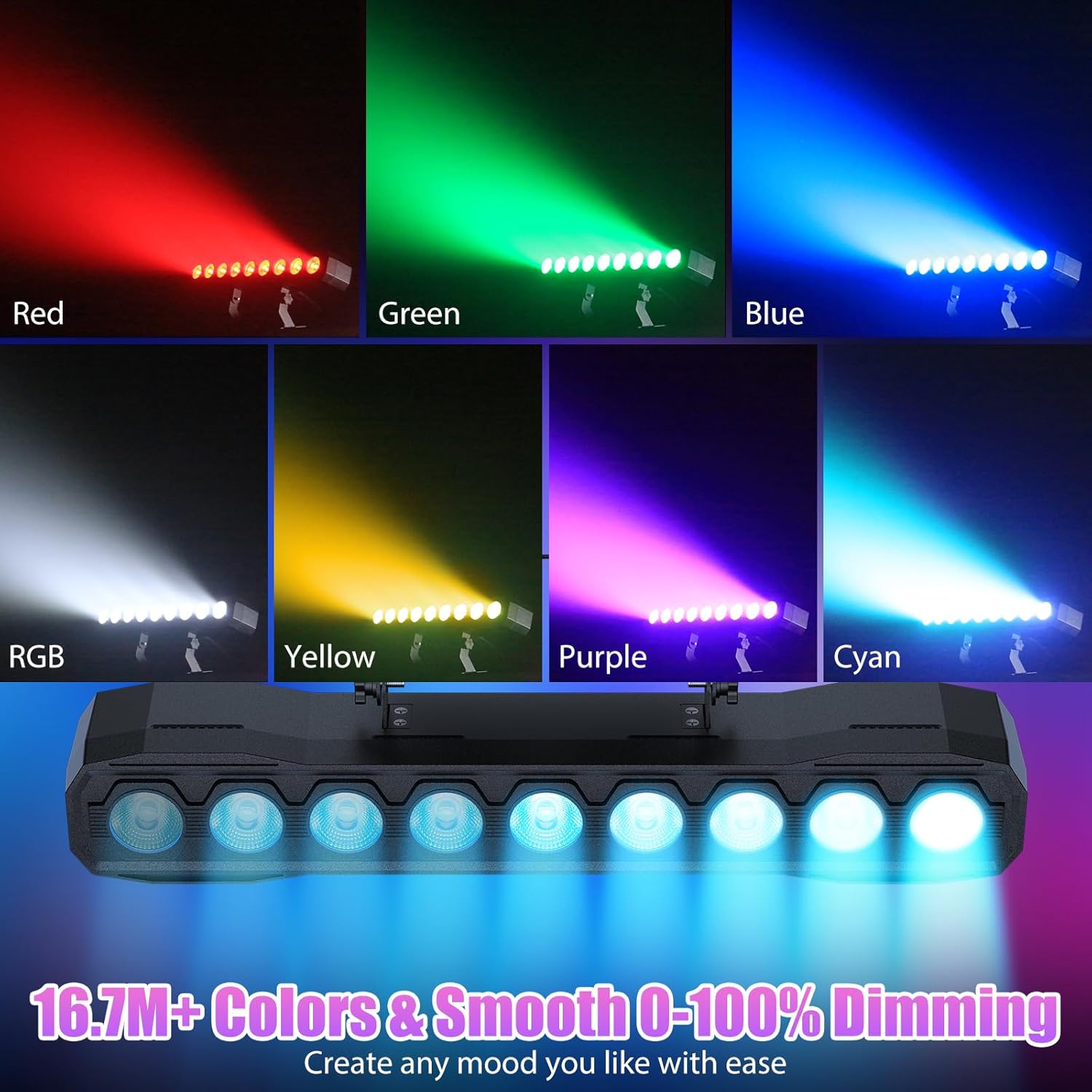
Obrázek 6.2: Příkladamples of color mixing and dimming capabilities.

Image 6.3: Visual representation of Strobe, Jump, Fade, and Pulse effects.
7. Funkce dálkového ovládání
Dodávané dálkové ovládání poskytuje pohodlný přístup k různým funkcím:
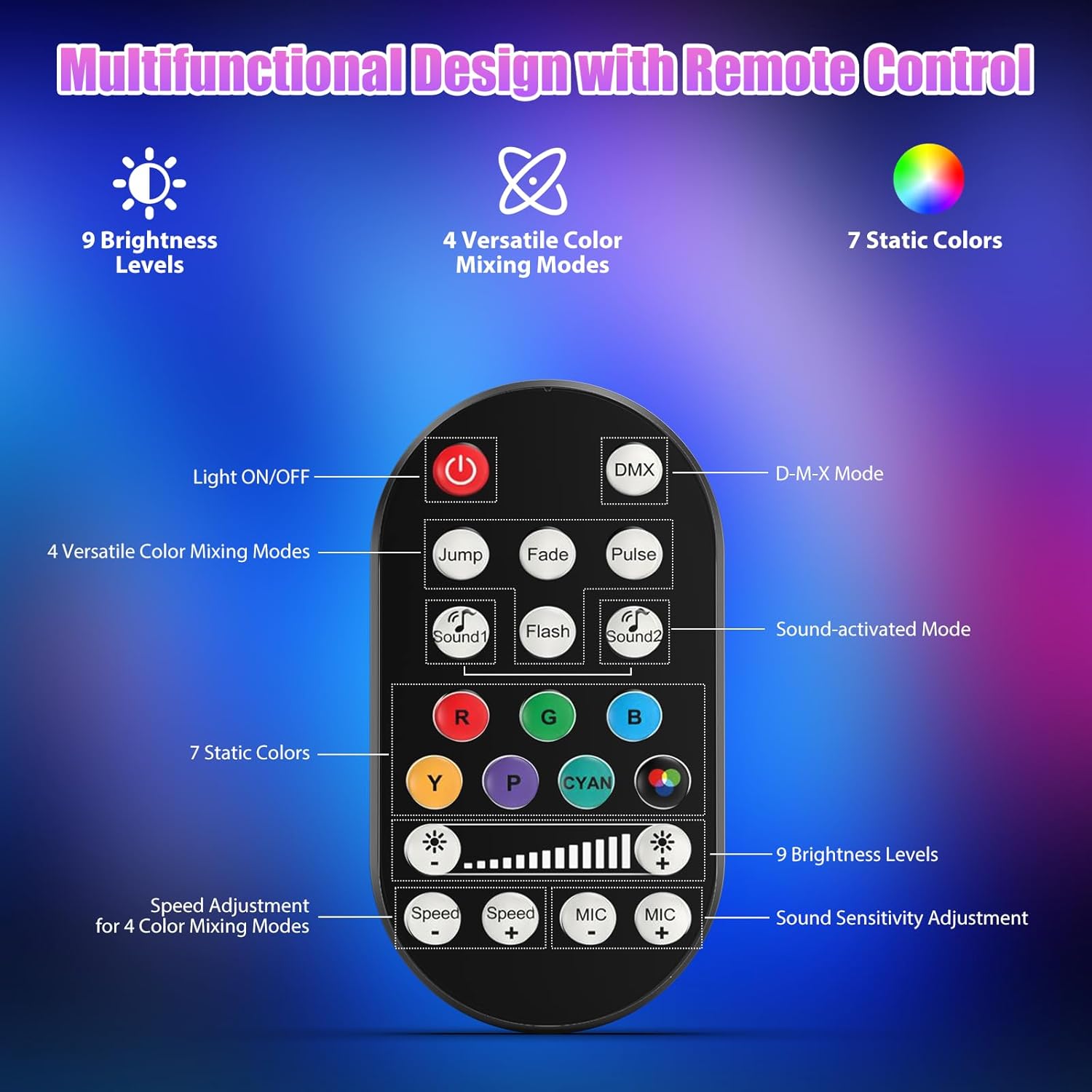
Obrázek 7.1: Rozložení a funkce dálkového ovladače.
- Světlo ZAP/VYP: Zapíná nebo vypíná jednotku.
- DMX: Aktivuje režim DMX ovládání.
- Jump, Fade, Pulse, Flash: Selects different color mixing modes.
- Sound1, Sound2: Activates sound-activated modes with different sensitivities.
- R, G, B, Y, P, Cyan, White: Vybírá statické barvy.
- Úrovně jasu: Adjusts the overall intensity of the light (9 levels).
- Rychlost +/-: Upravuje rychlost dynamických efektů.
- Mikrofon +/-: Adjusts the sound sensitivity for sound-activated modes (15 levels).
8. DMX512 Control
For advanced control, connect the fixture to a DMX512 controller. The light bar typically uses 4 or 8 DMX channels. Refer to the display panel for DMX address setting and channel assignments.
8.1 Nastavení DMX adresy
Use the MENU, UP, DOWN, and ENTER buttons on the fixture's display panel to set the DMX starting address. The display will show 'AXXX' where XXX is the address (e.g., A001).
8.2 DMX Channel Functions (Example - 8 Channel Mode)
| Kanál | Funkce | Rozsah hodnot | Popis |
|---|---|---|---|
| CH1 | Mistr Dimmer | 0-255 | Celkový jas (0 % až 100 %) |
| CH2 | Intenzita červené | 0-255 | Red LED brightness (0% to 100%) |
| CH3 | Intenzita zelené | 0-255 | Green LED brightness (0% to 100%) |
| CH4 | Modrá intenzita | 0-255 | Blue LED brightness (0% to 100%) |
| CH5 | Intenzita bílé | 0-255 | White LED brightness (0% to 100%) |
| CH6 | Strobe/Effect | 0-255 | 0-10: No function; 11-255: Strobe speed (slow to fast) |
| CH7 | Automatický program | 0-255 | Selects and controls speed of built-in auto programs |
| CH8 | Zvuk aktivní | 0-255 | Activates sound mode and adjusts sensitivity |
Tabulka 8.1: Přample DMX Channel Functions (may vary slightly by firmware version).
9. Údržba
Pravidelná údržba zajišťuje optimální výkon a prodlužuje životnost vašeho svítidla.
- Čištění: Periodically clean the lens and housing with a soft, lint-free cloth. Do not use abrasive cleaners or solvents. Ensure the fixture is powered off and cool before cleaning.
- Inspekce: Regularly check power cables, DMX cables, and mounting hardware for any signs of wear or damage. Replace damaged components immediately.
- Skladování: When not in use for extended periods, store the fixture in a dry, dust-free environment.
10. Řešení problémů
Pokud narazíte na problémy, podívejte se na následující běžné problémy a jejich řešení:
| Problém | Možná příčina | Řešení |
|---|---|---|
| Žádná síla | Power cable disconnected; No power from outlet; Blown fuse | Check power cable connection; Test outlet with another device; Replace fuse if necessary |
| Žádný světelný výstup | Dimmer channel at 0%; Incorrect mode selected; DMX signal issue | Increase dimmer level; Select desired operating mode; Check DMX cable and address settings |
| Incorrect colors/effects | Incorrect DMX channel values; Remote control interference | Verify DMX channel settings; Ensure remote is pointed directly at the sensor; Check for other IR interference |
| Zvukově aktivovaný režim nefunguje | Microphone sensitivity too low; No sound input | Increase MIC sensitivity via remote or display; Ensure sufficient sound is present near the fixture |
| Přehřívání svítidla | Poor ventilation; Blocked heat sink | Ensure adequate airflow around the unit; Clean any dust or debris from the heat sink fins |
11. Specifikace
| Funkce | Detail |
|---|---|
| Značka | Oslňujícítage |
| Číslo modelu | ZQ06190 |
| Světelný zdroj | 9 x 60W RGBW LED |
| Míchání barev | RGBW 4-in-1, 16.7 million colors |
| Stmívání | 0-100% lineární elektronické stmívání |
| Úhel paprsku | 35° široký úhel |
| Režimy ovládání | DMX512, Auto, Sound-Activated, Remote Control, Master-Slave |
| DMX kanály | 4 or 8 Channels (selectable) |
| Zobrazit | 4místný LED displej |
| Materiál | Akrylonitrilbutadienstyren (ABS) |
| Rozměry produktu | 18.1 x 5.5 x 5.1 palce (46 x 14 x 13 cm) |
| Hmotnost položky | Přibl. 1.98 lb (0.9 kg) |
| Vstup napájení | AC 100-240V, 50/60Hz |
| Výrobce | Shenzhen Zhuoqiong Technology Co., Ltd. |
12. Záruka a podpora
Oslňujícítage products are designed for reliability and performance. For warranty information, please refer to the terms and conditions provided at the time of purchase or contact your retailer.
If you require technical assistance or have questions not covered in this manual, please contact DazzlingStage customer support through the retailer's platform or the official brand website. Please have your model number (ZQ06190) and purchase details ready when contacting support.