
Zavedení
This manual provides detailed instructions for the assembly, operation, and maintenance of your Cooler Master Elite 502 White ATX High Airflow Minimalist PC Case. Please read this manual thoroughly before beginning installation to ensure proper setup and optimal performance.
Konec produktuview
The Cooler Master Elite 502 is an ATX mid-tower PC case designed for high airflow and compatibility with modern components. It features a high-performance mesh front panel and supports a wide range of hardware configurations.
Klíčové vlastnosti:
- Kompatibilita základní desky: Supports ATX and Micro-ATX motherboards.
- Vyčištění GPU: Vhodné pro grafické karty o délce až 410 mm.
- Podpora chlazení: Supports up to a 360mm liquid cooler and seven fans for efficient thermal management.
- Vůle komponent: CPU coolers up to 170mm height, PSUs up to 170mm length.
- Návrh proudění vzduchu: Large, unrestricted intake grill for superior airflow.
- Přední I / O: Integrated USB Type-C port.

Obrázek 1: Kompatibilita základní desky. This image illustrates the dimensions for ATX (12.0 in x 9.6 in) and Micro-ATX (9.6 in x 9.6 in) motherboards, demonstrating the case's support for both form factors.

Figure 2: GPU Clearance. Vnitřní view of the case showing the maximum GPU length of 410mm, indicating ample space for high-performance graphics cards.

Figure 3: Cooling Support. This image highlights the areas within the case that support liquid coolers up to 360mm and multiple cooling fans for optimal thermal efficiency.
Nastavení a instalace
Follow these steps for proper assembly of your PC components within the Elite 502 case.
- Připravte si případ:
Carefully remove the side panels. The tempered glass side panel is typically secured with thumb screws at the rear. The opposite side panel may also use thumb screws or a latch mechanism. Place the case on a stable, flat surface.

Figure 4: Case Interior. An unobstructed view of the case's interior, showing the motherboard tray, drive bays, and cable management cutouts, ready for component installation.
- Install the Power Supply Unit (PSU):
Mount the PSU into its designated compartment at the bottom rear of the case. Secure it with screws. Ensure proper cable routing through the PSU shroud cutouts.

Figure 5: PSU Shroud. This image displays the ventilated PSU cover, designed to efficiently cool the power supply unit regardless of its orientation.
- Instalace základní desky:
Align your ATX or Micro-ATX motherboard with the standoffs inside the case. Secure the motherboard with screws. Connect the front panel headers (power, reset, USB, audio) to the motherboard. The case includes a USB Type-C port on the front I/O panel.

Figure 6: Front I/O Panel. Detailní view of the integrated USB Type-C port and other front panel connectors, facilitating modern connectivity.
- Instalace úložných jednotek:
Install 2.5-inch SSDs or 3.5-inch HDDs into the designated drive bays. Refer to the case's internal layout for specific mounting points, often located behind the motherboard tray or within the PSU shroud area.
- Instalace grafické karty (GPU):
Insert your graphics card into the appropriate PCIe slot on the motherboard. Secure it with the retention clip and a screw to the case's expansion slots. Ensure the GPU length does not exceed 410mm.
- Install Cooling Components:
Install CPU cooler (up to 170mm height) and any additional case fans or liquid cooling radiators. The case supports up to a 360mm liquid cooler. Ensure fans are oriented for optimal airflow (intake at front/bottom, exhaust at rear/top).

Figure 7: Unrestricted Airflow. This image demonstrates the effective airflow through the front mesh panel, highlighting the case's design for optimal cooling performance.

Figure 8: Large Intake Grill. Detailní view of the front panel's large intake grill, designed to maximize air intake for efficient cooling.
- Správa kabelů:
Route all cables neatly behind the motherboard tray using the provided cutouts and tie-down points. This improves airflow and aesthetics.
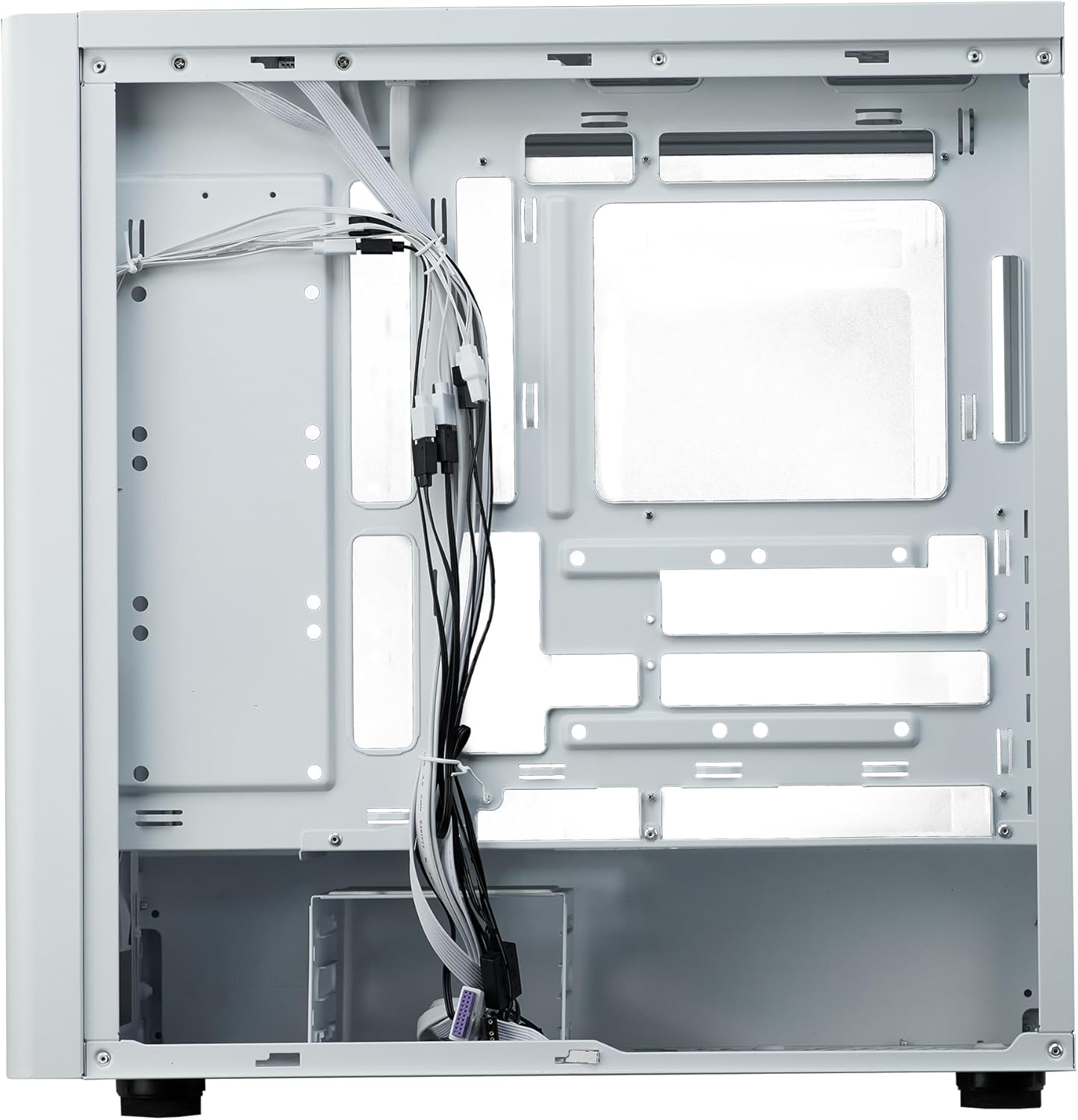
Obrázek 9: Správa kabelů. Vnitřní view from the rear side of the case, illustrating the space and tie-down points available for organized cable routing.
- Zavřít případ:
Once all components are installed and cables are managed, reattach the side panels. Ensure they are securely fastened.
Návod k obsluze
The Cooler Master Elite 502 is designed for continuous operation once components are properly installed. Ensure adequate ventilation around the case to maintain optimal temperatures.
- Zapnutí: Press the power button located on the front I/O panel to start your system.
- Proud vzduchu: The case's design prioritizes high airflow. Ensure the front mesh panel and any top/rear fan exhausts are not obstructed.
- Konektivita: Utilize the front panel USB ports, including the USB Type-C, for convenient peripheral connections.
Údržba
Pravidelná údržba pomáhá zajistit dlouhou životnost a výkon vaší počítačové skříně a jejích komponent.
- Čištění prachu: Periodically clean dust filters (front, top, bottom) to maintain optimal airflow. The front mesh panel is removable for easy cleaning.
- Čištění interiéru: K odstranění prachu z vnitřních součástí a lopatek ventilátoru použijte stlačený vzduch. Před čištěním se ujistěte, že je systém vypnutý a odpojený od sítě.
- Kontrola kabeláže: Occasionally verify that internal cables remain neatly routed and do not obstruct airflow or fan operation.
Odstraňování problémů
Pokud narazíte na problémy, zvažte následující běžné kroky pro řešení potíží:
- Bez napájení:
Check all power connections, including the PSU to the wall outlet, PSU to motherboard, and front panel power switch header to the motherboard. Ensure the PSU switch is in the 'ON' position.
- Přehřívání:
Verify all case fans and CPU cooler fans are spinning correctly. Clean any dust filters or internal components that may be obstructing airflow. Ensure proper fan orientation (intake/exhaust).
- USB/audio na předním panelu nefunguje:
Confirm that the front panel USB and audio headers are correctly connected to the motherboard. Check motherboard manual for correct pin assignments.
- Volné součásti:
If experiencing intermittent issues, power down the system and check that all components (GPU, RAM, storage drives) are securely seated in their slots and properly fastened.
Specifikace
| Funkce | Detail |
|---|---|
| Značka | Cooler Master |
| Název modelu | Elite 502 White |
| Číslo modelu položky | E502-WGNN-SAZ |
| Typ pouzdra | Střední věž |
| Kompatibilita základní desky | ATX, Micro ATX |
| Vyčištění GPU | Až 410 mm |
| Výška chladiče CPU | Až 170 mm |
| Délka PSU | Až 170 mm |
| Podpora kapalného chlazení | Up to 360mm radiator |
| Podpora fanoušků | Až 7 ventilátorů |
| Přední I / O porty | 1x USB 3.0, 1x USB typu C |
| Materiál | Legovaná ocel, tvrzené sklo |
| Barva | Bílý |
| Hmotnost položky | 17.73 libry (8.04 kg) |
| Rozměry produktu (DxŠxV) | 18.66 x 18.94 x 9.06 palce (47.4 x 48.1 x 23.0 cm) |

Obrázek 10: Rozměry produktu. An illustration detailing the length, width, and height of the Cooler Master Elite 502 case.
Záruka a podpora
Informace o záruce a technickou podporu získáte od oficiálního prodejce produktů Cooler Master. webnebo se obraťte přímo na jejich zákaznický servis. Uschovejte si doklad o koupi pro případ reklamace.
- Oficiální Webmísto: www.coolermaster.com
- Zákaznická podpora: Viz sekci podpory na oficiálním webu. webstránky s kontaktními údaji a častými dotazy.