
1. Úvod
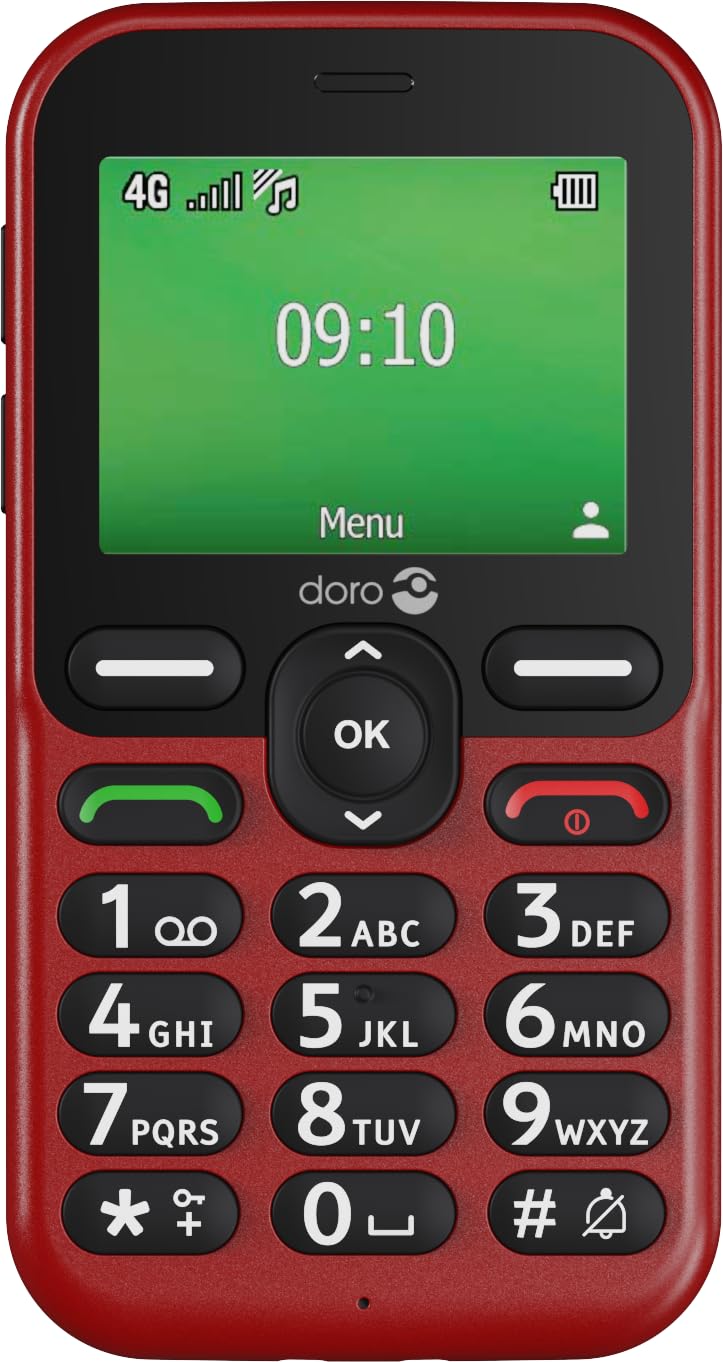
Welcome to the user manual for your Doro Leva E11 4G mobile phone. This guide provides essential information on setting up, operating, maintaining, and troubleshooting your device. The Doro Leva E11 is designed for ease of use, featuring a 2.4-inch display, high-contrast buttons, clear sound quality, and a dedicated security button, making it ideal for seniors.
Mezi klíčové vlastnosti patří:
- Intuitive design with a 2.4-inch landscape display.
- Clearly spaced, high-contrast buttons for easy dialing and texting.
- HD Voice for particularly clear sound quality.
- Integrated camera for taking and sending photos.
- Dedicated security button for emergencies.
- 4G connectivity for reliable calls and messages.
- Includes a convenient charging station.


2. Začínáme
2.1 Vybalení
Ujistěte se, že v balení jsou všechny součásti:
- Doro Leva E11 Mobile Phone
- Nabíjecí stanice
- USB kabel
- Battery (may be pre-installed or separate)
2.2 Vložení baterie
If the battery is not pre-installed, carefully remove the back cover of the phone. Align the battery contacts with the phone's terminals and gently press the battery into place. Replace the back cover, ensuring it clicks securely.
2.3 Vložení SIM karty
Your Doro Leva E11 requires a SIM card to make calls and send messages. With the phone turned off and the battery removed (if necessary), locate the SIM card slot. Insert your SIM card according to the diagram usually found near the slot, ensuring the gold contacts face down. Reinsert the battery and back cover.
2.4 Nabíjení telefonu
Before first use, fully charge your Doro Leva E11. Connect the USB cable to the charging station and then to a power adapter (not always included) or a computer USB port. Place the phone in the charging station. The charging indicator on the phone will show when it is charging. A full charge typically takes a few hours.

3. Operating Your Doro Leva E11
3.1 Zapnutí/vypnutí
To turn on the phone, press and hold the red End Call/Power button until the screen lights up. To turn off, press and hold the same button, then follow the on-screen prompts.
3.2 Volání
Enter the phone number using the keypad. Press the green Call button to initiate the call. To end a call, press the red End Call button.
3.3 Přijímání hovorů
When the phone rings, press the green Call button to answer. To reject a call, press the red End Call button.
3.4 Odesílání SMS zpráv
Navigate to the 'Messages' menu. Select 'New Message'. Enter the recipient's number or select from contacts. Type your message using the keypad. Press 'Send'.
3.5 Používání fotoaparátu
Access the camera from the main menu. Point the camera at your subject. Press the 'OK' button to take a photo. Photos can be viewed in the 'Gallery' and sent via MMS.
3.6 The Security Button
The Doro Leva E11 features a dedicated security button on the back. In an emergency, press and hold this button to automatically alert pre-set contacts. Ensure emergency contacts are configured in the phone settings.

4. Údržba a péče
To ensure the longevity of your Doro Leva E11, follow these guidelines:
- Čištění: K čištění povrchu telefonu používejte měkký, suchý hadřík. Nepoužívejte tekuté čisticí prostředky ani aerosoly.
- Voděodolnost: The phone is splash-proof (IP54 rated), meaning it can withstand light splashes of water. Do not immerse the phone in water or expose it to heavy rain.
- Teplota: Avoid exposing the phone to extreme temperatures, direct sunlight, or very humid environments.
- Péče o baterie: Do not attempt to replace the battery yourself unless it is designed for user replacement. Use only Doro-approved chargers and batteries.
- Skladování: Pokud telefon delší dobu nepoužíváte, skladujte jej na chladném a suchém místě.
5. Řešení problémů
Pokud se s Doro Leva E11 setkáte s problémy, vyzkoušejte následující řešení:
5.1 Phone Does Not Turn On
- Ujistěte se, že je baterie správně vložena a plně nabitá.
- Connect the phone to the charger and wait a few minutes before attempting to turn it on again.
5.2 Cannot Make or Receive Calls/SMS
- Zkontrolujte, zda je SIM karta správně vložena.
- Ověřte, zda máte pokrytí sítí.
- Ensure your SIM card is active and has sufficient credit/plan.
- Restartujte telefon.
5.3 Špatná kvalita zvuku
- Adjust the volume settings during a call.
- Ensure the speaker and microphone are not obstructed.
- If using a hearing aid, ensure the phone's hearing aid compatibility feature is enabled (if applicable).
5.4 Rychlé vybíjení baterie
- Snižte jas obrazovky.
- Zavřete nepoužívané aplikace.
- Ensure the phone is not in an area with very poor network signal, as this can increase battery consumption.
- Consider replacing the battery if it is old and consistently performing poorly.
6. Technické specifikace
| Funkce | Specifikace |
|---|---|
| Značka | Doro |
| Název modelu | Doro Leva E11 |
| Číslo modelu položky | 8996 |
| Operační systém | Mocor RTOS |
| Buněčná technologie | 4G |
| Velikost obrazovky | 2.4 palce |
| Typ zobrazení | LCD |
| Rezoluce | 320x240 |
| Typ procesoru | Cortex A7 |
| Rychlost procesoru | 1 GHz |
| Velikost nainstalované paměti RAM | 64 MB |
| Velikost instalované paměti Flash | 64 MB |
| Digitální kapacita úložiště | 128 MB (Internal), supports up to 128 GB external memory card |
| Výkon baterie | 1150 XNUMX mAh |
| Form Factor | Bar |
| Zahrnuté komponenty | USB Cable, Charging Station |
| Speciální funkce | Contrast-rich buttons, HD Voice, Camera, Security button, Splash-proof (IP54), Hearing aid compatible, Flashlight |
7. Záruka a podpora
Your Doro Leva E11 is covered by a manufacturer's warranty. Please refer to the warranty card included in your product packaging for specific terms and conditions. For technical support, service, or to find more information, please visit the official Doro website or contact Doro customer service.
Doro Official Webmísto: www.doro.com
