1. Úvod
This manual provides essential information for setting up, operating, maintaining, and troubleshooting your GMKtec Mini PC M3 Ultra. Please read this manual thoroughly before using the device to ensure proper functionality and longevity.
The GMKtec Mini PC M3 Ultra is a compact desktop computer powered by an Intel Core i7-12700H processor, featuring 14 cores and 20 threads with a maximum turbo frequency of 4.7 GHz. It includes Intel Iris Xe Graphics, 16GB DDR4 RAM, and a 1TB NVMe SSD, designed for various computing tasks from daily use to demanding applications.

Obrázek: Přední a boční view of the GMKtec Mini PC M3 Ultra, showcasing its compact design and ventilation.
2. Obsah balení
Ověřte, zda jsou v balení obsaženy všechny níže uvedené položky:
- 1 x Nucbox M3 Ultra Mini PC
- 1 x Power Supply & Cable
- 1 x Uživatelská příručka (tento dokument)
- 1 x HDMI kabel
- 1 x držák VESA se šrouby
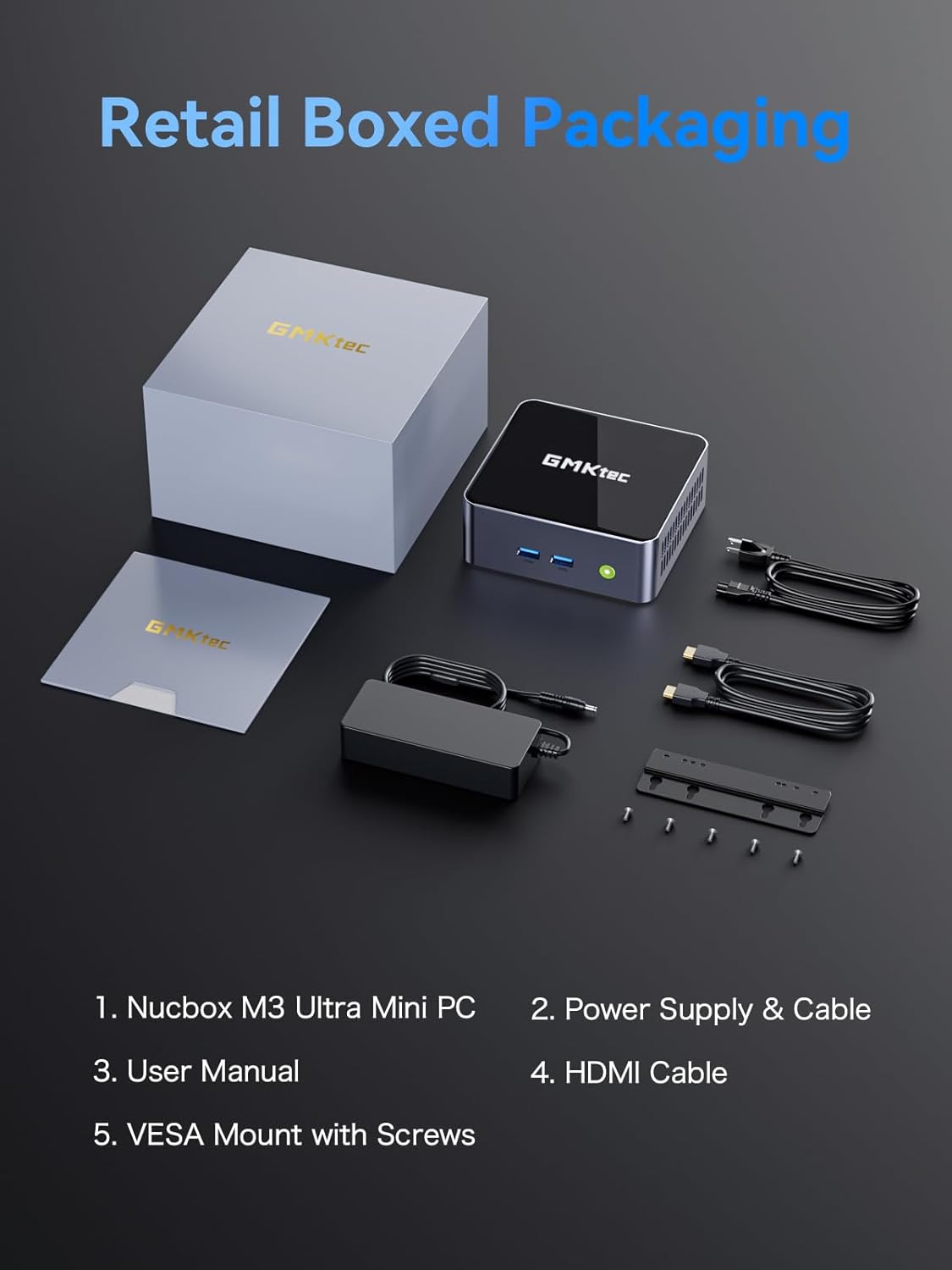
Image: Contents of the GMKtec Mini PC M3 Ultra retail package, including the mini PC, power adapter, cables, user manual, and VESA mount.
3. Konec produktuview
The GMKtec Mini PC M3 Ultra features a comprehensive set of ports for connectivity and expansion.
Přední panel
- Vypínač: Pro zapnutí nebo vypnutí zařízení.
- USB 3.2 (x2): Vysokorychlostní porty pro přenos dat.
Zadní panel
- DC IN (20V/5A 100W): Port napájení.
- HDMI (4K@60Hz) (x2): Video output ports for connecting displays.
- 2.5G LAN (Intel I226-V): High-speed Ethernet port for network connectivity.
- USB 3.2 (x1): Port pro vysokorychlostní přenos dat.
- USB 2.0 (x1): Standardní port pro přenos dat.
- Type-C (DP1.4/DATA): Multi-function port supporting DisplayPort 1.4 video output and data transfer.
- 3.5mm CTIA: Audio jack for headphones or speakers.

Obrázek: Podrobný view of the front and rear ports on the GMKtec Mini PC M3 Ultra, indicating their functions.
4. Počáteční nastavení
Pro nastavení Mini PC postupujte podle těchto kroků:
- Připojení displeje: Connect your monitor(s) to the HDMI ports or the Type-C port using appropriate cables.
- Připojení periferií: Zapojte klávesnici, myš a další zařízení USB do dostupných portů USB.
- Připojení k síti (volitelné): For a wired connection, connect an Ethernet cable from your router or modem to the 2.5G LAN port. For wireless, ensure your WiFi network is available.
- Připojte napájení: Plug the power adapter into the DC IN port on the Mini PC, then connect the power cable to an electrical outlet.
- Zapnutí: Stiskněte tlačítko napájení na přední straně Mini PC. Systém se spustí.
5. Návod k obsluze
Operační systém
The Mini PC comes with an operating system pre-installed (OS POR). Follow the on-screen instructions for initial setup, including language, region, and user account creation. The device is compatible with various operating systems, including Windows 10, Linux, and Ubuntu.
Základní operace
- Zapnutí/vypnutí: Press the power button once to turn on. To turn off, use the operating system's shutdown function or press and hold the power button for 5 seconds.
- Restartovat: Použijte funkci restartu operačního systému.
- Režim spánku: Použijte funkci spánku operačního systému.
Auto Power On and Wake-on-LAN
The Mini PC supports 'Auto Power On' and 'Wake-on-LAN' features. These can typically be configured within the system's BIOS settings. Refer to your operating system or BIOS documentation for detailed instructions on enabling and configuring these features.
6. Hardware Expansion (RAM & SSD)
The GMKtec Mini PC M3 Ultra is designed for easy upgrades of its RAM and storage components.
Memory (RAM) Expansion
The device is equipped with dual 16GB DDR4 RAM and supports expansion up to 64GB (via two SO-DIMM slots).
Storage (SSD) Expansion
The Mini PC includes a 1TB M.2 PCIe 2280 SSD. It supports expansion up to 16TB. Additionally, there is support for a second M.2 SATA/PCIEX4 2242 drive, also expandable up to 16TB.
To upgrade or install additional components, carefully open the chassis as per the instructions provided in the full user manual (if available) or by a qualified technician. Ensure the device is powered off and unplugged before performing any hardware modifications.

Obrázek: Interní view of the GMKtec Mini PC M3 Ultra, highlighting the M.2 2280 PCIe SSD slot, M.2 2242 SATA/PCIEX4 slot, and dual DDR4 SO-DIMM slots for memory expansion.
7. Chladicí systém
The M3 Ultra Mini PC incorporates an upgraded quiet cooling fan system designed for efficient heat dissipation. It features copper cooling pipes and multiple exhaust vents to maintain optimal operating temperatures and ensure stable performance.
- Dual Turbo Cooling: Enhances airflow and heat removal.
- Two-way Convection Air Inlet: Optimizes air circulation within the chassis.
- Quiet Cooling Design: Minimizes operational noise.

Image: Diagram illustrating the dual turbo cooling, two-way convection air inlet, and quiet cooling design of the GMKtec Mini PC M3 Ultra.
8. Konektivita
Wired Network (2.5GbE NIC LAN)
The built-in Intel Ethernet Controller I226-V provides a 2.5 Gbit/s connection speed, offering significantly faster network performance compared to traditional Gigabit Ethernet. This is beneficial for large data transfers, online gaming, and streaming.
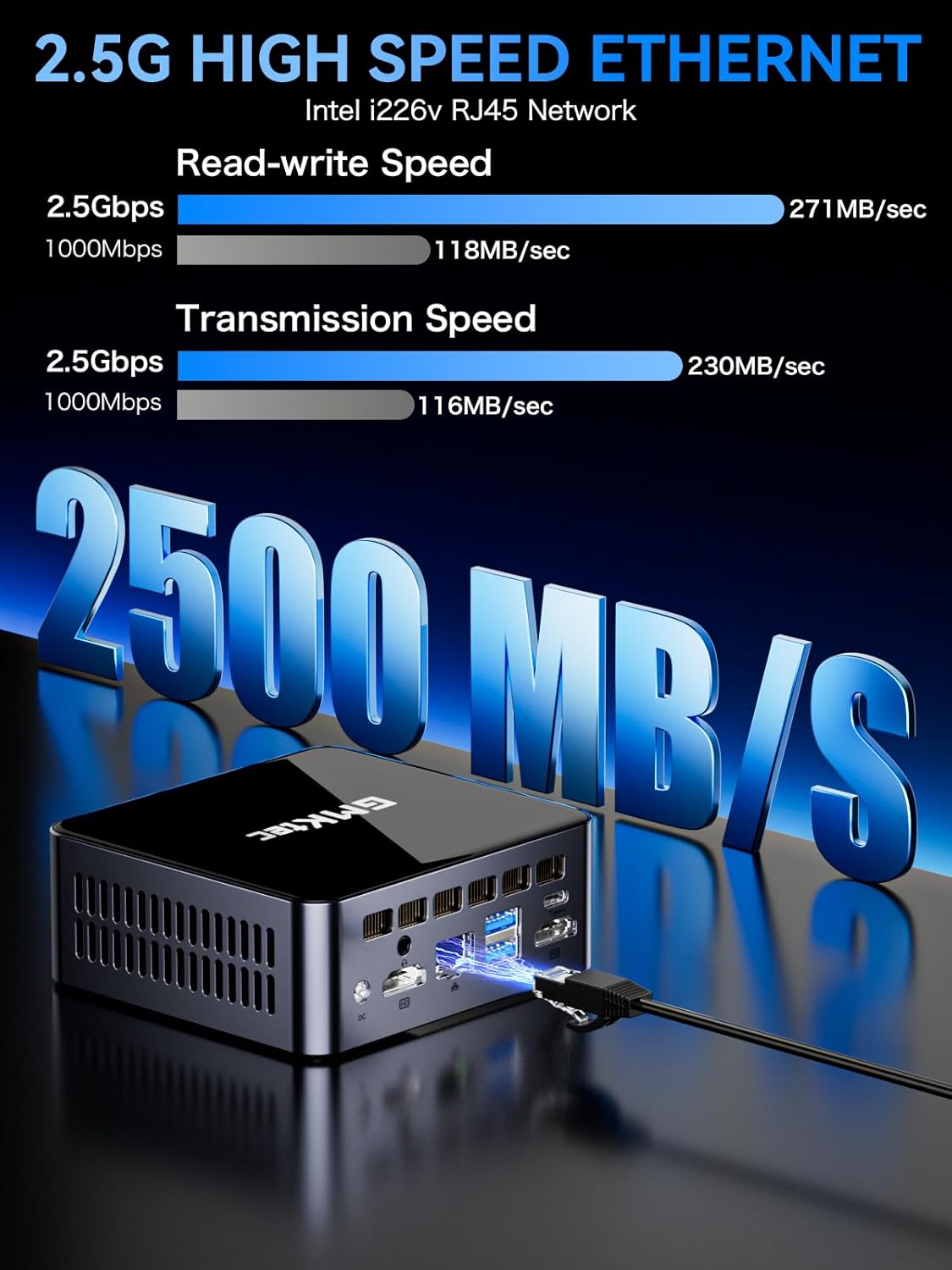
Image: Visual representation of 2.5G high-speed Ethernet performance on the GMKtec Mini PC M3 Ultra, showing read-write and transmission speeds compared to 1000Mbps.
Wireless Connectivity (WiFi 6 + Bluetooth 5.2)
The Mini PC supports WiFi 6 (802.11ax) and Bluetooth 5.2 technologies. WiFi 6 offers faster internet speeds, lower latency, and improved network efficiency for stable and quick connections. Bluetooth 5.2 enables seamless connection with wireless peripherals such as keyboards, mice, and audio devices.
9. Triple 4K Display Setup
The GMKtec M3 Ultra supports up to three 4K displays simultaneously, enhancing productivity and providing an extended workspace. This is achieved through its dual HDMI ports and one Type-C (DP1.4/DATA) port.
Connecting Multiple Displays
- Connect your primary monitor to one of the HDMI ports.
- Connect a second monitor to the other HDMI port.
- Connect a third monitor to the Type-C port using a compatible USB-C to DisplayPort cable or adapter.
- Once connected, configure your display settings within your operating system to extend or duplicate your desktop across the monitors.

Image: A user enjoying a triple 4K display setup powered by the GMKtec Mini PC M3 Ultra, demonstrating its multi-monitor capabilities for gaming and productivity.
10. Údržba
Pro zajištění dlouhé životnosti a optimálního výkonu vašeho Mini PC dodržujte tyto pokyny pro údržbu:
- Udržujte v čistotě: Pravidelně čistěte vnější povrch Mini PC měkkým, suchým hadříkem. K odstranění prachu z větracích otvorů použijte stlačený vzduch.
- Správné větrání: Ensure the Mini PC is placed in a well-ventilated area, away from direct sunlight or heat sources. Do not block the air vents.
- Aktualizace softwaru: Pro zajištění bezpečnosti a výkonu udržujte operační systém a ovladače aktualizované.
- Bezpečné vypnutí: Always shut down the system properly through the operating system before unplugging the power.
- Vyhněte se tekutinám: Keep the Mini PC away from liquids to prevent damage.
11. Řešení problémů
If you encounter issues with your GMKtec Mini PC, refer to the following common troubleshooting steps:
Žádná síla
- Ujistěte se, že je napájecí adaptér bezpečně připojen k Mini PC i k funkční zásuvce.
- Ověřte funkčnost elektrické zásuvky zapojením jiného zařízení.
Žádný displej
- Check that the display cable (HDMI, USB-C) is securely connected to both the Mini PC and the monitor.
- Ujistěte se, že je monitor zapnutý a nastavený na správný vstupní zdroj.
- Zkuste se připojit k jinému displeji nebo použít jiný kabel.
Žádné připojení k internetu
- Kabelové: Zkontrolujte připojení ethernetového kabelu. Ověřte, zda váš router/modem funguje.
- Bezdrátový: Ensure WiFi is enabled in the operating system. Check if you are connected to the correct network and entered the password correctly. Restart your router/modem.
System Slowdown or Freezing
- Zavřete nepotřebné aplikace běžící na pozadí.
- Zkontrolujte, zda máte na SSD disku dostatek volného místa.
- Ensure the Mini PC has adequate ventilation and is not overheating.
- Aktualizujte ovladače a operační systém.
Pokud tyto kroky váš problém nevyřeší, kontaktujte prosím zákaznickou podporu.
12. Technické specifikace
| Komponent | Specifikace |
|---|---|
| Procesor | Intel Core i7-12700H (14 Cores/20 Threads, up to 4.7 GHz, 24 MB Cache) |
| Grafika | Intel Iris Xe Graphics (up to 1.45GHz) |
| Paměť (RAM) | 16GB DDR4 (Dual Channel SO-DIMM, expandable up to 64GB) |
| Skladování | 1TB M.2 PCIe 2280 SSD (expandable up to 16TB) |
| Secondary Storage Slot | M.2 SATA/PCIEX4 2242 (expandable up to 16TB) |
| Video výstup | 2 x HDMI (4K@60Hz), 1 x Type-C (DP1.4/DATA) - Triple 4K Display Support |
| Ethernet | 2.5GbE NIC LAN (Intel I226-V) |
| Bezdrátové připojení | Wi-Fi 6 (802.11ax), Bluetooth 5.2 |
| USB porty | 3 x USB 3.2, 1 x USB 2.0, 1 x Type-C (DP1.4/DATA) |
| Zvuk | 3.5mm CTIA Audio Jack |
| Napájení | 20V/5A (100W) |
| Operační systém | OS Pre-installed (Compatible with Windows 10, Linux, Ubuntu) |
| Rozměry | Přibližně 6.46 x 6.22 x 4.69 cm (rozměry balení) |
| Hmotnost | Přibližně 3.27 libry |
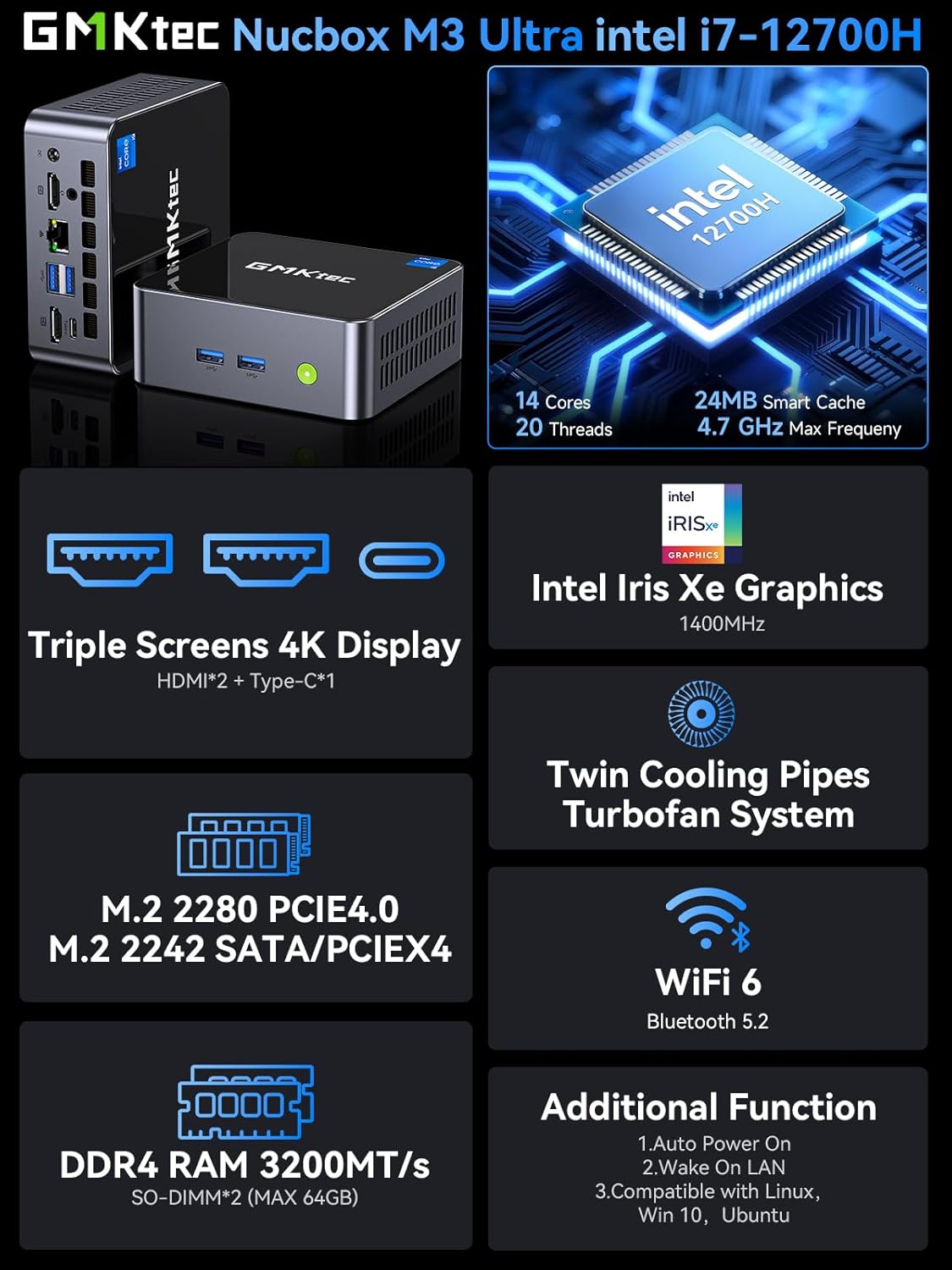
Image: Summary of key features for the GMKtec Nucbox M3 Ultra, including CPU, GPU, display, storage, cooling, and connectivity.
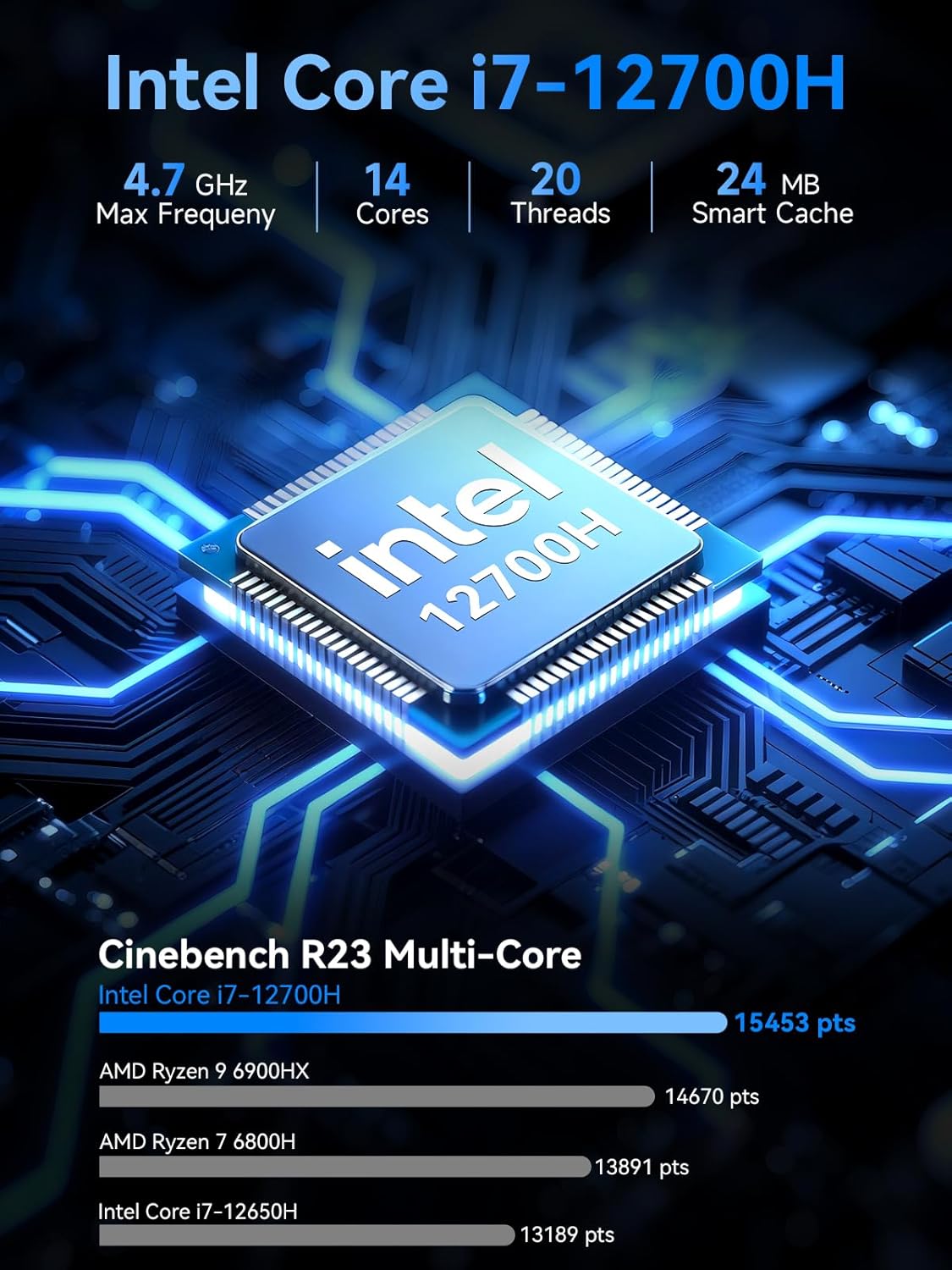
Image: Detailed specifications of the Intel Core i7-12700H processor, including core count, threads, max frequency, and Cinebench R23 multi-core performance comparison.
13. Informace o záruce
GMKtec provides a 1letá omezená záruka for each Mini PC, effective from the date of purchase. This warranty covers all defects attributed to design and workmanship. For warranty claims or service, please retain your proof of purchase.
14. Zákaznická podpora
Should you require assistance, have questions, or encounter issues not covered in this manual, please contact the GMKtec professional after-sales support team. Refer to the contact information provided with your product packaging or visit the official GMKtec webstránky pro podrobnosti o podpoře.