
Zavedení
Děkuji za nákupasing the AGPTEK M6U MP3 Player. This device is designed to provide a high-quality portable audio experience with its 64GB internal storage and Bluetooth 5.3 connectivity. This manual will guide you through the setup, operation, and maintenance of your new MP3 player to ensure optimal performance and longevity.
Obsah balení
Zkontrolujte prosím balení, zda neobsahuje následující položky:
- AGPTEK M6U MP3 Player (1 unit)
- USB Type-C Cable (for data transfer and charging) (1 unit)
- Wired Earphones (can be used as FM antenna) (1 unit)
- User Manual (multi-language, including English) (1 unit)
Konec produktuview
The AGPTEK M6U MP3 Player features a sleek design with a 2.4-inch LCD screen and intuitive controls. Familiarize yourself with the device's physical components.

Obraz: The AGPTEK M6U MP3 Player, showcasing its compact size and user interface. The device is held in a hand, highlighting its portability and the layout of its screen and physical control buttons.
The player is equipped with a durable zinc alloy body, providing a comfortable grip. It features a responsive display for easy navigation through menus and media files.
Nastavení
1. Nabíjení zařízení
Before initial use, fully charge the MP3 player. Connect the provided USB Type-C cable to the player's charging port and the other end to a USB power adapter (not included) or a computer's USB port.
- Plné nabití obvykle trvá 2 až 2.5 hodiny.
- The battery charges to 80% capacity in approximately 1.5 hours.
- A fully charged battery provides up to 40 hours of music playback.

Obraz: The AGPTEK M6U MP3 Player displaying its battery charging status and indicating a long playback time. The image visually represents the charging process and extended battery life.
2. Zapnutí/vypnutí
- Zapnutí: Stiskněte a podržte tlačítko napájení (obvykle umístěné na boku), dokud se obrazovka nerozsvítí.
- Vypnutí: Press and hold the Power button until a power-off option appears on the screen, then confirm.
3. Přenos hudby Files
Connect the MP3 player to your computer using the provided USB Type-C cable. The player will appear as a removable disk drive. You can then drag and drop your music files (FLAC, MP3, WMA, WAV, APE, ACELP, AAC, Audible, OGG) directly into the player's storage.

Obraz: The AGPTEK M6U MP3 Player screen showing various album covers and music playback information, with an overlay indicating internal memory. This illustrates the player's capacity for storing thousands of songs.
The player comes with 64GB of internal memory. You can also expand storage using a microSD card.
4. Párování Bluetooth
To connect your AGPTEK M6U to Bluetooth headphones or speakers:
- Go to the Bluetooth menu on your MP3 player.
- Povolit Bluetooth.
- Přepněte sluchátka/reproduktor Bluetooth do režimu párování.
- Select your device from the list of available devices on the MP3 player's screen.
- The player supports automatic reconnection to previously paired devices upon power-on.
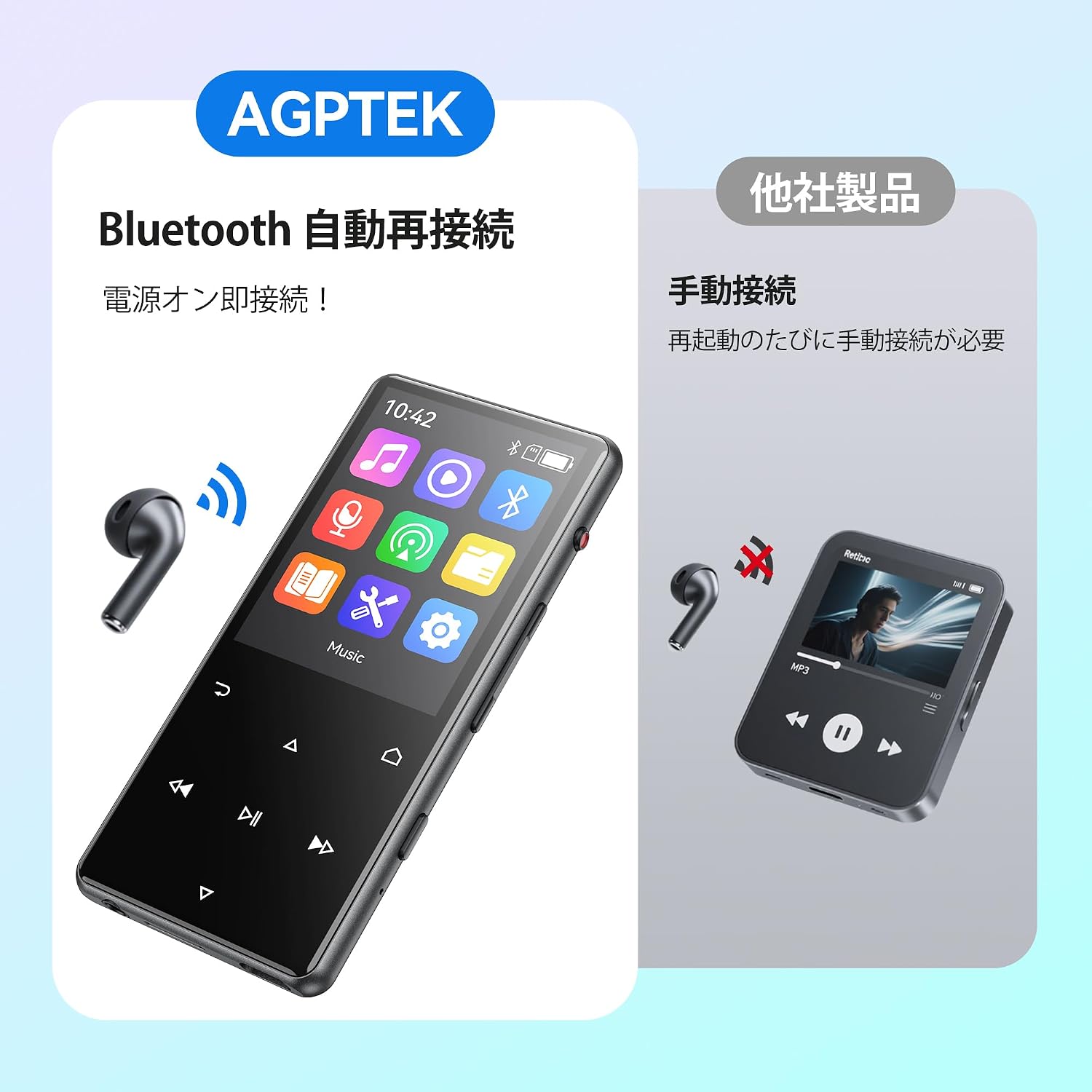
Obraz: The AGPTEK M6U MP3 Player connected wirelessly to a pair of Bluetooth earbuds, illustrating the automatic reconnection feature. The screen shows the Bluetooth icon, indicating an active connection.
Návod k obsluze
1. Základní navigace
Use the touch screen or physical buttons (Play/Pause, Next/Previous, Volume) to navigate through menus and control playback. The interface is designed for intuitive use.
2. Přehrávání hudby
V hlavní nabídce vyberte „Hudba“ pro procházení audioknih files. You can sort by artist, album, genre, or view all songs. Tap a song to begin playback.
- Stisknutím tlačítka Přehrát/Pozastavit spustíte nebo pozastavíte přehrávání hudby.
- Pro přeskakování skladeb použijte tlačítka Další/Předchozí.
- Upravte hlasitost pomocí vyhrazených ovladačů hlasitosti.
3. Hlasový záznam
The AGPTEK M6U features a one-key recording function, allowing you to quickly capture audio. This is useful for lectures, meetings, or personal notes.

Obraz: The AGPTEK M6U MP3 Player screen showing an active recording session, indicated by a large microphone icon and a filename. This highlights the device's one-key recording capability, useful for capturing ideas or discussions instantly.
To start a recording, locate the dedicated recording button (if available, otherwise navigate through the menu). Recordings are saved in MP3 or WAV format.
4. FM rádio
To use the FM radio function, connect the wired earphones to the player. The earphones act as an antenna. Navigate to the FM Radio application from the main menu, then scan for available stations.
5. Nastavení
Access the "Settings" menu to customize various aspects of your player, including display brightness, language, date and time, equalizer settings, and system information.
Údržba
- Čištění: K čištění zařízení používejte měkký, suchý hadřík. Nepoužívejte tekuté čisticí prostředky ani abrazivní materiály.
- Skladování: Přehrávač skladujte na chladném a suchém místě mimo dosah přímého slunečního záření a extrémních teplot.
- Péče o baterie: Chcete-li prodloužit životnost baterie, vyvarujte se častého úplného vybíjení. Pravidelně ji nabíjejte, i když ji delší dobu nepoužíváte.
- Aktualizace softwaru: Periodically check the official AGPTEK webPro zajištění optimálního výkonu a nových funkcí navštivte webové stránky s dostupnými aktualizacemi firmwaru.
Odstraňování problémů
| Problém | Řešení |
|---|---|
| Zařízení se nezapne. | Ensure the battery is charged. Connect the player to a power source for at least 10 minutes, then try powering on again. |
| Nelze se připojit k Bluetooth sluchátkům. | Make sure Bluetooth is enabled on both the player and the headphones. Put headphones in pairing mode. Ensure they are within range and not connected to another device. |
| Hudba files are not recognized. | Ověřte, že hudba files are in a supported format (FLAC, MP3, WMA, WAV, APE, ACELP, AAC, Audible, OGG). Ensure files are transferred correctly to the player's internal storage or microSD card. |
| Obrazovka nereaguje. | Try restarting the device. If the issue persists, a factory reset might be necessary (note: this will erase all data). |
Specifikace
| Funkce | Detail |
|---|---|
| Značka | AGPTEK |
| Číslo modelu | M6U |
| Vnitřní paměť | 64 GB |
| Velikost obrazovky | 2.4 palce |
| Technologie displeje | LCD |
| Technologie připojení | USB, Bluetooth 5.3 |
| Kompatibilní zařízení | PC, Headphones |
| Typ média | microSD Card (expandable storage) |
| Podporované zvukové formáty | FLAC, MP3, WMA, WAV, APE, ACELP, AAC, Audible, OGG |
| Podporované formáty nahrávání | MP3, WAV |
| Podporované video formáty | AMV, AVI (240*320) |
| Výdrž baterie (průměrná) | Až 40 hodin |
| Barva | Černý |
| Původ | Čína |
Záruka a podpora
The AGPTEK M6U MP3 Player comes with a 180-day warranty from the date of purchase. This warranty covers manufacturing defects under normal use.
For technical support, warranty claims, or further assistance, please contact AGPTEK customer service through their official website or the retailer where you purchased the product. Please have your model number (M6U) and proof of purchase ready when contacting support.
Důležité bezpečnostní informace
- Nevystavujte zařízení extrémním teplotám, přímému slunečnímu záření nebo vysoké vlhkosti.
- Zabraňte pádu zařízení nebo jeho vystavení silným nárazům.
- Nepokoušejte se zařízení rozebírat ani opravovat sami. Ztratíte tak záruku.
- Používejte pouze schválené nabíjecí kabely a příslušenství.
- Listen to audio at moderate volumes to prevent hearing damage.