
1. Úvod
Thank you for choosing the SGIN C10 10.1-inch Kids Tablet. This device is designed to provide an engaging and safe digital experience for children, featuring parental controls and educational content. This manual will guide you through the setup, operation, and maintenance of your tablet to ensure optimal performance and user safety.
2. Konec produktuview
2.1 Obsah balení
Po vybalení se prosím ujistěte, že jsou přítomny všechny níže uvedené položky:
- SGIN C10 10.1-inch Tablet
- Ochranné pouzdro
- Nabíječka
- USB kabel
- Návod k použití

Image: Diagram showing the tablet's ports and buttons, along with the included accessories: tablet, protective case, charger, USB cable, and instruction manual.
2.2 Součásti tabletu
Familiarize yourself with the physical components of your SGIN C10 tablet:
- Vypínač: Located on the side, used to turn the tablet on/off or put it to sleep.
- Tlačítka hlasitosti: Upravte úroveň zvukového výstupu.
- Sluchátkový jack: Pro připojení drátových sluchátek.
- USB port: Pro nabíjení a přenos dat.
- Slot na kartu TF: For expanding storage with a microSD card.
- Přední kamera: Pro videohovory a selfie.
- Zadní kamera: Pro pořizování fotografií a videí.
- Řečníci: Pro audio výstup.
- 10.1palcový HD IPS dotykový displej: Hlavní displej pro interakci.
- Ochranné pouzdro se stojanem: Provides protection and allows for hands-free viewIng.
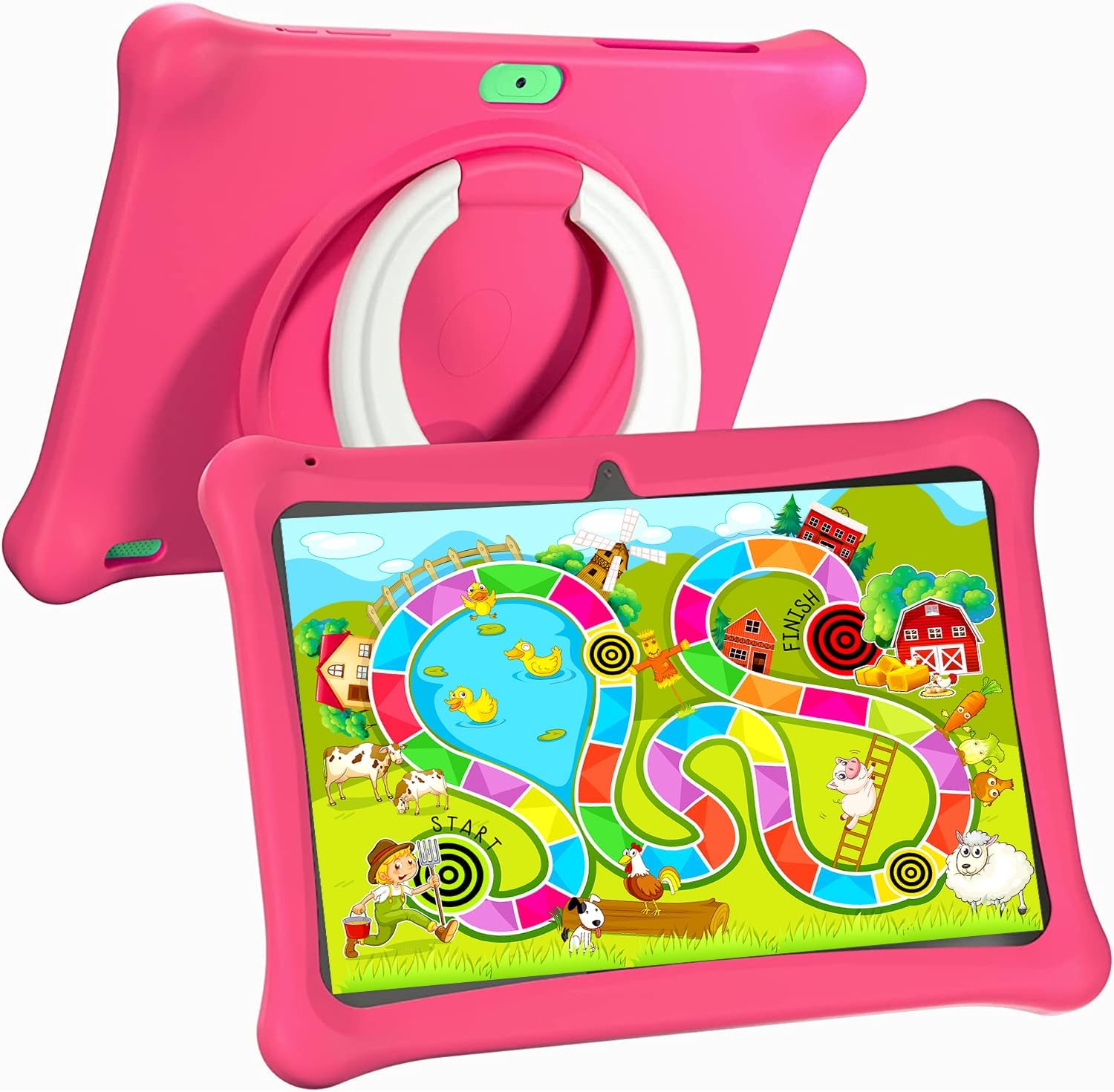
Image: The SGIN C10 tablet in its pink protective case, displaying a colorful educational game on its screen. The rear of the tablet shows the integrated stand.
2.3 Klíčové vlastnosti
- Vysoký výkon: Equipped with a 1.6GHz quad-core processor, 2GB RAM, and 32GB ROM (expandable up to 32GB via TF card).
- Pouzdro odolné proti dětem: Durable pink case designed to protect against dust, bumps, and drops, with heat dissipation features.
- Pre-installed iWawa Kid's Software: Offers a safe and entertaining environment with thousands of free educational games and apps.
- Parental Control System: Allows parents to manage screen time, content, and user accounts.
- Dlouhá výdrž baterie: 5000mAh lithium battery provides 6-8 hours of usage.
- Eye Protection Screen: 1280*800 HD IPS touch screen for vibrant colors and comfortable viewIng.
- Duální fotoaparát: 2MP front camera and 5MP rear camera for photos and videos.

Image: Icons representing key features of the SGIN C10 tablet: Android 12, Quad-core processor, Dual Camera, 5000mAh battery, WiFi, HD Display, 2GB RAM + 32GB storage, 10 Inch screen, and Parental Control.

Image: Visual representation of the tablet's 2GB RAM and 32GB ROM (expandable via TF card), alongside a diagram of the 1.6 GHz Quad-core Processor.

Image: The 10-inch HD display showing vibrant content, and a close-up of the protective case's rotatable stand.

Image: A child using the tablet, highlighting the 5000mAh Lithium Battery, and a close-up of the tablet's dual camera system.
3. Nastavení
3.1 Počáteční nabíjení
- Connect the USB cable to the tablet's USB port.
- Připojte druhý konec USB kabelu k dodané nabíječce.
- Zapojte nabíječku do elektrické zásuvky.
- Před prvním použitím nechte tablet plně nabít. Stav nabíjení bude zobrazovat indikátor baterie na obrazovce.
3.2 Zapnutí/vypnutí
- Zapnutí: Press and hold the Power Button until the SGIN logo appears on the screen.
- Vypnutí: Press and hold the Power Button until a menu appears. Select "Power off" and confirm.
- Spánek/probuzení: Krátkým stisknutím tlačítka napájení tablet uspíte nebo probudíte.
3.3 Připojení k Wi-Fi
- Na domovské obrazovce přejetím prstem shora dolů otevřete panel Rychlé nastavení.
- Klepnutím a podržením ikony Wi-Fi otevřete nastavení Wi-Fi.
- Toggle Wi-Fi on if it's off.
- Vyberte ze seznamu požadovanou síť Wi-Fi.
- Pokud se zobrazí výzva, zadejte heslo k síti a poté klepněte na „Připojit“.
3.4 Initial iWawa Setup
The SGIN C10 tablet comes with iWawa Kid's software pre-installed. Follow the on-screen prompts to set up the child-friendly environment and parental controls during the first launch.
4. Návod k obsluze
4.1 Základní navigace
- Dotek: Klepnutím na ikonu nebo možnost ji vyberte.
- Výpad: Tažením prstu po obrazovce můžete procházet stránky nebo seznamy.
- Štípání: Pro přiblížení nebo oddálení obrázků použijte dva prsty nebo web stránky.
- Tlačítko Domů: Vrátí vás na domovskou obrazovku.
- Tlačítko Zpět: Vrátí vás na předchozí obrazovku.
- Tlačítko Nedávné aplikace: Zobrazuje naposledy použité aplikace.
4.2 Používání fotoaparátu
- Otevřete aplikaci Fotoaparát z domovské obrazovky nebo ze zásuvky aplikací.
- Klepnutím na ikonu přepínače fotoaparátu přepínáte mezi předním a zadním fotoaparátem.
- Klepnutím na tlačítko spouště pořídíte fotografii.
- Tap the video icon to switch to video recording mode, then tap the record button to start/stop recording.
4.3 Installing/Uninstalling Apps
- Instalace aplikací: Within the iWawa environment, access the Kids Store to download free games and educational applications. Parents can also approve apps from the Google Play Store via parental controls.
- Odinstalace aplikací: From the parental control interface, select the app management option to uninstall unwanted applications.
4.4 Úprava nastavení
- Objem: Use the physical Volume Buttons on the side of the tablet.
- Jas: Swipe down from the top of the screen to access Quick Settings and adjust the brightness slider. More detailed display settings are available in the main Settings app.
- Další nastavení: Access the main Settings app for Wi-Fi, Bluetooth, display, sound, storage, and other system configurations.
5. Rodičovská kontrola
The SGIN C10 tablet features a robust parental control system integrated with the iWawa Kid's software, allowing you to create a safe and customized environment for your child.
5.1 Přístup k rodičovské kontrole
To access parental control settings, you will typically need to exit the iWawa Kid's interface and enter a password-protected parent mode. Follow the on-screen instructions within the iWawa app to set up and manage this access.
5.2 Key Parental Control Features
- Nastavit hesla: Establish a secure password to prevent children from exiting the iWawa environment or altering settings.
- Limity času stráveného u obrazovky: Define daily usage limits and specific time periods when the tablet can be used.
- Správa obsahu: Control access to apps, games, videos, and websites. You can whitelist appropriate websites and block unwanted content.
- App Approval: Manage which applications your child can access, including those downloaded from the Kids Store or Google Play Store.
- Více uživatelských účtů: Vytvořte samostatného profesionálafiles for each child, allowing personalized settings and content for individual users.
- Ad Elimination: The system helps eliminate unwanted advertisements within the child's environment.
6. Údržba
6.1 Čištění zařízení
- Always power off the tablet before cleaning.
- K otření obrazovky a těla použijte měkký hadřík, který nepouští vlákna.
- Na odolné šmouhy lehce otřeteampOtřete hadřík vodou nebo čisticím prostředkem na obrazovky. Vyhněte se agresivním chemikáliím.
- Zajistěte, aby se do otvorů nebo portů nedostala vlhkost.
6.2 Péče o baterii
- Vyhněte se častému úplnému vybíjení baterie.
- Nevystavujte tablet extrémním teplotám.
- Používejte pouze dodanou nabíječku a kabel.
6.3 Aktualizace softwaru
Periodically check for system updates in the tablet's Settings menu under "System" or "About tablet." Keeping your software updated ensures optimal performance and security.
6.4 Správa úložiště
To manage storage, you can:
- Smažte nepoužívané aplikace a files.
- Move photos and videos to a computer or cloud storage.
- Insert a TF (microSD) card into the designated slot to expand storage capacity up to 32GB.
7. Řešení problémů
| Problém | Možné řešení |
|---|---|
| Tablet se nezapne. | Ujistěte se, že je baterie nabitá. Připojte nabíječku a před opětovným zapnutím počkejte několik minut. |
| Obrazovka nereaguje. | Restart the tablet by holding the Power Button for about 10 seconds until it powers off, then power it on again. |
| Nelze se připojit k Wi-Fi. | Check if Wi-Fi is enabled. Ensure the password is correct. Restart your Wi-Fi router. |
| Aplikace padají nebo běží pomalu. | Close background apps. Clear app cache (Settings > Apps > [App Name] > Storage > Clear cache). Ensure sufficient storage space. |
| Parental controls are not working as expected. | Re-enter the parental control settings and verify all configurations (time limits, content filters, app approvals). Ensure the correct child profile je aktivní. |
8. Specifikace
| Funkce | Specifikace |
|---|---|
| Značka | SGIN |
| Název modelu | C10 |
| Operační systém | Android |
| Velikost obrazovky | 10 palce |
| Maximální rozlišení obrazovky | 1280 XNUMX pixelů |
| Procesor | 1.6GHz Quad-core (Intel Processor Brand) |
| BERAN | 2 GB |
| Interní úložiště (ROM) | 32 GB |
| Rozšiřitelné úložiště | TF karta až 32 GB |
| Přední kamera | 2 MP |
| Zadní kamera | 5 MP |
| Kapacita baterie | 5000 XNUMX mAh |
| Konektivita | WiFi, Bluetooth |
| Hmotnost položky | 2.35 libry |
| Rozměry produktu | 1 x 1 x 1 palce |
9. Záruka a podpora
For warranty information and technical support, please refer to the documentation included with your purchase or visit the official SGIN website. If you encounter issues not covered in this manual, please contact SGIN customer service for assistance.