
WOLFANG WDV01
WOLFANG WDV01 Portable DVD Player User Manual
Model: WDV01
1. Úvod
Thank you for choosing the WOLFANG WDV01 Portable DVD Player. This manual provides essential information for setting up, operating, and maintaining your device. Please read it carefully before use to ensure optimal performance and longevity of your product.
The WOLFANG WDV01 is designed for portable entertainment, featuring a 9.5-inch unit with a 7.5-inch HD swivel screen, stereo speakers, and a long-lasting battery. It supports various disc and file formats, making it versatile for different media content.
2. Obsah balení
Ověřte, zda jsou v balení přítomny všechny položky:
- WOLFANG WDV01 Portable DVD Player
- Dálkové ovládání
- Uživatelská příručka
- AC nabíječka
- Nabíječka do auta
- AV kabel 3 v 1

Image: Contents of the WOLFANG WDV01 package, showing the DVD player, remote control, user manual, AC charger, car charger, and AV cable.
3. Konec produktuview
3.1 Klíčové vlastnosti
- Zobrazit: 9.5-inch unit with 7.5-inch HD eye-protection screen.
- Rotace obrazovky: 270° horizontal rotation and 180° vertical flip for flexible viewing úhly.
- Zvuk: Integrované stereo reproduktory.
- Životnost baterie: Up to 6 hours of playback on a full charge.
- Možnosti napájení: AC power adapter and car charger included.
- Funkce paměti: Breakpoint memory resumes playback from the last stopped point.
- Kompatibilita médií: Supports DVD, SVCD, VCD, CD-R/RW discs.
- File Podpora formátů: JPEG, WMA, MPG, MP3, DIVX, VOB, AVI.
- Externí připojení: USB port, SD card slot (max 32GB), AV input, AV output, 3.5mm headphone jack.
3.2 Rozložení zařízení
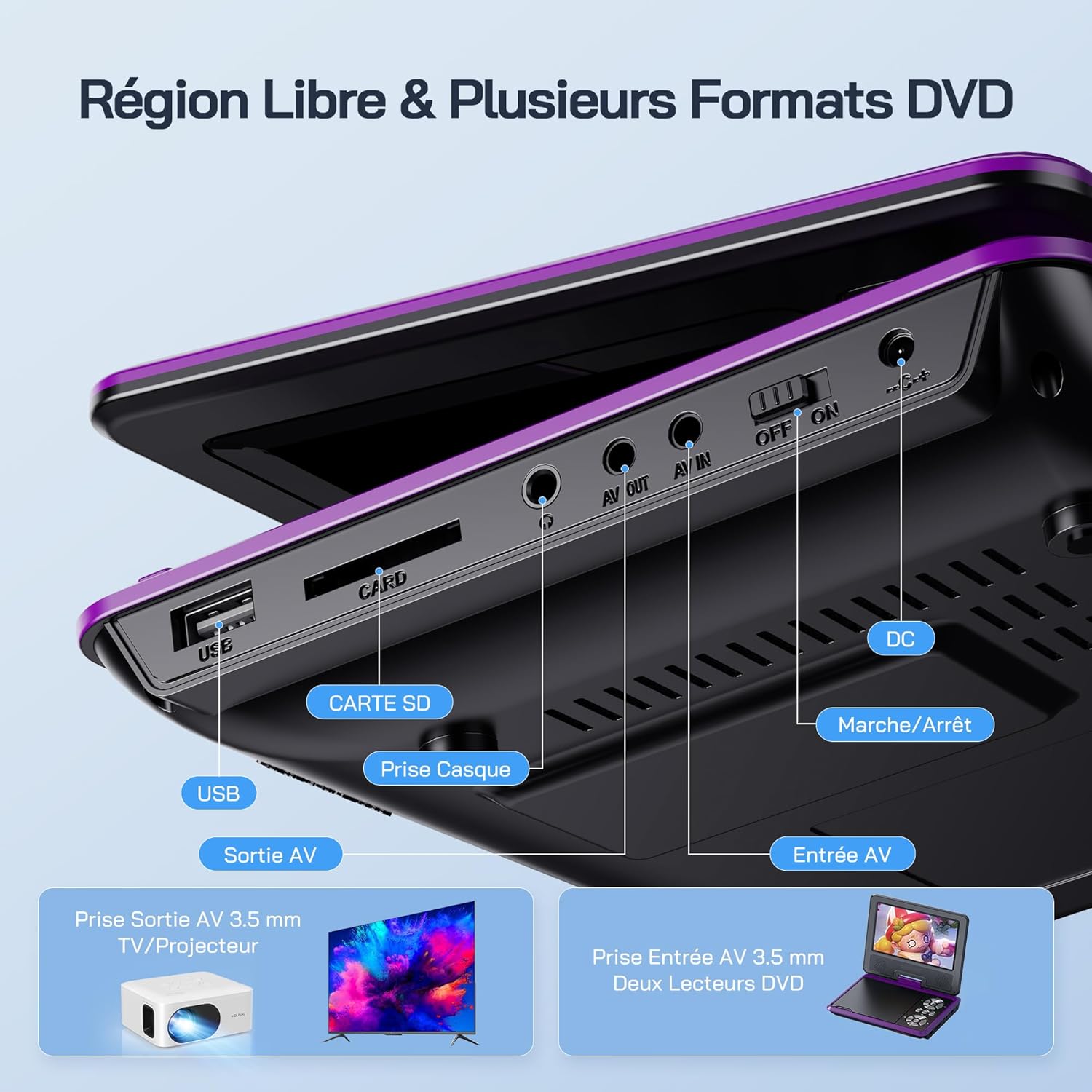
Obrázek: Podrobný view of the side panel of the WOLFANG WDV01, highlighting the USB port, SD card slot, headphone jack, AV OUT, AV IN, DC power input, and ON/OFF switch.
- USB port: Pro připojení USB flash disků.
- Slot pro SD kartu: For inserting SD/MMC cards.
- Sluchátkový jack: 3.5mm audio výstup pro sluchátka.
- AV OUT: Audio/Video output for connecting to a TV or projector.
- AV IN: Audio/Video input for connecting external devices or another DVD player.
- DC IN: Vstup pro napájení síťovým adaptérem nebo autonabíječkou.
- Přepínač ON/OFF: Ovládání napájení zařízení.
4. Nastavení
4.1 Počáteční nabíjení
Before first use, fully charge the device. Connect the AC charger to the DC IN port on the player and plug it into a wall outlet. The charging indicator light will illuminate. Once fully charged, the light may change color or turn off, depending on the model.
4.2 Zapnutí/vypnutí
Chcete-li zařízení zapnout, přepněte vypínač do polohy „ON“. Chcete-li zařízení vypnout, přepněte jej do polohy „OFF“.
4.3 Nastavení obrazovky
The screen can be rotated 270 degrees horizontally and flipped 180 degrees vertically. Adjust the screen to your preferred viewing angle. This feature is particularly useful for mounting in a car or for shared viewIng.

Image: Illustration demonstrating the 270-degree rotation and 180-degree flip capabilities of the WOLFANG WDV01 screen.
5. Návod k obsluze
5.1 Přehrávání DVD/CD
- Opatrně otevřete kryt disku.
- Place a compatible DVD or CD onto the spindle, label side up.
- Zavřete kryt disku.
- The player will automatically detect and begin playback. If not, select "Disc" from the main menu.
Poznámka: This device supports DVD, SVCD, VCD, CD-R/RW discs. It is not compatible with 1080p, 4K, or Blu-ray discs.
5.2 Playing from USB/SD Card
- Vložte USB flash disk do USB portu nebo SD kartu do slotu pro SD kartu.
- From the main menu, select "USB" or "SD" depending on your media source.
- Procházejte složkami a files using the control buttons or remote control.
- Vyberte požadované file (JPEG, WMA, MPG, MP3, DIVX, VOB, AVI) to begin playback.
Poznámka: Maximum supported Micro SD card capacity is 32GB. Video files should have a resolution up to 720x480. Image files should have a resolution up to 2650x1440.
5.3 Breakpoint Memory Function
The player automatically remembers the last playback position. When you power on the device again or re-insert the same disc/media, it will prompt you to resume playback from where you left off. This function may need to be activated in the system settings.

Image: Visual representation of the breakpoint memory feature, illustrating how the player can pause and resume video playback from the exact point of interruption.
5.4 Connecting to an External Display (TV/Projector)
Use the provided 3-in-1 AV cable to connect the player to a TV or projector.
- Connect one end of the AV cable to the AV OUT port on the DVD player.
- Connect the other end of the AV cable to the corresponding AV input ports (Yellow for Video, Red for Right Audio, White for Left Audio) on your TV or projector.
- Vyberte správný AV vstupní zdroj na televizoru nebo projektoru.
- Obsah obrazovky přehrávače se nyní zobrazí na externí obrazovce.

Image: A WOLFANG WDV01 Portable DVD Player connected to a large television screen, displaying content for a family watching together, demonstrating the TV sync feature.
5.5 Connecting to Another DVD Player (AV IN)
The AV IN port allows you to connect another compatible device, such as a second DVD player, to display its content on the WOLFANG WDV01 screen.
- Connect one end of an AV cable to the AV OUT port of the external device.
- Connect the other end of the AV cable to the AV IN port on the WOLFANG WDV01.
- Switch the WOLFANG WDV01 to AV input mode (refer to the on-screen menu or remote control for this option).
6. Údržba
6.1 Čištění zařízení
- Před čištěním se ujistěte, že je zařízení vypnuté a odpojené ze zásuvky.
- K otření vnějšího povrchu přehrávače použijte měkký, suchý hadřík.
- Na obrazovku použijte měkký hadřík, který nepouští vlákna, speciálně určený pro elektronické obrazovky. Nepoužívejte abrazivní čisticí prostředky ani rozpouštědla.
- To clean the disc lens, use a specialized DVD lens cleaning disc. Do not attempt to clean the lens manually.
6.2 Péče o baterii
- Nevystavujte zařízení extrémním teplotám (horkým nebo nízkým).
- If storing the device for an extended period, charge the battery to approximately 50% to prolong its lifespan.
- Nepokoušejte se vyměnit interní baterii sami. V případě problémů s baterií kontaktujte zákaznickou podporu.
6.3 Skladování
Store the player in a cool, dry place away from direct sunlight and moisture. Keep it in its original packaging or a protective case when not in use to prevent damage.
7. Řešení problémů
| Problém | Možná příčina | Řešení |
|---|---|---|
| Žádná síla | Battery drained, power adapter not connected, power switch off. | Charge the battery, ensure power adapter is securely connected, slide power switch to ON. |
| Disk se nepřehrává | Incompatible disc format, disc dirty/scratched, disc inserted incorrectly. | Check disc compatibility (no Blu-ray/4K), clean disc, insert disc label side up. |
| Žádný zvuk | Volume too low, headphones connected, audio settings incorrect. | Increase volume, disconnect headphones, check audio output settings. |
| Žádný obraz na televizi | AV cable loose, incorrect TV input selected. | Ensure AV cable is securely connected, select correct AV input on TV. |
| USB/SD karta nebyla rozpoznána | Incompatible format, card/drive damaged, incorrect file systém. | Ensure media is formatted to FAT32, check for damage, try another USB/SD card. Max 32GB SD card. |
If the problem persists after trying these solutions, please contact WOLFANG customer support.
8. Specifikace
| Funkce | Detail |
|---|---|
| Značka | WOLFANG |
| Model | 01 WDV |
| Velikost obrazovky | 7.5 palců |
| Velikost jednotky | 9.5 palců (úhlopříčka) |
| Rozlišení obrazovky | Až 800 x 480 pixelů |
| Kompatibilita disků | DVD, SVCD, VCD, CD-R/RW |
| File Podpora formátů | Video: AVI, MPG, MP3, DIVX, VOB; Audio: WMA, MP3; Image: JPEG |
| Podpora USB/SD karet | Max 32GB (Micro SD) |
| Video Resolution (USB/SD) | Až 720 x 480 pixelů |
| Image Resolution (USB/SD) | Až 2650 x 1440 pixelů |
| Životnost baterie | 4-6 hodin |
| Hmotnost položky | 1100 gramů |
| UPC | 850067892205 |
9. Záruka a podpora
9.1 Záruka výrobce
The WOLFANG WDV01 Portable DVD Player comes with a 24měsíční záruka výrobce od data nákupu. Tato záruka se vztahuje na vady materiálu a zpracování při běžném používání. Nevztahuje se na škody způsobené nesprávným použitím, nehodami, neoprávněnými úpravami nebo běžným opotřebením.
Uschovejte si prosím doklad o koupi pro uplatnění záruky.
9.2 Zákaznická podpora
For any questions, technical assistance, or warranty claims, please contact WOLFANG customer support. Our team is available to assist you and aims to respond within 24 hours.
Contact information can typically be found on the official WOLFANG webwebu nebo prostřednictvím vaší nákupní platformy.
Ask a question about this manual
Ask about setup, troubleshooting, compatibility, parts, safety, or missing instructions. Manuals+ will review the question and use this page’s manual context to help answer it.