
1. Konec produktuview
The JZAQ A50 is an ultra-thin wireless Bluetooth headset designed for motorcycle helmets, offering high-definition audio, DSP noise reduction, and intelligent features for communication and entertainment during riding, skiing, and other sports. It features a long-lasting 1000mAh battery and IP67 waterproof rating.
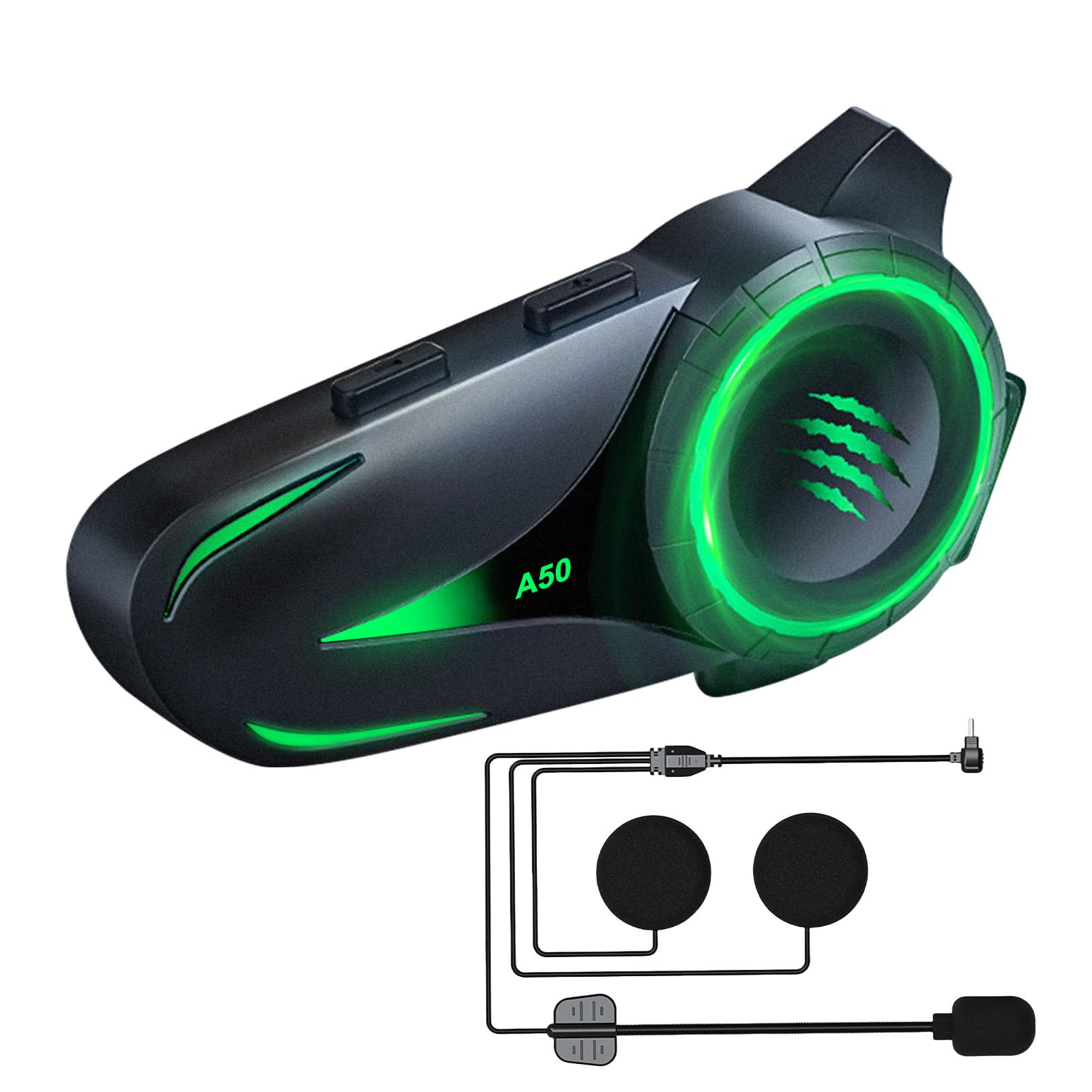
Image: The JZAQ A50 Motorcycle Helmet Bluetooth Headset, showcasinjeho elegantní design.
2. Co je v krabici
Ověřte, zda jsou v balení přítomny všechny komponenty:
- Bluetooth Host (Main Unit)
- Speaker Microphone Set (with soft and hard microphones)
- Základna klipu
- 3M Glue Base
- Nabíjecí kabel (USB Type-C)
- Velcro Pads (4 pieces)
- Noise-Reducing Windproof Cotton (2 pieces)
- Uživatelská příručka (tento dokument)

Image: All components included in the JZAQ A50 package, laid out for easy identification.
3. Nastavení a instalace
Follow these steps to install your JZAQ A50 headset into your helmet.
3.1 Nabíjení headsetu
Before first use, fully charge the headset. Connect the provided USB Type-C charging cable to the headset's charging port and a suitable USB power source. A full charge takes approximately 2 hours.

Image: The JZAQ A50 headset highlighting its 1000mAh battery capacity and charging port.
3.2 Instalace hlavní jednotky
The JZAQ A50 is designed for easy installation in various helmet types. You can choose between the clip base or the 3M glue base.
- Vyberte místo montáže: Select a flat surface on the left side of your helmet, near the bottom edge.
- Připevněte základnu:
- Základna klipu: Slide the clip base between the helmet shell and the inner padding. Ensure it is securely fastened.
- 3M Glue Base: Clean the chosen area on the helmet. Peel off the protective film from the 3M glue base and firmly press it onto the helmet for at least 30 seconds. Allow 24 hours for the adhesive to fully cure before attaching the main unit.
- Mount the main unit: Slide the JZAQ A50 main unit onto the installed base until it clicks securely into place.

Image: The JZAQ A50 headset shown compatible with various helmet styles, demonstrating its versatile installation.
3.3 Instalace reproduktorů a mikrofonu
The ultra-thin speakers (0.38 inches) are designed to fit comfortably without squeezing your ears.
- Attach Velcro pads: Place the provided Velcro pads inside the helmet's ear pockets.
- Position speakers: Attach the speakers to the Velcro pads, ensuring they are centered over your ears for optimal audio.
- Position microphone: Choose either the soft or hard microphone based on your helmet type and preference. Position the microphone near your mouth for clear voice transmission.
- Connect to main unit: Plug the speaker and microphone cable into the designated port on the main unit.
Video: A demonstration of the JZAQ A50 headset's features, including installation steps for the main unit, speakers, and microphone, as well as showcasing the various lighting effects.
4. Návod k obsluze
Learn how to use your JZAQ A50 headset for calls, music, and voice assistance.
4.1 Zapnutí/vypnutí a párování přes Bluetooth
- Zapnutí: Press and hold the Power button for approximately 3 seconds until the indicator light flashes and you hear a power-on tone.
- Bluetooth párování:
- When powered on for the first time, the headset will automatically enter pairing mode (indicator light flashes rapidly).
- On your mobile device, enable Bluetooth and search for "JZAQ A50".
- Select "JZAQ A50" to connect. Once paired, the indicator light will slow down or turn solid, and you will hear a confirmation tone.
- For subsequent uses, the headset will automatically connect to the last paired device when powered on.
- Vypnout: Stiskněte a podržte tlačítko napájení přibližně 5 sekund, dokud kontrolka nezhasne a neuslyšíte tón vypnutí.

Image: Visual representation of Bluetooth 5.4 technology, indicating stable connection, reduced energy consumption, and improved transmission efficiency.
4.2 Přehrávání hudby
- Přehrát/pozastavit: Stiskněte jednou multifunkční tlačítko.
- Další skladba: Stiskněte a podržte tlačítko pro zvýšení hlasitosti (+).
- Předchozí skladba: Stiskněte a podržte tlačítko pro snížení hlasitosti (-).
- Nastavení hlasitosti: Stisknutím tlačítka pro zvýšení hlasitosti (+) nebo snížení hlasitosti (-) upravte hlasitost.
The headset provides loud, 3D sound quality with high/low pitch effects, ensuring clear music playback even while riding.

Image: A motorcyclist enjoying music with loud, clear sound, illustrating the DSP noise reduction technology of the JZAQ A50 headset.
4.3 Telefonní hovory
- Přijmout hovor: The headset will automatically answer incoming calls after a few rings. Alternatively, press the Multi-function button once to answer.
- Ukončit hovor: Během hovoru stiskněte jednou multifunkční tlačítko.
- Odmítnout hovor: Při příchozím hovoru stiskněte a podržte multifunkční tlačítko po dobu 2 sekund.
- Znovu vytočit poslední číslo: Dvakrát stiskněte multifunkční tlačítko.
The DSP noise reduction ensures clear call quality, allowing you to communicate effectively while riding.
4.4 Hlasový asistent
Activate your smartphone's intelligent voice assistant (e.g., Siri, Google Assistant) directly from the headset.
- Aktivovat Voice Assistant: Double-click the Volume Down (-) button.

Image: A motorcyclist interacting with the intelligent voice assistant feature of the JZAQ A50 headset, indicated by a glowing microphone icon.
4.5 Světelné efekty
The JZAQ A50 features 4 dazzling lighting effects that can be switched to personalize your headset's appearance.
- Efekt přepínání světelných efektů: Refer to the specific button combination in the quick start guide or experiment with the main unit buttons to cycle through the lighting modes.

Image: Four JZAQ A50 headsets displaying different intelligent lighting effects in red, blue, pink, and green.
5. Údržba
Proper maintenance ensures the longevity and optimal performance of your JZAQ A50 headset.
- Čištění: Use a soft, dry cloth to wipe the main unit. For speakers, gently clean with a slightly damp cloth if necessary. Avoid harsh chemicals or abrasive materials.
- Hydroizolace: The headset has an IP67 waterproof rating, meaning it is protected from dust and can withstand immersion in water up to 1 meter for 30 minutes. This allows for confident use on rainy days. Ensure the charging port cover is securely closed when not charging to maintain waterproofing.
- Péče o baterie:
- Vyhněte se častému úplnému vybíjení baterie.
- Charge the headset regularly, even if not in use for extended periods, to maintain battery health.
- Store the headset in a cool, dry place.

Image: The JZAQ A50 headset demonstrating its IP67 deep waterproof capability, suitable for riding in wet conditions.
6. Řešení problémů
If you encounter issues with your JZAQ A50 headset, refer to the following common problems and solutions:
| Problém | Možná příčina | Řešení |
|---|---|---|
| Sluchátka se nezapínají. | Slabá baterie. | Nabíjejte sluchátka alespoň 2 hodiny. |
| Nelze spárovat s telefonem. | Bluetooth not enabled on phone; headset not in pairing mode; too many paired devices. | Ensure phone Bluetooth is on. Power off/on headset to re-enter pairing mode. Forget previous devices on phone and try again. |
| Žádný zvuk nebo slabý zvuk. | Volume too low; speakers incorrectly positioned; loose connection. | Increase headset and phone volume. Adjust speaker position. Ensure speaker/mic cable is fully plugged into the main unit. |
| Kvalita hovoru je špatná. | Microphone not positioned correctly; excessive wind noise. | Adjust microphone closer to your mouth. Ensure noise-reducing windproof cotton is installed on the microphone. |
| Nestabilní připojení Bluetooth. | Interference; device too far from headset. | Ensure no major obstructions between phone and headset. Keep devices within optimal Bluetooth range. |
7. Specifikace
| Funkce | Detail |
|---|---|
| Model | A50 |
| Verze Bluetooth | 5.4 |
| Kapacita baterie | 1000 XNUMX mAh |
| Doba nabíjení | Přibl. 2 hodin |
| Doba přehrávání hudby | Až 160 hodin |
| Pohotovostní doba | Až 600 hodin |
| Voděodolnost | IP67 Vodotěsný |
| Kontrola hluku | DSP Noise Reduction, Adaptive Noise Cancellation |
| Tloušťka reproduktoru | 0.38 inches (Ultra-thin) |
| Nabíjecí rozhraní | USB Type-C |
| Hmotnost | 0.16 kilogramu (přibližně 5.6 unce) |
| Certifikace | CE, FCC, Bluetooth Association |
8. Záruka a podpora
JZAQ is committed to providing quality products and customer satisfaction.
8.1 Zákaznická podpora
If you encounter any issues with your JZAQ A50 helmet headset, please contact us through the Amazon Buyer Center. Our support team aims to respond within 12 hours to assist you with troubleshooting or product-related inquiries.
Pro další pomoc prosím navštivte JZAQ Store on Amazon.
8.2 Informace o záruce
Specific warranty details are typically provided with your purchase documentation. Please retain your proof of purchase for any warranty claims. The product is designed and manufactured to high standards, holding CE and FCC certifications.