
HITBOX HBC45II
HITBOX HBC45II Plasma Cutter User Manual
Model: HBC45II
Brand: HITBOX
1. Úvod
This user manual provides comprehensive instructions for the safe and efficient operation, setup, and maintenance of your HITBOX HBC45II Plasma Cutter. Designed for cutting various metals, this non-touch pilot arc machine offers reliable performance for both beginners and experienced users. Please read this manual thoroughly before operating the device.

Figure 1: HITBOX HBC45II Plasma Cutter and included accessories.
2. Bezpečnostní informace
Operating plasma cutting equipment requires strict adherence to safety protocols to prevent injury or damage. Always wear appropriate personal protective equipment (PPE), including welding helmets with proper shade, flame-resistant clothing, gloves, and safety shoes. Ensure adequate ventilation in the work area to disperse fumes. Never operate the machine in damp or wet conditions. Disconnect power before performing any maintenance or changing consumables. Keep children and unauthorized personnel away from the operating area.
- Always wear a welding helmet with appropriate shade.
- Use flame-resistant clothing and gloves.
- Zajistěte řádné větrání, aby se zabránilo vdechování výparů.
- Neprovozujte ve vlhkém prostředí.
- Před údržbou odpojte napájení.
3. Konec produktuview
3.1 Součásti a ovládací prvky
The HBC45II Plasma Cutter features an intuitive design with a large LED display for real-time monitoring of operational parameters.
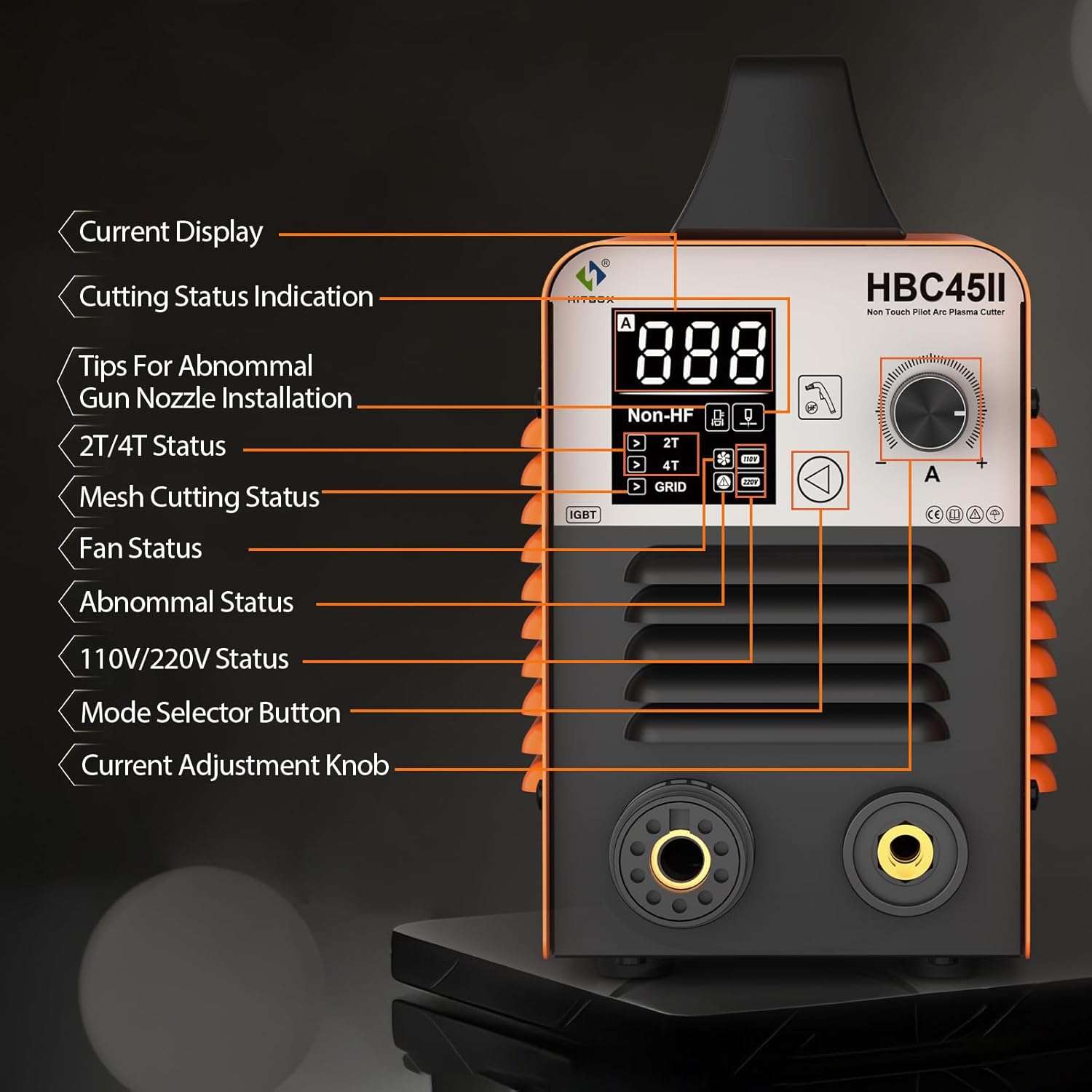
Figure 2: Front panel layout with LED display and control functions.
- Aktuální zobrazení: Zobrazuje výstupní proud v Amperes.
- Cutting Status Indication: Indicates the current cutting mode or status.
- Tips For Abnormal Gun Nozzle Installation: Alerts if the torch nozzle is incorrectly installed.
- 2T/4T Status: Displays the selected trigger mode (2-Touch or 4-Touch).
- Mesh Cutting Status (GRID): Indicates if the machine is optimized for cutting mesh or expanded metal.
- Stav fanouška: Shows if the cooling fan is active.
- Abnormální stav: Displays error codes if a malfunction occurs.
- 110V/220V Status: Indicates the detected input voltage.
- Mode Selector Button: Used to cycle through different operational modes.
- Knoflík pro nastavení proudu: Adjusts the output cutting current.
3.2 Klíčové vlastnosti
- Non-High Frequency Start: Utilizes a non-high-frequency blowback start, reducing electromagnetic interference.
- Bezdotykový pilotní oblouk: Allows cutting without direct contact between the torch tip and the workpiece, ideal for rusty or painted surfaces, and extends consumable life.
- Velký LED displej: Provides real-time display of air pressure, voltage, and current, along with error codes for easy troubleshooting.
- Funkce 2T/4T: Offers two trigger modes for continuous cutting, reducing operator fatigue.
- PT/PA Function: Post-Time (PT) cools the torch head, extending consumable life. Pilot Arc (PA) duration can be adjusted for cutting mesh metal.
- CNC Functionality: Compatible with CNC cutting tables for enhanced precision.
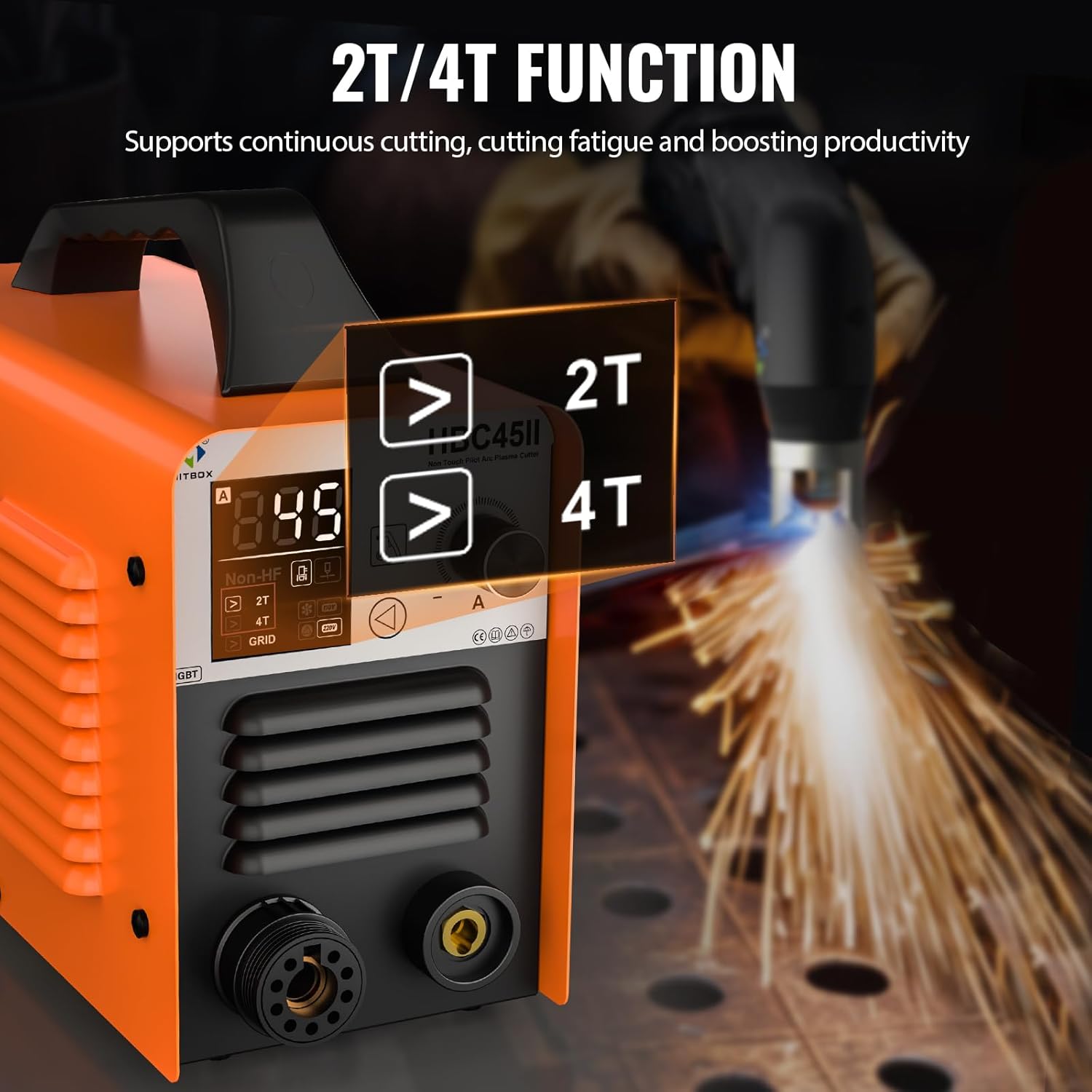
Figure 3: Explanation of 2T and 4T trigger modes for continuous cutting.

Figure 4: Demonstrating the stable, non-stick arc of the low frequency non-contact pilot arc technology.
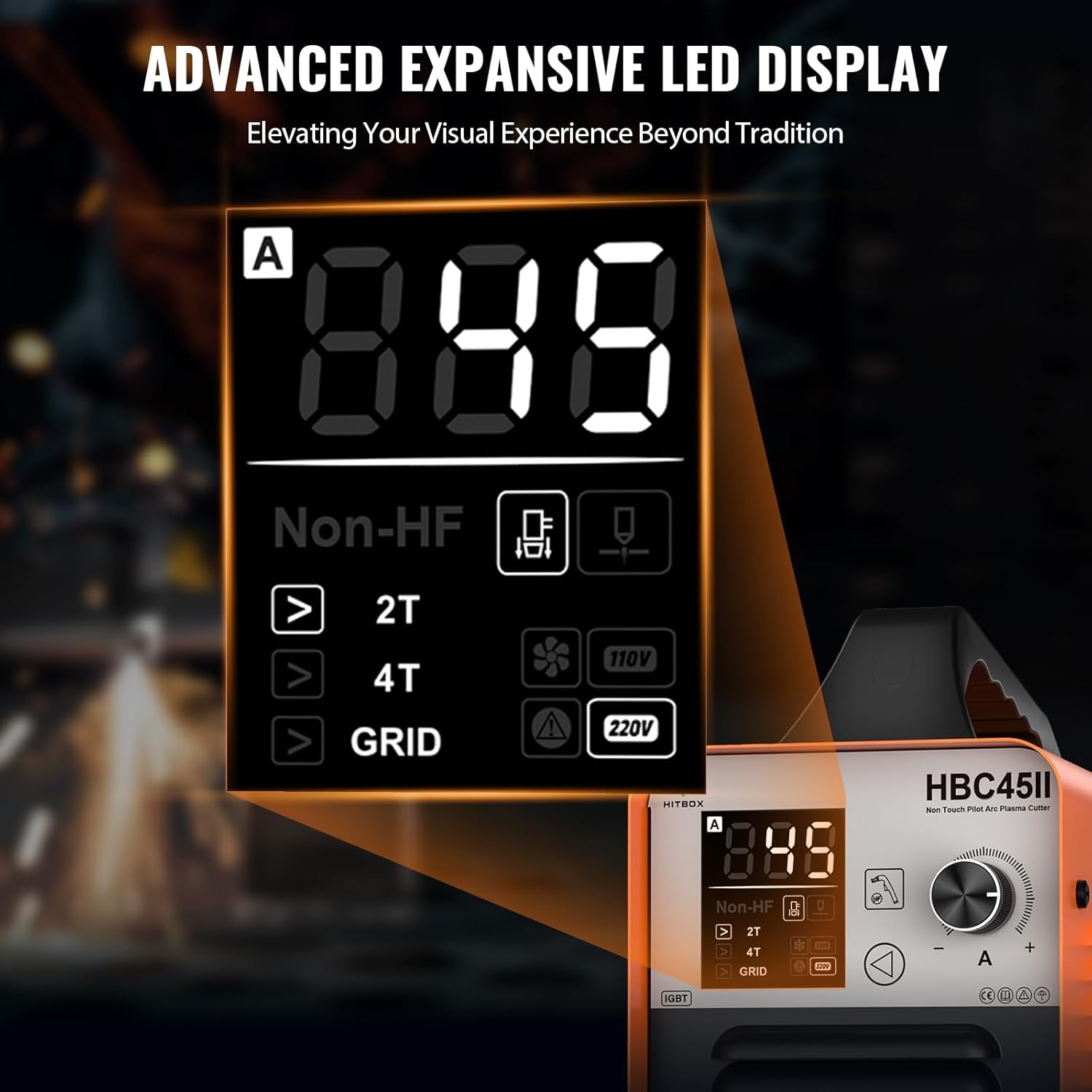
Obrázek 5: Detailní view of the advanced LED display showing current, voltage a indikátory stavu.
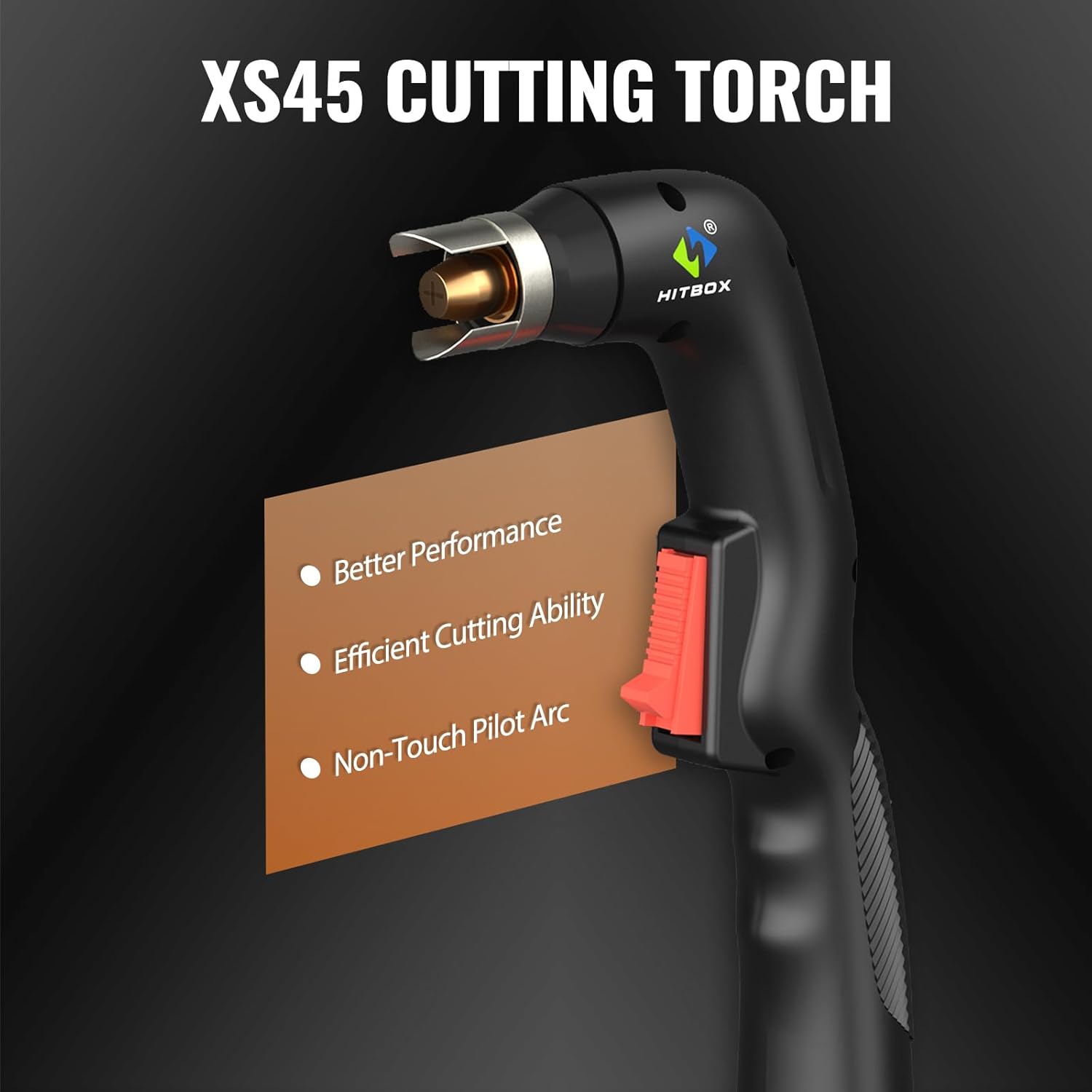
Figure 6: The XS45 cutting torch, designed for better performance and non-touch pilot arc cutting.
4. Nastavení
- Rozbalení: Carefully remove the plasma cutter and all accessories from the packaging. Inspect for any shipping damage.
- Připojení napájení: Connect the machine to a suitable 110V or 220V AC power source. The machine automatically detects the voltage. Ujistěte se, že je elektrická zásuvka řádně uzemněna.
- Připojení vzduchového kompresoru: Connect your air compressor to the air inlet on the plasma cutter. Ensure the air pressure regulator is properly installed and set to the recommended PSI (typically 40-60 PSI for optimal cutting).
- Pochodeň a uzemnění Clamp Spojení: Connect the plasma cutting torch and the ground clamp to their respective terminals on the front panel of the machine. Ensure connections are secure.
- Příprava obrobku: Ensure the workpiece is clean and free of rust, paint, or other contaminants for best cutting results. Secure the ground clamp firmly to the workpiece or work table, ensuring good electrical contact.
5. Návod k obsluze
5.1 Základní obsluha
- Zapnutí: Turn on the main power switch located on the rear or front panel. The LED display will illuminate.
- Nastavení tlaku vzduchu: Set the air pressure using the regulator to the recommended range (e.g., 40-60 PSI) for the material thickness you intend to cut.
- Select Mode (2T/4T): Use the mode selector button to choose between 2T (2-Touch) or 4T (4-Touch) operation.
- Režim 2T: Press and hold the torch trigger to cut; release to stop.
- Režim 4T: Press and release the trigger to start cutting; press and release again to stop. This mode is ideal for longer cuts to reduce finger fatigue.
- Adjust Cutting Current: Use the current adjustment knob to set the appropriate amperage for your material thickness. Refer to the cutting capacity guidelines below.
- Zahájení řezu: Position the torch tip approximately 1/8 inch (3mm) above the workpiece. Press the torch trigger to initiate the pilot arc. Once the arc is established, move the torch steadily along the cutting line.
- Post-Time (PT) and Pilot Arc (PA) Adjustment: The machine automatically manages PT to cool the torch. For mesh cutting, the PA function can be utilized to maintain the arc across gaps.
5.2 Řezné schopnosti
The HBC45II is capable of cutting various metals including steel, stainless steel, copper, iron, galvanized sheet, and carbon steel.

Figure 7: Broad spectrum of materials that can be cut with the HBC45II.
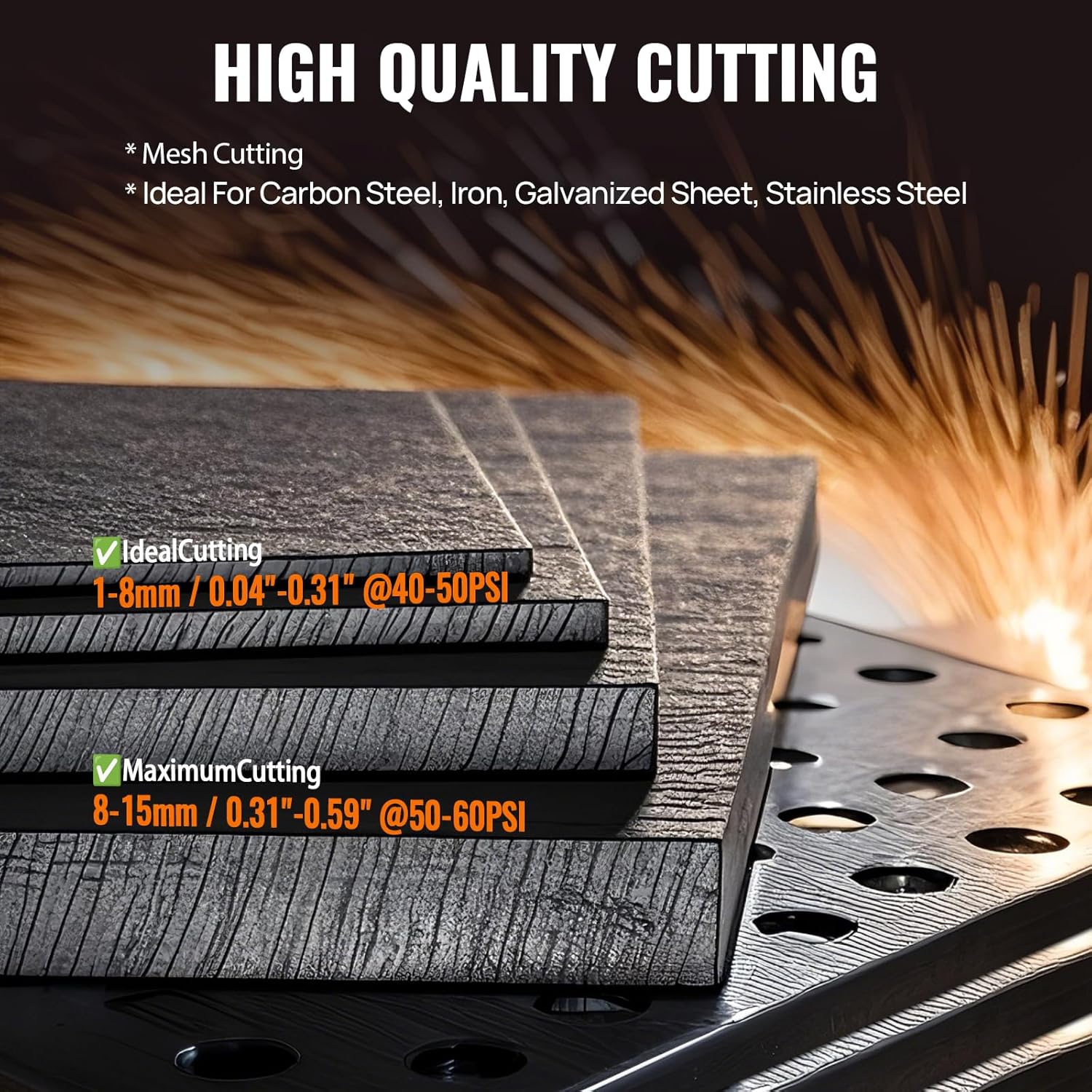
Figure 8: Cutting thickness guidelines for the HBC45II.
| Typ řezání | Rozsah tloušťky | Doporučený tlak vzduchu |
|---|---|---|
| Ideal Cutting | 1–8 mm (0.04"–0.31") | 40 50-PSI |
| Maximální řezání | 8–15 mm (0.31"–0.59") | 50 60-PSI |
6. Údržba
Pravidelná údržba zajišťuje dlouhou životnost a optimální výkon vaší plazmové řezačky.
- Spotřební materiál: Regularly inspect and replace worn-out torch consumables (nozzles, electrodes, swirl rings, shield cups). Worn consumables can lead to poor cut quality and damage to the torch.
- Vzduchový filtr: Check and clean or replace the air filter element in the air pressure regulator periodically to ensure clean, dry air supply to the torch. Moisture and oil in the air can severely impact cutting performance and torch life.
- Čištění: Keep the machine clean and free of dust and metal particles. Use compressed air to blow out internal components if necessary, ensuring the machine is unplugged.
- Kabely a připojení: Inspect all cables and connections for damage or loose fittings before each use.
7. Řešení problémů
The HBC45II's LED display provides error codes to assist in diagnosing issues. If the plasma cutter cannot work, refer to the display for specific error codes.
| Problém | Možná příčina | Řešení |
|---|---|---|
| Žádný oblouk / Oblouk se nespustí | No power, poor ground connection, worn consumables, insufficient air pressure, incorrect torch nozzle installation. | Zkontrolujte napájení, zajistěte uzemněníamp is secure, replace consumables, adjust air pressure, verify torch nozzle installation (check LED display for "Tips For Abnormal Gun Nozzle Installation" alert). |
| Špatná kvalita řezu | Worn consumables, incorrect cutting speed/current, improper air pressure, dirty workpiece. | Replace consumables, adjust current and speed, set correct air pressure, clean workpiece. |
| Overheating / Machine Shuts Off | Exceeded duty cycle, blocked ventilation, fan malfunction. | Allow machine to cool down, ensure clear ventilation paths, check fan operation. |
| LED Display Shows Error Code | Internal fault, specific operational issue. | Consult the specific error code in the full product manual (if available) or contact HITBOX customer support with the code. |
8. Specifikace
| Funkce | Detail |
|---|---|
| Výrobce | HITBOX |
| Číslo dílu | HBC45II |
| Hmotnost položky | 14.42 libry |
| Rozměry produktu | 8.11 x 11.1 x 17.1 palce |
| Číslo modelu položky | HBC45II |
| Velikost | HBC45 110V/220V Non HF |
| Barva | Pomerančový |
| Styl | HBC45II |
| Zdroj napájení | AC |
| Technologie řezání | Non-Touch Pilot Arc, Non-High Frequency Start |
| Max Cut Thickness | 15 mm (0.59 palce) |
| Vstupní objemtage | 110V/220V (Auto-sensing) |
| Zobrazit | Large LED Display (Air Pressure, Voltage, Current, Error Codes) |
| Funkce | 2T/4T, PT/PA, CNC Compatibility |
9. Záruka a podpora
HITBOX offers 2 years of quality support for the HBC45II Plasma Cutter. For technical assistance, troubleshooting, or warranty claims, please contact HITBOX customer service through their official webweb nebo prodejce, u kterého byl produkt zakoupen. Při kontaktování podpory si prosím připravte číslo modelu a datum nákupu.
For more information, visit the official HITBOX store: HITBOX Store on Amazon
Ask a question about this manual
Ask about setup, troubleshooting, compatibility, parts, safety, or missing instructions. Manuals+ will review the question and use this page’s manual context to help answer it.