
HP Z2 Mini G1a
Uživatelská příručka pracovní stanice HP Z2 Mini G1a
Model: Z2 Mini G1a (BN4F9UT#ABA)
1. Úvod
This manual provides essential information for setting up, operating, maintaining, and troubleshooting your HP Z2 Mini G1a Workstation. Please read this manual thoroughly before using the device to ensure proper functionality and safety.
The HP Z2 Mini G1a is a compact workstation designed for demanding professional workflows, featuring an AMD Ryzen AI MAX PRO processor and AMD Radeon 8050S Graphics.
2. Bezpečnostní informace
Always follow basic safety precautions to reduce the risk of fire, electric shock, and injury to persons, and damage to the product.
- Do not open the computer chassis unless instructed by qualified personnel.
- Ensure the power cord is properly grounded.
- Keep the workstation away from liquids and excessive humidity.
- Nezakrývejte ventilační otvory.
- Use only HP-approved power adapters and accessories.
3. Obsah balení
Ověřte, zda jsou v balení přítomny všechny položky:
- HP Z2 Mini G1a Workstation
- Napájecí adaptér a kabel
- Rychlý průvodce
- Informace o záruce
4. Nastavení
4.1 Vybalení a umístění
Carefully remove the workstation from its packaging. Place the unit on a stable, flat surface with adequate ventilation. Avoid placing it in enclosed spaces or near heat sources.
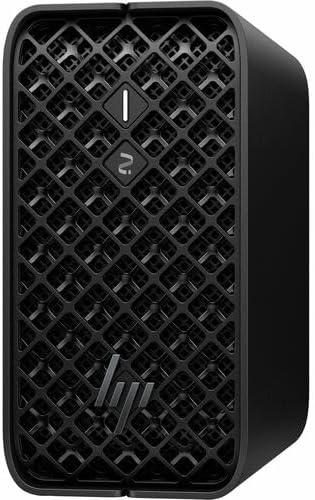
Obrázek 1: Přední strana view of the HP Z2 Mini G1a Workstation, showcasing its compact design and ventilation grille.
4.2 Připojení periferních zařízení
Connect your monitor, keyboard, and mouse to the appropriate ports on the workstation. Refer to the port diagram below for guidance.

Figure 2: A user working with the HP Z2 Mini G1a Workstation connected to a monitor, keyboard, and mouse in an office setting.
4.3 Připojení napájení
- Připojte napájecí kabel k napájecímu adaptéru.
- Plug the power adapter into the workstation's power input port.
- Zapojte druhý konec napájecího kabelu do uzemněné elektrické zásuvky.
4.4 Počáteční spuštění
Press the power button located on the front of the workstation. The system will initiate the Windows 11 Pro setup process. Follow the on-screen instructions to complete the operating system configuration.
5. Obsluha pracovní stanice
5.1 Zapnutí/vypnutí
- Zapnutí: Stiskněte tlačítko napájení.
- Vypnout: Click the Start button in Windows, then select Power > Shut down. Alternatively, press and hold the power button for 5 seconds to force a shutdown (use only when necessary).
5.2 Připojení k síti
The workstation supports both wired (Ethernet) and wireless (Wi-Fi) network connections.
- Kabelové: Connect an Ethernet cable from your router or network switch to the Ethernet port on the workstation.
- Bezdrátový: In Windows, click the Wi-Fi icon in the taskbar, select your network, enter the password, and click Connect.
5.3 Používání USB portů
The workstation is equipped with multiple USB ports for connecting external devices such as storage drives, printers, and other peripherals.

Obrázek 3: Strana view of the HP Z2 Mini G1a Workstation, showing various input/output ports for connectivity.
5.4 AI Acceleration Features
The HP Z2 Mini G1a Workstation features an AMD Ryzen AI MAX PRO processor with hardware AI accelerators. These are designed to enhance performance for AI-driven tasks and professional workflows. Utilize software optimized for AI acceleration to leverage these capabilities.
6. Údržba
6.1 Čištění
- Use a soft, dry cloth to clean the exterior of the workstation.
- Pro odolné skvrny lehce otřeteampnavlhčete hadřík vodou nebo jemným neabrazivním čisticím prostředkem.
- Do not spray cleaners directly onto the workstation.
6.2 Aktualizace softwaru
Regularly update your Windows operating system and drivers to ensure optimal performance and security. Check for updates via Windows Update and the HP Support Assistant application.
6.3 Zálohování dat
It is recommended to regularly back up your important data to an external storage device or cloud service to prevent data loss.
7. Řešení problémů
7.1 Bez napájení
- Ujistěte se, že je napájecí kabel bezpečně připojen k pracovní stanici i do elektrické zásuvky.
- Ověřte funkčnost elektrické zásuvky zapojením jiného zařízení.
- Zkontrolujte napájecí adaptér, zda nevykazuje viditelné poškození.
7.2 Žádný displej
- Confirm the monitor is powered on and connected correctly to the workstation.
- Try connecting the monitor to a different display port if available.
- Ujistěte se, že je na monitoru vybrán správný vstupní zdroj.
7.3 Zpomalení systému
- Zavřete nepotřebné aplikace běžící na pozadí.
- Zkontrolujte a nainstalujte všechny čekající aktualizace systému Windows nebo ovladačů.
- Run a system diagnostic tool (e.g., HP Support Assistant) to identify potential hardware issues.
8. Specifikace
| Funkce | Detail |
|---|---|
| Model | HP Z2 Mini G1a Workstation (BN4F9UT#ABA) |
| Procesor | AMD Ryzen AI MAX PRO 390-32 GB |
| Grafika | AMD Radeon 8050S Graphics |
| Skladování | 1 TB SSD (NVMe Controller, RAID Levels 0, 1) |
| Operační systém | Windows 11 Pro |
| Rozměry (V x Š x H) | 19 x 7.5 x 11 palce |
| Hmotnost | 11.2 libry |
9. Záruka a podpora
9.1 Informace o záruce
Your HP Z2 Mini G1a Workstation comes with a standard manufacturer's warranty. Please refer to the warranty document included in your package for specific terms and conditions. Keep your proof of purchase for warranty claims.
9.2 Technická podpora
For technical assistance, visit the official HP support website or contact HP customer service. Have your product model number (BN4F9UT#ABA) and serial number ready when contacting support.
Podpora HP Webmísto: www.hp.com/support
Ask a question about this manual
Ask about setup, troubleshooting, compatibility, parts, safety, or missing instructions. Manuals+ will review the question and use this page’s manual context to help answer it.