
1. Úvod
Thank you for choosing the Dynamic Walkfitpad T500 Trekking Band. This user manual provides essential information for the safe and effective operation, maintenance, and troubleshooting of your new fitness equipment. Please read this manual thoroughly before first use and keep it for future reference.
The Dynamic Walkfitpad T500 is designed for home use, featuring an ultra-slim profile for easy storage, an energy-saving motor, Bluetooth connectivity for app integration, and convenient remote control operation.
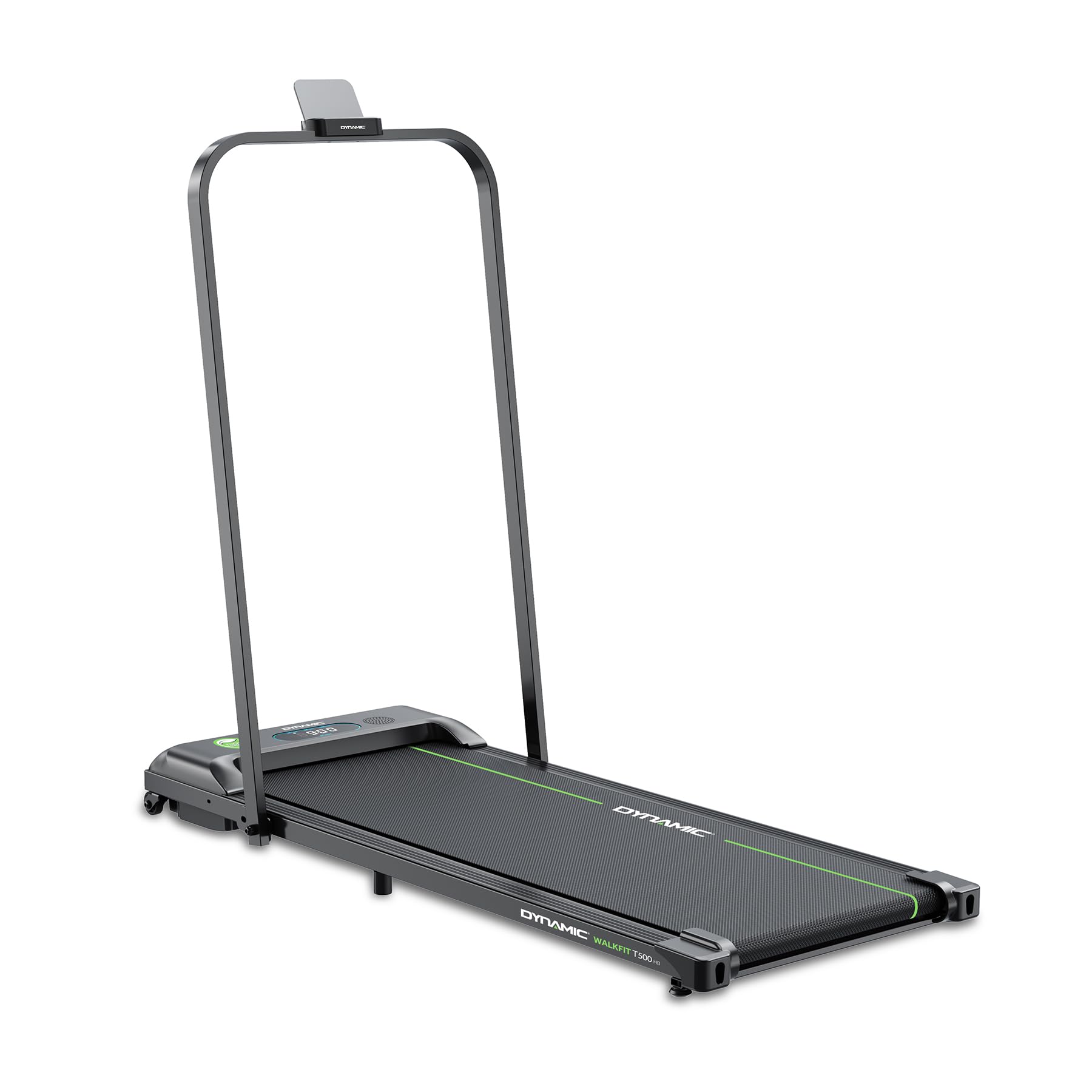
Obrázek 1.1: Dynamic Walkfitpad T500 Trekking Band in use, highlighting its compact design and user-friendly interface.

Obrázek 1.2: Key features of the Dynamic Walkfitpad T500, including Bluetooth support, speaker, remote control, energy-saving motor, quiet operation, and 2-year warranty.
2. Bezpečnostní informace
To ensure your safety and prolong the life of your trekking band, please adhere to the following safety guidelines:
- Always read the entire user manual before operating the trekking band.
- Place the trekking band on a flat, stable surface. Ensure there is at least 2 meters of clear space behind the unit and 0.5 meters on each side.
- Keep children and pets away from the trekking band during operation.
- The maximum user weight for this device is 90 kg (as per product description) / 120 kg (as per detailed specifications). Do not exceed the stated weight limit.
- Always attach the safety key clip to your clothing before starting your workout. The safety key is an emergency stop mechanism.
- Pokud se během cvičení cítíte mdlo, točí se vám hlava nebo pociťujete bolest, okamžitě přestaňte cvičení a poraďte se s lékařem.
- Do not use the trekking band if it is damaged or malfunctioning. Contact customer support for assistance.
- Ensure the power cord is not pinched or damaged and is kept away from hot surfaces.
3. Obsah balení
Carefully unpack your Dynamic Walkfitpad T500 Trekking Band and verify that all items are present:
- Dynamic Walkfitpad T500 Trekking Band Unit
- Dálkové ovládání
- Bezpečnostní klíč
- Uživatelská příručka (tento dokument)
4. Nastavení
4.1 Vybalení a umístění
- Remove the trekking band from its packaging.
- Place the unit on a firm, level surface. Ensure adequate clearance around the device as described in the Safety Information section.
- This trekking band is designed for immediate use and requires no complex assembly.
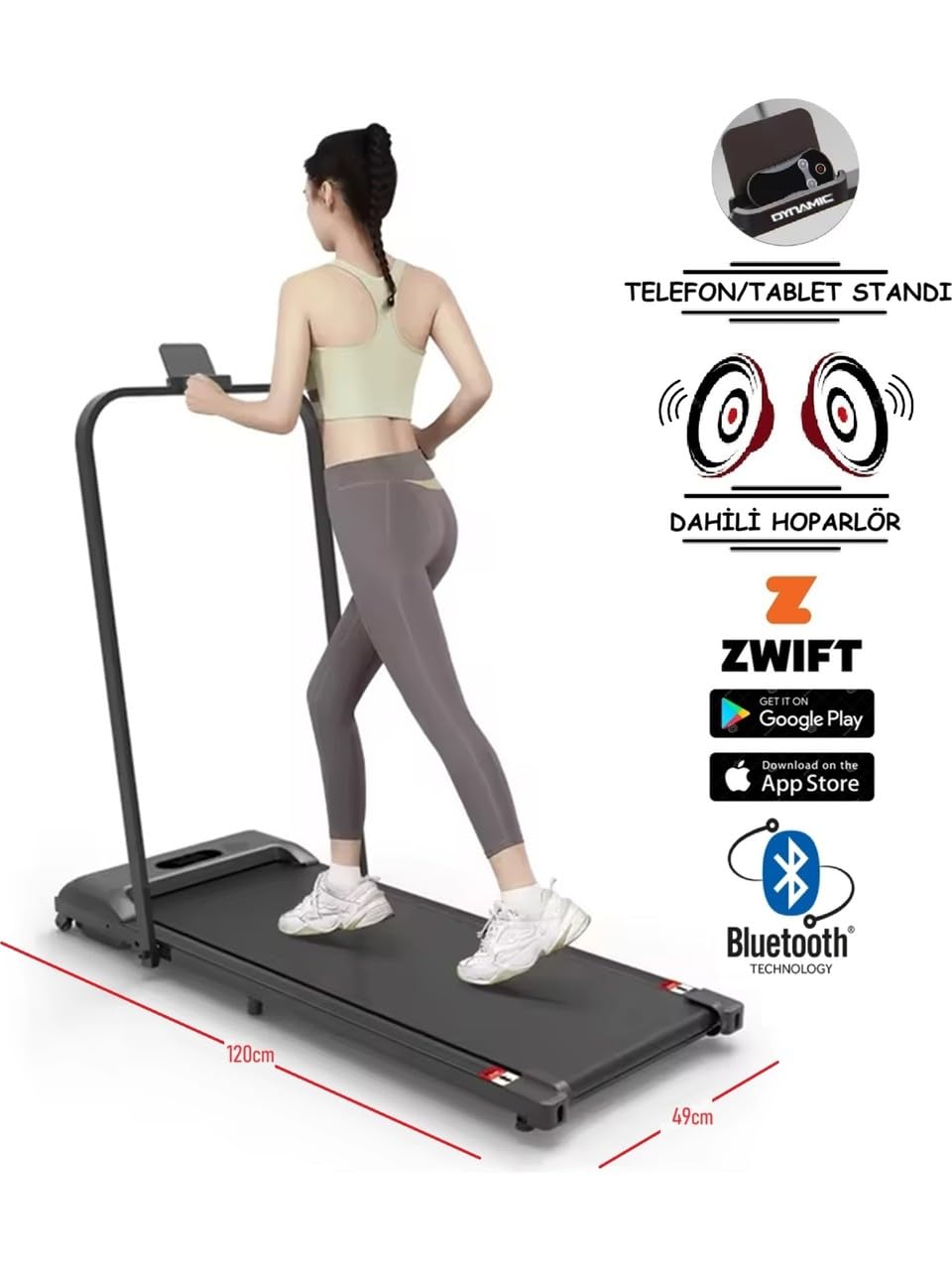
Obrázek 4.1: Dimensions of the Dynamic Walkfitpad T500 Trekking Band, showing its length of 120cm and width of 49cm, along with compatible fitness applications.
4.2 Skladování
The ultra-slim design of the Walkfitpad T500 allows for convenient storage. It can be easily stored under furniture such as a sofa or bed, or placed upright against a wall when not in use.

Obrázek 4.2: The Dynamic Walkfitpad T500 stored compactly under a sofa, demonstrating its ultra-slim design for easy storage.
5. Návod k obsluze
5.1 Zapnutí/vypnutí
- Připojte napájecí kabel do vhodné elektrické zásuvky.
- Attach the safety key to the designated slot on the trekking band's console and clip the other end to your clothing. The display will illuminate.
- To power off, remove the safety key and unplug the unit from the power outlet.
5.2 Používání dálkového ovladače
The trekking band is operated via the included remote control.
- Start/Stop: Press the 'Start' button to begin the walking belt movement. Press 'Stop' to pause or end your workout.
- Nastavení rychlosti: Use the '+' and '-' buttons to increase or decrease the walking speed. The speed range is 0-6.4 km/h.
5.3 Připojení Bluetooth a aplikace
The Walkfitpad T500 supports Bluetooth connectivity, allowing you to connect to compatible fitness applications and stream audio.
- Připojení aplikace: The trekking band is compatible with fitness apps such as Kinomap and Zwift. Download the respective app on your smartphone or tablet, enable Bluetooth, and follow the app's instructions to connect to your Walkfitpad T500.
- Streamování zvuku: Connect your device via Bluetooth to the trekking band's built-in speakers to enjoy music or audio during your workout.

Obrázek 5.1: Close-up of the Dynamic Walkfitpad T500 handlebar, featuring a built-in stand for a phone or tablet.
5.4 Zobrazení informací
The integrated LCD display shows key workout metrics:
- Rychlost: Aktuální rychlost chůze v km/h.
- Čas: Délka vašeho tréninku.
- Vzdálenost: Celková ujetá vzdálenost.
- Kalorie: Odhad spálených kalorií.
6. Údržba
Regular maintenance ensures the longevity and optimal performance of your trekking band.
6.1 Čištění
- Always unplug the trekking band before cleaning.
- Otřete konzoli a vnější povrchy měkkým hadříkemamp tkanina. Vyhněte se použití abrazivních čisticích prostředků nebo rozpouštědel.
- Keep the area around the trekking band clean and free of dust and debris.
6.2 Walking Belt Care
The Dynamic Walkfitpad T500 features a specialized non-lubricating, self-resin band system. This means no lubrication is required for the walking belt, simplifying maintenance.
- Inspect the walking belt regularly for any signs of wear or damage.
- Ensure the belt is centered and not rubbing against the sides of the frame. If adjustment is needed, refer to the troubleshooting section or contact customer support.
7. Řešení problémů
If you encounter any issues with your Dynamic Walkfitpad T500, please refer to the following common problems and solutions:
| Problém | Možná příčina | Řešení |
|---|---|---|
| Trekking band does not power on. | Power cord not connected, safety key not in place, power outlet issue. | Ensure power cord is securely plugged in. Verify safety key is fully inserted. Test the power outlet with another device. |
| Walking belt does not move. | Safety key not in place, 'Start' button not pressed, motor issue. | Ensure safety key is correctly placed. Press the 'Start' button on the remote. If the issue persists, contact customer support. |
| Dálkové ovládání nereaguje. | Low battery in remote, remote out of range, interference. | Replace the remote control battery. Ensure you are within effective range of the trekking band. Remove any obstructions between the remote and the unit. |
| Běžecký pás prokluzuje nebo váhá. | Belt tension too loose, user weight exceeds limit. | Refer to the belt adjustment instructions (if provided separately) or contact customer support. Ensure user weight is within the specified limit. |
If you cannot resolve the issue using the above table, please contact Dynamic customer support for further assistance.
8. Specifikace
Detailed technical specifications for the Dynamic Walkfitpad T500 Trekking Band:
| Funkce | Specifikace |
|---|---|
| Číslo modelu | 1DYKBWLKFTHB/V1 |
| Výkon motoru | 750W (Energy Saving System) / 1.25 HP |
| Rozsah rychlosti | 0 - 6.4 km/h |
| Pěší oblast | Rozměr 42 cm x 120 cm |
| Maximální hmotnost uživatele | 90 kg (Product Description) / 120 kg (Detailed Specifications) |
| Rozměry produktu (D x Š x V) | 120H x 49Š x 10.5V centimetrů |
| Hmotnost položky | 21.5 kg |
| Materiál | Kov |
| Zobrazit | LCD displej |
| Konektivita | Bluetooth (Kinomap, Zwift compatible) |
| Záruka | 2 roky |
| Speciální funkce | Non-lubricating self-resin band system |
9. Záruka a podpora
Your Dynamic Walkfitpad T500 Trekking Band comes with a 2-year warranty, ensuring peace of mind regarding manufacturing defects and performance.
9.1 Záruční krytí
The warranty covers defects in materials and workmanship under normal use for a period of two years from the date of purchase. Please retain your proof of purchase for warranty claims.
9.2 Technical Service and Spare Parts
Intersport provides comprehensive technical service and replacement parts for the Dynamic Walkfitpad T500. With a service network spanning over 100 points in 81 countries, you can expect reliable support.

Obrázek 9.1: Information about Intersport's technical service and spare parts network, highlighting 31 years of experience and service points in over 81 countries.
For warranty claims, technical assistance, or to inquire about spare parts, please contact Intersport customer service through their official channels.