
VicoSafe CG7
Uživatelská příručka k venkovní bezpečnostní kameře VicoHome CG7
Značka: VicoSafe | Model: CG7
1. Úvod
This manual provides comprehensive instructions for the installation, operation, and maintenance of your VicoHome CG7 Outdoor Security Camera. Please read this manual thoroughly before using the product to ensure proper functionality and safety.
The VicoHome CG7 is a wireless, battery-powered 3MP WiFi camera designed for outdoor security. It offers extended battery life, color night vision, and smart motion detection to provide reliable surveillance for your property.

Figure 1: VicoHome CG7 Outdoor Security Camera. This image shows the camera's main body, lens, and two adjustable antennas, mounted on a wall bracket.
2. Co je v krabici
Ověřte, zda jsou v balení přítomny všechny komponenty:
- 1 × VicoHome CG7 Outdoor Security Camera
- 1 × Nabíjecí kabel
- 1 × Mounting Kit & Screws
- 1 × Quick Start Guide (this manual serves as a detailed guide)
3. Průvodce nastavením
The VicoHome CG7 is designed for quick and easy setup without complex wiring. Follow these steps to get your camera operational.
3.1 Počáteční nabíjení
Before first use, fully charge the camera using the provided charging cable. The charging port is typically located on the back or bottom of the camera, often protected by a weather-resistant cover.
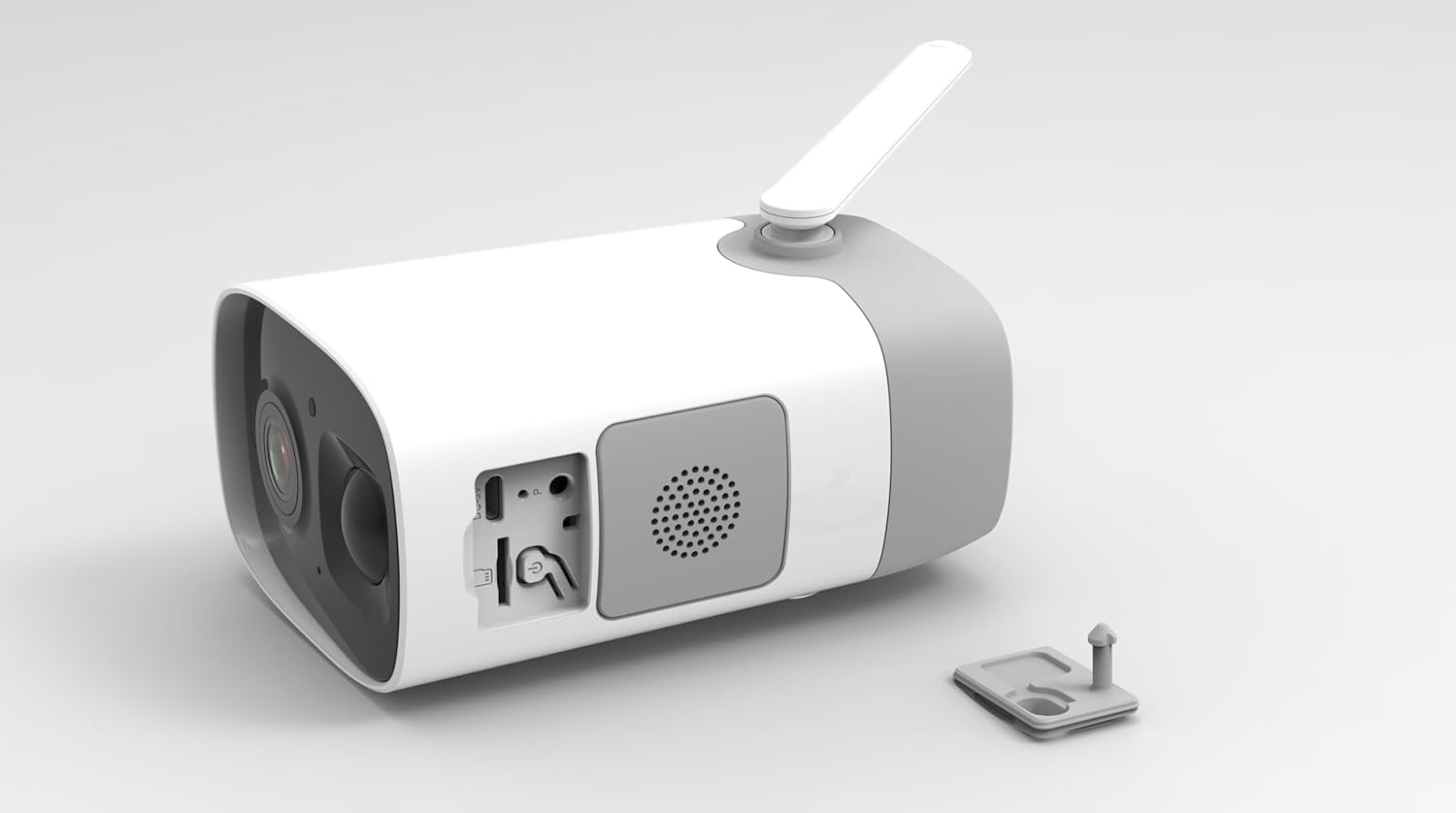
Obrázek 2: Zadní view of the VicoHome CG7 camera with the protective cover for the charging port and reset button open, revealing the USB port and a speaker grille.
3.2 Download and Install VicoHome App
Hledat "VicoHome" in your smartphone's app store (Google Play Store for Android or Apple App Store for iOS) and install the application. Create an account or log in if you already have one.
3.3 Párování kamery a připojení Wi-Fi
- Open the VicoHome app and tap "Add Device" or the "+" icon.
- Follow the on-screen instructions to power on your camera and put it into pairing mode. This usually involves pressing a reset button or power button for a few seconds.
- Vyberte svou síť Wi-Fi 2.4 GHz a zadejte heslo. Kamera nepodporuje Wi-Fi 5 GHz.
- The app will generate a QR code. Position your camera's lens to scan this QR code from your phone screen. A voice prompt from the camera will confirm successful pairing.
- Once connected, you can name your camera and complete the setup process in the app.
3.4 Montáž fotoaparátu
Vyberte si vhodné venkovní místo, které poskytuje požadované viewing angle and strong Wi-Fi signal. Use the included mounting kit and screws to securely attach the camera to a wall or other stable surface.

Obrázek 3: Spodní část view of the VicoHome CG7 camera, illustrating the screw holes for mounting the device securely.
4. Ovládání fotoaparátu
The VicoHome CG7 is operated primarily through the VicoHome mobile application, offering a range of features for effective home security.
4.1 Živě View a Nahrávání
Access the live feed of your camera anytime through the VicoHome app. The camera captures video in 3MP (2304×1296) resolution, ensuring clear and detailed footage. Recordings are triggered by motion detection and can be stored locally on a microSD card (not included) or in the cloud (subscription may be required).
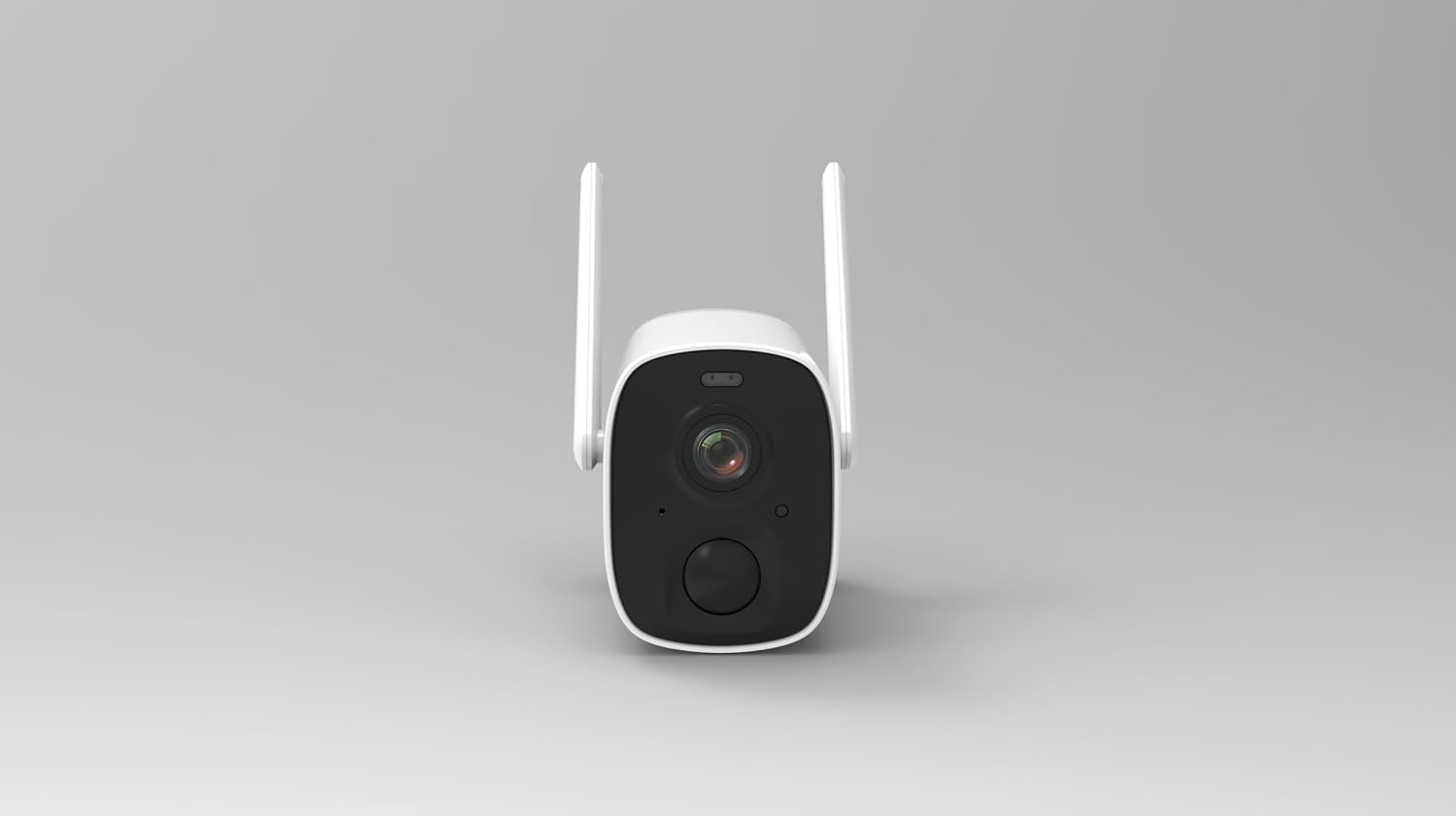
Obrázek 4: Přední strana view of the VicoHome CG7 camera, highlighting the main lens, infrared sensors, and motion detection sensor.
4.2 Režimy nočního vidění
The camera features dual night vision capabilities:
- Infrared (IR) Monochrome: Poskytuje jasné černobílé snímkytage in low-light conditions, maintaining stealth.
- Color LED Mode: Activates built-in LEDs to provide full-color night vision, enhancing detail and recognition up to 23ft.
4.3 Detekce pohybu a upozornění s umělou inteligencí
The VicoHome CG7 utilizes a real PIR sensor with intelligent AI detection to minimize false alarms. It can differentiate between people, vehicles, and packages. When motion is detected, you will receive instant notifications on your smartphone.
- Vlastní zóny: Nastavte konkrétní oblasti v záběru fotoaparátu view pro detekci pohybu.
- Nastavení citlivosti: Adjust the sensitivity of the motion sensor to suit your environment.
4.4 Obousměrný zvuk a siréna
Communicate with visitors or deter intruders using the built-in speaker and microphone. You can speak directly through the camera via the VicoHome app. The camera also features a siren that can be activated manually or automatically upon detection to scare off unwanted guests.
4.5 Voděodolná konstrukce
With an IP65 weatherproof rating, the VicoHome CG7 is designed to withstand various outdoor conditions, including rain, heat, and snow, ensuring reliable performance year-round.
5. Údržba
Proper maintenance ensures the longevity and optimal performance of your VicoHome CG7 camera.
- Nabíjení baterie: Recharge the camera battery when prompted by the app or when the battery level is low. The 8000mAh battery can last up to 8 months on a single charge under typical usage.
- Čištění: Pravidelně čistěte objektiv a tělo fotoaparátu měkkým hadříkemamp hadříkem odstraňte prach, nečistoty nebo skvrny od vody, které by mohly ovlivnit ostrost obrazu. Nepoužívejte agresivní chemikálie.
- Aktualizace firmwaru: Keep the camera's firmware updated through the VicoHome app. Updates often include performance improvements, new features, and security enhancements.
- Wi-Fi signál: Ensure the camera maintains a strong 2.4GHz Wi-Fi signal for consistent performance. Relocate the camera or Wi-Fi router if signal strength is poor.
6. Řešení problémů
If you encounter issues with your VicoHome CG7 camera, refer to the following common problems and solutions:
| Problém | Možná příčina / řešení |
|---|---|
| Kamera se nezapíná | Battery is depleted. Charge the camera fully. Ensure the charging cable is properly connected. |
| Nelze se připojit k Wi-Fi |
|
| Špatná kvalita obrazu |
|
| Detekce pohybu nefunguje nebo je příliš mnoho falešných poplachů |
|
| Nefunguje obousměrný zvuk |
|
If the problem persists, please contact VicoSafe customer support for further assistance.
7. Technické specifikace
| Funkce | Detail |
|---|---|
| Název modelu | CG7 Outdoor Camera Wireless |
| Značka | VicoSafe |
| Vnitřní/venkovní použití | Venkovní |
| Zdroj napájení | Battery Powered (8000mAh, up to 8 months) |
| Protokol připojení | Wi-Fi (pouze 2.4 GHz) |
| Rozlišení záznamu videa | 3MP (2304×1296p) |
| Pole View | Širokoúhlý objektiv 110° |
| Noční vidění | IR Monochrome + Color LED Mode (up to 23ft) |
| Detekce pohybu | Smart PIR Sensor (detects people, vehicles, packages) |
| Zvuk | Two-Way Audio, Built-in Siren |
| Hodnocení odolnosti vůči povětrnostním vlivům | IP65 |
| Kompatibilní zařízení | Smartphone (via VicoHome App), Amazon Alexa, Google Assistant |
| Typ montáže | Držák na zeď |
| Rozměry produktu (D x Š x V) | 3.2 x 4.7 x 3.2 palce |
| Hmotnost položky | 2.2 libry |
| Jsou vyžadovány baterie | 1 12V baterie (součástí balení) |
| Formát záznamu videa | MP4 |
8. Záruka a podpora
For detailed warranty information, technical support, and customer service, please refer to the official VicoSafe website or the specific warranty card included with your product packaging. You can also find frequently asked questions and troubleshooting tips on the VicoHome app or webmísto.
Výrobce: Vicohome
Ask a question about this manual
Ask about setup, troubleshooting, compatibility, parts, safety, or missing instructions. Manuals+ will review the question and use this page’s manual context to help answer it.