
Oakcastle IR200
Uživatelská příručka k internetovému rádiu Oakcastle IR200
Model: IR200
1. Úvod
Thank you for choosing the Oakcastle IR200 Internet Radio. This manual provides essential information for the safe and efficient operation of your device. Please read it thoroughly before use and retain it for future reference.
The Oakcastle IR200 is a versatile audio system offering multiple listening options, including Internet Radio, DAB+, FM, Bluetooth 5.3, and AUX input. It features a color display, remote control, and podcast support for a comprehensive audio experience.
2. Obsah balení
Opatrně vybalte krabici a ujistěte se, že jsou všechny níže uvedené položky přítomny a v dobrém stavu:
- Oakcastle IR200 Internet Radio Unit
- Napájecí kabel
- Dálkové ovládání
- Uživatelská příručka (tento dokument)
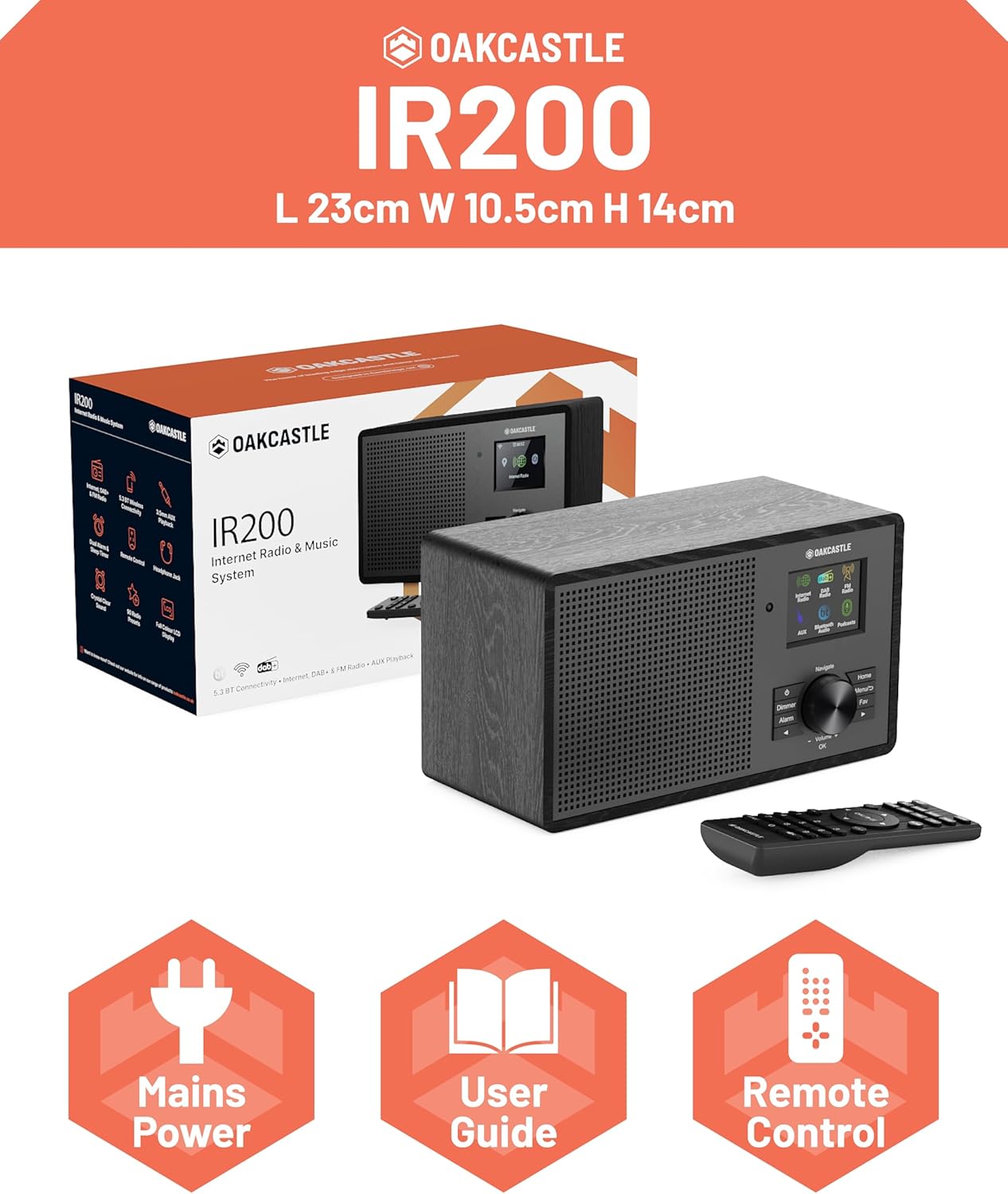
Image 2.1: Contents of the Oakcastle IR200 package, including the radio unit, its box, power cable, remote control, and user manual.
3. Konec produktuview
Familiarize yourself with the main components and controls of your Oakcastle IR200 radio.
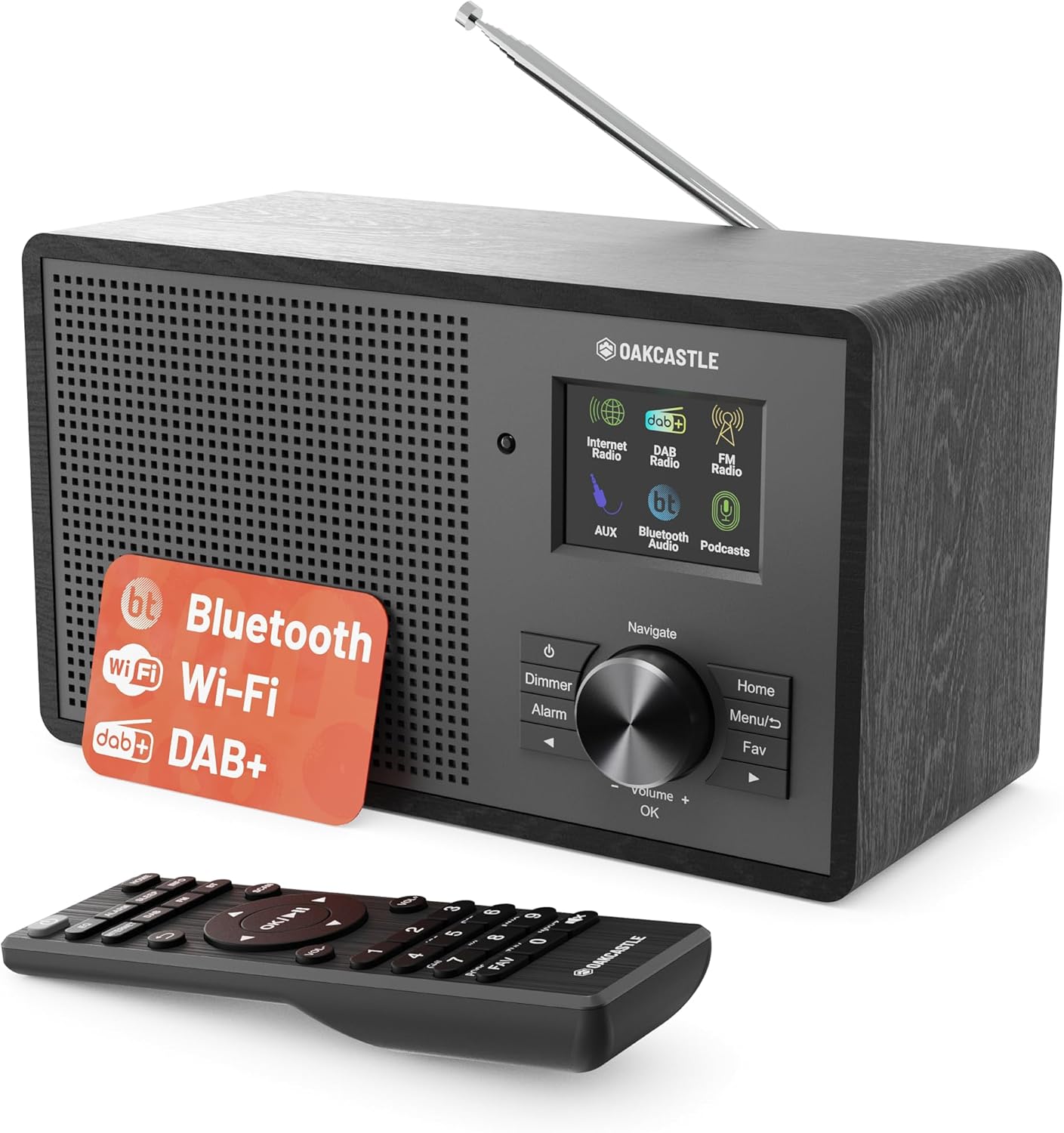
Obrázek 3.1: Přední strana view of the Oakcastle IR200 radio, showcasing the display, control knob, buttons, and the included remote control.
3.1 Ovládací prvky na předním panelu
- Displej: Zobrazuje informace o stanici, čas a možnosti nabídky.
- Navigate/Volume/OK Knob: Otáčením můžete procházet nabídky nebo upravovat hlasitost; stisknutím potvrdíte výběr.
- Vypínač: Zapíná/vypíná jednotku nebo ji přepíná do pohotovostního režimu.
- Tlačítko stmívače: Upravuje jas displeje.
- Tlačítko budíku: Přístup k nastavení budíku.
- Tlačítko Domů: Návrat do hlavní nabídky.
- Tlačítko nabídky: Accesses mode-specific menus.
- Tlačítko Oblíbené: Accesses favorite station presets.
3.2 Připojení zadního panelu

Obrázek 3.2: Zadní strana view of the Oakcastle IR200, highlighting the headphone output and AUX input ports.
- Teleskopická anténa: Pro příjem DAB+ a FM.
- Vstup AUX: Připojte externí audio zařízení.
- Sluchátkový výstup: Připojte sluchátka pro soukromý poslech.
- DC IN: Připojení napájecího adaptéru.
4. Počáteční nastavení
4.1 Připojení napájení
- Insert the power cable into the DC IN port on the rear of the radio.
- Zapojte druhý konec napájecího kabelu do zásuvky ve zdi.
- Stiskněte tlačítko napájení na předním panelu nebo na dálkovém ovladači pro zapnutí rádia.
4.2 Nastavení antény
For optimal DAB+ and FM reception, fully extend the telescopic antenna located at the rear of the unit.
4.3 Network Connection (for Internet Radio)
- Upon first power-on, the radio will guide you through the network setup.
- Select "Network Wizard" or "Wi-Fi Setup" from the menu.
- Rádio prohledá dostupné sítě Wi-Fi. Vyberte svou síť ze seznamu.
- Enter your Wi-Fi password using the navigation knob and OK button.
- Po připojení se na rádiu zobrazí potvrzovací zpráva.
5. Provozní režimy
The Oakcastle IR200 offers several listening modes. Press the "Home" button to access the main menu and select your desired mode.
5.1 Internetové rádio
Access thousands of global radio stations via your Wi-Fi connection.

Image 5.1: The radio's display screen in Internet Radio mode, showing station information.
- V hlavní nabídce vyberte možnost „Internetové rádio“.
- You can browse stations by location, genre, or search by name.
- Rotate the Navigate knob to scroll through options and press OK to select.
- To save a station as a favorite, press the "Fav" button during playback.
5.2 DAB+ rádio
Užijte si vysoce kvalitní digitální rozhlasové vysílání.

Image 5.2: The radio's display screen in DAB+ Radio mode, showing the current station.
- V hlavní nabídce vyberte „DAB+ Rádio“.
- Rádio automaticky vyhledá dostupné stanice DAB+.
- Use the Navigate knob to select a station from the list.
- To save a station as a favorite, press the "Fav" button during playback.
5.3 FM rádio
Nalaďte si tradiční analogové FM vysílání.
- V hlavní nabídce vyberte „FM rádio“.
- To auto-scan for stations, press and hold the OK button or use the scan function via the menu.
- To manually tune, rotate the Navigate knob.
- To save a station as a favorite, press the "Fav" button during playback.
5.4 Připojení Bluetooth
Streamujte zvuk bezdrátově ze zařízení s podporou Bluetooth.

Image 5.3: The radio's display screen in Bluetooth mode, indicating readiness for pairing.
- From the main menu, select "Bluetooth". The radio will enter pairing mode.
- On your external device (e.g., smartphone), enable Bluetooth and search for "Oakcastle IR200".
- Select "Oakcastle IR200" to pair. Once connected, you can stream audio.
5.5 Vstup AUX
Externí zdroje zvuku připojte pomocí 3.5mm audio kabelu.
- Connect one end of a 3.5mm audio cable to the AUX IN port on the rear of the radio.
- Druhý konec připojte ke konektoru pro sluchátka nebo audio výstupu vašeho externího zařízení.
- From the main menu, select "AUX".
- Ovládejte přehrávání z externího zařízení.
5.6 podcastů
Browse and listen to a wide range of podcasts.
- From the main menu, select "Podcasts".
- Browse podcasts by category or search for specific titles.
- Select a podcast to start listening.
6. Nastavení a funkce
6.1 Nastavení systému
Access general system settings via the main menu to configure time, language, display, and more.
- Čas/Datum: Set time format, synchronize time.
- Jazyk: Select your preferred language for the menu.
- Zobrazit: Adjust backlight, color scheme.
- Síť: Reconfigure Wi-Fi settings.
- Aktualizace softwaru: Zkontrolujte a nainstalujte aktualizace firmwaru.
6.2 Ekvalizér (EQ)
Customize the audio output to your preference using the equalizer settings, accessible via the remote control or system menu.
6.3 předvoleb
The radio supports over 90 presets for your favorite Internet, DAB+, and FM stations. To recall a preset, press the "Fav" button and select from the list.
6.4 Alarmy
Set alarms to wake up to your favorite radio station or a buzzer sound. Access alarm settings via the "Alarm" button on the front panel or remote.
7. Dálkové ovládání
The included remote control provides convenient access to all radio functions from a distance.
Ensure batteries are correctly inserted. Point the remote control towards the front of the radio for optimal response.
7.1 Funkce dálkového ovládání
- Moc: On/Off/Standby.
- Hlasitost +/-: Upravte úroveň hlasitosti.
- Navigační tlačítka (nahoru/dolů/vlevo/vpravo): Navigace v nabídkách.
- OK: Potvrďte výběr.
- Mode Buttons (Internet, DAB, FM, Bluetooth, AUX): Přepínání mezi režimy.
- Přednastavená tlačítka (1-90+): Directly select saved favorite stations.
- EQ: Přístup k nastavení ekvalizéru.
- Menu: Access mode-specific menus.
- Oblíbené: Access favorite station list.
8. Údržba
8.1 Čištění
To clean the radio, use a soft, dry cloth. Do not use abrasive cleaners, waxes, or solvents as these may damage the finish.
8.2 Obecná péče
- Chraňte jednotku před přímým slunečním zářením, zdroji tepla a vlhkostí.
- Zabraňte pádu jednotky nebo jejímu vystavení silným nárazům.
- Zajistěte řádné větrání kolem jednotky.
9. Řešení problémů
| Problém | Možná příčina | Řešení |
|---|---|---|
| Žádná síla | Napájecí kabel není připojen; zásuvka není aktivní. | Check power cable connection; try a different wall socket. |
| Žádný zvuk | Příliš nízká hlasitost; Aktivováno ztlumení; Vybrán nesprávný zdroj. | Increase volume; Check mute status; Select correct input mode. |
| Internetové rádio se nepřipojuje | Incorrect Wi-Fi password; Weak Wi-Fi signal; Router issue. | Re-enter Wi-Fi password; Move radio closer to router; Restart router. |
| Špatný příjem DAB+/FM | Anténa není vysunutá; Oblast se slabým signálem. | Fully extend antenna; Reposition radio for better signal. |
| Bluetooth není párování | Radio not in pairing mode; Device too far; Device already paired. | Ensure radio is in Bluetooth mode; Move device closer; Unpair from other devices. |
10. Specifikace
| Funkce | Detail |
|---|---|
| Značka | Oakcastle |
| Model | IR200 |
| Barva | Černý |
| Technologie připojení | Wi-Fi, Bluetooth 5.3, AUX |
| Technologie ladění | Internetové rádio, DAB+, FM |
| Speciální funkce | Bluetooth, EQ, Podcasts, Internet Radio, Remote Control |
| Zdroj napájení | Electric Cable (Mains) |
| Rozměry produktu (V x Š x H) | 14 cm x 10.5 cm x 23 cm (přibližně) |
| Hmotnost produktu | 0.94 kg |
| Kompatibilní zařízení | MP3 přehrávač, chytrý telefon, tablet |
11. Záruka a podpora
11.1 Informace o záruce
The Oakcastle IR200 comes with a standard warranty. An extended 3-year warranty is available upon product registration on the manufacturer's website. Please refer to the warranty card included in your package or visit the official Oakcastle webstránky pro podrobnosti.
11.2 Zákaznická podpora
For technical assistance, troubleshooting, or further inquiries, please contact Oakcastle customer support. Contact details can typically be found on the official Oakcastle webna webu nebo na záručním listu.
Ask a question about this manual
Ask about setup, troubleshooting, compatibility, parts, safety, or missing instructions. Manuals+ will review the question and use this page’s manual context to help answer it.