
1. Úvod
The FLSUN S1 Pro is an advanced FDM Delta 3D printer designed for high-speed and high-precision additive manufacturing. It features an ultra-fast printing speed of up to 1200mm/s and an acceleration of 40,000mm/s², significantly reducing print times. Equipped with Klipper firmware, a 7-inch smart touch screen, and a 350℃ all-metal hotend, the S1 Pro supports a wide range of filaments, including high-performance engineering materials. Its large build volume of Φ320*320*430 mm³ accommodates substantial projects. This manual provides essential information for setting up, operating, maintaining, and troubleshooting your FLSUN S1 Pro 3D Printer.
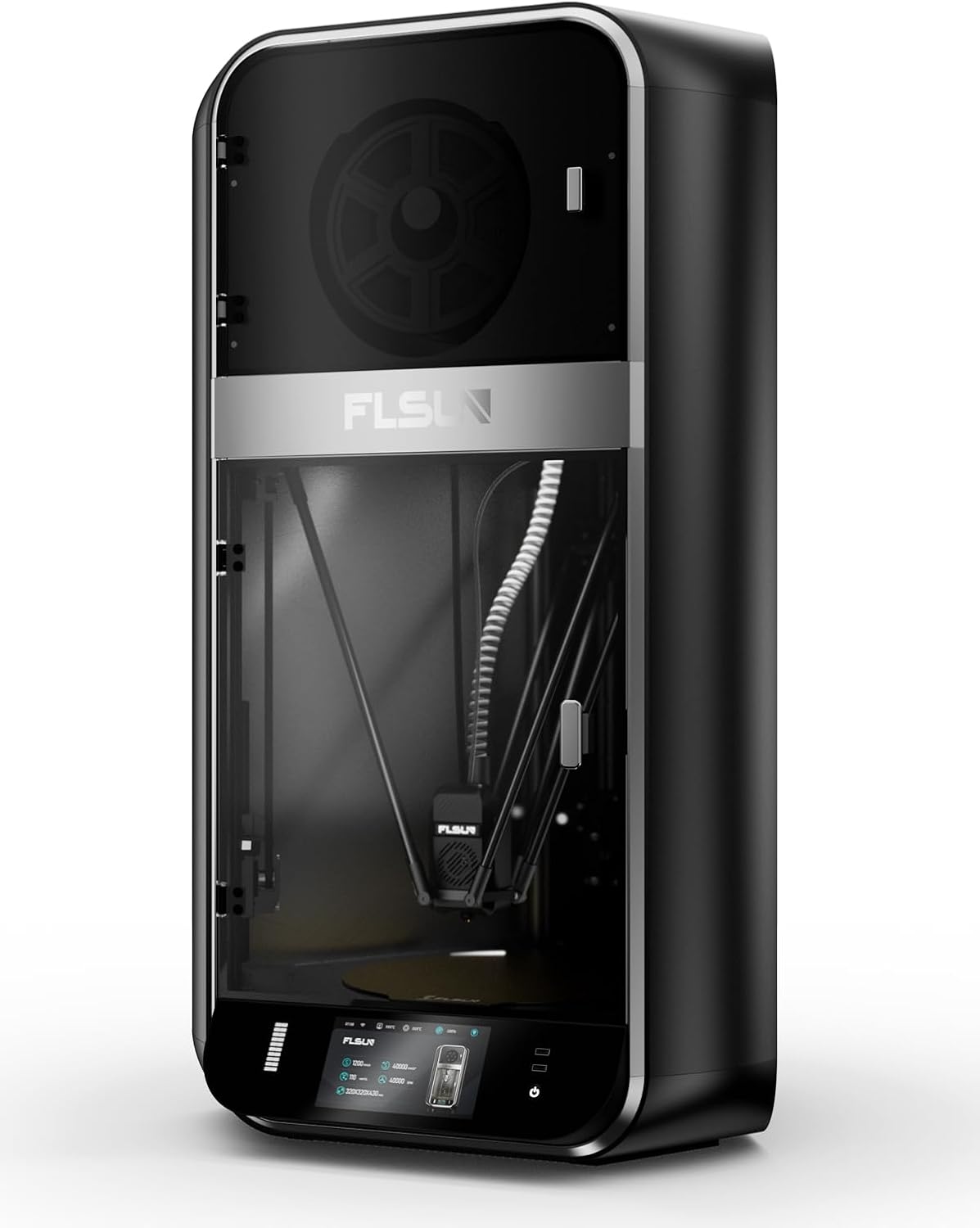
Obrázek 1.1: Přední strana view of the FLSUN S1 Pro 3D Printer, showcasing its sleek design and enclosed build chamber.
2. Co je v krabici
Po vybalení se prosím ujistěte, že jsou přítomny všechny komponenty:
- FLSUN S1 Pro 3D Printer (main unit)
- Sušička na vlákna
- Napájecí kabel
- USB kabel
- Sada nářadí (různé klíče, šroubováky atd.)
- Sample vlákno
- Uživatelská příručka (tento dokument)
- Rychlý průvodce

Image 2.1: The FLSUN S1 Pro 3D Printer and its included accessories, demonstrating its 95% pre-assembled state.
3. Pokyny k nastavení
The FLSUN S1 Pro is designed for quick setup, being 95% pre-assembled. The initial setup typically takes less than 10 minutes.
- Rozbalení: Opatrně vyjměte tiskárnu a veškeré příslušenství z obalu.
- Umístění: Umístěte tiskárnu na stabilní, rovný povrch v dobře větraném prostoru.
- Shromáždění: Install the door and glass panels as per the instructions in the detailed Instalační manuál (PDF).
- Připojení napájení: Připojte napájecí kabel k tiskárně a do vhodné elektrické zásuvky.
- Počáteční zapnutí: Turn on the printer using the main power switch. The device will perform self-checks to ensure stability.
- Automatické vyrovnání: The printer features automatic leveling. Follow the on-screen prompts on the 7-inch touch screen to initiate and complete the leveling process. This ensures optimal print bed calibration.
- Zatížení vlákna: Load your desired filament into the filament dryer box and then guide it into the extruder as instructed on the display.
- Internetové připojení: Connect the printer to your local Wi-Fi network via the touch screen interface for remote monitoring and control.
Podrobné vizuální pokyny naleznete v oficiálních Instalační manuál (PDF).
4. Návod k obsluze
4.1 Uživatelské rozhraní a ovládání
The FLSUN S1 Pro utilizes a 7-inch Klipper firmware smart touch screen for intuitive control. The visual operation interface allows for smart adjustment and monitoring directly from the printer. Additionally, with advanced Microtac radar control and Wi-Fi connectivity, you can monitor and control your printer in real-time from mobile phones and PCs.

Image 4.1: Remote control and monitoring capabilities via the FLSUN World app on a mobile device.
- Dálkové ovládání: Manage your printers remotely from anywhere.
- Tap it, Print it, Like it: Start printing tasks with a quick tap on the FLSUN World app, utilizing cloud storage for G-code files.
- Monitor in Pocket: Real-time checking of your printing progress.
- Smart Reminder: Receive notifications when print errors occur.
4.2 Proces tisku
- Příprava modelu: Use compatible slicing software (FLSUN Slicer V2.0 or other slicers like PrusaSlicer, Cura) to prepare your 3D model. Ensure settings are optimized for the S1 Pro's capabilities, including its high speed and acceleration.
- Převod File: Přeneste rozřezaný G-kód file to the printer via USB or Wi-Fi (FLSUN World app).
- Zahájit tisk: Vyberte file on the touch screen or through the app and initiate the print.
- Sledování: Utilize the built-in camera for real-time monitoring and time-lapse recording. The printer's low noise level (55dB) ensures a quiet operating environment.
- Power-Off Resume: In case of power interruption, the printer supports power-off continuous printing, resuming from where it left off. Vibration compensation further ensures print quality.

Image 4.2: Illustration of the FLSUN S1 Pro's epic speed capabilities: 1200mm/s max printing speed, 40000mm/s² max acceleration, and 110mm³/s peak flow rate.

Image 4.3: Key features for smooth and consistent printing, including AI-powered functions, auto-leveling, spaghetti detection, and perfect first layer adhesion.

Image 4.4: Advanced features like the Air Filter, Filament Dryer, Built-in camera, Intelligent Zoned Heating, and 16GB EMMC storage.
5. Údržba
Regular maintenance ensures the longevity and optimal performance of your FLSUN S1 Pro 3D Printer.
- Čištění: Regularly clean the print bed, nozzle, and internal components to prevent debris buildup. Use a soft cloth and appropriate cleaning solutions.
- Vzduchový filtr: The printer is equipped with a combined HEPA + activated carbon air filter. Check and replace the filter periodically as needed to maintain air quality and prevent odors.
- Filament Dryer Box: Ensure the filament dryer box is functioning correctly to keep your filament dry, which is crucial for print quality.
- Kontrola trysek: Periodically inspect the 0.4mm hardened steel nozzle for wear or clogs. Replace if necessary. The all-metal hot end can reach up to 350°C, supporting various high-temperature filaments.
- Mazání: Refer to the detailed manual for any lubrication requirements for moving parts.

Image 5.1: Diagram illustrating the 350°C hotend, 50°C chamber, and 120°C hot bed for optimal material handling.
6. Řešení problémů
Tato část se zabývá běžnými problémy, se kterými se můžete setkat během provozu.
| Problém | Možná příčina | Řešení |
|---|---|---|
| Tisk se nelepí na podložku | Improper bed leveling, dirty print surface, incorrect bed temperature. | Re-run auto-leveling. Clean the print surface with isopropyl alcohol. Adjust hot bed temperature according to filament type (Max 120°C). |
| Ucpávání filamentu | Dust in filament, incorrect hotend temperature, worn nozzle, heat creep. | Ensure filament is dry (use filament dryer). Verify hotend temperature (Max 350°C). Clean or replace nozzle. Check cooling fan operation. |
| "Spaghetti" Prints | Poor bed adhesion, model detaching, extrusion issues. | The S1 Pro features Detekce špaget. Ensure proper bed adhesion. Monitor print progress via the built-in camera. |
| Tiskárna nereaguje | Software glitch, loose connection, power issue. | Restart the printer. Check all cable connections. Ensure stable power supply. |
| Špatná kvalita tisku | Incorrect slicing settings, worn nozzle, vibration, wet filament. | Optimize slicing parameters. Replace nozzle if worn. The printer has Kompenzace vibrací; ensure it's active. Use filament dryer. |

Image 6.1: Features like the 55dB quiet fan and Power Off Resume Print (UPS) contribute to a reliable printing experience.
7. Technické specifikace
| Kategorie | Specifikace | Podrobnosti |
|---|---|---|
| Generál | Maximální rychlost tisku | 1200 mm/s |
| Maximální zrychlení | 40000 mm/s² | |
| Maximální průtok | 110 mm³/s | |
| Build Volume | Φ320*320*430 mm³ (Maximum height of the cylinder: 383mm) | |
| Komora | ZAVŘENO | |
| Úroveň hluku | 55 dB | |
| Nástrojová hlava | Tryska | 0.4mm Hardened Steel Nozzle (supports various nozzle sizes) |
| Max Hot End Temp | 350℃ | |
| Průměr vlákna | 1.75 mm | |
| Vlákno | Podporované vlákno | Ideal: PLA, PETG, TPU. Satisfactory: ABS, ASA, PA, PC, PET. Capable: Carbon/Glass Fiber Reinforced PLA, PPS-CF, PPA-CF/GF. |
| Active Heating Dry Box | Ano | |
| Detekce ucpání vlákna | Ano | |
| Heatbed | Postavte talíř | Texturovaná PEI deska |
| Max Build Plate Temp | 120℃ | |
| Vytápění chytré zóny | Inner Circle Ø220mm, Outer Ring 220-320mm | |
| Elektronika | Zobrazit | 7" Color Touch Screen |
| Skladování | 16GB EMMC, 32GB USB Flash | |
| Napájení | 110-240V, 50/60Hz | |
| Spotřeba energie v zapnutém režimu | 400 wattů | |
| Software | Upgrade firmwaru | OTA (Over-The-Air) |
| Software pro krájení | FLSUN Slicer V2.0, Other Slicers | |
| Podporovaný OS | MacOS, Windows | |
| Vlastnosti | Monitorovací kamera | Realtime, Timelapse |
| Detekce vlákna | Ano | |
| Kompenzace vibrací | Ano | |
| Debris Detection | Ano | |
| Detekce špaget | Ano | |
| Screen Auto Sleep | Ano | |
| Printer Auto Power Off | Ano | |
| Automatické vyrovnávání | Ano | |
| Obnovení ztráty energie | Yes (Z lift, Backup Battery) | |
| Vzduchový filtr | HEPA + Activated Carbon | |
| Fyzické rozměry | Rozměry produktu (D x Š x V) | 23.62"H x 34.25"Š x 9.45"V (přibližně 600 mm x 870 mm x 240 mm) |
| Physical Dimension (Printer) | 550 * 596 * 1030 mm | |
| Hmotnost položky | 113 libry (přibližně 51.2 kg) | |
| Barva | Černý |

Image 7.1: Comprehensive technical specifications for the FLSUN S1 Pro 3D Printer.
8. Záruka a podpora
FLSUN is committed to providing reliable products and excellent customer service.
- Vrácení: The product is eligible for 30-day easy returns. Please refer to the retailer's return policy for specific details.
- Zákaznická podpora: For technical assistance, troubleshooting, or warranty inquiries, please contact FLSUN Customer Support. You can often find support resources and contact information on the official FLSUN webwebu nebo prostřednictvím prodejce, u kterého byl produkt zakoupen.
- Plány ochrany: Extended protection plans, such as a 4-Year Protection Plan, may be available for purchase separately to provide additional coverage beyond the standard warranty.
- Online zdroje: Navštivte FLSUN Store on Amazon pro další informace o produktu, časté dotazy a podporu.