
1. Konec produktuview
The ATTACK SHARK X8SE is a high-performance wireless gaming mouse designed for precision and versatility. It features tri-mode connectivity, an advanced optical sensor, and a lightweight ergonomic design for extended use.
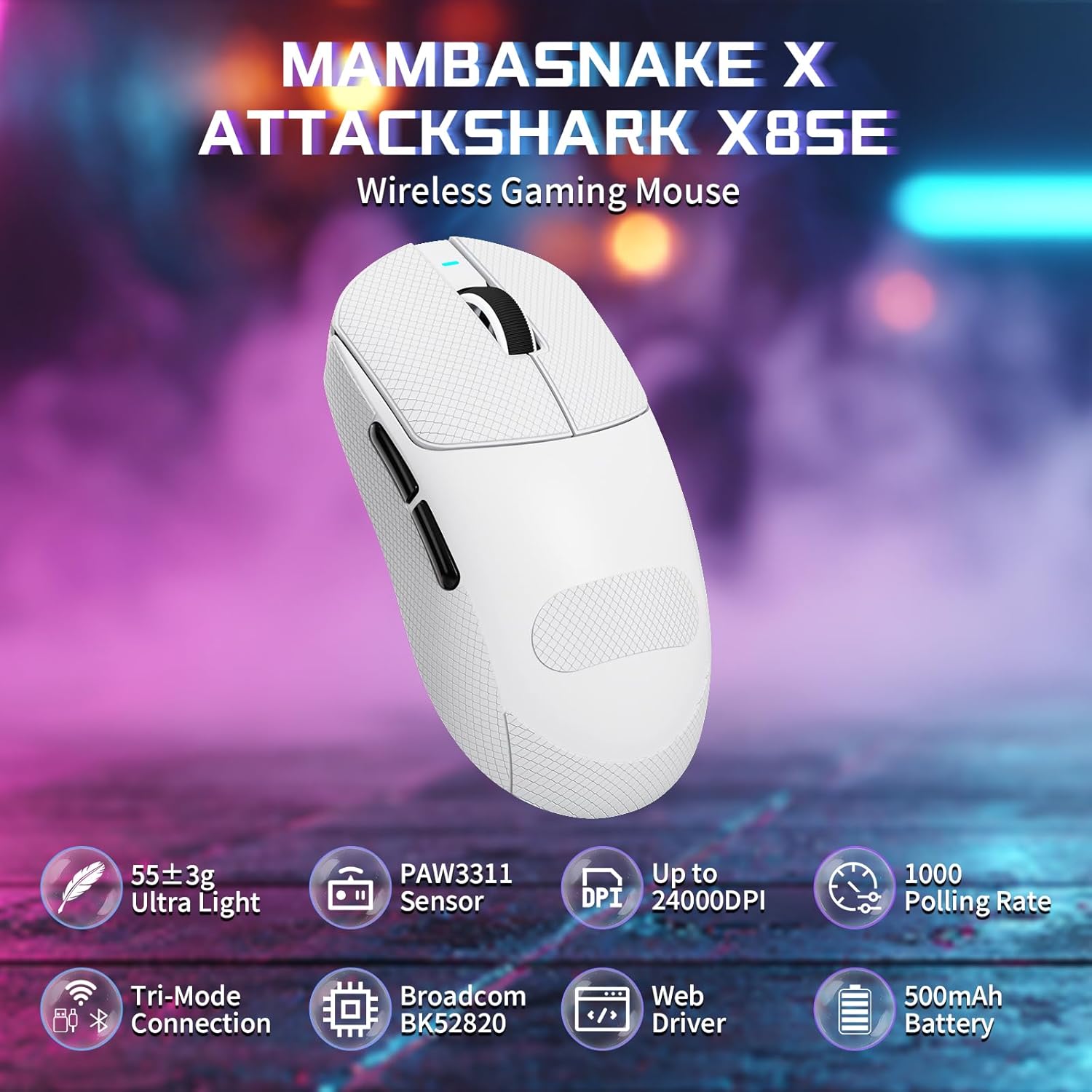
Figure 1: ATTACK SHARK X8SE Wireless Gaming Mouse highlighting ultra-light design, PAW3311 sensor, adjustable DPI, 1000Hz polling rate, tri-mode connection, Broadcom BK52820 chip, web driver, and 500mAh battery.
2. Obsah balení
- ATTACK SHARK X8SE Wireless Gaming Mouse
- Nabíjecí/datový kabel USB-C
- 2.4G USB přijímač
- Griptape (pre-applied or included separately)
- Návod k použití
3. Nastavení
3.1 Počáteční nabíjení
Before first use, connect the mouse to a USB-A port on your computer using the provided USB-C cable to ensure it is fully charged. The mouse can be used in wired mode while charging.
3.2 Režimy připojení
The X8SE mouse supports three connection modes: 2.4GHz Wireless, Bluetooth, and USB-C Wired. A switch on the bottom of the mouse allows you to select the desired mode.
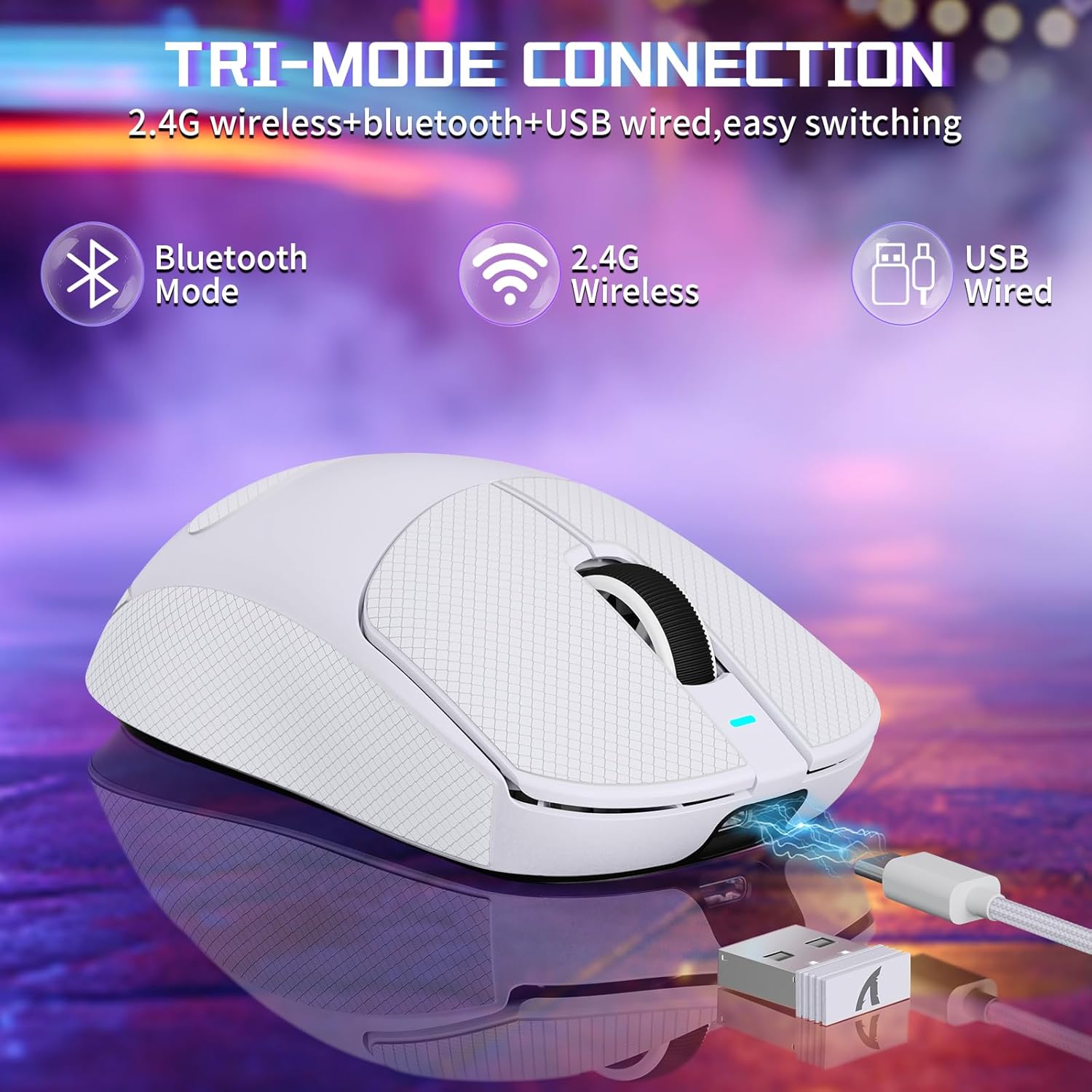
Figure 2: Tri-mode connection options including Bluetooth, 2.4G Wireless, and USB Wired.
Bezdrátový režim 3.2.1 2.4 GHz
- Vyhledejte 2.4G USB přijímač uložený v přihrádce na spodní straně myši.
- Zapojte USB přijímač do volného portu USB-A na vašem počítači.
- Přepněte přepínač režimů na spodní straně myši do polohy „2.4 G“.
- Myš by se měla automaticky připojit k počítači.
3.2.2 Režim Bluetooth
- Switch the mode selector on the bottom of the mouse to the 'BT' position.
- V počítači nebo zařízení přejděte do nastavení Bluetooth a povolte Bluetooth.
- Hledat new devices and select 'ATTACK SHARK X8SE' to pair.
3.2.3 Drátový režim USB-C
- Connect one end of the provided USB-C cable to the mouse and the other end to a USB-A port on your computer.
- Myš se automaticky přepne do kabelového režimu a začne se nabíjet.
3.3 Instalace ovladače
The ATTACK SHARK X8SE utilizes an intelligent cloud-based driver for customization. This driver typically auto-detects your system. For advanced settings and customization, visit the official ATTACK SHARK website to download the latest software if not automatically prompted.
4. Návod k obsluze
4.1 Funkce tlačítek
The X8SE mouse features 5 programmable buttons and a DPI switch.
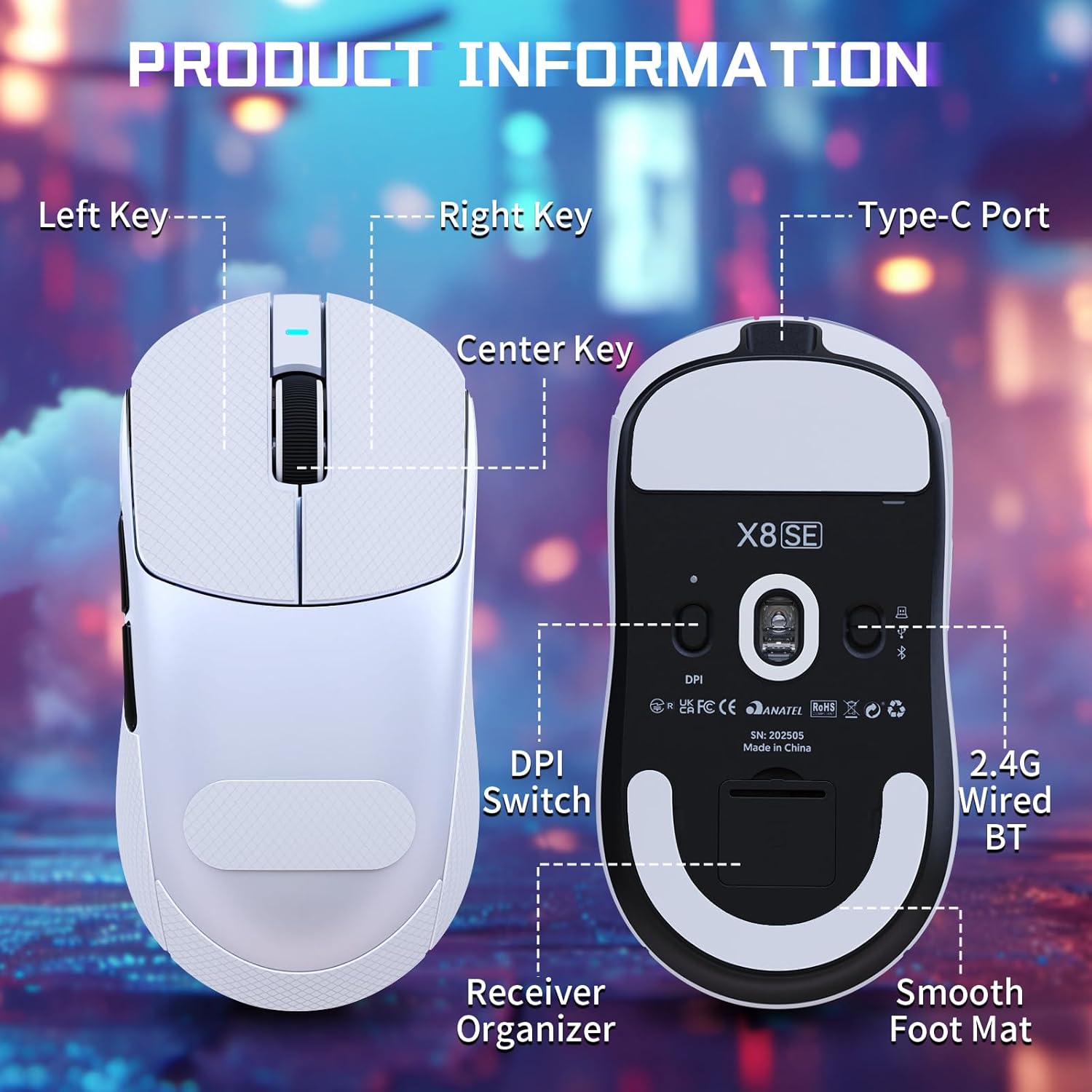
Figure 3: Product information diagram showing Left Key, Right Key, Center Key (scroll wheel), Type-C Port, Front Side Key, Back Side Key, DPI Switch, Receiver Organizer, and Smooth Foot Mat.
- Levé tlačítko: Primární funkce kliknutí.
- Pravý klíč: Funkce sekundárního kliknutí.
- Center Key (Scroll Wheel): Posun nahoru/dolů, kliknutí prostředním tlačítkem myši.
- Klíč na přední straně: Default function (programmable).
- Back Side Key: Default function (programmable).
- DPI Switch (bottom): Cykluje mezi nastaveními DPI.
4.2 Nastavení DPI
The mouse is equipped with a PixArt PAW3311 optical sensor, offering up to 25,000 DPI. You can adjust the DPI sensitivity using the dedicated DPI switch on the bottom of the mouse. There are 6 adjustable DPI levels:
- 800 DPI
- 1600 DPI
- 2400 DPI
- 3200 DPI
- 8000 DPI
- 25000 DPI

Figure 4: Visual representation of adjustable DPI levels (800-25000) and polling rates (125Hz-1000Hz) with corresponding indicator lights.
4.3 Úprava frekvence dotazování
The 2.4G wireless mode supports a 1000Hz polling rate for esports-level responsiveness. Polling rates can be adjusted via the cloud driver software to 125Hz, 250Hz, 500Hz, or 1000Hz.
NIKDY Přizpůsobení
Utilize the intelligent cloud driver software to fully customize your mouse settings. This includes:
- Remapping button functions.
- Adjusting DPI levels and sensitivity.
- Setting polling rates.
- Recording and assigning macros.

Figure 5: The cloud driver interface for customizing mouse settings, including button assignments, DPI, and polling rate.
4.5 Životnost baterie
The built-in 500mAh battery provides up to 65 hours of continuous use. Battery status can typically be monitored via the driver software or system indicators.

Figure 6: The 500mAh large capacity battery ensures extended usage.
4.6 Ergonomický design
Weighing approximately 55g, the X8SE features an optimized symmetrical shape suitable for medium to large hands, promoting comfort and control during long sessions.

Figure 7: Dimensions of the X8SE mouse (125mm length, 63mm width, 39.7mm height) and its ergonomic design for larger hands and symmetrical waist-tapered shape.
5. Údržba
5.1 Čištění
K čištění myši použijte měkký, suchý hadřík. V případě odolných nečistot použijte lehceamp Lze použít hadřík namočený v jemném mýdle, ale dbejte na to, aby se do myši nedostala žádná tekutina. Nepoužívejte agresivní chemikálie ani abrazivní materiály.
5.2 Péče o baterii
Chcete-li prodloužit životnost baterie, vyvarujte se častého úplného vybíjení myši. Nabíjejte myš, když je indikátor nabití baterie nízký. Pokud myš delší dobu nepoužíváte, skladujte ji na chladném a suchém místě.
5.3 Griptape Application
If your mouse came with separate griptape, ensure the mouse surface is clean and dry before applying. Carefully peel the backing from the griptape and align it with the designated areas on the mouse for improved grip. Press firmly to secure.
6. Řešení problémů
6.1 Myš nereaguje
- Zkontrolujte připojení: Ensure the mouse is in the correct mode (2.4G, BT, or Wired) and properly connected. For 2.4G, ensure the receiver is securely plugged in. For Bluetooth, verify pairing in your device's settings.
- Úroveň baterie: Charge the mouse using the USB-C cable.
- Restartovat: Turn the mouse off and then on again using the switch on the bottom.
- Software ovladače: If using the cloud driver, ensure it is running correctly. Sometimes restarting the driver software or running it as an administrator can resolve issues.
- USB port: Zkuste jiný port USB na počítači.
6.2 DPI or Polling Rate Not Changing
- Přepínač DPI: Ensure you are pressing the DPI switch on the bottom of the mouse firmly to cycle through settings.
- Nastavení softwaru: Verify DPI and polling rate settings within the cloud driver software. Apply any changes made in the software.
6.3 Problémy s párováním Bluetooth
- Režim myši: Confirm the mouse is set to 'BT' mode.
- Bluetooth zařízení: Ensure Bluetooth is enabled and discoverable on your computer or device.
- Zapomenout zařízení: If previously paired, try 'forgetting' the mouse in your device's Bluetooth settings and re-pairing.
7. Specifikace
| Funkce | Specifikace |
|---|---|
| Model | X8SE |
| Konektivita | Bezdrátové připojení 2.4 GHz, Bluetooth, kabelové připojení USB-C |
| Senzor | PixArt PAW3311 Optical |
| DPI | Nastavitelné až do 25,000 DPI |
| IPS | 400 IPS |
| Akcelerace | 40G |
| Míra hlasování | 125Hz, 250Hz, 500Hz, 1000Hz |
| Spínače | Huano Micro Switches (80 Million Clicks) |
| Kodér | TTC kodér |
| Baterie | 500mAh (až 65 hodin používání) |
| Hmotnost | Přibližně 55 g (±3 g) |
| Rozměry | 125 mm x 63 mm x 39.7 mm (přibližně) |
| Speciální funkce | Ergonomic Design, Lightweight, Programmable Buttons, Rechargeable |
8. Produktové video
Video: Oficiální video s produktemasing the ATTACK SHARK X8 SE 55g Superlight Wireless Gaming Mouse, demonstrating its design and features.
9. Záruka a podpora
Informace o záruce a technickou podporu naleznete v dokumentaci dodané s vaším produktem nebo navštivte oficiální webové stránky ATTACK SHARK. webUschovejte si doklad o koupi pro případ reklamace.