
1. Úvod a bezpečnostní informace
This manual provides detailed instructions for the safe installation, operation, and maintenance of your Parrot Uncle 52-inch Gold Smart Ceiling Fan with Lights and Remote. Please read all instructions carefully before beginning installation and retain this manual for future reference.
Důležité bezpečnostní pokyny:
- Před instalací nebo servisem se ujistěte, že je napájení odpojeno jističem.
- Veškeré zapojení musí být v souladu s národními a místními elektrotechnickými předpisy. Pokud nejste s elektroinstalací obeznámeni, poraďte se s kvalifikovaným elektrikářem.
- Montážní konstrukce musí být schopna unést hmotnost ventilátoru (přibližně 15 liber).
- Během instalace, vyvažování nebo čištění neohýbejte držáky čepelí.
- Během provozu ventilátoru se nedotýkejte jeho lopatek.
- This fan is suitable for indoor and covered outdoor use. Avoid direct water exposure.
2. Obsah balení
Ověřte, zda jsou všechny níže uvedené komponenty součástí balení. Pokud některé díly chybí nebo jsou poškozené, kontaktujte zákaznickou podporu.
- Montáž skříně motoru
- Fan Blades (5 reversible blades: matte black & maple)
- LED Light Panel (integrated 24W)
- Dálkové ovládání
- Spouštěcí tyče (6 palce a 10 palců)
- Montážní konzola
- Sada hardwaru (šrouby, podložky, matice)
- Návod k použití

Obrázek 2.1: Fan components and dimensions. The fan features an anti-glare light cover and double-sided blades (matte black and maple finish).
3. Instalační příručka
Pro správnou instalaci postupujte podle těchto kroků. Doporučuje se, aby instalaci provedly dvě osoby.
3.1 Předinstalace
- Vypněte napájení jističem.
- Identify a suitable mounting location. The ceiling fan must be mounted to a ceiling joist or a fan-rated outlet box capable of supporting at least 35 lbs.
- Vybalte všechny součásti a položte je na měkký povrch, abyste zabránili poškrábání.
3.2 Montáž držáku
- Secure the mounting bracket to the ceiling outlet box using the screws provided with the outlet box. Ensure the bracket is firmly attached.
3.3 Sestavení ventilátoru
- Attach the chosen downrod (6-inch or 10-inch) to the motor housing.
- Carefully hang the fan assembly from the mounting bracket.
- Connect the electrical wires according to the wiring diagram provided in the full instruction manual (Live, Neutral, Ground).
- Attach the fan blades to the motor housing using the provided screws. Ensure all screws are tightened securely.
- Connect the LED light panel to the fan's light kit wiring and secure it to the bottom of the motor housing.

Obrázek 3.1: The fan is designed for easy installation with modular assembly.
3.1 video: An official video demonstrating the features and installation process of the Parrot Uncle Gold Ceiling Fan Light. This video provides visual guidance for setting up your fan.
4. Návod k obsluze
Your Parrot Uncle Smart Ceiling Fan can be controlled via the included remote control or a smartphone application.
4.1 Funkce dálkového ovládání
The remote control allows for comprehensive management of your fan and light settings.
- Vypínač: Zapíná/vypíná ventilátor a světlo.
- Ovládání rychlosti ventilátoru: Nastavuje mezi 6 rychlostmi ventilátoru.
- Světlo zapnuto/vypnuto: Přepíná LED světlo.
- Nastavení teploty barev: Cycles through 3000K (Warm White), 4200K (Natural White), and 6500K (Cool White).
- Ovládání stmívání: Stepless dimming from 15% to 100% brightness.
- Funkce časovače: Sets the fan to turn off after 1 or 2 hours.
- Reverzní funkce: Changes the direction of blade rotation for summer (downward airflow) or winter (upward airflow).
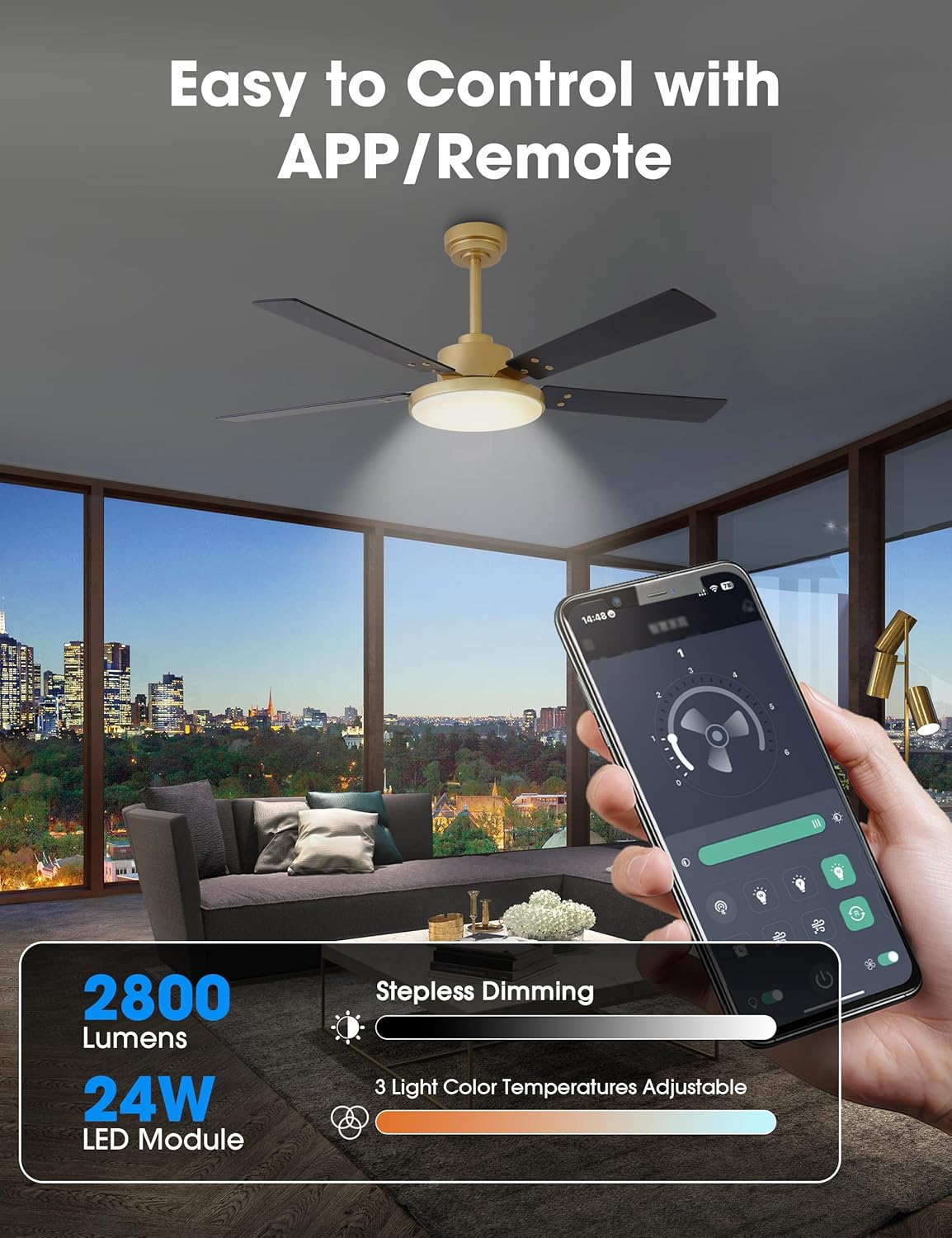
Obrázek 4.1: Control your fan and light settings via the remote or smartphone app, including stepless dimming and 3 color temperatures.

Obrázek 4.2: The reversible DC motor allows for seasonal air circulation: downward airflow for cooling in summer and upward airflow for heat distribution in winter.
4.2 Ovládání pomocí aplikace v chytrém telefonu
Download the dedicated smartphone application (refer to the full manual for app name and QR code) to access additional smart features:
- All remote control functions.
- Scheduling and automation.
- Built-in memory function to recall last settings.
5. Údržba
Pravidelná údržba zajistí optimální výkon a dlouhou životnost vašeho stropního ventilátoru.
5.1 Čištění
- Před čištěním vždy vypněte napájení jističem.
- Použijte měkký, damp K čištění lopatek ventilátoru a krytu motoru použijte hadřík. Nepoužívejte abrazivní čisticí prostředky ani rozpouštědla.
- Periodically check for dust accumulation on the blades and light cover to maintain airflow and light output.
5.2 Obecná péče
- Check all connections and screws periodically to ensure they remain tight.
- Stejnosměrný motor je navržen pro dlouhodobý, tichý provoz a obvykle nevyžaduje mazání.
6. Řešení problémů
Pokud máte s ventilátorem problémy, podívejte se na následující běžné problémy a jejich řešení:
| Problém | Možná příčina | Řešení |
|---|---|---|
| Ventilátor se nespustí | Žádné napájení Uvolněné kabelové spoje Vybitá baterie dálkového ovládání | Zkontrolujte jistič Ověřte, zda jsou všechna kabelová připojení bezpečná Vyměňte baterii dálkového ovládání |
| Světlo nefunguje | Uvolněné kabelové spoje Problém s LED panelem | Zkontrolujte zapojení světelné sady Contact customer support if LED panel is faulty |
| Ventilátor se třese | Uvolněné šrouby čepele Nevyvážené čepele Uvolněná montážní konzola | Utáhněte všechny šrouby nožů Use balancing kit (not included) if necessary Ensure mounting bracket is securely fastened |
| Dálkový ovladač nereaguje | Vybitá baterie Dálkové ovládání není spárováno | Vyměňte baterii Refer to full manual for remote pairing instructions |
If the problem persists after attempting these solutions, please contact Parrot Uncle customer support.
7. Specifikace produktu
- Značka: Strýček papouška
- Číslo modelu: VZA01A117GD
- Velikost: 52 palců
- Barva: Gold-A117
- Materiál: Iron (housing), Acrylic (shade), MDF (blades)
- Typ motoru: DC Motor, Reversible
- Wattage: 35 watts (fan)
- Proud vzduchu: Až 4896 XNUMX CFM
- Světelný zdroj: Integrated 24W LED Module
- Jas: 2800 lumenů (max.)
- Teplota barev: 3000K / 4200K / 6500K (nastavitelná)
- Stmívání: Stepless (15% - 100%)
- Způsob ovládání: Remote Control, Smartphone APP
- svtage: 120 voltů
- Vnitřní/venkovní použití: Vnitřní, Kryté venkovní
- Hmotnost položky: 15 libry
- certifikace: Certifikováno ETL

Obrázek 7.1: The fan features high efficiency and low energy consumption, providing up to 4896 CFM air volume.

Obrázek 7.2: The 35W pure copper DC motor ensures high performance and energy efficiency with 6 wind speeds.

Obrázek 7.3: Enjoy ultra-quiet operation, ensuring a comfortable rest with noise levels as low as 35dB.
8. Záruka a podpora
Parrot Uncle stands behind the quality of its products.
8.1 Záruka výrobce
Na tento produkt se vztahuje a 3letá záruka výrobce. Tato záruka se vztahuje na vady materiálu a zpracování při běžném používání.
8.2 Zákaznická podpora
For any questions, assistance, or warranty claims, please contact Parrot Uncle customer support. Our team is available 24/7 to provide the best service.
If your ceiling fan arrives damaged or does not meet your expectations, please reach out to us immediately.