
1. Úvod
This manual provides detailed instructions for the installation, operation, and maintenance of your Skyworth H30P WiFi 3MP Indoor Camera. Please read this manual carefully before using the product to ensure proper and safe operation. Keep this manual for future reference.
2. Bezpečnostní informace
- Zajistěte napájení objtage is within the specified range for the camera.
- Do not expose the camera to water, moisture, or extreme temperatures. This product is designed for indoor use only.
- Neumísťujte kameru do blízkosti zdrojů tepla nebo na přímé sluneční světlo.
- Nepokoušejte se fotoaparát rozebírat ani upravovat. Mohlo by dojít ke zrušení záruky a poškození.
- Uchovávejte fotoaparát a jeho příslušenství mimo dosah dětí.
- Používejte pouze napájecí adaptér dodaný s fotoaparátem.
3. Obsah balení
Ověřte, zda jsou v balení přítomny všechny položky:
- Skyworth H30P WiFi 3MP Indoor Camera
- Napájecí adaptér
- Montážní příslušenství (šrouby, hmoždinky)
- Uživatelská příručka
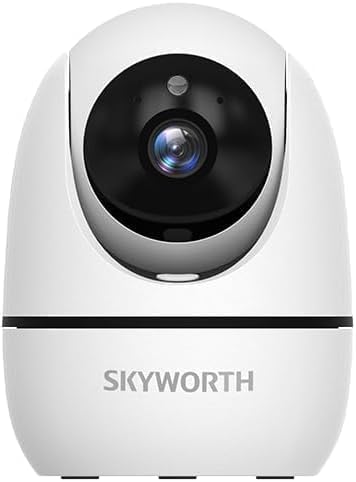
Image: The Skyworth H30P camera shown with its instruction manual and other accessories, indicating typical package contents.
4. Konec produktuview
The Skyworth H30P camera features a compact design with advanced surveillance capabilities. Familiarize yourself with its main components:
- Objektiv fotoaparátu: Captures 3MP video.
- Mikrofon: Pro audio vstup a obousměrnou komunikaci.
- Reproduktor: Pro audio výstup a obousměrnou komunikaci.
- Kontrolka stavu: Shows camera status (e.g., connected, recording).
- Napájecí port: Připojuje se k napájecímu adaptéru.
- Resetovací tlačítko: Používá se k obnovení továrního nastavení.
- Ethernetový port RJ45: Pro kabelové síťové připojení.
- Slot pro microSD kartu: Pro lokální ukládání videa.
Obrázek: Zadní view of the Skyworth H30P camera, highlighting the RJ45 Ethernet port, power input, and other rear components.
5. Nastavení
5.1 Zapnutí
- Připojte napájecí adaptér k napájecímu portu fotoaparátu.
- Zapojte napájecí adaptér do elektrické zásuvky.
- The camera will power on, and the status indicator light will illuminate. Wait for the camera to initialize.
5.2 Instalace aplikace
- Download the recommended surveillance app (e.g., 'Skyworth Smart' or similar, check product packaging for specific app name) from your smartphone's app store (App Store for iOS, Google Play Store for Android).
- Zaregistrujte se a přihlaste se.
5.3 Připojení k síti
The H30P supports both wireless (WiFi 6) and wired (RJ45) connections.
Wireless Connection (WiFi)
- Otevřete aplikaci a vyberte možnost „Přidat zařízení“.
- Follow the on-screen instructions to connect the camera to your WiFi network. This typically involves scanning a QR code on the camera or entering your WiFi credentials.
- Ensure your WiFi network is 2.4GHz or 5GHz compatible (WiFi 6 for optimal performance).
Wired Connection (RJ45)
- Connect an Ethernet cable from your router to the RJ45 port on the back of the camera.
- Open the app and select 'Add Device'. The app should automatically detect the camera via the wired connection.
- Follow any remaining on-screen prompts to complete the setup.
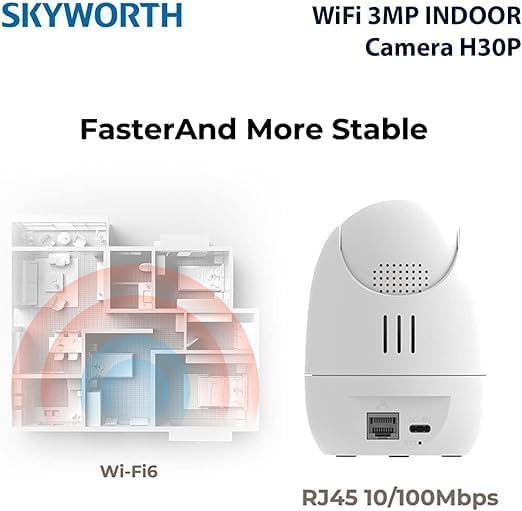
Image: A diagram illustrating the enhanced coverage of Wi-Fi 6 and the physical RJ45 port on the camera for stable network connectivity.
5.4 Montáž fotoaparátu
The Skyworth H30P camera can be placed on a flat surface or mounted to a wall.
Montáž na stěnu
- Choose a suitable location on a wall, ensuring it is within range of a power outlet and your network.
- Use the provided mounting template (if included) or mark the screw holes on the wall.
- Drill pilot holes and insert the wall plugs.
- Secure the mounting bracket (if applicable) or the camera directly to the wall using the screws.
- Podle potřeby upravte úhel kamery.
6. Návod k obsluze
6.1 Živě View
Po připojení otevřete aplikaci view the live feed from your camera. You can select the camera from your device list to access its real-time video stream.
6.2 Ovládání otáčení, naklápění a zoomu (PTZ)
The H30P camera offers 360-degree horizontal rotation and vertical tilt. Use the controls within the app to remotely adjust the camera's viewúhel záběru. To umožňuje komplexní pokrytí bez slepých míst.
6.3 Obousměrný zvuk
The camera features a built-in microphone and speaker. In the app, activate the microphone icon to speak through the camera and the speaker icon to listen to audio from the camera's location. This enables real-time communication.
6.4 Noční vidění
The H30P camera supports color night vision, providing clear images even in low-light conditions. This feature typically activates automatically when ambient light is insufficient.
6.5 Detekce a sledování pohybu
Enable motion detection in the app settings to receive alerts when movement is detected. The camera can also be configured to track detected motion, keeping the subject in view.
6.6 Nahrávání a ukládání
The camera supports local storage via a MicroSD card (not included) and may offer cloud storage options (subscription may be required). Insert a MicroSD card into the designated slot for continuous or event-triggered recording. Manage recording settings and view přehrávání prostřednictvím aplikace.

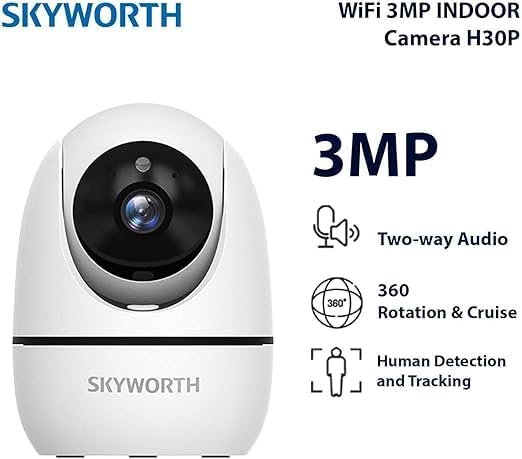
Image: A visual representation of the Skyworth H30P camera's key features, including 3MP resolution, two-way audio, 360-degree rotation, and human detection capabilities.
7. Údržba
7.1 Čištění
To clean the camera, gently wipe the lens and body with a soft, dry cloth. Do not use harsh chemicals or abrasive cleaners.
7.2 aktualizací firmwaru
Periodically check the app for available firmware updates. Keeping your camera's firmware up-to-date ensures optimal performance and security features.
8. Řešení problémů
| Problém | Možná příčina | Řešení |
|---|---|---|
| Kamera se nezapíná | Žádné napájení, vadný adaptér | Check power connection and outlet. Ensure adapter is working. |
| Nelze se připojit k WiFi | Incorrect WiFi password, camera too far from router, 5GHz only network (if camera is 2.4GHz only) | Verify password. Move camera closer to router. Ensure router supports 2.4GHz or camera supports 5GHz. Reset camera and try again. |
| Žádný kanál videa | Network issue, camera offline | Check network connection. Restart camera and router. Verify camera status in app. |
| Nefunguje obousměrný zvuk | Microphone/speaker muted in app, volume too low | Check app settings for audio controls. Adjust volume. |
| Detekce pohybu se nespouští | Detection sensitivity too low, feature disabled | Adjust motion detection sensitivity in app. Ensure feature is enabled. |
9. Specifikace
| Funkce | Detail |
|---|---|
| Číslo modelu | H30P |
| Rozlišení záznamu videa | 3 megapixelů |
| Technologie připojení | Wireless (WiFi 6), Wired (RJ45) |
| Komunikační protokol | WiFi síť |
| Speciální funkce | HD Resolution, Two-Way Audio, Color Night Vision, Motion-Activated Recording, Motion Sensor |
| Vnitřní/venkovní použití | Krytý |
| Kompatibilní zařízení | Smartphone |
| Zdroj napájení | Elektrický kabel |
| Typ montáže | Držák na zeď |
| Doporučená použití | Baby Monitoring, Pet Monitoring, Indoor Security, Gaming, Tracking |
| Rozměry produktu | 4 x 8 x 8 cm; 240 gramů |
| Jsou vyžadovány baterie? | Žádný |
| Zahrnuté komponenty | Skyworth Body |
| Země původu | Čína |
10. Záruka a podpora
Your Skyworth H30P camera comes with a standard manufacturer's warranty. Please refer to the warranty card included in your package or contact Skyworth customer support for details regarding warranty terms and conditions.
For technical support, troubleshooting assistance, or any inquiries regarding your product, please visit the official Skyworth webnebo kontaktujte jejich oddělení zákaznických služeb. Kontaktní informace obvykle naleznete na obalu produktu nebo na webových stránkách výrobce. webmísto.