
FLEXISPOT V9-Max-AR
FLEXISPOT V9-Max-AR Exercise Bike with 2D Desktop User Manual
Model: V9-Max-AR (Exercise Bike with Desk)
1. Úvod
This manual provides essential information for the safe and effective use of your FLEXISPOT V9-Max-AR Exercise Bike with 2D Desktop. Please read all instructions carefully before assembly and operation. Retain this manual for future reference.
Důležité bezpečnostní informace
- Před každým použitím se ujistěte, že jsou všechny díly bezpečně upevněny.
- Nepřekračujte doporučenou maximální hmotnost 300 liber.
- Během provozu držte děti a domácí zvířata v dostatečné vzdálenosti od rotopedu.
- Před zahájením jakéhokoli nového cvičebního programu se poraďte s lékařem.
- Use the product on a stable, level surface.
2. Konec produktuview a Komponenty
The FLEXISPOT V9-Max-AR is a versatile exercise bike designed for indoor use, featuring an integrated 2D adjustable desktop. It combines a stationary bike with a functional workspace, allowing for simultaneous exercise and productivity.

Figure 2.1: User operating the FLEXISPOT V9-Max-AR Exercise Bike with the desktop in use.
Key features include an 8-level quiet magnetic resistance system, an LCD display for tracking workout metrics, and a robust design supporting up to 300 lbs. The adjustable seat and desktop accommodate various user heights and preferences.
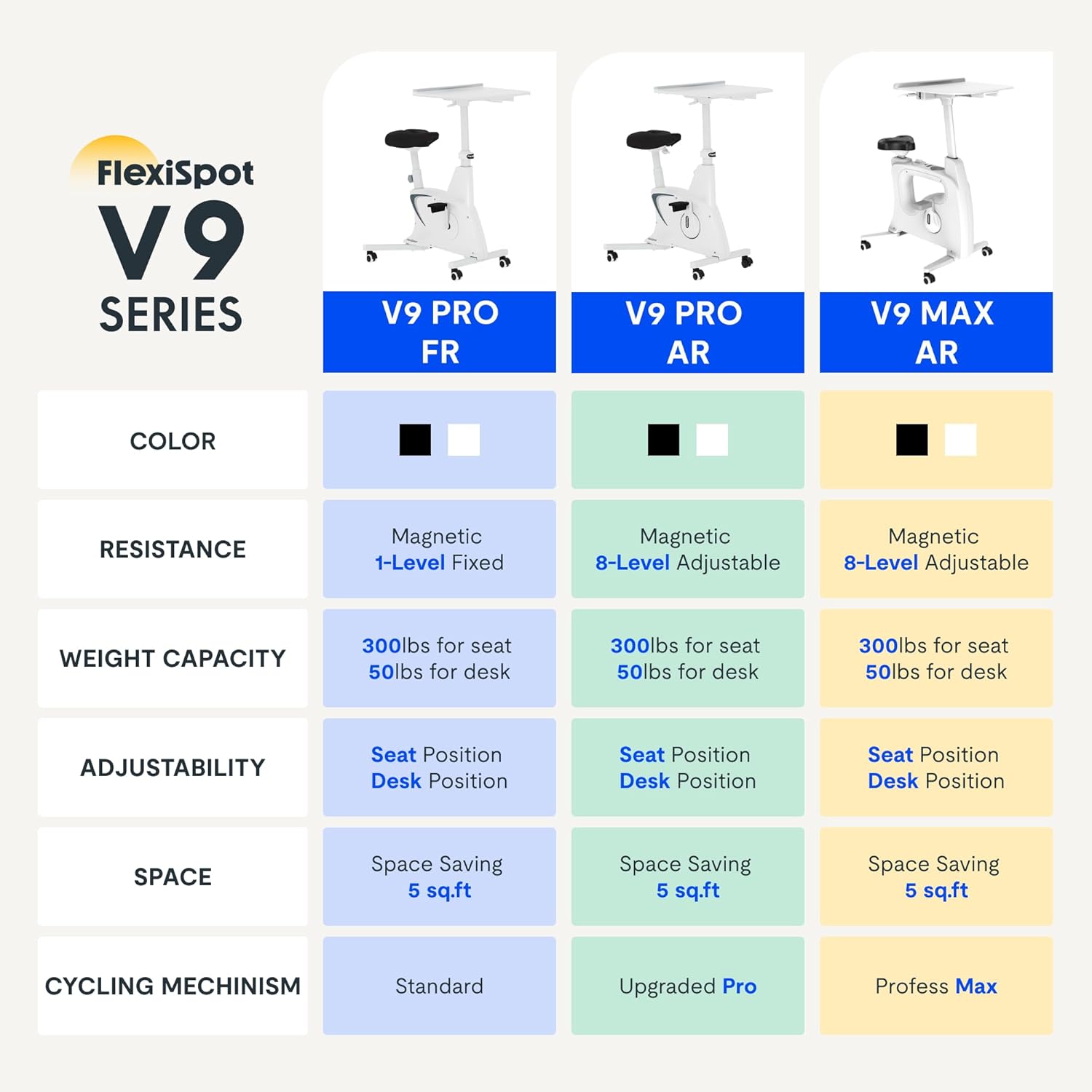
Figure 2.2: Comparison of FlexiSpot V9 series models, highlighting features like resistance and adjustability.
Hlavní komponenty:
- Main Frame with Flywheel and Resistance Mechanism
- Nastavitelné sedadlo
- Adjustable Desktop
- Pedály
- LCD displej konzole
- Transportní kola
3. Nastavení a montáž
The FLEXISPOT V9-Max-AR is designed for quick and straightforward assembly, typically requiring about 10 minutes.
Montážní kroky:
- Vybalte všechny součásti a ověřte je podle dodacího listu.
- Attach the front and rear stabilizers to the main frame using the provided screws.
- Install the pedals, ensuring the left pedal is tightened counter-clockwise and the right pedal clockwise.
- Mount the seat post and seat onto the main frame, securing them firmly.
- Attach the desktop support column to the main frame.
- Secure the desktop to its support column.
- Insert batteries into the LCD display (batteries not included) and connect the sensor wire.
- Ensure all screws and connections are tightened before first use.

Figure 3.1: Illustration of adjustable components for personalized setup.
4. Návod k obsluze
Adjusting Seat and Desktop:
- Výška sedáku: Use the quick-release lever located on the seat post to adjust the seat to a comfortable height. Ensure your leg has a slight bend at the knee when the pedal is at its lowest point.
- Desktop Height: The desktop can be adjusted vertically. Locate the adjustment lever beneath the desktop and raise or lower the desktop to your desired working height.
- Desktop Depth: The desktop can also be adjusted horizontally (forward/backward) to optimize your working posture.
Úrovně odolnosti:
The V9-Max-AR features 8 levels of quiet magnetic resistance. Rotate the resistance knob, located below the desktop, clockwise to increase resistance and counter-clockwise to decrease it.

Figure 4.1: LCD display and resistance control knob.
Používání LCD displeje:
The built-in LCD display monitors your workout statistics. It tracks:
- Čas
- Rychlost
- Vzdálenost
- Spálené kalorie
- Total Distance Covered (Odometer)
- Rychlost otáčení
Press the button on the display to cycle through different metrics or hold it to reset values (refer to display specific instructions for exact operation).
Using the 2D Desktop:
The spacious desktop (20" x 22.8") is designed to hold a laptop, notebook, mobile phone, or water cup. It provides a stable surface for working or entertainment while exercising.

Figure 4.2: Desktop in use for studying or working.
Přenosnost:
Equipped with movable silent wheels, the exercise bike can be easily relocated within your home or office. Simply tilt the bike and roll it to your desired position.
5. Údržba
Regular maintenance ensures the longevity and optimal performance of your FLEXISPOT V9-Max-AR Exercise Bike.
- Čištění: Pravidelně otírejte kolo čističemamp hadříkem a jemným čisticím prostředkem. Nepoužívejte abrazivní čisticí prostředky ani rozpouštědla.
- Inspekce: Periodically check all bolts, nuts, and moving parts for tightness. Tighten any loose components immediately.
- Mazání: Pro magnetický odporový systém není nutné žádné specifické mazání.
- Skladování: Kolo skladujte na suchém a chladném místě mimo dosah přímého slunečního záření a extrémních teplot.
6. Řešení problémů
Tato část se zabývá běžnými problémy, se kterými se můžete setkat při používání rotopedu.
| Problém | Možná příčina | Řešení |
|---|---|---|
| LCD displej nefunguje | Baterie jsou vybité nebo nesprávně nainstalované. | Replace batteries (AAA, not included) or ensure correct polarity. |
| Nestabilní nebo vratké kolo | Uvolněné šrouby nebo nerovný povrch. | Check and tighten all assembly bolts. Ensure the bike is on a flat, stable surface. |
| Odpor se nemění | Problém s odporovým mechanismem. | Ensure the resistance knob is properly engaged. If the issue persists, contact customer support. |
| Vrzání nebo neobvyklé zvuky | Uvolněné součásti nebo tření. | Inspect all connections and tighten any loose parts. Ensure no foreign objects are interfering with moving parts. |
7. Specifikace
Detailed specifications for the FLEXISPOT V9-Max-AR Exercise Bike:
- Model: V9-Max-AR (Exercise Bike with Desk)
- Značka: FLEXISPOT
- Barva: Černý
- Odporový mechanismus: Magnetický
- Počet úrovní odporu: 8
- Maximální hmotnost Doporučení: 300 libry
- Rozměry produktu (H x Š x V): 37.6 cm x 23.2 cm x 47.2 cm
- Rozměry pracovní plochy: Approximately 20" x 22.8"
- Minimum Height (Seat): 29.6 palce
- Maximum Height (Overall): 47.2 Inches (desktop height can go up to 47.2")
- Zdroj napájení: Pohon na pedál (neelektrický)
- Systém pohonu: Pás
- Speciální funkce: Adjustable Seat, Adjustable Desktop
- Doporučená použití: Krytý
- Space Occupied: Přibližně 5 XNUMX čtverečních stop

Obrázek 7.1: Rozměry produktu.
8. Záruka a podpora
Společnost FLEXISPOT se zavázala k poskytování kvalitních produktů a spokojenosti zákazníků.
- Vrácení: Tento produkt lze snadno vrátit do 30 dnů. Podrobnosti naleznete v podmínkách vrácení zboží na vaší nákupní platformě.
- Záruka: For specific warranty terms and conditions, please refer to the official FLEXISPOT webwebu nebo se přímo obraťte na jejich zákaznickou podporu.
- Zákaznická podpora: For any questions, assistance, or troubleshooting not covered in this manual, please contact FLEXISPOT customer support. Contact information can typically be found on the manufacturer's webwebu nebo v dokumentaci k nákupu.
9. Další informace
While no specific official product videos were provided in the product data, users may find helpful assembly or usage guides on the manufacturer's official website or their authorized channels. Always ensure the source is official for accurate information.
Ask a question about this manual
Ask about setup, troubleshooting, compatibility, parts, safety, or missing instructions. Manuals+ will review the question and use this page’s manual context to help answer it.