
1. Úvod
The FOSSIBOT F114 is a rugged smartphone designed for durability and performance in challenging environments. It features a robust build, a powerful battery, and an advanced camera system, running on the Android 15 operating system. This manual provides essential information for setting up, operating, maintaining, and troubleshooting your device.
2. Co je v krabici
Upon opening your FOSSIBOT F114 package, you should find the following items:
- FOSSIBOT F114 Mobile Phone
- Rychlá nabíječka 18W
- Kabel USB typu C
- PIN karty SIM
- Uživatelská příručka

Video: Rozbalení a úvodní obrázekview of the FOSSIBOT F114 Rugged Smartphone, showcasing the included accessories and the device itself.
3. Zařízení skončiloview
3.1. Displej
The FOSSIBOT F114 features a 6.67-inch HD+ IPS display with a resolution of 720 x 1600 pixels and a 60Hz refresh rate. The display is designed to be scratch-resistant, offer high transparency, and include anti-fingerprint properties for clear visibility.

3.2. Procesor a paměť
Powered by an octa-core UNISOC T615 processor, the F114 ensures smooth multitasking and gaming. It comes with 16GB of RAM (4GB physical + 12GB virtual RAM) and 128GB of internal storage, expandable up to 2TB via an SD card.

3.3. Kamerový systém
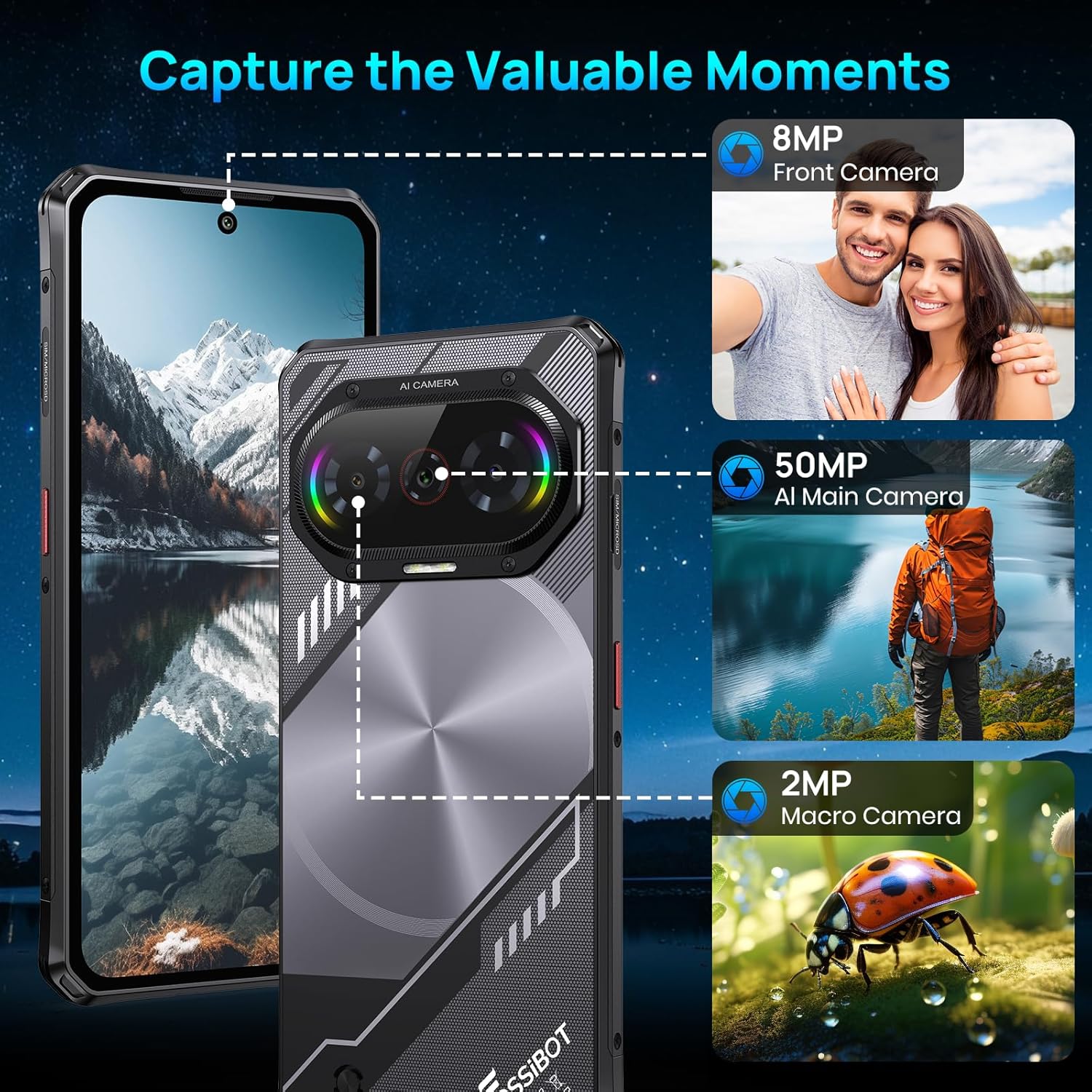
The device is equipped with a versatile camera setup: a 50MP AI main camera, an 8MP front camera, and a 2MP macro camera. This configuration allows for detailed photos, clear selfies, and close-up shots.
3.4. Baterie
A 5000mAh large-capacity battery provides extended usage, complemented by 18W fast charging capabilities to quickly replenish power.

3.5. Trvanlivost
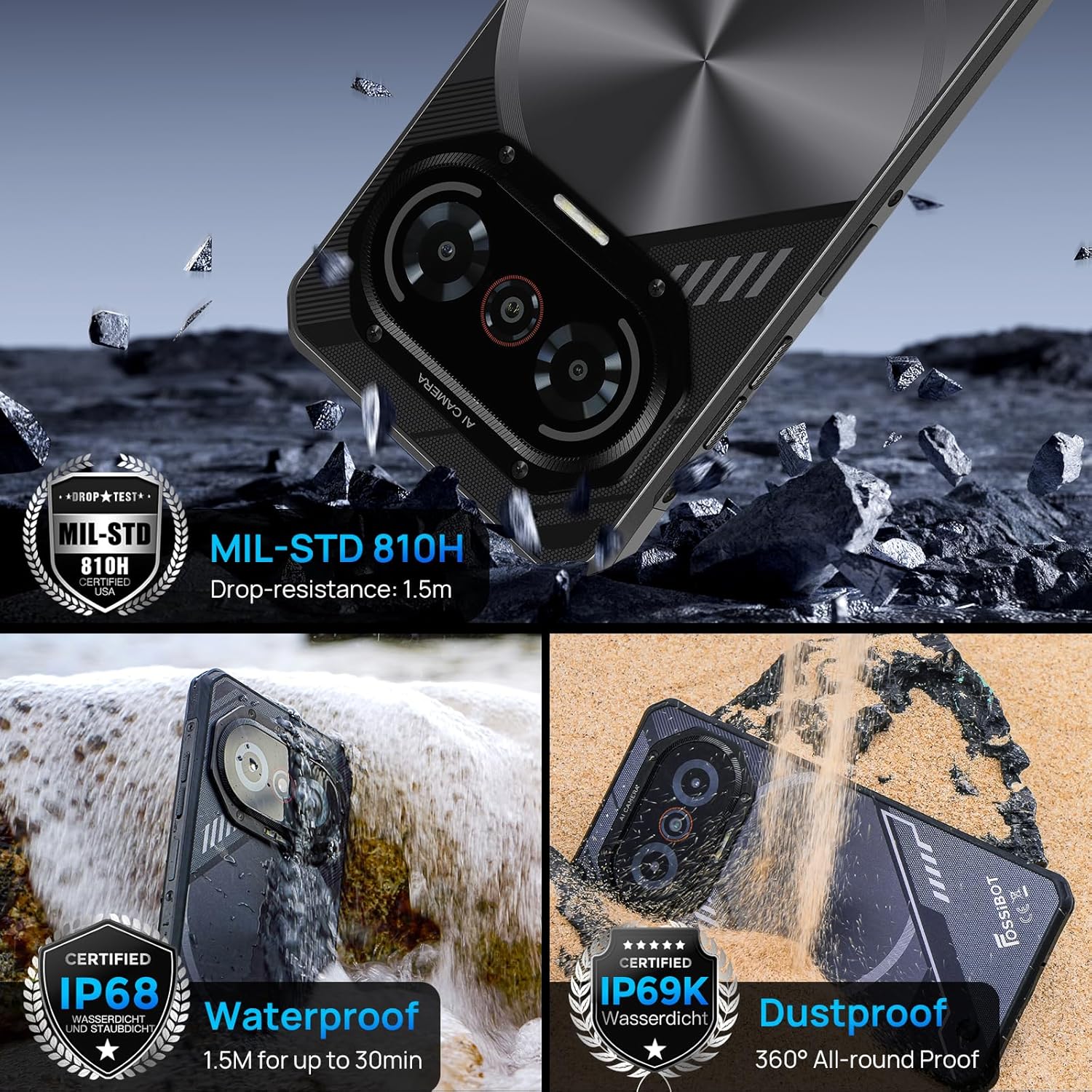
The F114 is certified with IP68/IP69K and MIL-STD-810H standards, making it waterproof, dustproof, and drop-resistant. It is built to withstand harsh outdoor conditions.
3.6. Operační systém
The smartphone runs on the latest Android 15 operating system, offering enhanced privacy features, faster app launches, and improved multitasking capabilities.

3.7. Připojení a další funkce
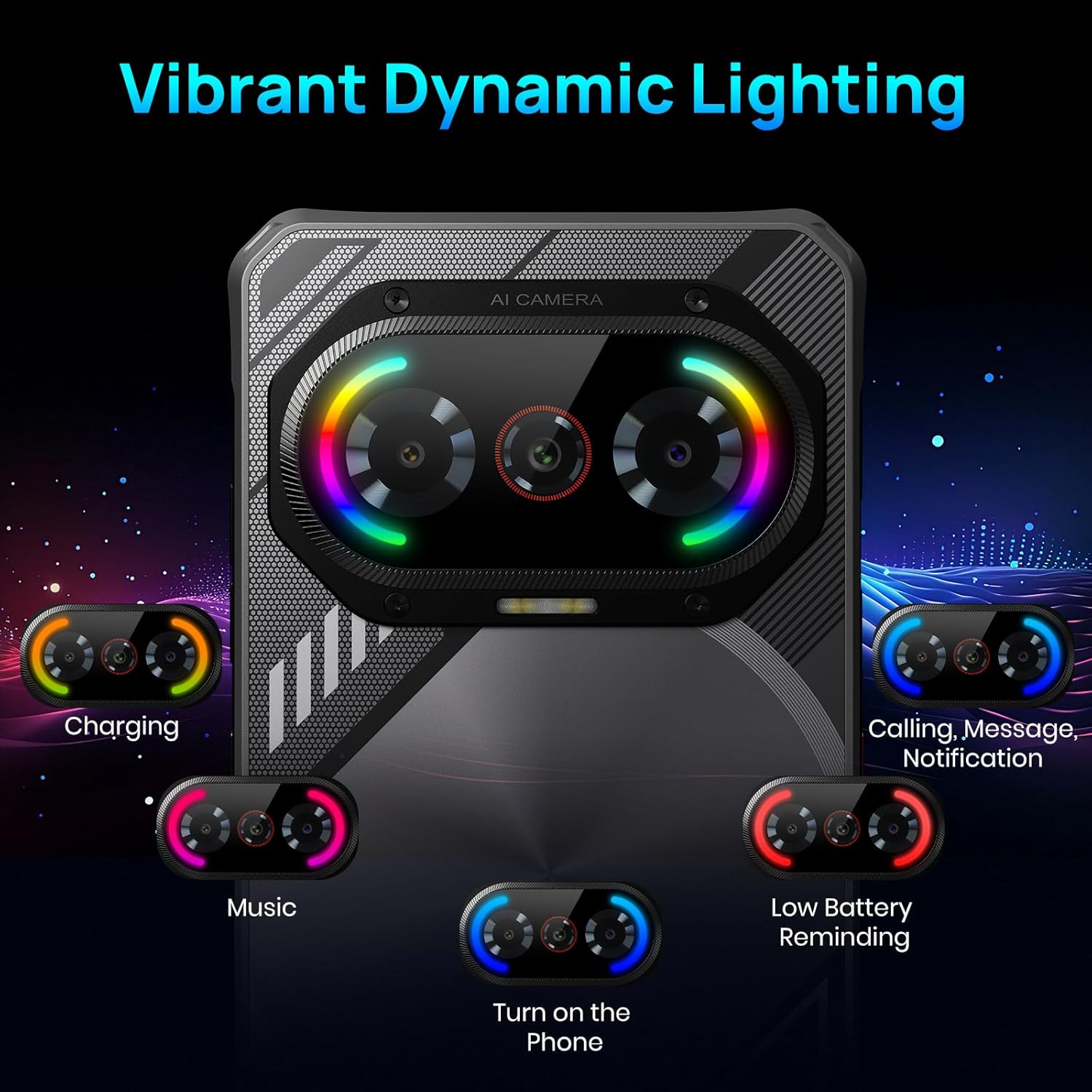
The F114 supports dual 4G SIM cards and includes comprehensive navigation systems (GPS, GLONASS, Galileo, Beidou, QZSS). It also features NFC for contactless payments and data transfer. The device incorporates a dynamic lighting effect on the rear for notifications and charging status.
4. Počáteční nastavení
4.1. Instalace SIM karty a SD karty
- Vyhledejte držák SIM karty na boku telefonu.
- Vložte dodaný kolík SIM karty do malého otvoru vedle přihrádky, abyste ji vysunuli.
- Place your Nano SIM card(s) and/or a microSD card (up to 2TB) into the tray, ensuring correct orientation.
- Opatrně vložte zásobník zpět do telefonu.
4.2. Zapnutí/vypnutí
- Zapnutí: Press and hold the Power button (usually on the right side) until the FOSSIBOT logo appears.
- Vypnutí: Stiskněte a podržte tlačítko napájení a poté z možností na obrazovce vyberte možnost „Vypnout“.
- Restartovat: Stiskněte a podržte tlačítko napájení a poté z možností vyberte „Restartovat“.
5. Základní obsluha
5.1. Navigace na obrazovce
- Klepněte na: Dotykem vyberte ikonu nebo možnost.
- Výpad: Tažením prstu po obrazovce můžete procházet nebo přecházet mezi obrazovkami.
- Štípání: Pro přiblížení nebo oddálení obrázků použijte dva prsty a web stránky.
5.2. Oznámení a rychlé nastavení
- Oznámení: Přejeďte prstem dolů z horní části obrazovky na view oznámení.
- Rychlé nastavení: Swipe down again from the notification panel to access quick settings for Wi-Fi, Bluetooth, brightness, etc.
6. Obsluha kamery
The FOSSIBOT F114's camera app offers various modes to enhance your photography:
- Režim fotografie: Standard mode for everyday pictures.
- Režim Portrét: Vytváří efekt hloubky ostrosti a rozmazává pozadí.
- Profesionální režim: Allows manual control over settings like ISO, white balance, and exposure.
- Noční režim: Optimalizuje nastavení pro slabé světelné podmínky.
- HDR: High Dynamic Range for balanced exposure in high-contrast scenes.
- Režim makro: For extreme close-up photography using the 2MP macro lens.
- Podvodní režim: Special mode for capturing photos and videos while submerged.
To take a photo, open the Camera app and tap the shutter button. To switch between modes, swipe left or right on the mode selector above the shutter button.
7. Speciální funkce
7.1. Dynamické světelné efekty
The FOSSIBOT F114 features customizable dynamic lighting on the rear panel. These lights can indicate various statuses:
- Stav nabíjení: Different light patterns/colors for charging levels.
- Incoming Calls/Messages: Visual alerts for new communications.
- Hudební rytmus: Lights can synchronize with music playback.
- Připomenutí nízké baterie: A distinct light pattern to indicate low power.
You can configure these lighting effects in the device settings under 'Radiant and agile' or similar menu options, allowing you to choose different rhythm modes like Joyful Movement, Bidirectional streaming light, Musical Pulse, and Rhythmic Pursuit.
Video: A demonstration of the FOSSIBOT F114's various features, including its display, processor, camera capabilities, dynamic mood lights, and fast charging.
7.2. NFC (Near Field Communication)
NFC allows for quick, short-range wireless communication. Use it for:
- Bezkontaktní platby: Make payments at compatible terminals using Google Pay.
- Přenos dat: Podíl files, photos, and contacts with other NFC-enabled devices.
To enable NFC, go to Settings > Connected devices > Connection preferences > NFC.
7.3. GPS a navigace
The FOSSIBOT F114 supports multiple global navigation satellite systems (GPS, GLONASS, Galileo, Beidou, QZSS) for accurate location tracking and navigation, ideal for outdoor activities.
8. Údržba
- Čištění: Použijte měkký, damp hadříkem. Nepoužívejte agresivní chemikálie.
- Vystavení vodě: While waterproof, ensure all ports are securely closed before exposing the phone to water. After water exposure, dry the phone thoroughly before charging.
- Aktualizace softwaru: Pravidelně kontrolujte a instalujte aktualizace softwaru, abyste zajistili optimální výkon a zabezpečení.
- Péče o baterie: Nevystavujte extrémním teplotám. Nevybíjejte baterii příliš často.
9. Řešení problémů
9.1. Zařízení se nezapíná
- Ujistěte se, že je baterie nabitá. Připojte telefon k nabíječce alespoň na 30 minut.
- Stiskněte a podržte tlačítko napájení po dobu 10–15 sekund pro vynucení restartu.
9.2. Poor Network Connection
- Zkontrolujte, zda je vaše SIM karta správně vložena.
- Verify that your carrier is supported (Note: AT&T, CRICKET, and Verizon are not supported).
- Restartujte telefon.
- Přejděte do Nastavení > Síť a internet > Mobilní síť a ujistěte se, že jsou povolena mobilní data.
9.3. Aplikace padá nebo zamrzávají
- Vymažte mezipaměť problematické aplikace (Nastavení > Aplikace > [Název aplikace] > Úložiště a mezipaměť > Vymazat mezipaměť).
- Aktualizujte aplikaci na nejnovější verzi z Obchodu Google Play.
- Pokud problém přetrvává, odinstalujte a znovu nainstalujte aplikaci.
9.4. Rychlé vybíjení baterie
- Snižte jas obrazovky.
- Zavřete nepoužívané aplikace běžící na pozadí.
- Vypněte Wi-Fi, Bluetooth a GPS, když je nepoužíváte.
- Zkontrolujte spotřebu baterie v Nastavení > Baterie a identifikujte aplikace s vysokou spotřebou energie.
10. Specifikace
| Funkce | Specifikace |
|---|---|
| Značka | FOSSIBOT |
| Název modelu | F114FT128 |
| Operační systém | Android 15 |
| Velikost nainstalované paměti RAM | 16 GB |
| Kapacita paměti | 128 GB (Expandable to 2 TB via SD card) |
| Velikost obrazovky | 6.67 palce |
| Rezoluce | 720 x 1600 |
| Obnovovací frekvence | 60 Hz |
| Buněčná technologie | 4G |
| Bezdrátový nosič | Unlocked (AT&T, CRICKET, and Verizon not supported) |
| Počet slotů pro SIM karty | Duální SIM |
| Typ konektoru | USB typ C |
| Úroveň odolnosti proti vodě | Waterproof (IP68/IP69K) |
| Front Photo Sensor Resolution | 8 MP |
| Rear Facing Camera Photo Sensor Resolution | 50 MP (Main) |
| Number of Rear Facing Cameras | 2 (50MP Main + 2MP Macro) |
| Kapacita baterie | 5000 miliamp hodiny |
| Průměrná životnost baterie | 5 days (Standby) |
| Rozlišení záznamu videa | 1080p při 30 fps |
| GPS Geotagging Functionality | Věrný |
11. Záruka a podpora
FOSSIBOT offers comprehensive support for your F114 smartphone:
- Záruka: A 1-year long-term warranty is provided.
- Vrácení: A 30-day free return guarantee is available.
- Služby zákazníkům: Year-round customer support and 24-hour online customer service are provided to assist with any issues.
For further assistance, please refer to the contact information provided with your product documentation or visit the official FOSSIBOT webmísto.