
SIXTOP 4 Core 4+128G
SIXTOP 4+128G Android 15 Car Radio User Manual
For Renault Clio 3rd Generation (2005-2014)
1. Úvod
Thank you for choosing the SIXTOP 4+128G Android 15 Car Radio. This device is designed to enhance your driving experience with advanced features including Wireless CarPlay, Android Auto, GPS navigation, Bluetooth 5.0, FM/RDS radio, and more. This manual provides essential information for installation, operation, maintenance, and troubleshooting to ensure optimal performance and user satisfaction. Please read this manual thoroughly before installation and use.
2. Obsah balení
Ověřte prosím, zda jsou ve vašem balení obsaženy všechny níže uvedené položky:
- 1 x Přehrávač do auta
- 2 x napájecí kabely
- 1x GPS anténa
- 1 x vstupní kabel zadní kamery
- 1x zadní kamera
- 1 x RCA kabel
- 2 x USB kabely
- 2 x montážní držáky
- 4 x šrouby
- 1 x Uživatelská příručka
- 1 x krabice CANbus
- 1 x Instalační nástroj
- 1 x Rádiová anténa
- 1 x adaptérový kabel rádia
- 1 x adaptér antény
- Doplňkové příslušenství
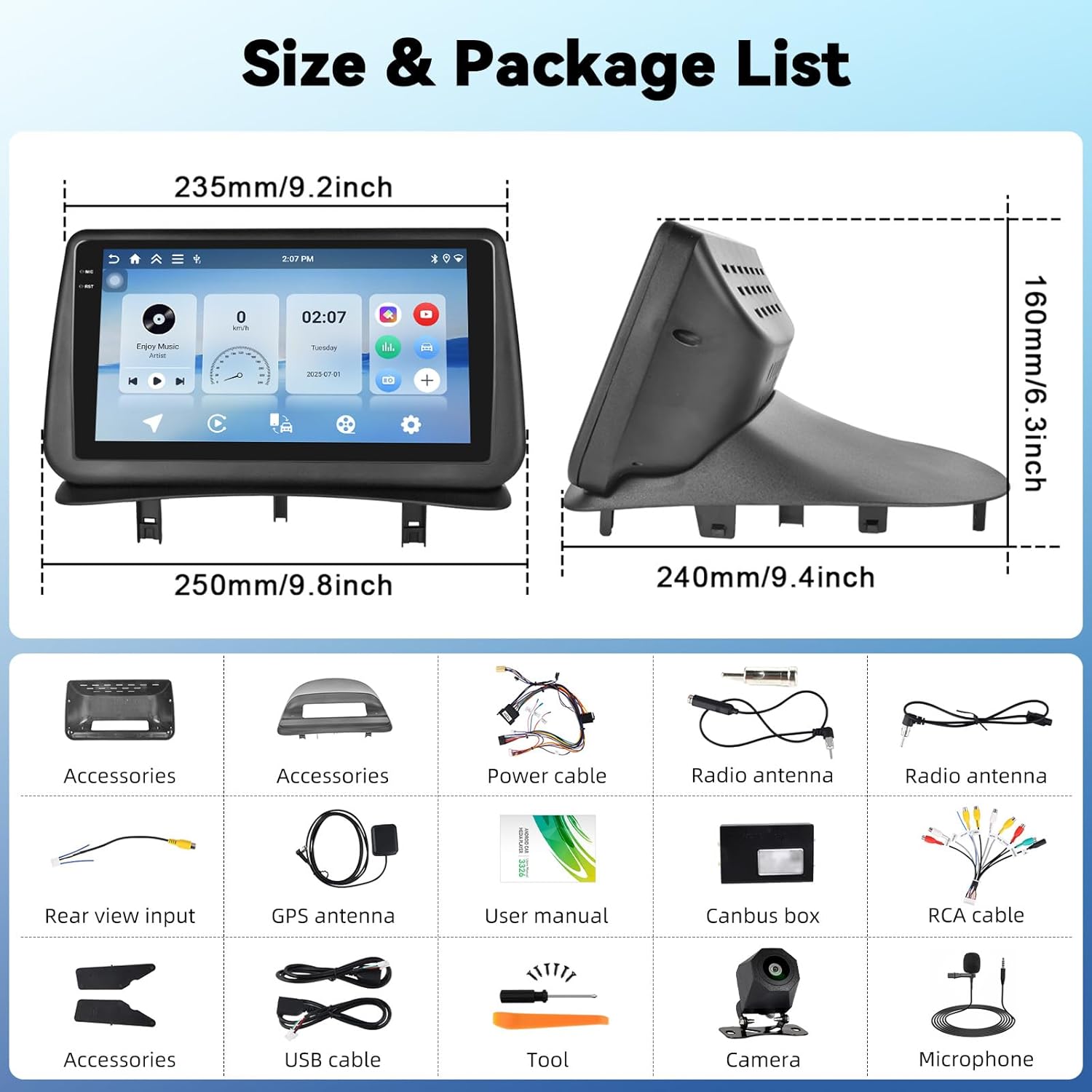
This image displays the dimensions of the car radio unit and a visual representation of all components included in the package.
3. Nastavení a instalace
This car radio is specifically designed for Renault Clio 3rd Generation models manufactured between 2005 and 2014. Professional installation is recommended to ensure proper functionality and avoid damage to your vehicle or the unit.
3.1 Kompatibilita s vozidly
Ensure your vehicle dashboard matches the compatible models for seamless integration.

This image illustrates the appearance of the SIXTOP car radio installed in a Renault Clio 3 dashboard, contrasting it with the original setup.
3.2 Zapojení kabeláže
Carefully connect all cables according to the wiring diagram provided in the separate installation guide. Key connections include:
- Napájecí kabely: Připojte k elektrické síti vozidla.
- GPS anténa: Namontujte na místě s průhledným view oblohy pro optimální příjem signálu.
- Anténa rádia: Connect for FM/RDS reception.
- USB kabely: Pro přenos dat a nabíjení.
- RCA kabel: For audio/video output to external devices.
- Krabice CANbus: Integrate with vehicle's CAN-BUS system for steering wheel controls and other functions.
- Vstup pro zadní kameru: Connect the included rear camera for parking assistance.
4. Návod k obsluze
4.1 Bezdrátové CarPlay a Android Auto
Connect your iPhone or Android smartphone wirelessly to access navigation, make calls, listen to music, and send/receive messages directly from the car radio display. This feature ensures a safe and convenient driving experience.

This image demonstrates the wireless CarPlay and Android Auto functionalities, including hands-free calling, music playback, and app integration.
4.2 MirrorLink
MirrorLink allows you to project your smartphone screen onto the car radio display. Connect your smartphone via USB or Wi-Fi to use your favorite apps, such as music and video players, on the larger screen.
4.3 GPS navigace
The unit features a built-in GPS module supporting both online and offline maps. For offline maps, an internet connection is required initially to download map data. Enjoy real-time traffic updates and voice guidance for accurate navigation.

This image displays the GPS navigation interface with various map applications and illustrates the WiFi connection for browsing and downloading apps.
4.4 Wi-Fi připojení
With integrated Wi-Fi, you can connect to your phone's hotspot to browse the internet, stream videos (e.g., YouTube), listen to music (e.g., Spotify), and download additional applications directly to the car radio.
4.5 Bluetooth 5.0
The Bluetooth 5.0 function enables clear hands-free calls, phonebook synchronization, and wireless music streaming from your smartphone. This ensures you stay connected while driving.

This image highlights the Bluetooth 5.0 features for hands-free communication and music streaming, as well as the FM/RDS radio interface.
4.6 FM/RDS rádio
Enjoy your favorite radio stations with the built-in FM/RDS tuner. It supports automatic channel search and station memory, providing an immersive audio experience.
4.7 Ovládání na volantu (SWC)
The unit supports the original steering wheel control learning function. This allows you to control volume, change tracks, and manage other functions without taking your hands off the steering wheel, enhancing safety.

This image illustrates the steering wheel control learning function and the AHD rear view camera input with parking guidelines.
4.8 AHD Zadní View Vstup fotoaparátu
The car radio supports AHD/CVBS rear camera input. When reversing, the rear image automatically displays on the screen, making parking safer and more convenient. A rear camera is included in the package.
4.9 Funkce rozdělené obrazovky
Využijte funkci rozdělené obrazovky pro současné spuštění dvou aplikací. Napříkladample, you can have navigation on one side and music playback on the other, improving multitasking capabilities.

This image shows the split-screen functionality, allowing two applications to run concurrently, and the graphic equalizer interface for sound customization.
4.10 Funkce EQ
The integrated equalizer (EQ) allows you to adjust sound effects, reduce noise, and enhance audio quality, providing a personalized and immersive listening experience.
5. Údržba
Pro zajištění dlouhé životnosti a optimálního výkonu vašeho autorádia dodržujte tyto pokyny pro údržbu:
- Čištění: K čištění obrazovky a vnějšího povrchu používejte měkký, suchý hadřík. Nepoužívejte abrazivní čisticí prostředky ani rozpouštědla.
- Aktualizace softwaru: Pravidelně kontrolujte a instalujte aktualizace softwaru, abyste zajistili efektivní chod systému a jeho nejnovější funkce.
- Teplota: Nevystavujte jednotku extrémním teplotám, ať už horkým nebo nízkým, po delší dobu.
- Vypnout: Turn off the unit before turning off your vehicle's ignition to prevent potential data corruption.
6. Řešení problémů
Pokud narazíte na nějaké problémy, podívejte se na následující běžné problémy a jejich řešení:
| Problém | Možná příčina | Řešení |
|---|---|---|
| Jednotka se nezapne | Uvolněné připojení napájení, spálená pojistka, problém s autobaterií. | Check power cables, inspect fuses, verify vehicle battery voltage. |
| Žádný zvuk | Příliš nízká hlasitost, nesprávný zdroj zvuku, problém s kabeláží reproduktorů. | Increase volume, select correct audio source, check speaker connections. |
| GPS nefunguje | GPS antenna not properly connected or positioned, no map data. | Ujistěte se, že anténa GPS má jasnou oblohu view, check connection, download offline maps if needed. |
| Problémy s připojením Bluetooth | Bluetooth není povoleno, zařízení není viditelné, rušení. | Ensure Bluetooth is on for both devices, make device discoverable, try re-pairing. |
| Ovládání na volantu nereaguje | Canbus box not connected, SWC learning not completed. | Check Canbus connection, perform SWC learning procedure in settings. |
Pokud problém přetrvává i po vyzkoušení těchto řešení, kontaktujte zákaznickou podporu.
7. Specifikace
| Funkce | Detail |
|---|---|
| Systém | Android 15 |
| Materiál obrazovky | Incell Touch Screen |
| Velikost obrazovky | 9 palců |
| Rozlišení obrazovky | 1280*720 |
| RAM + ROM | 4GB RAM + 128GB ROM |
| Rychlost procesoru | 1.5 GHz |
| Verze Bluetooth | 5.0 |
| Rádiový čip | UMW2652 |
| Rozhlasové pásmo | FM/RDS |
| Výstupní výkon | 4*45 W (Max 180W) |
| Provozní svtage | 9V-16V |
| Provozní teplota | -20 ℃ až 70 ℃ |
| Vstup pro zadní kameru | AHD/CVBS |
| Rozhraní USB | Duální USB porty |
| Zvukové formáty | APE/FLAC/WAV/MP3/WMA atd. |
| Video formáty | MKV/RMVB/AVI/MP4/MDV atd. |
| Formáty obrázků | PNG/JPEG/JPG/GIF/WBMP/BNP atd. |
| Podporované jazyky | Čínština, angličtina, francouzština, italština, korejština, japonština, arabština, španělština, portugalština, ruština, turečtina, vietnamština, hebrejština, polština, němčina |
| Hmotnost | 3.35 kg |
8. Záruka a podpora
8.1 Informace o záruce
Your SIXTOP car radio comes with a 2-letá záruka. In case of any manufacturing defects or issues covered under warranty, please contact our customer service.
8.2 Zásady vrácení
Nabízíme a 30denní zásada vrácení for eligible products. Please refer to the retailer's return policy for detailed terms and conditions.
8.3 Zákaznická podpora
For technical assistance, troubleshooting, or warranty claims, please contact SIXTOP customer support. We aim to provide a response within 24 hours and offer lifetime technical support.
Kontaktní informace obvykle najdete na webových stránkách prodejce website or within the product packaging. For Amazon purchases, you can click on the seller's name (e.g., "xinshunhangdianpu") and then select "Ask a question" to reach us directly.

This image illustrates the process of contacting seller support through the Amazon platform.
Ask a question about this manual
Ask about setup, troubleshooting, compatibility, parts, safety, or missing instructions. Manuals+ will review the question and use this page’s manual context to help answer it.