
Zavedení
Thank you for choosing the Cleyver DECT Office Mono Headset ODHW20V2. This manual provides detailed instructions for the proper setup, operation, and maintenance of your new headset. Please read this manual carefully before using the product to ensure optimal performance and longevity.
Obsah balení
Zkontrolujte prosím obsah balení, abyste se ujistili, že jsou přítomny všechny položky:
- Cleyver DECT Office Mono Headset
- Základní stanice DECT
- Napájecí adaptér pro základní stanici
- Telephone Connection Cable (RJ11)
- USB Connection Cable (Type-C to Type-A)
- Uživatelská příručka (tento dokument)
Konec produktuview
Součásti náhlavní soupravy
The Cleyver DECT Office Mono Headset is designed for comfortable, single-ear communication. Key components include:
- Nastavitelná čelenka: Pro bezpečné a pohodlné nošení.
- Ušní polštář: Měkké polstrování pro delší nošení.
- Rameno mikrofonu: Flexible arm with an anti-snore microphone for clear voice transmission.
- Ovládání hlasitosti: Buttons on the earcup for adjusting listening volume.
- Tlačítko ztlumení: To temporarily disable the microphone.
- Tlačítko pro ovládání hovorů: For answering and ending calls.
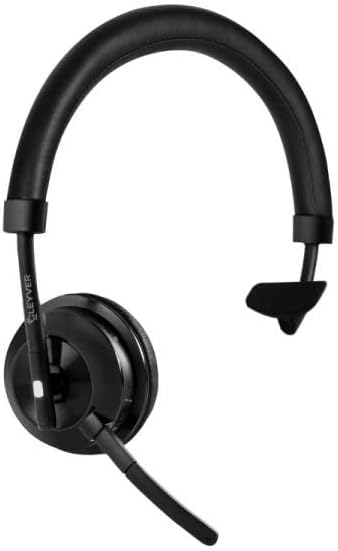
Image 1: Cleyver DECT Office Mono Headset. This image shows the mono headset with an adjustable headband, ear cushion, and a flexible microphone boom.
Součásti základnové stanice
The DECT Base Station serves as the charging dock and connection hub for your headset.
- Nabíjecí kolébka: Where the headset rests for charging.
- Napájecí port: Pro připojení napájecího adaptéru.
- Telephone Port (RJ11): For connecting to a DECT telephone.
- USB port (typu C): For connecting to a computer for softphone applications (if supported).
- AUX port: Additional connection option (if available).
- Tlačítko párování: To initiate pairing with the headset.
- Indikátory stavu: LEDs to show power, charging, and connection status.
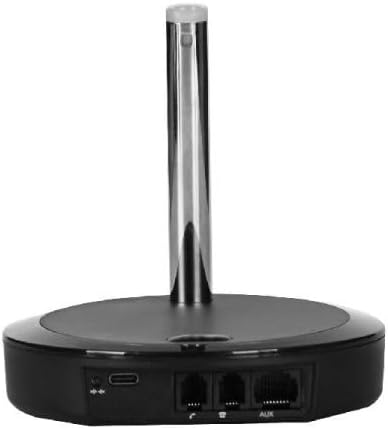
Obrázek 2: Zadní strana view of the Cleyver DECT Base Station. This image highlights the various connection ports including USB-C, telephone (RJ11), and AUX ports.
Nastavení
1. Připojení základní stanice
- Připojte napájení: Plug the power adapter into the base station's power port and then into a wall outlet. The power indicator LED on the base station should illuminate.
- Connect to Telephone:
- For DECT Phones: Connect one end of the telephone connection cable (RJ11) to the "TEL" port on the base station and the other end to the headset port on your DECT telephone.
- For USB Connection (Softphone): Connect the USB-C end of the USB cable to the base station's USB port and the USB-A end to an available USB port on your computer.
2. Nabíjení náhlavní soupravy
Place the Cleyver DECT Office Mono Headset into the charging cradle on the base station. Ensure it is seated correctly. The charging indicator LED on the base station should light up, indicating that the headset is charging. For first use, charge the headset for at least 2 hours.
3. Pairing the Headset with the Base Station
The headset and base station are usually pre-paired from the factory. If pairing is lost or you are setting up for the first time and the headset does not connect:
- Ujistěte se, že jsou sluchátka nabitá a zapnutá.
- Press and hold the pairing button on the base station for approximately 3 seconds until the pairing indicator LED starts flashing.
- On the headset, press and hold the call control button for approximately 3 seconds until the headset's indicator light flashes rapidly.
- Once paired, the indicator lights on both the headset and base station will become solid, or flash slowly, indicating a successful connection.
Návod k obsluze
Nošení náhlavní soupravy
Adjust the headband for a comfortable fit. Position the microphone boom approximately 2 cm (0.8 inches) from the corner of your mouth for optimal voice pickup. The microphone boom is flexible and can be adjusted.
Zapnutí/vypnutí
- Zapnutí: Press and hold the Call Control button on the headset for approximately 2 seconds.
- Vypnutí: Press and hold the Call Control button on the headset for approximately 3 seconds.
Uskutečňování a přijímání hovorů
- Přijetí hovoru: When an incoming call rings, press the Call Control button on the headset.
- Ukončení hovoru: During a call, press the Call Control button on the headset.
- Uskutečnění hovoru: Dial the number on your connected DECT phone or softphone. The call will automatically route to the headset once connected.
Ovládání hlasitosti
Use the Volume Up (+) and Volume Down (-) buttons located on the earcup of the headset to adjust the listening volume during a call or for media playback (if connected to a computer).
Funkce ztlumení
Press the Mute button on the headset to temporarily disable the microphone. Press it again to unmute. A tone or indicator light on the headset may confirm the mute status.
Údržba
- Čištění: Use a soft, dry cloth to clean the headset and base station. Do not use abrasive cleaners or solvents. Avoid getting moisture into any openings.
- Skladování: When not in use, store the headset on its base station or in a cool, dry place away from direct sunlight and extreme temperatures.
- Péče o baterie: For optimal battery life, avoid fully discharging the headset frequently. Charge it regularly, especially if it will be stored for an extended period.
Odstraňování problémů
| Problém | Možné řešení |
|---|---|
| Žádný zvuk z náhlavní soupravy. |
|
| Mikrofon nefunguje. |
|
| Sluchátka se nenabíjejí. |
|
| Cannot pair headset. |
|
Specifikace
- Značka: Cleyver
- Číslo modelu: ODHW20V2
- Konektivita: DECT, Wired (RJ11, USB-C)
- Typ náhlavní soupravy: Mono, Over-the-head
- Mikrofon: Anti-snore, Noise-cancelling
- Kompatibilita: DECT Phones, PCs (via USB for softphones)
- ASIN: B0FGJLNGRM
Záruka a podpora
Cleyver products are designed for reliability and performance. This product is covered by a standard manufacturer's warranty against defects in materials and workmanship. For specific warranty terms and conditions, please refer to the warranty card included with your purchase or visit the official Cleyver webmísto.
For technical support, troubleshooting assistance, or to inquire about replacement parts, please contact Cleyver customer service through their official website or the contact information provided in your product packaging. Please have your model number (ODHW20V2) and proof of purchase ready when contacting support.