
Zavedení
This manual provides essential information for the proper use and care of your Nokia C200 N151DL smartphone. Please read these instructions carefully before using your device to ensure optimal performance and longevity.
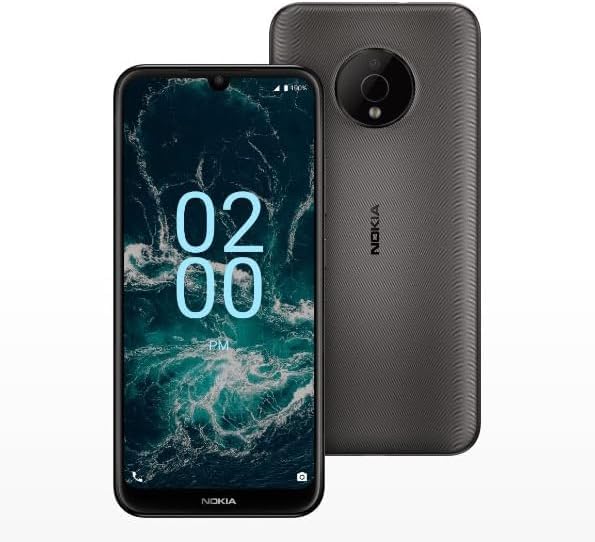
Image: The Nokia C200 N151DL smartphone, featuring its 6.1-inch HD+ display and Space Gray finish.
Co je v krabici
Upon unboxing your Nokia C200 N151DL, verify that all the following items are included:
- Nokia C200 N151DL Smartphone
- USB-C kabel
- Nástroj pro vysunutí SIM karty
Nastavení
1. Vložení SIM karty
- Vyhledejte držák SIM karty na boku telefonu.
- Vložte nástroj pro vysunutí SIM karty do malého otvoru v zásobníku a otevřete jej.
- Vložte kartu Nano-SIM do slotu zlatými kontakty dolů.
- Opatrně zatlačte zásobník zpět do telefonu, dokud nezacvakne na místo.
2. Nabíjení zařízení
Before initial use, it is recommended to fully charge your Nokia C200 N151DL.
- Připojte kabel USB-C k nabíjecímu portu ve spodní části telefonu.
- Connect the other end of the USB-C cable to a compatible USB wall adapter (not included) and plug it into a power outlet.
- Indikátor baterie na obrazovce bude ukazovat průběh nabíjení.
3. Zapnutí a počáteční konfigurace
- Press and hold the power button (usually on the right side) until the Nokia logo appears.
- Postupujte podle pokynů na obrazovce a vyberte jazyk, připojte se k Wi-Fi a nastavte si účet Google.
- Your phone runs on Android 12.0, providing a clean and intuitive user experience.
Provozní
Základní navigace
The Nokia C200 N151DL features a 6.1-inch HD+ touchscreen display. Navigate by tapping, swiping, and pinching gestures. The Android 12.0 operating system offers a user-friendly interface for accessing apps, settings, and notifications.
Správa baterie
Your device is equipped with a 5000 mAh battery designed for extended daily use. To optimize battery life:
- Upravte jas obrazovky.
- Zavřete nepoužívané aplikace běžící na pozadí.
- Pokud Wi-Fi, Bluetooth nebo GPS nepoužíváte, vypněte je.
Úložiště a výkon
With 32GB of internal storage and 3GB of RAM, the Nokia C200 N151DL provides reliable multitasking capabilities and space for your applications and media. For additional storage, consider using a microSD card (sold separately).
Údržba
Čištění zařízení
To clean your phone, use a soft, lint-free cloth. Avoid using abrasive materials, alcohol, or chemical cleaners, as these can damage the screen and finish.
Aktualizace softwaru
Periodically check for software updates to ensure your device has the latest features and security enhancements. Navigate to Nastavení > Systém > Aktualizace systému zkontrolovat a nainstalovat dostupné aktualizace.
Odstraňování problémů
If you encounter issues with your Nokia C200 N151DL, try the following common solutions:
- Telefon se nezapíná: Ensure the battery is charged. Connect the phone to a charger for at least 30 minutes, then try powering it on again.
- Aplikace padá nebo zamrzá: Zavřete problematickou aplikaci a znovu ji otevřete. Pokud problém přetrvává, restartujte telefon.
- Slabý signál sítě: Zkontrolujte vložení SIM karty. Přesuňte se do oblasti s lepším pokrytím sítě.
- Problémy s nabíjením: Verify the USB-C cable and charger are working correctly. Try a different cable or power source.
- Pomalý výkon: Clear cache for frequently used apps. Consider uninstalling unused applications to free up storage.
For more complex issues, refer to Nokia's official support webnebo kontaktujte zákaznický servis.
Specifikace
Key technical specifications for the Nokia C200 N151DL:
| Funkce | Specifikace |
|---|---|
| Značka | Nokia |
| Název modelu | Nokia C200 |
| Operační systém | Android 12.0 |
| Velikost nainstalované paměti RAM | 3 GB |
| Kapacita paměti | 32 GB |
| Model CPU | Qualcomm Snapdragon S1 QSD8650 |
| Rychlost CPU | 1.8 GHz |
| Velikost obrazovky | 6.1 palce |
| Typ zobrazení | LCD |
| Buněčná technologie | 4G |
| Bezdrátový nosič | Přímá řeč |
| Napájení z baterie | 5000 XNUMX mAh |
| Typ konektoru | USB typ C |
| Barva | Vesmírně šedá |
| Výrobce | HMD Global |
| UPC | 617230227802 |
| ASIN | B0FGG1Y47Z |
Záruka a podpora
Informace o záruce
Na tento produkt se vztahuje a 30denní zásada vrácení for a full refund or exchange from the date of purchase. Please retain your proof of purchase for warranty claims.
Zákaznická podpora
For further assistance, technical support, or warranty inquiries, please visit the official Nokia support website or contact your retailer. Ensure you have your device model number (N151DL) and proof of purchase available when seeking support.