
1. Úvod
Thank you for choosing the roborock Q10 S5 Robot Vacuum and Mop Cleaner. This manual provides essential information for setting up, operating, and maintaining your device to ensure optimal performance and longevity. Please read this manual thoroughly before using the product and keep it for future reference.
2. Bezpečnostní informace
To reduce the risk of injury, electric shock, fire, or damage, please observe the following safety precautions:
- Tento spotřebič mohou používat děti ve věku 8 let a starší a osoby se sníženými fyzickými, smyslovými nebo duševními schopnostmi nebo nedostatkem zkušeností a znalostí, pokud jsou pod dohledem nebo jsou poučeny o používání spotřebiče bezpečným způsobem a chápou související nebezpečí. .
- Děti by měly být pod dozorem, aby bylo zajištěno, že si se spotřebičem nebudou hrát.
- Čištění a uživatelskou údržbu nesmějí provádět děti bez dozoru.
- Do not use the robot in areas with open flames or fragile objects.
- Ensure the charging dock is placed on a level surface against a wall.
- Používejte pouze originální napájecí adaptér dodaný se zařízením.
- Do not expose the robot to direct sunlight or moisture.
- Before cleaning, remove power cords, small objects, and fragile items from the floor.
3. Konec produktuview
Familiarize yourself with the components of your roborock Q10 S5 robot vacuum.
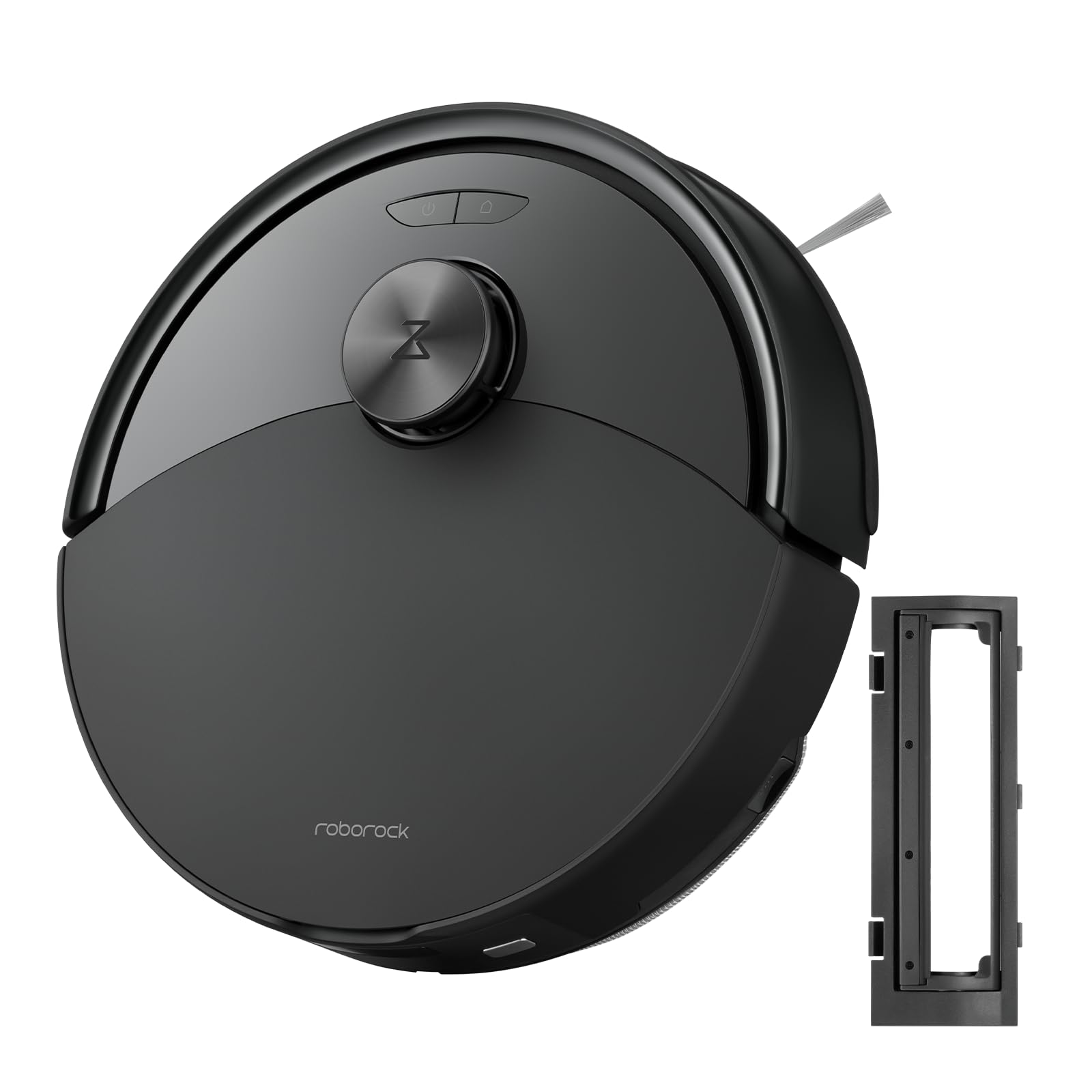
Obrázek 1: The roborock Q10 S5 Robot Vacuum and Mop Cleaner. This image shows the top view of the robot, highlighting its sleek black design and main control buttons.
Komponenty robota:
- Horní kryt: Lifts to reveal the dustbin and Wi-Fi indicator.
- Tlačítko napájení/čištění: Press to start/pause cleaning, hold to turn on/off.
- Dock/Spot Clean Button: Press to send the robot back to the dock, hold for spot cleaning.
- Snímač LDS: For navigation and mapping.
- Nárazník: Detekuje překážky.
- Boční kartáč: Odstraňuje nečistoty z hran a rohů.
- Hlavní kartáč: Collects dirt and debris from floors. Features a floating design for better contact.
- Omnidirectional Wheel: For movement.
- Kontakty pro nabíjení: Připojuje se k nabíjecí stanici.
- Senzory srázu: Zabraňuje pádu robota ze schodů.
- Nádrž na vodu a podložka na mop: Pro funkci vytírání.
Nabíjecí dok:
- Dock Location Beacon: Helps the robot locate the dock.
- Kontakty pro nabíjení: Transfers power to the robot.
- Port napájecího kabelu: Připojuje napájecí adaptér.
4. Nastavení
- Rozbalte robota: Opatrně vyjměte robota a veškeré příslušenství z obalu. Odstraňte veškeré ochranné fólie nebo přepravní materiály.
- Install the Side Brush: Press the side brush onto its post until it clicks into place.
- Umístění nabíjecí stanice:
- Place the charging dock on a hard, level surface against a wall.
- Ensure there is at least 0.5 meters (1.6 feet) of clear space on both sides and 1.5 meters (4.9 feet) in front of the dock.
- Connect the power cable to the charging dock and plug it into a wall outlet.
- Počáteční poplatek: Place the robot on the charging dock. The robot will automatically turn on and begin charging. For first-time use, fully charge the robot before operation (approximately 4-6 hours). The power indicator light will breathe white during charging and turn solid white when fully charged.
- Stáhněte si aplikaci: Hledat "Roborock" in the App Store or Google Play Store, or scan the QR code on the packaging to download and install the app.
- Připojení k Wi-Fi:
- Open the Roborock app and follow the on-screen instructions to add your device.
- Ujistěte se, že je váš telefon připojen k síti Wi-Fi 2.4 GHz.
- Stiskněte a podržte Dok a Moc buttons simultaneously for 3 seconds until you hear the "Resetting Wi-Fi" voice alert.
- Follow the app's instructions to complete the connection.
5. Návod k obsluze
Zahájení úklidu:
- Od Robota: Stiskněte tlačítko Moc button once. The robot will start cleaning.
- Z aplikace: Open the Roborock app and tap the "Clean" button.
Pausing/Resuming/Stopping:
- Pauza: Press any button on the robot or tap "Pause" in the app.
- Resumé: Stiskněte tlačítko Moc button or tap "Resume" in the app.
- Stop: To stop a cleaning cycle, press the Dok button to send the robot back to the charging dock, or tap "Stop" in the app.
Funkce vytírání:
- Naplňte nádrž na vodu: Open the water tank cover, fill with clean water, and close securely.
- Attach Mop Pad: Wet the mop pad and wring it out. Slide it into the mop pad slot until it is securely attached.
- Začněte s vytíráním: The robot will automatically detect the mop module and switch to mopping mode. You can adjust water flow levels in the app.
Vlastnosti aplikace:
- Správa map: Create and save maps, set no-go zones, virtual walls, and invisible barriers.
- Selektivní úklid pokojů: Vyberte si konkrétní místnosti k úklidu.
- Plánované čištění: Nastavte si úklidové plány pro různé časy a dny.
- Custom Cleaning Modes: Upravte sací výkon a průtok vody.
- Dálkové ovládání: Ručně ovládejte pohyb robota.
6. Údržba
Regular maintenance ensures your roborock Q10 S5 operates efficiently. Always turn off the robot and unplug the charging dock before performing any maintenance.
Dustbin and Filter (Weekly):
- Zvedněte horní kryt robota.
- Odstraňte popelnici.
- Otevřete víko odpadkového koše a vysypte jeho obsah do odpadkového koše.
- Remove the filter. Tap it gently to remove dust. The filter can be rinsed with water; ensure it is completely dry before reinstallation (allow 24 hours).
- Rinse the dustbin with water if necessary and allow it to dry completely.
- Reinstall the dry filter and dustbin.
Main Brush (Weekly):
- Otočte robota.
- Stiskněte jazýčky pro sejmutí krytu hlavního kartáče.
- Vyjměte hlavní kartáč.
- Pomocí čisticího nástroje (pokud je součástí dodávky) nebo nůžek odstřihněte a odstraňte vlasy nebo nečistoty zamotané kolem kartáče.
- Reinstall the main brush and cover, ensuring it clicks into place.
Side Brush (Monthly):
- Unscrew the side brush.
- Odstraňte veškeré vlasy nebo nečistoty.
- Reattach and tighten the screw.
Sensors and Charging Contacts (Monthly):
- Wipe all sensors (cliff sensors, wall sensor, LDS sensor window) and the charging contacts on both the robot and the dock with a soft, dry cloth.
Mop Pad (After Each Use):
- Vyjměte mopovou podložku z vodní nádrže.
- Rinse thoroughly with water and allow it to air dry completely before next use.
7. Řešení problémů
If you encounter issues with your robot, please refer to the following table before contacting support.
| Problém | Možná příčina | Řešení |
|---|---|---|
| Robot se nezapne. | Slabá baterie nebo není nabitá. | Umístěte robota na nabíjecí stanici a ujistěte se, že se nabíjí. |
| Robot se nemůže připojit k Wi-Fi. | Nesprávné heslo k Wi-Fi, síť 5 GHz nebo slabý signál. | Ensure correct 2.4GHz Wi-Fi, reset Wi-Fi on robot, move closer to router. |
| Robot se často zasekává. | Obstacles, tangled cables, or dirty sensors. | Clear floor, clean sensors, use no-go zones in app. |
| Špatný čisticí výkon. | Full dustbin, dirty filter, tangled brushes. | Empty dustbin, clean/replace filter, clean main/side brushes. |
| Robot vydává neobvyklé zvuky. | Debris in main brush, side brush, or wheels. | Zkontrolujte a vyčistěte všechny kartáče a kola, zda nejsou ucpané. |
If the problem persists, please refer to the Roborock app for more detailed error messages or contact customer support.
8. Specifikace
| Funkce | Detail |
|---|---|
| Model | Q10 S5 |
| Rozměry | Přibližně 353 x 350 x 96.5 mm (13.9 x 13.8 x 3.8 palce) |
| Hmotnost | Přibl. 3.7 kg (8.16 lb) |
| Baterie | Lithium-Ion (Capacity not specified, typical for robot vacuums) |
| Jmenovitý výkon | Approx. 60W (Typical for robot vacuums) |
| Kapacita popelnice | Approx. 470 ml (Typical for robot vacuums) |
| Kapacita vodní nádrže | Approx. 300 ml (Typical for robot vacuums) |
| Sací výkon | Up to 10,000 Pa (HyperForce Suction Power from feature bullets) |
| Wi-Fi připojení | 2.4 GHz |
Poznámka: Specifikace se mohou změnit bez předchozího upozornění.
9. Záruka a podpora
roborock products are manufactured to the highest quality standards. For detailed warranty information, please refer to the warranty card included in your product packaging or visit the official roborock website. For technical support, troubleshooting assistance, or to purchase replacement parts, please contact roborock customer service through the app or their official webmísto.
Oficiální Webmísto: www.roborock.com