
1. Přesview
The Srhythm NiceComfort 35 (2nd Gen) headphones offer an immersive audio experience with advanced features designed for comfort and superior sound quality. These headphones integrate hybrid active noise cancellation, Bluetooth 6.0 connectivity, and spatial audio technology to deliver clear sound and effective noise reduction.

Image: The Srhythm NiceComfort 35 (2nd Gen) headphones in black, showcasinjejich elegantní design.
2. Co je v krabici
Your Srhythm NiceComfort 35 package includes the following items:
- 1 x Balení dárkové krabičky
- 1 x NC35 Headphone
- 1 x Průvodce rychlým startem
- 1 x Quick Start Guide with Srhythm APP information
- 1 x 1m Type-C Charging Cable with Audio Function
- 1 x 1.2m 3.5mm audio kabel
- 1 x Airplane Adaptor (for airplane use only)

Image: All items included in the Srhythm NiceComfort 35 headphone package, neatly arranged.
3. Nastavení
3.1. Zapnutí/vypnutí
- Zapnutí: Press and hold the Power button located on the right earcup until the indicator light illuminates.
- Vypnutí: Stiskněte a podržte tlačítko napájení, dokud kontrolka nezhasne.
3.2. Párování Bluetooth
- Ujistěte se, že jsou sluchátka vypnutá.
- Stiskněte a podržte tlačítko napájení přibližně 5 sekund, dokud kontrolka nezačne blikat modře a červeně, což signalizuje režim párování.
- Na svém zařízení (chytrý telefon, tablet, počítač) povolte Bluetooth a vyhledejte dostupná zařízení.
- Select "Srhythm NC35" from the list of available devices to connect.
- Po připojení se kontrolka rozsvítí modře.
3.3. Kabelové připojení
For a wired connection, use the provided 1.2m 3.5mm audio cable or the 1m Type-C charging cable with audio function. Plug one end into the headphone's audio port and the other into your audio source. The headphones can be used in wired mode even if the battery is depleted or powered off.
3.4. Srhythm App Installation
To unlock full customization features, download the official Srhythm App from your device's app store (App Store for iOS or Google Play Store for Android). Follow the in-app instructions to connect your headphones and access custom EQ settings, ambient sound modes, and more.
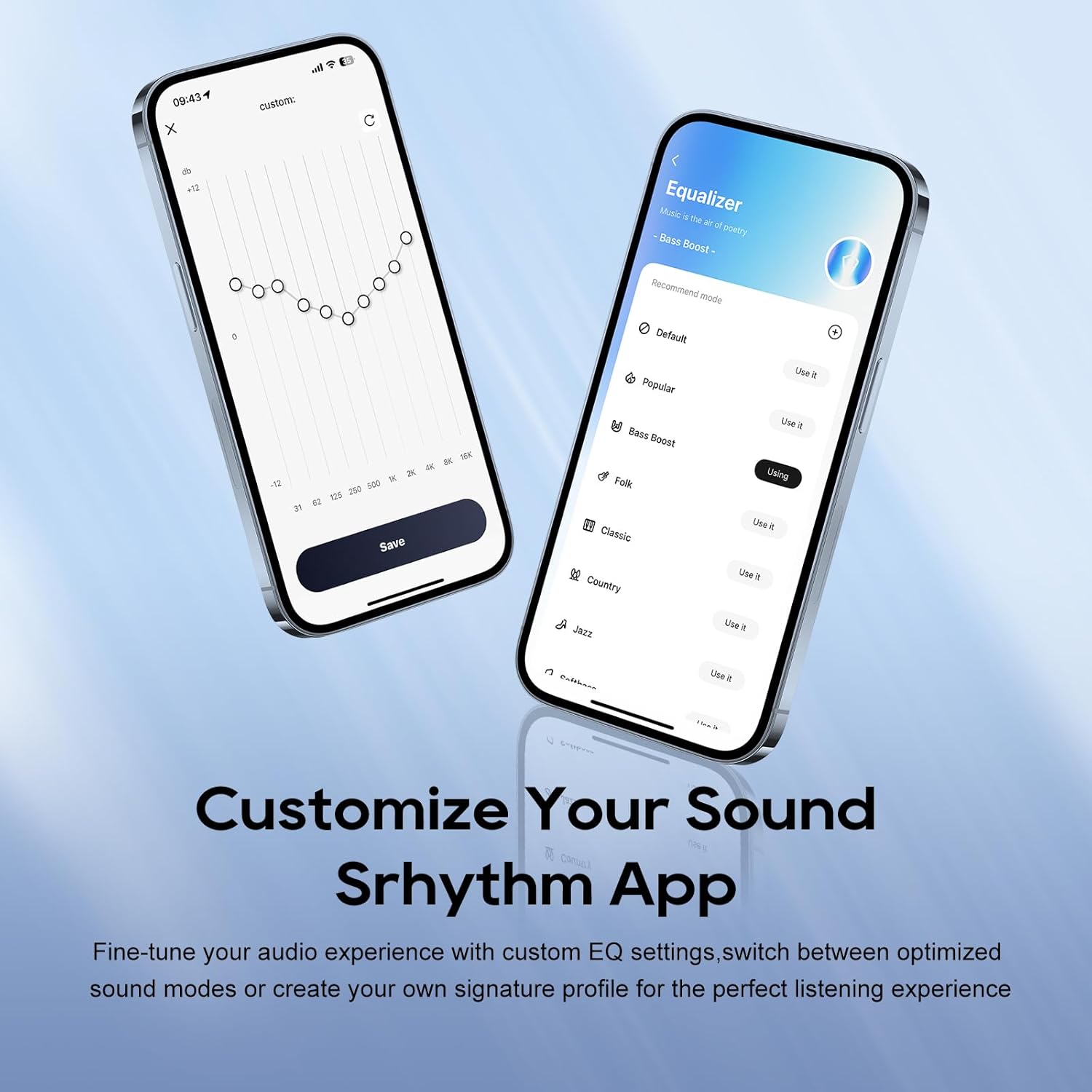
Image: A smartphone screen displaying the Srhythm App interface, highlighting equalizer and ambient sound customization options.
4. Ovládání sluchátek
4.1. Základní ovládací prvky
- Zvýšení/Snížení hlasitosti: Use the dedicated volume buttons on the earcup.
- Přehrát/pozastavit: Stiskněte jednou multifunkční tlačítko.
- Další skladba: Dvakrát stiskněte multifunkční tlačítko.
- Předchozí skladba: Třikrát stiskněte multifunkční tlačítko.
- Přijmout/ukončit hovor: Během příchozího nebo aktivního hovoru stiskněte jednou multifunkční tlačítko.
- Odmítnout hovor: Během příchozího hovoru stiskněte a podržte multifunkční tlačítko po dobu 2 sekund.
4.2. Noise Cancellation and Ambient Sound Modes
The headphones feature Hybrid Active Noise Cancellation (ANC) and Transparency Mode. These modes can be toggled using the dedicated ANC button on the earcup or through the Srhythm App.
- Potlačení hluku (ANC): Blocks up to 98% of ambient noise, ideal for travel or focused work.
- Normální režim: ANC is inactive.
- Režim průhlednosti: Umožňuje vám slyšet své okolí během poslechu zvuku, což zlepšuje situační povědomí.
You can adjust the noise cancellation depth and select specific modes (Commuting, Indoor, Outdoor) via the Srhythm App for optimized performance.

Image: A man wearing the Srhythm NiceComfort 35 headphones, illustrating the 98% noise cancellation feature in a busy environment.
4.3. AI-Powered Call Clarity
Equipped with 5 advanced microphones and Environmental Noise Cancellation (ENC), the headphones ensure your voice is clear during calls, even in noisy environments. This technology reduces background distractions for flawless communication.

Image: A man smiling while using the Srhythm NiceComfort 35 headphones with a smartphone, highlighting the AI-Powered Call Clarity feature.
4.4. Prostorový zvuk
Experience immersive sound with 4-speaker spatial audio technology. This feature delivers precision-tuned sound with distinct highs, deep bass, and stunning clarity across an ultra-wide 40kHz frequency range, creating a 3D audio experience for music, movies, and games.

Obrázek: Explodoval view diagram illustrating the 4-speaker spatial audio technology inside the Srhythm NiceComfort 35 headphones.
4.5. Custom EQ via App
The Srhythm App allows you to fine-tune your audio experience with custom Equalizer (EQ) settings. You can switch between optimized sound modes (e.g., Bass Boost, Folk, Classic, Country, Jazz, Softbass, Softpitch) or create your own signature profile for personalized listening.
5. Údržba
5.1. Čištění
- K čištění vnějších povrchů sluchátek používejte měkký, suchý hadřík.
- Náušníky jemně otřete lehceamp hadříkem a v případě potřeby jemným mýdlem, poté důkladně osušte. Zabraňte nadměrné vlhkosti.
- Nepoužívejte agresivní chemikálie, čisticí rozpouštědla ani silné čisticí prostředky.
5.2. Skladování
- Sluchátka skladujte na chladném a suchém místě mimo dosah přímého slunečního záření a extrémních teplot.
- The headphones feature a space-saving foldable design, allowing them to be folded for compact storage and transport.
- Nepokládejte na sluchátka těžké předměty.
5.3. Péče o baterie
- Sluchátka pravidelně nabíjejte, i když je nepoužíváte často, abyste zachovali jejich stav.
- Avoid fully depleting the battery frequently.
6. Řešení problémů
- Bez napájení: Ensure the headphones are fully charged. Connect the Type-C charging cable and allow sufficient time for charging.
- Nelze spárovat přes Bluetooth: Ensure the headphones are in pairing mode (flashing blue and red light). Turn off and on your device's Bluetooth, then try re-pairing. Make sure the headphones are not connected to another device.
- Žádný zvuk: Zkontrolujte úroveň hlasitosti na sluchátkách i na připojeném zařízení. Ujistěte se, že jsou sluchátka správně spárována nebo že je audio kabel bezpečně připojen.
- Špatná kvalita zvuku: Ensure the audio source is of good quality. If using Bluetooth, try moving closer to your device to avoid interference. Adjust EQ settings via the Srhythm App.
- Potlačení hluku není účinné: Ensure the earcups form a tight seal around your ears. Adjust ANC settings via the Srhythm App.
- Finding Lost Headphones: Use the "Find It" feature within the Srhythm App, which can play a loud sound to help locate your headphones if they are within Bluetooth range.
7. Specifikace
| Název modelu | NC35 |
| Kontrola hluku | Hybridní potlačení hluku |
| Frekvenční odezva | 40 kHz |
| Citlivost | 97 dB |
| Jack pro sluchátka | Zásuvka 3.5 mm |
| Technologie připojení | Kabelové, bezdrátové |
| Technologie bezdrátové komunikace | Bluetooth |
| Verze Bluetooth | 6.0 |
| Dosah Bluetooth | 10 metrů |
| Životnost baterie | 140 Hours (ANC OFF, 40% Volume), 70 Hours (ANC ON, 40% Volume) |
| Doba nabíjení | 2.5 hodiny |
| Typ zvukového ovladače | Dynamický ovladač |
| Velikost zvukového ovladače | 40 milimetrů |
| Hmotnost položky | 276 gramů (9.7 unce) |
| Rozměry produktu | 5.91 x 3.94 x 2.36 palce |
| Materiál | Acrylonitrile Butadiene Styrene (ABS), Faux Leather, Metal, Polycarbonate (PC) |
| Speciální funkce | Adjustable Headband, Built-In Voice Assistant, Foldable, Microphone Included, Noise Cancellation |

Image: A woman running outdoors wearing the Srhythm NiceComfort 35 headphones, illustrating the long battery life.
8. Záruka a podpora
Each Srhythm product comes with an 18-month aftersales warranty. For any inquiries or assistance, our 7*24-hour online service is available to provide support and address any concerns you may have.
For further assistance, please refer to the contact information provided in your Quick Start Guide or visit the official Srhythm webmísto.