
1. Úvod
This manual provides detailed instructions for the setup, operation, and maintenance of your ATTACK SHARK G3PRO Wireless Gaming Mouse. Please read this manual thoroughly to ensure proper use and to maximize the performance of your device.
2. Vlastnosti produktu
- Pro-Grade Precision & Speed: Equipped with PixArt PAW3311 gaming sensor and Broadcom BK52820 custom MCU for zero latency and pixel-perfect tracking. Adjustable DPI from 100 to 25000, polling rate up to 1000Hz, tracking speed 300IPS, and acceleration 40G.
- Legendary Durability & Tactile Clicks: Features genuine mechanical switches rated for 100 million clicks, providing crisp, responsive, and reliable feedback. The unique F-Switch encoder ensures precise scrolling.
- Ultra-Light Agility & Effortless Glide: Weighs only 59±3 grams, reducing wrist fatigue during extended use. Ergonomic design supports palm, claw, and finger grip styles. Double-layer premium mouse feet offer smooth, consistent glide.
- Seamless Tri-Mode Connectivity: Supports stable 2.4GHz wireless, low-latency Bluetooth, and reliable wired USB-C connections. Quickly switch between modes using the button at the bottom of the mouse. Compatible with desktops, laptops, smartphones, and tablets.
- AI Designed Driver: Utilizes an innovative cloud-driven webpage for customization, eliminating the need for traditional software installation. Allows for DPI adjustment, polling rate, competitive mode, customized buttons, macro recording, and personalized key mapping.
- RGB Backlight Charging Base: The included charging dock features cool RGB backlighting and allows for quick recharging. It also serves as a convenient passthrough for the 2.4GHz USB receiver, optimizing wireless signal reception.
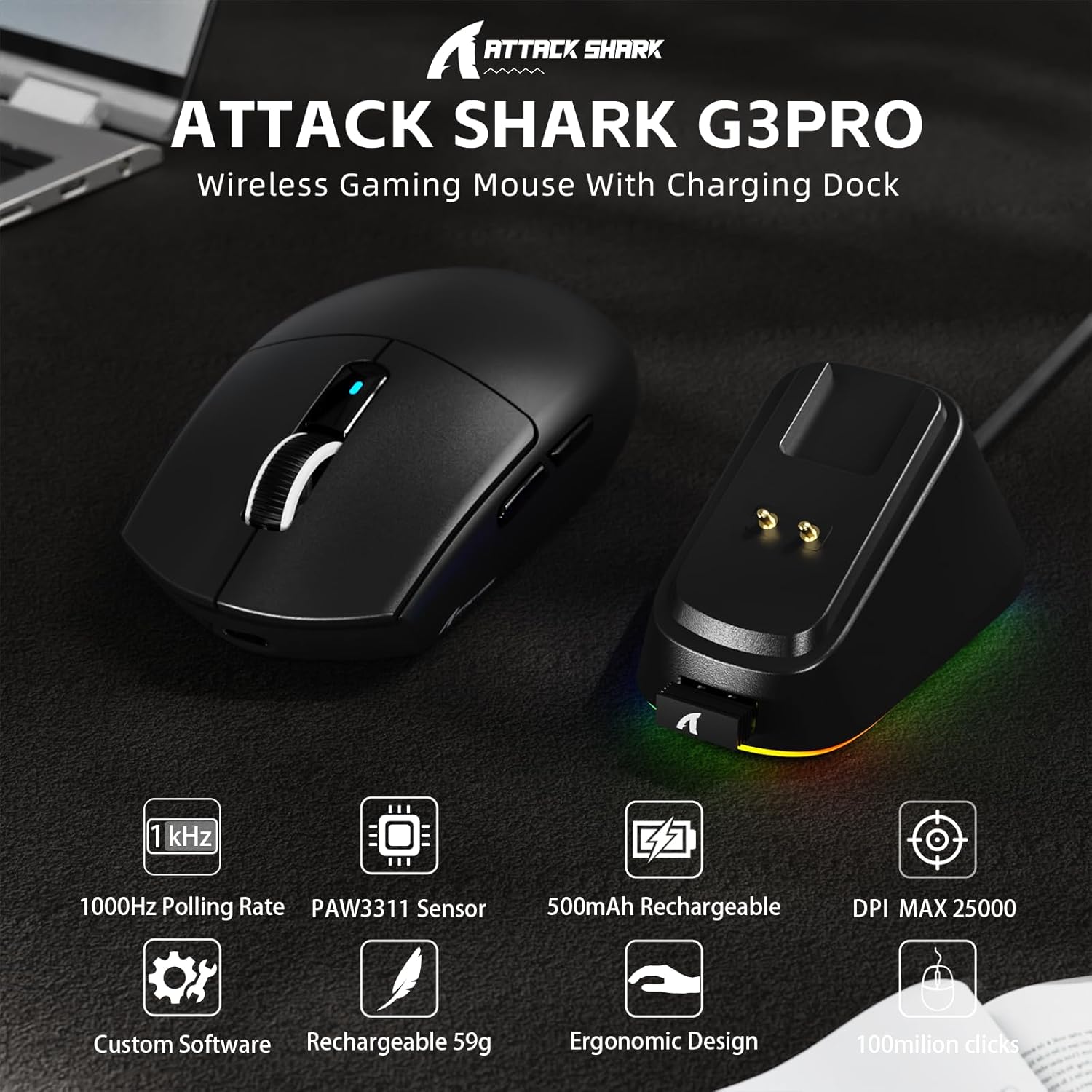
Obrázek: Overview of the ATTACK SHARK G3PRO mouse and its charging dock, highlighting key features such as 1000Hz polling rate, PAW3311 sensor, 500mAh rechargeable battery, 25K DPI, custom software, lightweight design, ergonomic shape, and 100 million click lifespan.

Image: A composite image detailing the internal components and features of the G3PRO mouse, including the 1K polling rate, PixArt PAW3311 sensor, Omron microswitches, 500mAh battery, BK52820 MCU, and the web rozhraní ovladače.
3. Obsah balení
Prosím, ověřte, zda jsou v balení přítomny všechny položky:
- ATTACK SHARK G3PRO Wireless Gaming Mouse
- RGB Backlight Charging Dock
- Kabel USB-C na USB-A
- USB 2.4GHz Wireless Receiver (often stored inside the mouse or dock)
- Uživatelská příručka
- Samolepky (mohou se lišit)
- Grip Tape (if included with your specific bundle)
4. Nastavení
4.1 Nabíjení myši
Before first use, it is recommended to fully charge the mouse. Connect the USB-C cable to the charging dock and then to a power source (e.g., computer USB port, USB wall adapter). Place the mouse onto the charging dock. The RGB lighting on the dock will indicate charging status.

Image: The ATTACK SHARK G3PRO Wireless Gaming Mouse resting on its RGB backlight charging dock, connected via a USB-C cable. This illustrates the primary charging method.
4.2 Připojení myši
The G3PRO mouse offers three connectivity modes: 2.4GHz Wireless, Bluetooth, and USB-C Wired.

Image: A visual representation of the three connectivity options for the G3PRO mouse: USB-C Wired, 2.4G Wireless, and Bluetooth, showing the mouse interacting with a charging dock and a laptop.
4.2.1 Bezdrátové připojení 2.4 GHz
- Locate the USB 2.4GHz receiver. It may be stored in a compartment on the underside of the mouse or within the charging dock.
- Plug the receiver into an available USB port on your computer. For optimal signal, you can plug the receiver into the USB port on the charging dock, then connect the dock to your computer.
- Switch the mode selector switch on the bottom of the mouse to the '2.4G' position.
- The mouse should automatically connect. If not, press and hold the 'Left/Center/Right' buttons simultaneously for 3 seconds to force pairing.
4.2.2 Připojení Bluetooth
- Switch the mode selector switch on the bottom of the mouse to the 'BT' position.
- V počítači nebo zařízení přejděte do nastavení Bluetooth a povolte Bluetooth.
- Hledat new devices. The mouse should appear as 'ATTACK SHARK G3PRO' or similar.
- Select the mouse to pair. If prompted, press and hold the 'Left/Center/Right' buttons simultaneously for 3 seconds to force pairing.
4.2.3 Kabelové připojení USB-C
- Connect the USB-C end of the cable to the mouse and the USB-A end to your computer.
- Switch the mode selector switch on the bottom of the mouse to the 'OFF' position (or ensure it's not in 2.4G/BT mode). The mouse will operate in wired mode.
5. Návod k obsluze
The ATTACK SHARK G3PRO mouse features multiple programmable buttons and adjustable settings for enhanced gaming and productivity.

Image: A detailed diagram illustrating the multi-functional buttons on the G3PRO mouse (Left Key, Right Key, Center Key, Backward Button, Forward Button, DPI Switch) and the components of the charging dock (Type C Port, Charging Thimble, Receiver Interface, RGB Light Switch, Receiver Organizer).
5.1 Funkce tlačítek
- Levé tlačítko: Primární funkce kliknutí.
- Pravý klíč: Funkce sekundárního kliknutí.
- Center Key (Scroll Wheel Click): Middle click function.
- Tlačítko vpřed: Naviguje vpřed web prohlížeče nebo aplikace.
- Tlačítko zpět: Naviguje zpět web prohlížeče nebo aplikace.
- Přepínač DPI: Cykluje mezi přednastavenými úrovněmi DPI.
5.2 Nastavení DPI
Press the DPI switch button (located on the top of the mouse, usually behind the scroll wheel) to cycle through different DPI sensitivity levels. The default DPI settings can be customized using the AI Designed Driver.
5.3 Ovládání RGB osvětlení
The RGB lighting on the charging dock can be controlled via a switch on the dock itself. The mouse's internal lighting (if any) and effects can be customized through the AI Designed Driver.
6. Customization (AI Designed Driver)
The ATTACK SHARK G3PRO features an innovative cloud-driven web driver for advanced customization. This eliminates the need for software installation.

Obrázek: Snímek obrazovky z web-based driver interface for the ATTACK SHARK G3PRO mouse, showing options for button settings, DPI settings, parameter settings, macro editing, and a personal center for customization.
6.1 Přístup k Web Řidič
To access the customization options, open a web prohlížeč a přejděte do URL provided in the product documentation or on the official ATTACK SHARK website. The driver is designed to automatically identify your computer system.
6.2 Možnosti přizpůsobení
Prostřednictvím web driver, you can:
- Adjust DPI levels and create custom profiles.
- Modify polling rate.
- Program individual buttons for various functions (e.g., multimedia controls, keyboard shortcuts, macros).
- Record and assign complex macros.
- Personalize key mapping.
- Configure competitive modes and other advanced functions.
7. Nabíjení a baterie
The G3PRO mouse is equipped with a 500mAh built-in battery for extended playtime.
7.1 způsoby nabíjení
- Via Charging Dock: Simply place the mouse onto the RGB backlight charging dock. The magnetic connection will ensure proper alignment and charging.
- Přes kabel USB-C: Connect the mouse directly to your computer or a USB power adapter using the provided USB-C cable.
7.2 Stav baterie
Battery status can typically be monitored through the AI Designed Driver interface or your operating system's Bluetooth device settings.
8. Údržba
To ensure the longevity and optimal performance of your ATTACK SHARK G3PRO mouse, follow these maintenance guidelines:
- Čištění: Use a soft, dry cloth to wipe the mouse and charging dock. For stubborn dirt, a slightly damp Lze použít hadřík, ale dbejte na to, aby se do zařízení nedostala vlhkost. Nepoužívejte agresivní chemikálie ani abrazivní materiály.
- Péče o senzor: Udržujte optický senzor na spodní straně myši čistý a bez prachu a nečistot. V případě potřeby použijte vatový tampon nebo stlačený vzduch.
- Skladování: Pokud myš delší dobu nepoužíváte, skladujte ji na chladném a suchém místě.
- Vyhněte se extrémním podmínkám: Nevystavujte myš extrémním teplotám, přímému slunečnímu záření ani vysoké vlhkosti.
9. Řešení problémů
If you encounter issues with your ATTACK SHARK G3PRO mouse, please refer to the following common solutions:
| Problém | Možná příčina / řešení |
|---|---|
| Myš nereaguje (bezdrátová) |
|
| Myš nereaguje (kabelová) |
|
| Nastavení DPI nefunguje |
|
| Charging dock RGB not lighting up |
|
| Mouse tracking issues / erratic movement |
|
10. Specifikace
- Značka: ÚTOČNÉHO ŽRALOKA
- Model: G3PRO
- Barva: Černý
- Technologie připojení: Bezdrátové připojení 2.4 GHz, Bluetooth, kabelové připojení USB-C
- Technologie detekce pohybu: Optical (PixArt PAW3311 Sensor)
- Rozsah DPI: 100–16 000 DPI (nastavitelné)
- Míra hlasování: Až 1000 Hz
- Rychlost sledování: 300 IPS
- Akcelerace: 40G
- Přepínače: Mechanical (100 million click lifespan)
- Kapacita baterie: 500 XNUMX mAh
- Hmotnost: 59 ± 3 gramů
- Speciální vlastnosti: Ergonomic Design, Lightweight, Programmable Buttons, Rechargeable, Wireless, RGB Charging Dock
- Rozměry balení: 6.57 x 4.37 x 1.93 palce
- Hmotnost položky: 8.1 unce
11. Produktové video
Video: Oficiální video s produktemasing the ATTACK SHARK G3PRO Wireless Gaming Mouse, highlighting its design, features, and various color options. This video provides a dynamic view of the mouse and its charging dock.
12. Záruka a podpora
Informace o záruce a technickou podporu získáte na oficiálních stránkách ATTACK SHARK. webnebo se obraťte na prodejce, od kterého jste produkt zakoupili. Uschovejte si doklad o koupi pro případ reklamace.