
Rocketek B0FFGMBWRZ
Wireless CarPlay and Android Auto Dongle User Manual
Rocketek Model: B0FFGMBWRZ
Zavedení
This manual provides comprehensive instructions for the 2025 Upgraded Wireless CarPlay and Android Auto Dongle. This device is designed to convert your existing wired CarPlay or Android Auto system into a wireless setup, offering enhanced convenience and functionality. It allows seamless integration with your smartphone, retaining original vehicle controls while adding features like built-in Netflix and YouTube.
Nastavení
Follow these steps to set up your Wireless CarPlay and Android Auto Dongle:
- Připojení hardwarového klíče: Connect the wireless CarPlay dongle to your car's original USB or USB-C port using the provided USB-A to USB-C or USB-C to USB-C cable. Ensure the connection is secure.
- Čekání na uznání: After connecting, the car's system will load and recognize the USB dongle. This may take a few moments. The car's display will show the dongle's interface.
- Povolit bezdrátové připojení: On your smartphone, switch on both Wi-Fi and Bluetooth.
- Pair with the Dongle: On your phone's Bluetooth settings, find and select the Bluetooth name of the dongle (usually labeled "HI-BOX"). Click "Pair" on your phone when prompted.
- Kompletní připojení: After successful pairing, choose the "Use CarPlay/Android Auto" option on your phone to establish the wireless connection.
Once connected, your car's display will mirror your CarPlay or Android Auto interface wirelessly.

Figure 1: Plug and Play Installation Steps
Video 1: Demonstration of Wireless CarPlay and Android Auto Adapter Setup and Use. This video shows the connection process, how the car's screen loads the dongle, and the seamless transition to wireless CarPlay, including the use of steering wheel controls and Siri voice commands.
Návod k obsluze
The Wireless CarPlay and Android Auto Dongle enhances your in-car experience with various features:
Bezdrátové CarPlay a Android Auto
After initial setup, the dongle automatically connects to your phone's CarPlay or Android Auto wirelessly. You can access navigation, music, calls, messages, and other applications directly from your car's display. The system retains the car's original controls, including touch screen, physical buttons, knobs, and voice commands (e.g., Siri).

Figure 2: Retained Original Vehicle Controls
Built-in Netflix & YouTube
The dongle features pre-installed Netflix and YouTube applications, allowing you to stream video content directly on your car's screen when connected to the internet. For offline entertainment, you can insert a TF card to play local videos and music.

Figure 3: Built-in Entertainment Features
Kompatibilita
The Wireless CarPlay and Android Auto Dongle is designed for broad compatibility:
- Compatible with most original car models equipped with wired CarPlay/Android Auto from the factory after 2016.
- Supports iPhone devices running iOS 10 and above.
- Supports Android phones running Android 11 and above.
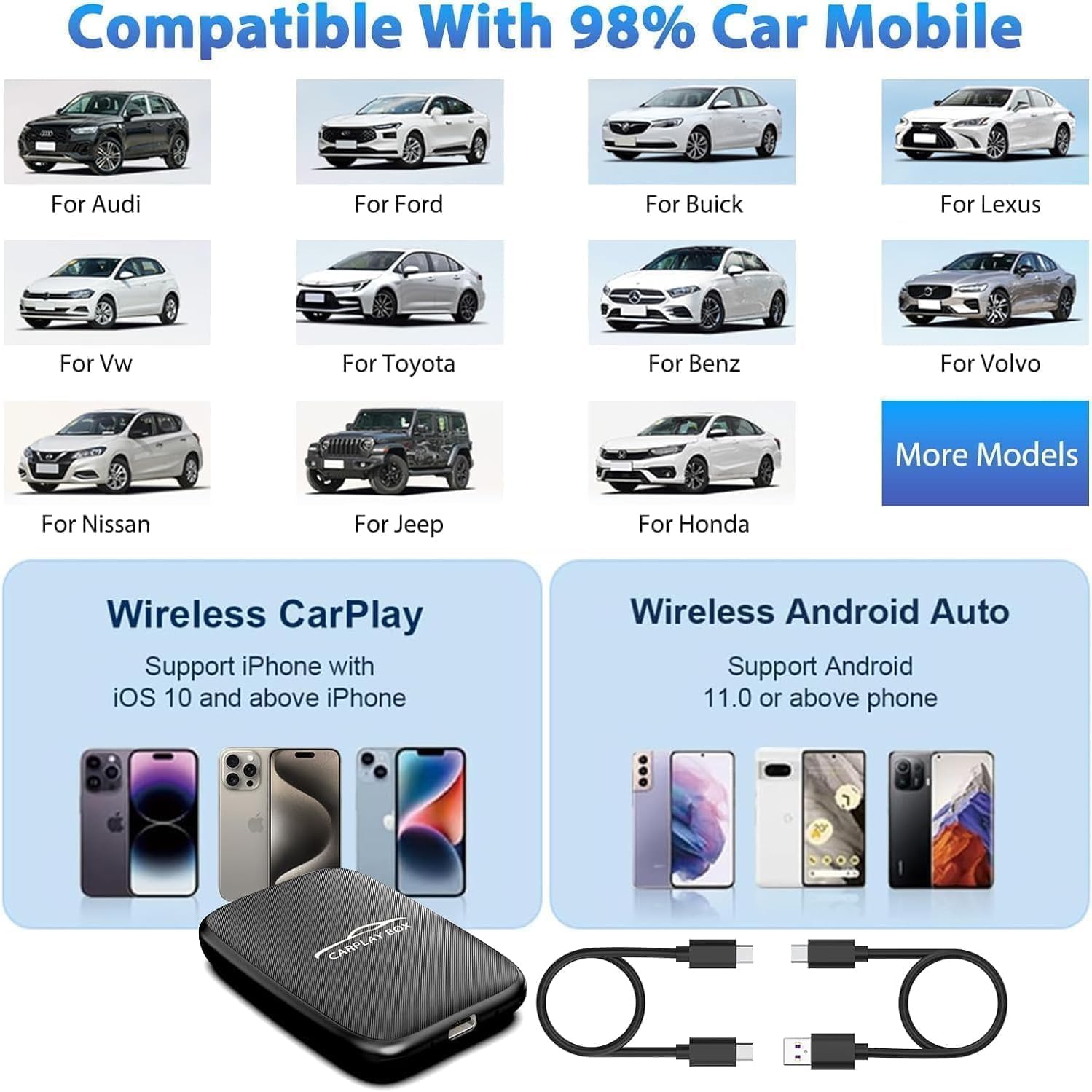
Figure 4: Broad Compatibility with Vehicles and Smartphones
Údržba
To ensure optimal performance and longevity of your dongle:
- Udržujte zařízení čisté a bez prachu. K čištění používejte měkký, suchý hadřík.
- Nevystavujte zařízení extrémním teplotám, přímému slunečnímu záření nebo vlhkosti.
- Nepokoušejte se zařízení rozebírat ani opravovat sami. Ztratíte tak záruku.
- Store the dongle in a cool, dry place when not in use.
Odstraňování problémů
If you encounter issues with your dongle, try the following solutions:
- Problémy s připojením:
- Ujistěte se, že je hardwarový klíč bezpečně zapojený do USB portu vozu.
- Verify that your phone's Wi-Fi and Bluetooth are enabled.
- Forget the Bluetooth connection on your phone and re-pair with the "HI-BOX" device.
- Restart both your car's infotainment system and your smartphone.
- Netflix/YouTube Not Working:
- Ensure the dongle has an active internet connection (e.g., via your phone's hotspot).
- Check for any available software updates for the dongle.
- Verify that the Netflix/YouTube apps are updated to their latest versions.
- Žádný zvuk:
- Zkontrolujte úroveň hlasitosti v systému vašeho auta i na smartphonu.
- Ensure the car's audio input is set to the correct source (e.g., USB, Bluetooth).
Pokud problémy přetrvávají, kontaktujte prosím zákaznickou podporu.
Specifikace
| Funkce | Detail |
|---|---|
| Značka | Rocketek |
| Číslo modelu | B0FFGMBWRZ |
| Hmotnost položky | 3.2 unce |
| Rozměry balení | 16.73 x 5.91 x 0.83 palce |
| Barva | černý |
| Speciální funkce | Wireless CarPlay, Built-in Netflix, Built-in YouTube |
| Konektivita | 5.8 GHz WiFi, Bluetooth 5.0 |
| Compatibility (Car) | Original models with wired CarPlay/Android Auto (after 2016) |
| Kompatibilita (telefon) | iOS 10+ (iPhone), Android 11+ (Android) |
Záruka a podpora
Rocketek provides a 12měsíční poprodejní servis for this product. If you have any questions, concerns, or require technical assistance, please do not hesitate to contact our friendly customer support team. We are committed to providing quality products and superior customer service.
For support, please refer to the contact information provided with your product packaging or visit the official Rocketek webmísto.
Ask a question about this manual
Ask about setup, troubleshooting, compatibility, parts, safety, or missing instructions. Manuals+ will review the question and use this page’s manual context to help answer it.