
1. Úvod
Děkuji za nákupasing the VOKSUN Weather Station Model 3378YC. This device provides accurate indoor and outdoor temperature and humidity readings, weather forecasts, time, date, and other useful meteorological data. Please read this manual carefully before use to ensure proper operation and to maximize the product's lifespan.
2. Bezpečnostní informace
- Nevystavujte hlavní jednotku ani venkovní senzor extrémním teplotám, přímému slunečnímu záření nebo vlhkosti.
- Zabraňte pádu zařízení nebo jeho vystavení silným nárazům.
- Nepokoušejte se jednotku rozebírat ani opravovat sami. Pro pomoc kontaktujte zákaznickou podporu.
- Uchovávejte baterie mimo dosah dětí. Použité baterie řádně zlikvidujte v souladu s místními předpisy.
- Ujistěte se, že je napájecí adaptér kompatibilní s vaší místní elektrickou sítí.
3. Obsah balení
- 1 x VOKSUN Weather Station Main Unit
- 1 x Bezdrátový venkovní senzor
- 1 x AC/DC napájecí adaptér
- 1 x Uživatelská příručka

Image: The VOKSUN Weather Station main unit and its wireless outdoor sensor, showcasing the multi-functional display.
4. Konec produktuview
4.1 Hlavní jednotka (meteorologická stanice)
The main unit features a 7.5-inch VA color display that shows indoor/outdoor temperature and humidity, weather forecast, time, date, moon phase, atmospheric pressure, and comfort level. It can be powered by an AC adapter or AA batteries.

Obrázek: Přední a zadní strana view of the main weather station unit with labeled components for display and controls.
Part A: Positive LCD Display Elements
- A1: Ikona venkovního bezdrátového kanálu a příjmu
- A2: Vnitřní teplota
- A3: Vnitřní vlhkost
- A4: Indikátor vnitřního komfortu
- A5: Čas
- A6: Měsíc a datum
- A7: Týden
- A8: Předpověď počasí
- A9: Venkovní teplota
- A10: Atmosférický tlak
- A11: Venkovní vlhkost
- A12: Histogram of historical pressure trends
- A13: Outdoor comfort indicator
- A14: Čas východu slunce
- A15: Měsíční fáze
- A16: Vybrané město
- A17: Hladina přílivu
- A18: Čas západu slunce
Part B: Back Buttons and Power Ports
- B1: "/zz" Touch field (Snooze/Light)
- B3: Podpěrný rám
- B4: Přihrádka na baterie
- B5: Otvor na zavěšení
- B6: "▼" Button
- B7: "▲/" Button
- B8: "" Button
- B9: "" Button
- B10: "" Button
- B11: "" Button
- B12: Napájecí zásuvka
- B13: Výstup USB nabíječky
4.2 Bezdrátový venkovní senzor
The wireless sensor measures outdoor temperature and humidity and transmits data to the main unit. It is battery-powered and designed for outdoor placement.

Image: The wireless remote sensor with its components labeled, including the LCD display, transmit signal LED, °C/°F button, channel switch, and battery compartment.
- C1: LCD display - Temperature
- C2: LCD display - Humidity
- C3: LED vysílací signál
- C4: Tlačítko „°C/°F“
- C5: Tlačítko „VYS.“
- C6: Přepínač „KANÁL 1 nebo 2 nebo 3“
- C7: Přihrádka na baterie
5. Nastavení
5.1 Instalace napájení
The main unit can be powered by the included AC adapter or 2 x AA batteries (not included). The outdoor sensor requires 2 x AA batteries (not included).
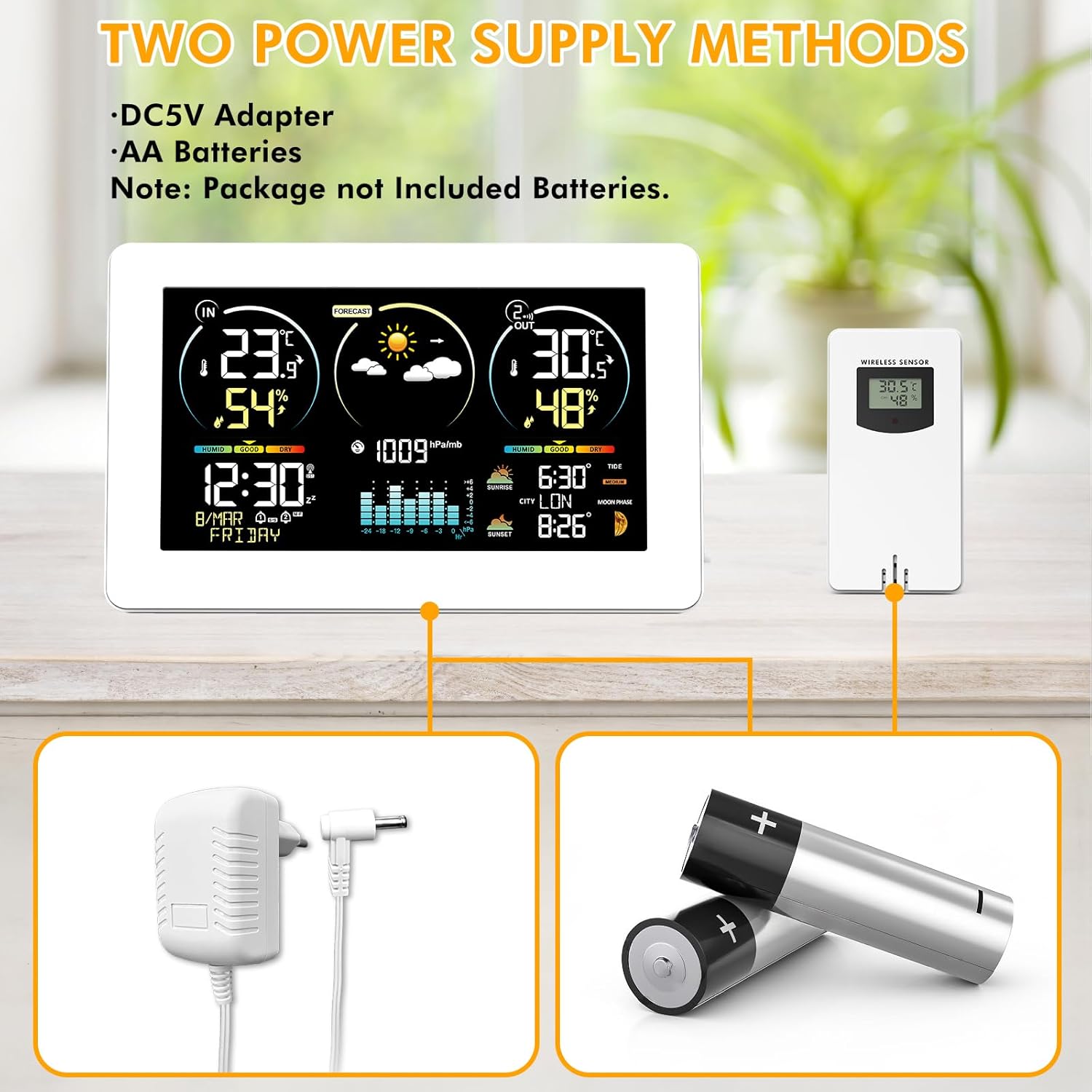
Image: Illustration of the weather station and sensor powered by either an AC adapter or AA batteries.
- For Outdoor Sensor: Open the battery compartment (C7) on the back of the wireless sensor. Insert 2 x AA batteries, observing the correct polarity (+/-). Close the compartment.
- For Main Unit: Open the battery compartment (B4) on the back of the main unit. Insert 2 x AA batteries, observing the correct polarity (+/-). Alternatively, connect the AC adapter to the power supply socket (B12) and plug it into a wall outlet.
- Poznámka: If using only batteries for the main unit, the backlight will only illuminate temporarily for 15 seconds when a button is pressed. For continuous backlight, use the AC adapter.
5.2 Párování senzorů
The main unit will automatically search for the outdoor sensor upon initial power-up. Ensure the sensor is within range (up to 60 meters / 200 feet in open air).
Image: The weather station and its outdoor sensor, demonstrating their wireless connection.
- Place the outdoor sensor near the main unit during the initial setup.
- Ensure the channel switch (C6) on the outdoor sensor is set to Channel 1 (default). If you have multiple sensors, set them to different channels (1, 2, or 3).
- The main unit will display outdoor temperature and humidity once connected. If connection fails, press and hold the "" button (B8) on the main unit for 3 seconds to initiate a manual search.
5.3 Initial Settings (Time, Date, City, Units)
The weather station supports DCF Radio Controlled Clock (RCC) function for automatic time synchronization in regions with DCF signal coverage (e.g., Europe).

Image: The weather station on a wooden table, illustrating the DCF radio-controlled time synchronization feature across Europe.
- Time Synchronization (RCC): After power-up, the unit will automatically attempt to synchronize the time via the DCF signal. This process may take several minutes. The RCC icon will flash during synchronization and become solid once successful.
- Ruční nastavení času/data: If RCC is not available or desired, press and hold the "" button (B9) to enter time setting mode. Use the "▲/" (B7) and "▼" (B6) buttons to adjust values, and "" (B9) to confirm and move to the next setting (Time Zone, 12/24H format, Hour, Minute, Year, Month, Day, Temperature Unit °C/°F, Pressure Unit hPa/inHg).
- Výběr města: Press the "" button (B10) to select your city. This affects sunrise/sunset times and tide information. Use "▲/" (B7) and "▼" (B6) to navigate through cities.
6. Návod k obsluze
6.1 Zobrazení nadview
The main display is divided into several zones, providing a comprehensive overview of weather data and time information.
Video: Produkt přesview of the VOKSUN Weather Station, demonstrating its various display zones and features.
- Zóna 1: Vnitřní teplota a vlhkost
- Zóna 2: Předpověď počasí
- Zóna 3: Venkovní teplota a vlhkost
- Zóna 4: Comfort Level, Time, Date
- Zóna 5: Barometric Pressure History
- Zóna 6: Sunrise/Sunset, City Code, Tides, Moon Phases
6.2 Předpověď počasí
The weather station provides a 12-hour weather forecast based on changes in atmospheric pressure. The forecast icons include Sunny, Slightly Cloudy, Cloudy, Rainy, Stormy, and Snowy.
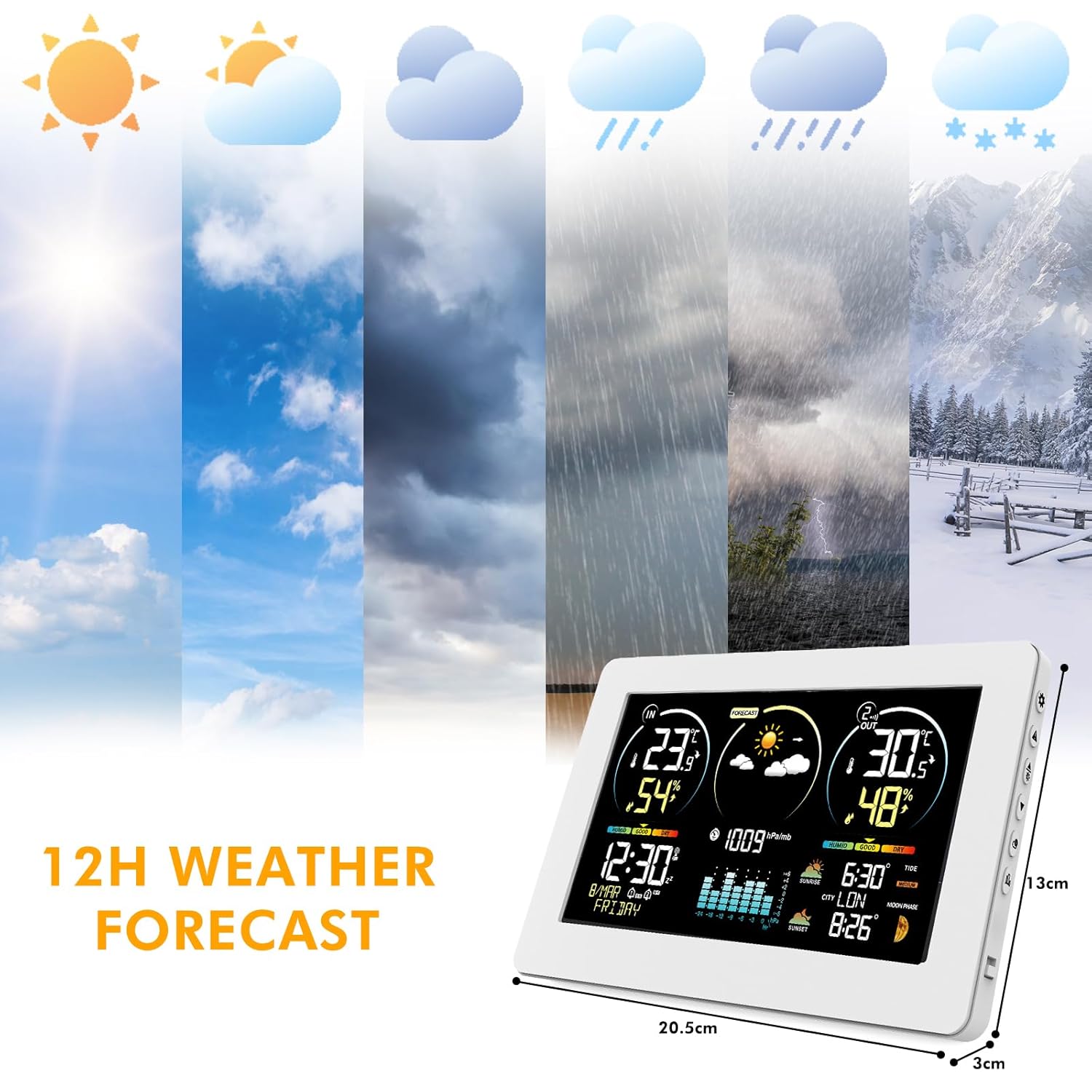
Image: Visual representation of the 12-hour weather forecast icons, from sunny to snowy conditions.
6.3 Monitorování teploty a vlhkosti
The station continuously monitors indoor and outdoor temperature and humidity. The outdoor sensor has a wireless transmission range of up to 60 meters (200 feet).

Image: The weather station displaying indoor and outdoor readings, suitable for various locations in a home.
- Indoor Temperature Range: -9.9 °C to +50 °C (14.2 °F to 122 °F)
- Outdoor Temperature Range: -40 °C to +70 °C (-40 °F to 158 °F)
- Rozsah vlhkosti: 20% až 95% RH
- If temperature exceeds range, "LL.L" or "HH.H" will be displayed.
- The station supports up to three wireless outdoor sensors (additional sensors sold separately).
6.4 Indikátor komfortu
The comfort indicator provides a visual representation of the indoor environment's comfort level based on humidity.

Image: The weather station's comfort display, showing categories like DRY, GOOD, and HUMID based on humidity percentages.
- SCHNOUT: 1-35% RH
- DOBRÝ: 35-44% RH (Dry), 45-65% RH (Comfort)
- MOKRÉ: 66-80% RH (Wet), 80-99% RH (To Wet)
6.5 Alarms and Snooze Function
Meteorologická stanice obsahuje budík s funkcí odložení buzení.

Image: The weather station acting as a bedside alarm clock with snooze function, next to a sleeping person.
- Nastavení budíku: Press the "" button (B11) to view alarm times. Press and hold "" (B11) to enter alarm setting mode. Use "▲/" (B7) and "▼" (B6) to adjust hour/minute, and "" (B11) to confirm.
- Aktivace odložení: When the alarm sounds, touch the "/zz" field (B1) to activate snooze. The alarm will sound again after 5-60 minutes (adjustable in settings).
6.6 Moon Phases and Tides
The display shows 12 different moon phases and 3 types of tide levels based on the set calendar and selected city.

Image: The weather station displaying moon phases and tide information, set against a nighttime ocean backdrop.
6.7 Nastavitelné podsvícení
The main unit features an adjustable backlight with four levels of brightness (L1-L4) when powered by the AC adapter. This allows for comfortable viewza různých světelných podmínek.
7. Údržba
- Čištění: Otřete povrch displeje a jednotky měkkým hadříkemamp tkanina. Nepoužívejte abrazivní čisticí prostředky nebo rozpouštědla.
- Výměna baterie: Vyměňte baterie v hlavní jednotce i venkovním senzoru, když se na displeji zobrazí indikátor slabé baterie. Dbejte na správnou polaritu.
- Umístění: For optimal performance, place the outdoor sensor in a shaded, dry location, protected from direct rain and sunlight. Ensure it is within the wireless range of the main unit.
8. Řešení problémů
| Problém | Možná příčina | Řešení |
|---|---|---|
| Žádný displej na hlavní jednotce | Žádné napájení nebo vybité baterie. | Connect AC adapter or replace AA batteries in the main unit. |
| Venkovní teplota/vlhkost se nezobrazuje | Senzor mimo dosah, vybité baterie senzoru nebo rušení. | Move sensor closer to main unit. Replace sensor batteries. Press and hold "" button (B8) on main unit to re-establish connection. Avoid placing near large metal objects or electronics. |
| Nesprávný čas/datum | RCC signal not received or manual settings incorrect. | Ensure unit is in an area with good RCC reception. Manually set time and date if RCC signal is weak or unavailable. |
| Předpověď počasí nepřesná | Weather forecasts are based on atmospheric pressure changes and are predictive, not absolute. | This is normal. The forecast provides a general trend for the next 12 hours. |
| "LL.L" or "HH.H" displayed | Temperature or humidity is outside the measurable range. | Move the unit or sensor to an environment within the specified operating range. |
9. Specifikace
- Model: 3378YC
- Rozsah vnitřní teploty: -9.9 °C až +50 °C (14.2 °F až 122 °F)
- Rozsah venkovních teplot: -40 °C až +70 °C (-40 °F až 158 °F)
- Přesnost teploty: ±1 °C
- Rozsah vlhkosti: 20 % až 95 % RH
- Dosah bezdrátového přenosu: Až 60 metrů (200 stop) ve volném prostoru
- Zdroj napájení (hlavní jednotka): AC/DC Adapter (included) or 2 x AA batteries (not included)
- Zdroj napájení (venkovní senzor): 2 x AA baterie (nejsou součástí balení)
- Typ displeje: Color VA LCD
- Technologie připojení: Bezdrátový
- UPC: 774300101834
10. Záruka a podpora
VOKSUN products are designed and manufactured to the highest quality standards. This product comes with a standard manufacturer's warranty. For specific warranty details, please refer to the warranty card included in your package or contact VOKSUN customer support.
If you encounter any issues or have questions regarding your VOKSUN Weather Station, please contact our customer support team:
- E-mail: [Zde vložte e-mail zákaznické podpory]
- Telefon: [Zde vložte telefonní číslo zákaznické podpory]
- Webmísto: [Insert VOKSUN Support Webstránky zde]
Please have your model number (3378YC) and purchase information ready when contacting support.