
1. Úvod
Thank you for choosing the Fame SPD Hybrid Wave Sample Pad. This versatile digital drum and sample pad is designed for musicians seeking a powerful and flexible percussion instrument. This manual will guide you through the setup, operation, and maintenance of your device, ensuring optimal performance and longevity.
2. Bezpečnostní informace
Přečtěte si prosím a dodržujte následující bezpečnostní opatření, abyste předešli poškození zařízení nebo zranění osob:
- Napájení: Only use the approved AC adapter provided with this unit. Using an unauthorized adapter may cause malfunction or damage.
- Vystavení vlhkosti: Do not expose the product to rain, moisture, or any liquids. Avoid using it in damp prostředí.
- Větrání: Zajistěte dostatečné větrání kolem jednotky. Neblokujte větrací otvory.
- Umístění: Umístěte jednotku na stabilní, rovný povrch. Neumísťujte ji do blízkosti zdrojů tepla nebo na přímé sluneční světlo.
- Čištění: Před čištěním odpojte napájecí adaptér. Použijte měkký, suchý hadřík. Nepoužívejte tekuté čisticí prostředky ani aerosoly.

Obrázek 2.1: Spodní část view of the unit, highlighting safety warnings and power input details (DC 9V 2A).
3. Konec produktuview
The Fame SPD Hybrid Wave Sample Pad features a robust design with responsive pads and intuitive controls for dynamic performance.
3.1 Přední panel a ovládací prvky

Obrázek 3.1: Nahoře view of the SPD Hybrid Wave Sample Pad, illustrating the layout of pads and controls.
- polštářky: Six velocity-sensitive pads for triggering sounds and samples.
- Zobrazit: LCD screen for navigating menus and viewing parametrů.
- Hlavní knoflík: Upravuje celkovou výstupní hlasitost.
- Phone Knob: Upravuje hlasitost výstupu sluchátek.
- FX Knobs (FX1, FX2): Control parameters for built-in effects.
- Navigační tlačítka: (HOME, SAMPLE, TEMPO, PAD EDIT, KIT SET, UTIL, SYSTEM, BT) For accessing various functions and settings.
- Směrová tlačítka a OK: Pro navigaci v menu a výběr.
- Vypínač: Zapíná nebo vypíná jednotku.
3.2 Připojení zadního panelu

Figure 3.2: Rear panel connections, including power, audio, MIDI, USB, and trigger inputs.
- DC IN: Power adapter input (9V 2A).
- MASTER OUT (L/MONO, R): Stereo audio outputs for connecting to an amplifier, mixer nebo audio rozhraní.
- LINE IN (L/MONO, R): Stereo audio inputs for connecting external audio sources.
- ZÍSKAT: Adjusts the input level for the LINE IN.
- USB-A: For connecting USB storage devices (e.g., USB flash drives).
- USB-B: Pro připojení k počítači pro přenos MIDI a audio dat.
- MIDI VSTUP/VÝSTUP: Standard MIDI connections for external MIDI devices.
- TRIGGER IN (1/2, 3/4, 5/6, 7/8): Inputs for connecting external drum triggers or pads.
- PEDAL IN (1, 2): Inputs for connecting footswitches or expression pedals.
4. Nastavení
Follow these steps to set up your Fame SPD Hybrid Wave Sample Pad:
- Připojení napájení: Connect the approved AC adapter to the DC IN port on the rear panel, then plug the adapter into a power outlet.
- Zvukový výstup:
- For stereo output, connect cables from the MASTER OUT (L/MONO, R) jacks to your amplifier, mixer nebo audio rozhraní.
- For mono output, connect a cable from the MASTER OUT (L/MONO) jack.
- For personal monitoring, connect headphones to the PHONE jack on the front panel.
- External Triggers/Pedals (Optional): Connect external drum triggers or pads to the TRIGGER IN jacks (1/2, 3/4, 5/6, 7/8) and footswitches or expression pedals to the PEDAL IN jacks (1, 2) as needed.
- Připojení USB (volitelné):
- To connect to a computer for MIDI/audio, use a USB-B cable to connect the USB-B port to your computer.
- To use a USB flash drive for importing/exporting samples, connect it to the USB-A port.
- Zapnutí: Press the POWER button on the front panel to turn on the unit.
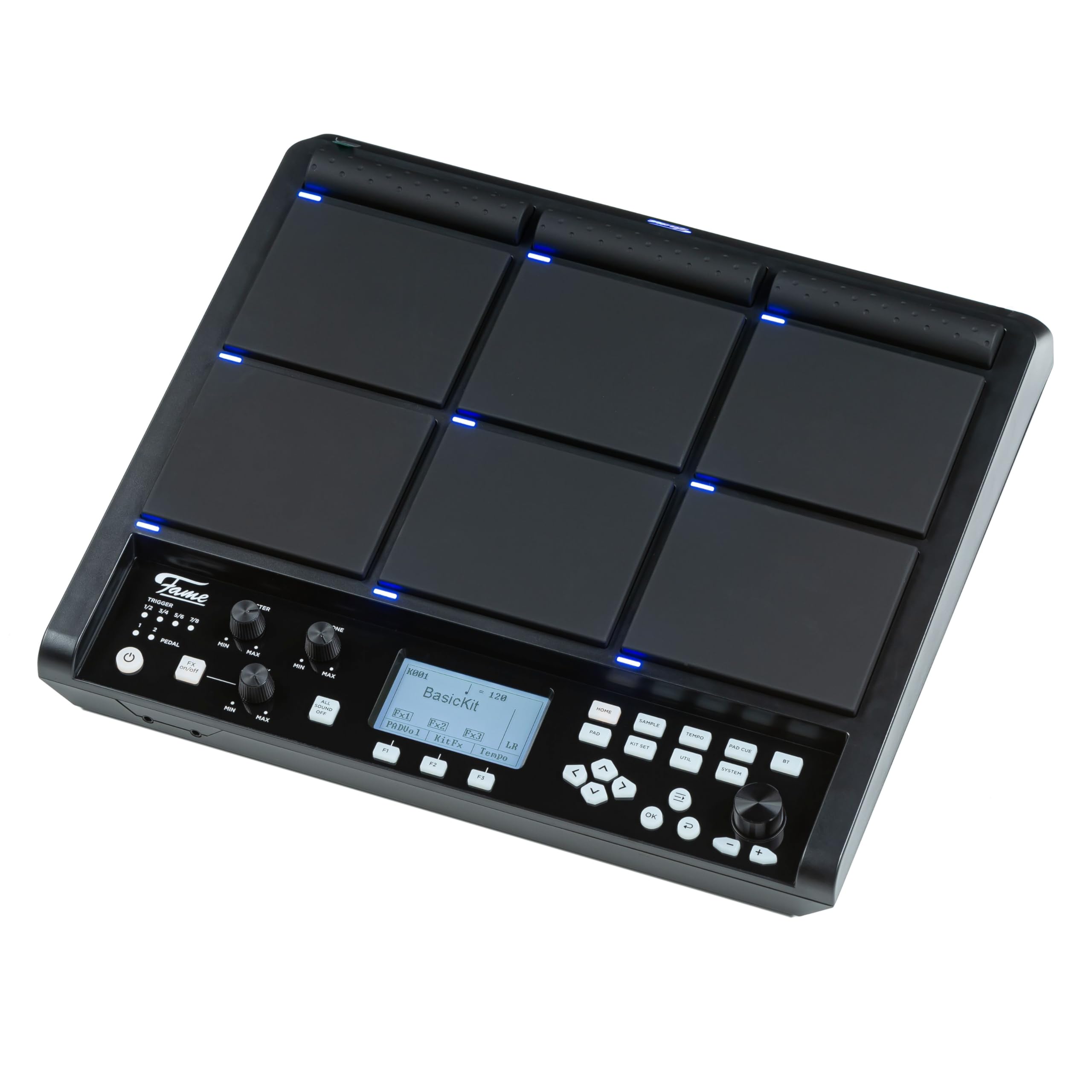
Figure 4.1: The SPD Hybrid Wave Sample Pad connected to its power adapter.
5. Návod k obsluze
5.1 Základní obsluha
- Nastavení hlasitosti: Use the MASTER knob to control the main output volume and the PHONE knob for headphone volume.
- Hrací pady: Strike the pads to trigger assigned sounds. The pads are velocity-sensitive, meaning the sound will vary based on how hard you strike them.
- Navigace v nabídkách: Use the directional buttons (left, right, up, down) to navigate through menu options on the LCD display. Press the OK button to confirm selections.
- Accessing Functions: Use the dedicated function buttons (HOME, SAMPLE, TEMPO, PAD EDIT, KIT SET, UTIL, SYSTEM, BT) to quickly access different modes and settings.
5.2 Kit Selection and Editing
- Selecting Kits: Press the KIT SET button to enter the Kit Selection mode. Use the directional buttons to browse through available drum kits. Press OK to load a kit.
- Editing Pads: Press the PAD EDIT button to assign sounds, adjust volume, pitch, and other parameters for individual pads.
- Saving Kits: After making changes to a kit, navigate to the UTIL (Utility) menu and select the 'Save Kit' option to store your custom settings.
5.3 Sampling and Effects
- Sampling: Stiskněte tlačítko S.AMPLE button to enter the sampling mode. Follow the on-screen instructions to record new samples via the LINE IN or internal microphone (if available).
- Použití efektů: Use the FX1 and FX2 knobs to adjust the parameters of the built-in effects. The specific effect and its parameters can be configured in the SYSTEM or UTIL menus.
5.4 Tempo and Metronome
- Adjusting Tempo: Press the TEMPO button to adjust the playback tempo. Use the directional buttons or a dedicated data entry knob (if present) to change the BPM (beats per minute).
- Metronom: The TEMPO menu also allows you to activate and configure the metronome for practice.
6. Údržba
Proper maintenance ensures the longevity and optimal performance of your SPD Hybrid Wave Sample Pad.
- Čištění: Regularly wipe the unit with a soft, dry cloth. For stubborn dirt, slightly damphadřík vodou. Nepoužívejte abrazivní čisticí prostředky, rozpouštědla ani vosky.
- Skladování: When not in use for extended periods, store the unit in a clean, dry place away from extreme temperatures and direct sunlight.
- Péče o vložky: Neúderte do podložek nadměrnou silou nebo ostrými předměty, mohlo by dojít k poškození senzorů.
7. Řešení problémů
If you encounter issues with your SPD Hybrid Wave Sample Pad, refer to the following common problems and solutions:
| Problém | Možná příčina | Řešení |
|---|---|---|
| No sound from main outputs |
|
|
| Elektrody nereagují |
|
|
| Jednotka se nezapne |
|
|
| External trigger not working |
|
|
8. Specifikace
- Model: Fame SPD Hybrid Wave Sample Pad
- polštářky: 6 padů citlivých na rychlost
- Zobrazit: LCD
- Moc: DC 9V, 2A (via included AC adapter)
- Vstupy:
- LINE IN (L/MONO, R)
- TRIGGER IN (x4, supporting 8 triggers)
- PEDAL IN (x2)
- MIDI IN
- USB-B (for computer connection)
- USB-A (for USB storage)
- výstupy:
- MASTER OUT (L/MONO, R)
- PHONE OUT (Stereo)
- MIDI OUT
- Konektivita: Bluetooth (BT button indicates functionality)
9. Záruka a podpora
Fame products are designed for quality and reliability. This product comes with a standard manufacturer's warranty against defects in materials and workmanship. Please refer to the warranty card included with your purchase for specific terms and conditions.
For technical support, service, or warranty claims, please contact your authorized Fame dealer or visit the official Fame webstránky pro kontaktní informace.