
1. Úvod
This manual provides instructions for the Ceybo EN2D36H ZDA1221216 Replacement Remote Control. This remote is designed to be fully compatible with various Hisense VIDAA Smart TV models, offering a direct replacement without the need for complex programming. Simply insert batteries, and the remote is ready for use.
The remote features dedicated shortcut buttons for popular streaming services, allowing quick access to your favorite entertainment platforms.
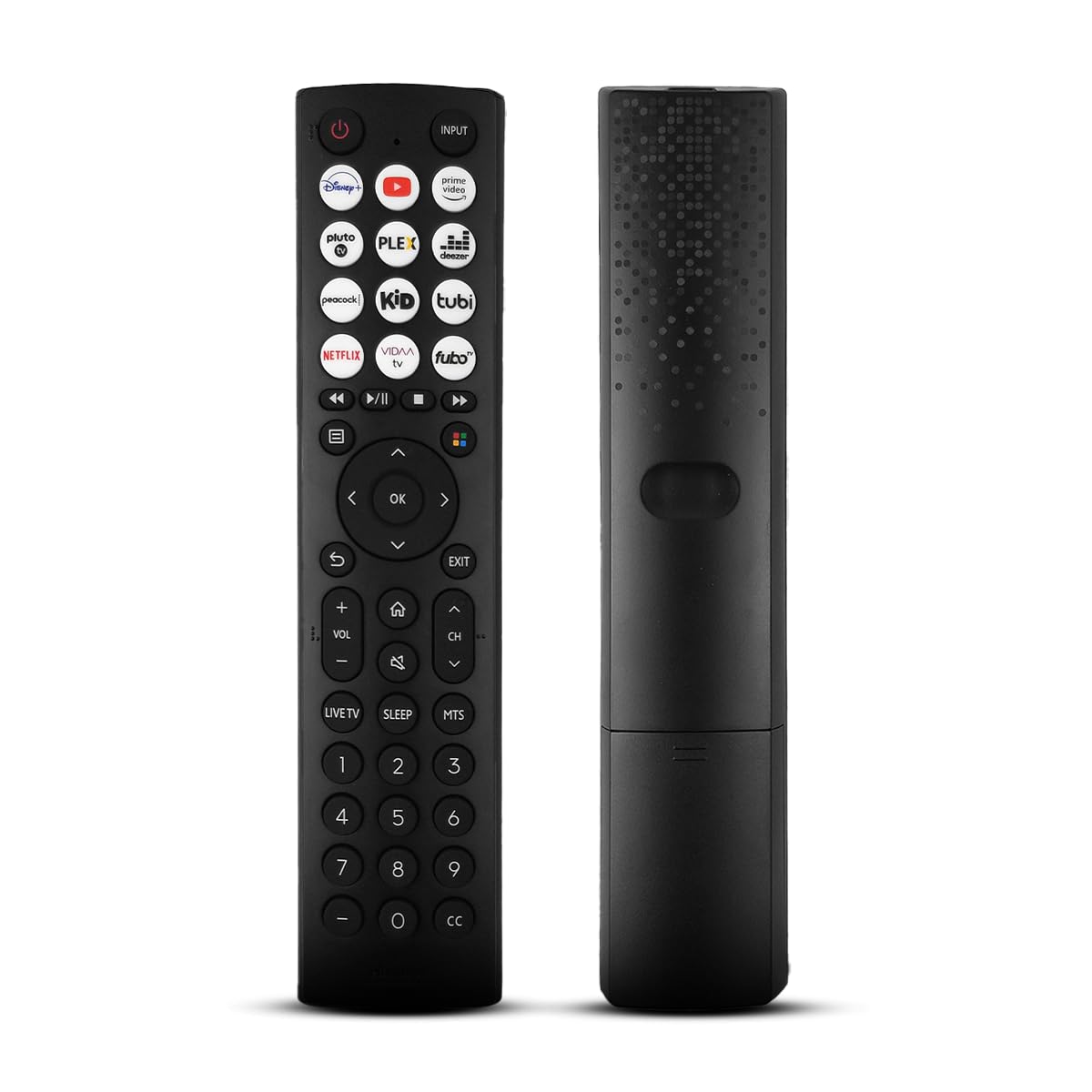
Přední strana view of the Ceybo EN2D36H ZDA1221216 replacement remote control, designed for Hisense televisions.
2. Vlastnosti
- Široká kompatibilita: Works with Hisense A4 Series UHD TVs and A6 Series UHD Smart TVs, including models such as 32A35HUV, 32A45GV, 40A35HUV, 40A45GV, 43A6GV, 43A35HUV, 43A45GV, 50A6GV, 55A6GV, and 65A6GV.
- Instant Streaming Access: Dedicated shortcut buttons for Disney+, YouTube, Prime Video, Pluto TV, Plex, Deezer, Peacock, Kidoodle, Tubi, Netflix, Vida, and Fubo.
- Funkce Plug & Play: No setup or programming required. The remote is ready to use immediately after battery installation.
- Full TV Control: Provides comprehensive control over TV functions including power, volume, input selection, channel navigation, and menu access.
- Ergonomický design: Lehký a navržený pro pohodlnou manipulaci.

This image displays the Ceybo EN2D36H ZDA1221216 remote control alongside several Hisense televisions, illustrating its compatibility with Hisense A4 and A6 Series UHD Smart TVs.
3. Nastavení
The Ceybo EN2D36H ZDA1221216 remote control is designed for immediate use without any programming steps.
3.1 Instalace baterie
- Najděte přihrádku na baterie na zadní straně dálkového ovladače.
- Posuňte kryt baterie dolů nebo stiskněte západku a zvedněte jej pro otevření.
- Vložte dvě (2) baterie typu AAA a ujistěte se, že kladný (+) a záporný (-) pól správně odpovídají označením uvnitř přihrádky.
- Nasaďte kryt baterie zpět jeho zasunutím zpět na místo, dokud bezpečně nezacvakne.
Once batteries are installed, the remote is ready to operate your compatible Hisense TV.

This image illustrates the battery compartment of the remote control, indicating that it is powered by two AAA batteries for lasting performance.

This image emphasizes the effortless setup of the remote control, stating that it requires no pairing and is ready to use immediately after battery insertion.
4. Návod k obsluze
Point the remote control directly at your Hisense TV's infrared receiver for optimal performance.
4.1 Základní funkce
- Tlačítko napájení (⏻): Stisknutím zapnete nebo vypnete televizor.
- Vstupní tlačítko: Press to cycle through available input sources (HDMI, AV, etc.).
- Zvýšení/snížení hlasitosti (VOL +/-): Upravuje úroveň hlasitosti televizoru.
- Kanál nahoru/dolů (CH +/-): Změní televizní kanál.
- Tlačítko ztlumení (🔇): Ztlumí nebo zruší ztlumení zvuku televizoru.
4.2 Navigace a menu
- Směrová podložka (nahoru, dolů, vlevo, vpravo): Navigates through menus and on-screen options.
- Tlačítko OK: Potvrzuje výběr nebo otevírá nabídky.
- Tlačítko Zpět (↩): Vrátí se na předchozí obrazovku nebo nabídku.
- Tlačítko Konec: Ukončí aktuální menu nebo aplikaci.
- Tlačítko Domů (🏠): Přístup k hlavnímu chytrému centru nebo domovské obrazovce televizoru.
4.3 Streaming Shortcut Buttons
Press any of the dedicated shortcut buttons to directly launch the corresponding streaming application:
- Disney+
- Youtube
- Prime Video
- Pluto TV
- Plex
- Deezer
- Páv
- Kidoodle
- Tubi
- Netflix
- Vida
- Fubo

The remote control is shown with a magnified view of its dedicated shortcut buttons for popular streaming services like Disney+, YouTube, Prime Video, Pluto TV, Plex, Deezer, Peacock, Kidoodle, Tubi, Netflix, Vida, and Fubo.

The remote control is presented to highlight its user-friendly design, featuring large and clearly labeled buttons for intuitive navigation and access to all functions.
5. Údržba
5.1 Čištění
K čištění dálkového ovladače použijte měkký, suchý hadřík. V případě odolných nečistot jej lehce setřete.amphadřík vodou. Nepoužívejte agresivní chemikálie, abrazivní čisticí prostředky ani rozpouštědla, protože by mohly poškodit povrch dálkového ovladače nebo jeho vnitřní součásti.
5.2 Výměna baterie
Replace batteries when the remote's response becomes sluggish or it stops functioning. Always replace both AAA batteries at the same time with new ones. Do not mix old and new batteries, or different types of batteries, as this can lead to leakage or improper operation. Dispose of used batteries according to local regulations.
6. Řešení problémů
If you experience issues with your Ceybo EN2D36H ZDA1221216 remote control, refer to the following common solutions:
| Problém | Možná příčina | Řešení |
|---|---|---|
| Dálkové ovládání nefunguje. | Vybité nebo nesprávně vložené baterie. | Vyměňte baterie za nové baterie AAA a dbejte na správnou polaritu (+/-). |
| Dálkový ovladač nereaguje. | Obstruction between remote and TV, or remote is too far. | Ensure a clear line of sight to the TV's IR receiver. Move closer to the TV. |
| Konkrétní tlačítka nefungují. | Dirt or debris under the button, or internal malfunction. | Clean the remote. If the issue persists, the remote may require replacement. |
| TV does not respond to remote. | TV's IR receiver is blocked or malfunctioning. | Check the TV's IR receiver for obstructions. Test with another remote if available to confirm TV functionality. |
7. Specifikace
- Značka: Ceybo
- Název modelu: EN2D36H ZDA1221216
- Technologie připojení: Infračervený (IR)
- Typ ovladače: Ovládání tlačítkem
- Kompatibilní zařízení: Television (Hisense VIDAA Smart TVs)
- Zdroj napájení: 2 x AAA baterie (nejsou součástí balení)
- Maximální rozsah: 30 stop (přibližně 9 metry)
- Speciální vlastnosti: Ergonomický, lehký, nevyžaduje žádné programování
- Barva: Černý
8. Záruka a podpora
For warranty information or technical support, please refer to the product packaging or contact Ceybo customer service through the retailer where the product was purchased. Keep your purchase receipt as proof of purchase.