
1. Úvod
Děkuji za nákupasing the Audio Array SB-01 Bluetooth Soundbar. This manual provides essential information for setting up, operating, and maintaining your device. Please read it thoroughly before use to ensure proper functionality and to maximize your audio experience.
2. Obsah balení
Ověřte, zda jsou v balení obsaženy všechny níže uvedené položky:
- Audio Array SB-01 Sound Bar
- Nabíjecí kabel
- Uživatelská příručka
3. Konec produktuview
The Audio Array SB-01 is a versatile Bluetooth soundbar designed to enhance your audio experience across various devices. It features multiple connectivity options, dynamic RGB lighting, and a portable design.

Obrázek: Overview of the Audio Array SB-01 Soundbar, highlighting its LED lights synced with music, wide connectivity options, stylish portable design, and full-range drivers for immersive sound.
Klíčové vlastnosti:
- 25W RMS Stereo Sound: Poskytuje silný a čistý zvuk.
- 2.0 Nastavení kanálů: Provides an enhanced audio experience.
- Dual Open Radiators: Produces clear surround sound and heightened bass.
- 8 hodin přehrávání: Equipped with a 2000mAh battery for extended use (at 60% volume).
- Vícenásobné připojení: Supports Bluetooth, AUX, FM, and TF Card.
- Ergonomický a přenosný design: Easy to carry and suitable for various settings.
- Max Loudness 90dB: Ensures crystal clear clarity at high volumes.
- Dynamická RGB světla: LED lights sync with music for visual enhancement.
- Vestavěný mikrofon: Enables hands-free calls.
- Funkce TWS: Allows pairing with another SB-01 for True Wireless Stereo sound.

Image: Detailed diagram of the Audio Array SB-01 Soundbar's control buttons (Play Backward, Play/Pause, Play Forward, Mute) and connection ports (Power On/Off, AUX, TF Card, USB, Type-C charging).
4. Nastavení
4.1 Nabíjení soundbaru
Before initial use, fully charge the soundbar using the provided Type-C charging cable. Connect the cable to the Type-C port on the soundbar and a compatible USB power adapter (not included).

Image: The Audio Array SB-01 Soundbar displaying its dimensions (36cm length, 9cm depth, 8cm height) and illustrating the Type-C charging cable connection.
4.2 Zapnutí/vypnutí
- To power on, long press the Power On/Off button located on the back panel.
- To power off, long press the Power On/Off button again.
5. Návod k obsluze
5.1 Výběr režimu
Single tap the 'M' button on the control panel to cycle through available modes: Bluetooth, AUX, USB, TF Card, and FM Radio.
5.2 Režim Bluetooth
The soundbar will automatically enter Bluetooth pairing mode when powered on or when Bluetooth mode is selected. The LED lights will indicate pairing status.
- Ujistěte se, že je soundbar v režimu Bluetooth.
- Na svém zařízení (chytrý telefon, tablet, notebook) povolte Bluetooth a vyhledejte dostupná zařízení.
- Select "Audio Array" from the list of devices.
- Once connected, the soundbar will indicate successful pairing, and you can begin playing audio.
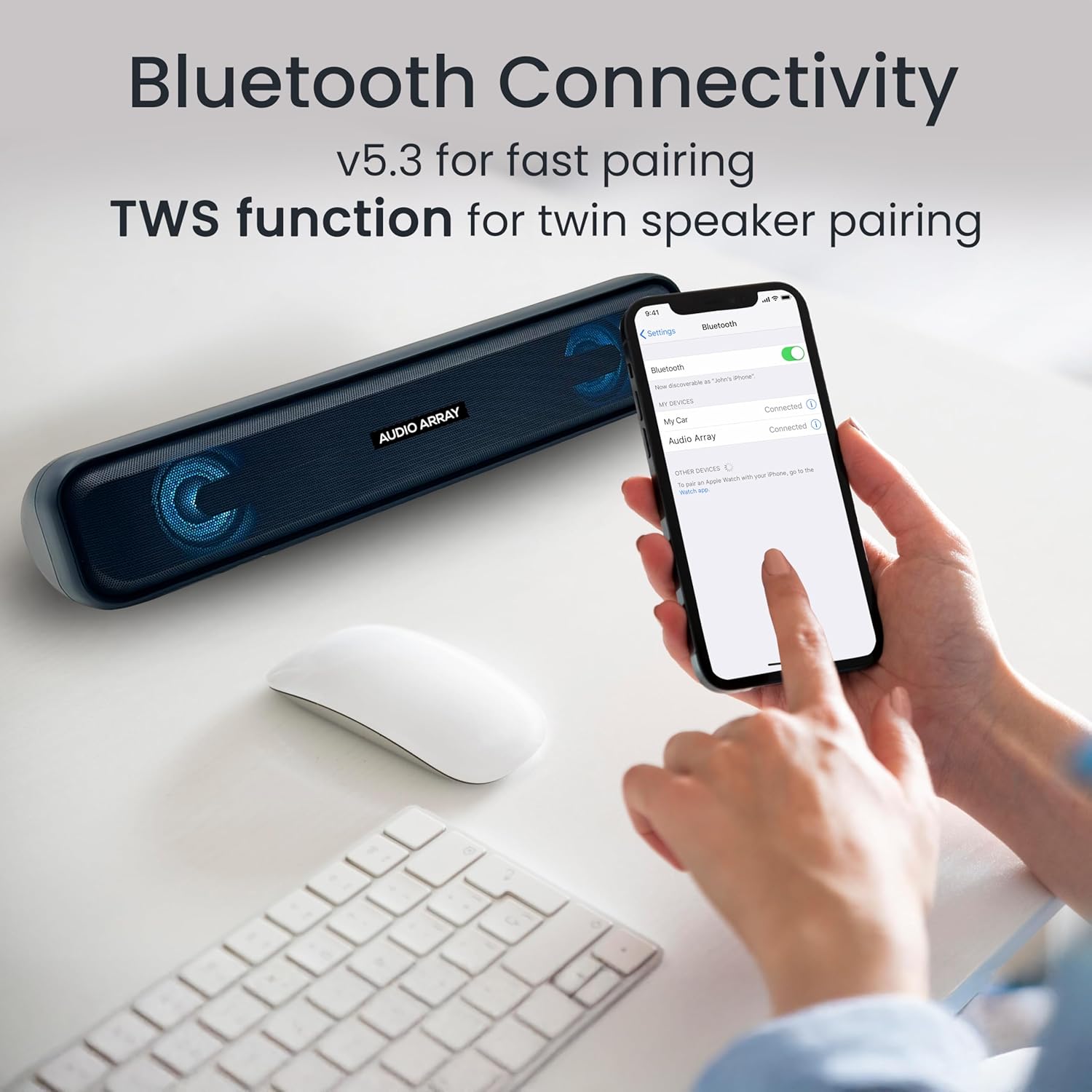
Image: A smartphone screen displaying the successful Bluetooth connection to the "Audio Array" soundbar, illustrating the pairing process.
Funkce 5.3 TWS (True Wireless Stereo)
To achieve a wider stereo sound, you can pair two Audio Array SB-01 soundbars together.
- Ensure both SB-01 soundbars are powered on and in Bluetooth mode.
- On one soundbar, long press the Play/Pause button until you hear a pairing tone.
- The two soundbars will automatically connect to each other.
- Once paired, connect your device to one of the soundbars via Bluetooth as described in section 5.2. Audio will now play through both soundbars in stereo.

Image: Two Audio Array SB-01 soundbars connected wirelessly, demonstrating the TWS (True Wireless Stereo) feature for enhanced audio output.
5.4 Režim AUX
Connect an external audio device using a 3.5mm AUX cable (not included).
- Connect one end of the 3.5mm AUX cable to the AUX port on the soundbar.
- Druhý konec připojte k audio výstupnímu konektoru vašeho zařízení.
- Select AUX mode on the soundbar by single tapping the 'M' button.
5.5 Přehrávání z USB
Vložte USB flash disk obsahující zvuk filedo portu USB. Soundbar se automaticky přepne do režimu USB a spustí přehrávání.
5.6 Přehrávání z TF karty
Vložte kartu TF (MicroSD) s audio files into the TF Card slot. The soundbar will automatically switch to TF Card mode and begin playback.
5.7 Režim rádia FM
To use the FM radio function, follow these steps:
- Connect an AUX cable to the soundbar before turning on FM Radio mode. This cable acts as an antenna to improve radio frequency reception.
- Single tap the 'M' button to select FM Mode.
- Long press the Play & Pause button to initiate an automatic scan for FM radio channels.
- Once scanning is complete, single tap the Play & Pause button to select a scanned radio channel.
- Use the Previous or Next buttons to navigate between channels.

Image: A detailed guide on connecting and operating the FM Radio feature of the Audio Array SB-01 Soundbar, showing button functions and the need for an AUX cable as an antenna.
5.8 Ovládací prvky
- Přehrát/pozastavit: Single tap the Play/Pause button to play or pause audio.
- Zvýšit hlasitost: Long press the Play Forward button to increase volume.
- Snížit hlasitost: Long press the Play Backward button to decrease volume.
- Další stopa/kanál: Single tap the Play Forward button.
- Předchozí stopa/kanál: Single tap the Play Backward button.
- Ztlumit: Single tap the Mute button.
5.9 Handsfree hovory
When connected via Bluetooth to a smartphone, the built-in microphone allows for hands-free calling.
- Přijmout hovor: Single tap the Play/Pause button.
- Ukončit hovor: Single tap the Play/Pause button during a call.
- Odmítnout hovor: Dlouze stiskněte tlačítko Přehrát/Pozastavit.

Image: A woman using the Audio Array SB-01 Soundbar for hands-free communication, highlighting the functionality of its built-in microphone for clear conversations.
6. Údržba
- Soundbar čistěte měkkým, suchým hadříkem. Nepoužívejte abrazivní čisticí prostředky ani rozpouštědla.
- Nevystavujte zařízení extrémním teplotám, přímému slunečnímu záření nebo vysoké vlhkosti.
- Do not disassemble the soundbar. This will void the warranty.
- Keep the device away from water and other liquids. The soundbar is moisture resistant, but not waterproof.
7. Řešení problémů
| Problém | Možná příčina | Řešení |
|---|---|---|
| Žádná síla | Baterie je vybitá; napájecí kabel není připojen. | Nabijte soundbar; Ujistěte se, že je napájecí kabel bezpečně připojen. |
| Žádný zvuk | Příliš nízká hlasitost; Vybrán nesprávný režim; Zařízení není připojeno. | Increase volume; Select correct input mode (Bluetooth, AUX, etc.); Reconnect device. |
| Párování Bluetooth se nezdařilo | Soundbar není v režimu párování; Zařízení je příliš daleko; Rušení. | Ensure soundbar is in Bluetooth pairing mode; Move device closer; Turn off other Bluetooth devices. |
| Příjem FM rádia je špatný | No AUX cable connected; Weak signal. | Connect an AUX cable to act as an antenna; Try repositioning the soundbar. |
8. Specifikace
| Funkce | Detail |
|---|---|
| Značka | Zvukové pole |
| Číslo modelu | SB-01 |
| Maximální výstupní výkon reproduktoru | 25 wattů |
| Frekvenční odezva | 20000 Hz |
| Technologie připojení | Bluetooth |
| Režim zvukového výstupu | Stereo |
| Typ montáže | Policový držák |
| Materiál pouzdra | Akrylonitrilbutadienstyren (ABS), kov |
| Typ reproduktoru | Soundbar |
| Vlastnosti produktu | Built In Microphone, LED Light, Portable, USB Port |
| Barva | Modrý |
| Maximální dosah | 10 metrů |
| Kontrolní metoda | Dotek |
| Úroveň odolnosti proti vodě | Odolné proti vlhkosti |
| Dosah Bluetooth | 10 metrů |
| Počet zvukových kanálů | 2.0 |
| Protokol připojení | AUX, Bluetooth, USB |
| Typ zvukového ovladače | Dynamický ovladač |
| Rozměry položky D x Š x V | 9H x 36Š x 8V centimetrů |
| Hmotnost položky | 700 gramů |
| Kompatibilní zařízení | Stolní počítač, notebook, chytrý telefon, tablet, televize |
9. Záruka a podpora
9.1 Informace o záruce
The Audio Array SB-01 Bluetooth Soundbar comes with a 1letá záruka výrobce od data nákupu. Uschovejte si prosím doklad o koupi pro případ reklamace. Záruka se vztahuje na výrobní vady a nevztahuje se na škody způsobené nesprávným použitím, nehodami nebo neoprávněnými úpravami.
9.2 Zákaznická podpora
For any support, feedback, or warranty-related inquiries, please contact Audio Array customer service:
- E-mail: podpora@audioarray.in
- Telefon: +91 93721 46440
- Výrobce: Cambium Retail Pvt Ltd
- Adresa: 109, Hubtown Solaris, N S, B 203, Professor NS Phadke Rd, Andheri East, Mumbai, Maharashtra 400069, India