
1. Úvod
The Thunderobot L1 Computer Monitor Lamp is designed to provide optimal lighting for your workspace, focusing on eye comfort and visual clarity. It features an asymmetric light source, high color rendering (Ra≥95), flicker-free illumination, low blue light protection, and adjustable color temperature and brightness levels.
2. Bezpečnostní informace
- Ujistěte se, že lamp is securely placed on the monitor to prevent accidental falls.
- Nevystavujte lamp vodě nebo nadměrné vlhkosti.
- Avoid disassembling the product. Contact support for repairs.
- Pro napájení používejte pouze dodaný kabel USB.
- Uchovávejte mimo dosah dětí.
3. Obsah balení
Ověřte, zda jsou v balení přítomny všechny položky:
- Thunderobot L1 Computer Monitor Lamp
- Napájecí kabel USB
- Uživatelská příručka
4. Pokyny k nastavení
- Umístění Lamp: Gently place the Thunderobot L1 Monitor Lamp on top of your computer monitor. The gravity-activated clamping mechanism and silicone anti-slip stabilizers will help secure it in place. Adjust the lamp's angle using the dual-pivot adjustment system to direct light onto your workspace without screen glare.
- Připojení napájení: Connect the provided USB cable to the USB-C port on the lamp and plug the other end into an available USB port on your computer or a USB power adapter (not included). The lamp se zapne.

Image: The Thunderobot L1 lamp features a gravity-activated clamp, silicone stabilizers, and a dual-pivot adjustment system for secure and flexible positioning.
Video: This video demonstrates the assembly and installation of the Thunderobot L1 Computer Monitor Lamp, showing how to attach it to a monitor and connect the power cable.
5. Návod k obsluze
The Thunderobot L1 Monitor Lamp features intuitive touch controls located on the top surface of the lamp.
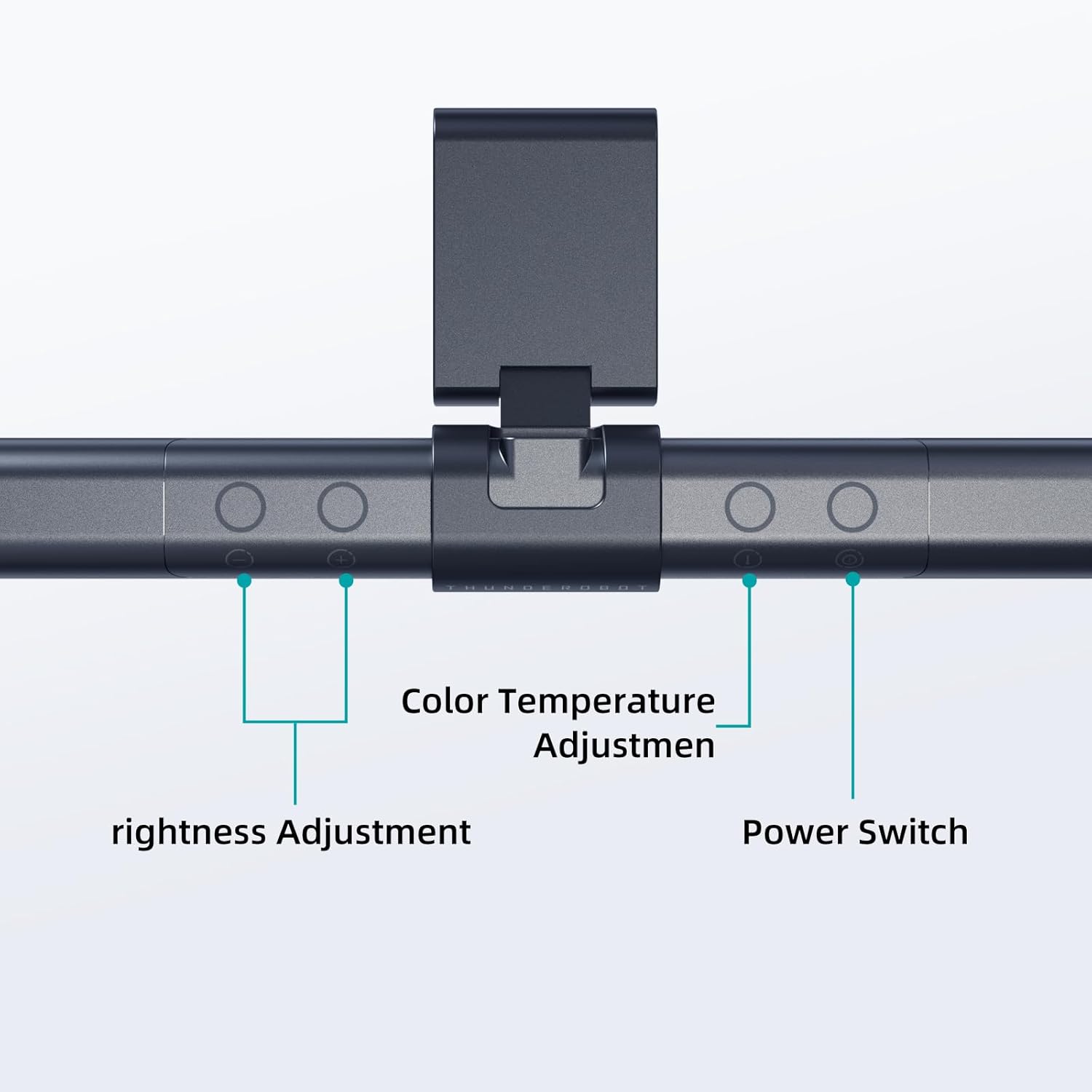
Image: The touch controls include buttons for brightness adjustment, color temperature adjustment, and power.
- Zapnutí/vypnutí: Stiskněte tlačítko napájení (O) pro otočení lamp zapnuto nebo vypnuto.
- Nastavení jasu: Use the brightness adjustment buttons (+ a -) to cycle through ten levels of brightness.
- Nastavení teploty barev: Press the color temperature button (i) to switch between six different color temperature settings.

Obrázek: The lamp offers six adjustable color temperatures, ranging from 3000K (Warm Light) to 6000K (Cool White Light), suitable for various activities like movie viewing, reading, studying, and working.
6. Klíčové vlastnosti
- Asymmetric Light Source: The advanced asymmetric light design ensures uniform light distribution across the workspace, eliminating screen glare and shadows. This optimizes the light path for comfortable, prolonged use.
- Ra≥95 High Color Rendering: With a color rendering index of Ra≥95, the lamp accurately reproduces colors, providing a vivid and true-to-life visual experience for various tasks.
- Osvětlení bez blikání: Equipped with flicker-free technology, this lamp provides constant, stable illumination, reducing eye strain and headaches associated with traditional lighting.
- Low Blue Light Protection: Advanced low blue light technology reduces harmful blue wavelengths, alleviating eye strain, dryness, and fatigue, especially during extended screen time.
- Six Color Temperatures: Offers a versatile range of six color temperature options, from warm white to cool white, allowing users to customize the lighting atmosphere for different scenarios and preferences.
- Ten-Level Dimming: Provides ten adjustable brightness levels for precise control over illumination intensity.

Image: The Ra≥95 High CRI ensures colors are displayed accurately and vibrantly, as demonstrated by the fruit comparison.

Obrázek: The lamp provides low blue light protection, reducing harmful blue light exposure for eye comfort.
7. Specifikace
| Funkce | Detail |
|---|---|
| Rozměry produktu | 3.5"H x 17.7"Š x 3.85"V |
| Hmotnost položky | 16 unce |
| Lamp Typ | Stůl Lamp |
| Barva stínu | Černý |
| Materiál stínidla | Polyester |
| Typ přepínače | Stiskněte tlačítko |
| Technologie připojení | USB (pro napájení) |
| svtage | 12 voltů |
| Barva | Černý |
| Tvar | Byt |
| Typ materiálu | Polykarbonát |
| Číslo modelu | TH-L1-B2 |
8. Údržba
- Čištění: Před čištěním odpojte napájení. K otření použijte měkký, suchý hadřík.amp. Nepoužívejte abrazivní čisticí prostředky nebo rozpouštědla.
- Skladování: Pokud přístroj delší dobu nepoužíváte, uložte jejamp na chladném a suchém místě.
9. Řešení problémů
- Lamp nezapne se:
- Ujistěte se, že je kabel USB pevně připojen k oběma lamp a zdroj energie.
- Verify that the power source (USB port or adapter) is functional.
- Blikání světla:
- Zkontrolujte připojení napájení.
- Pokud blikání přetrvává, kontaktujte zákaznickou podporu.
- Controls are unresponsive:
- Disconnect and reconnect the power cable to reset the lamp.
- Při používání dotykového ovládání se ujistěte, že máte čisté a suché prsty.
10. Záruka a podpora
Thunderobot provides 1-year product quality support for the L1 Computer Monitor Lamp. For warranty claims or technical assistance, please contact Thunderobot customer service.