
1. Úvod
The Flashpoint Zoom Li-Ion V480C is a high-performance on-camera flash designed for Canon cameras, offering advanced features for professional and enthusiast photographers. This flash integrates with the Flashpoint R2 wireless system, providing versatile lighting control. Key features include a Guide Number of GN50, rapid 1.7-second recycle time, TTL auto flash, manual flash modes, and 2.4GHz wireless control.

Image 1.1: Flashpoint Zoom Li-Ion V480C with an overview of its main features.
2. Zahrnuté komponenty
Ověřte, zda balení obsahuje všechny následující položky:
- Flashpoint Zoom Li-on Compact V480 Flash
- VB22 7.2 V / 2200 mAh Rechargeable Li-ion Battery Pack
- Nabíječka baterií
- Mini stojan
- Ochranné pouzdro
3. Konec produktuview
Familiarize yourself with the various parts of your Flashpoint V480C flash unit.

Obrázek 3.1: Přední a boční strana view of the Flashpoint V480C with numbered components.
- Catchlight Panel (White)
- Built-in Wide Angle Diffuser
- Blesková hlava
- LED modelování Lamp
- Senzor fotobuňky
- Zamykací kroužek
- Hot Shoe
- Synchronizační kabel Jack
- Dotyková obrazovka
- Port pro upgrade firmwaru USB-C
- Tlačítko vypínače
- Tlačítko Nastavit
- Vyberte možnost Vytočit
- Testovací tlačítko / Indikátor recyklace
- Upevňovací přezka na boty
4. Nastavení
4.1. Instalace a nabíjení baterie
The Flashpoint V480C uses a VB22 7.2V / 2200mAh rechargeable Li-ion battery pack. Ensure the battery is fully charged before first use.
- To install the battery, slide open the battery compartment cover located on the side of the flash unit.
- Insert the VB22 Li-ion battery pack, ensuring the contacts align correctly.
- Zavřete kryt přihrádky na baterie, dokud bezpečně nezacvakne na místo.
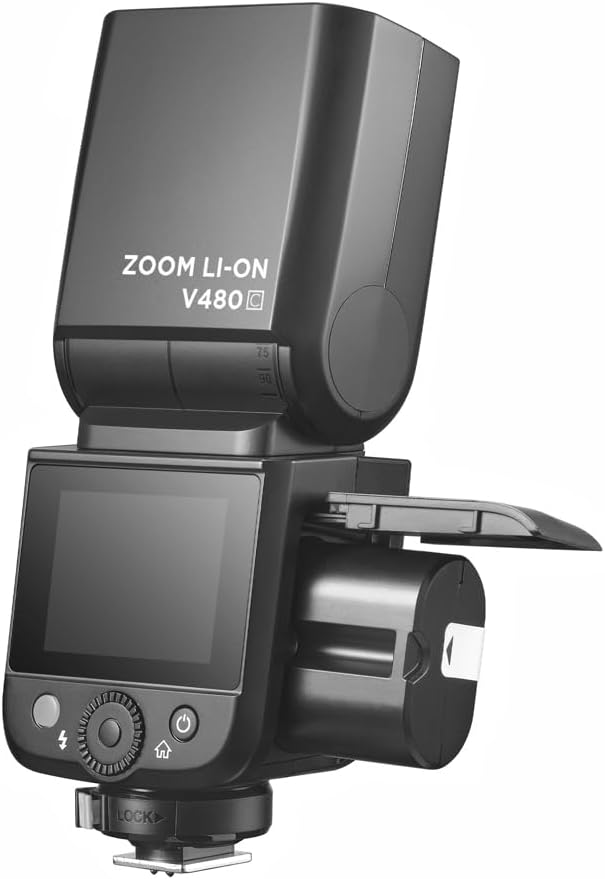
Image 4.1: Battery compartment open for installation.
To charge the battery, use the provided battery charger. Connect the battery to the charger and plug the charger into a power outlet. The indicator light on the charger will show the charging status.
4.2. Mounting the Flash to Your Camera
The V480C is designed to mount onto a camera's hot shoe.
- Ujistěte se, že je fotoaparát vypnutý.
- Slide the flash's hot shoe (7) into your camera's hot shoe mount.
- Rotate the Hot Shoe Fixing Buckle (15) clockwise to secure the flash firmly in place. Do not overtighten.
5. Ovládání blesku
5.1. Powering On/Off and Basic Controls
To power on the flash, press and hold the Power Switch Button (11) until the screen illuminates. To power off, press and hold the same button.
The V480C features a crisp color touchscreen (9) and tactile buttons for intuitive control.

Image 5.1: Touchscreen and button interface for adjusting flash settings.
- Set Button (12): Used to confirm selections or enter menu options.
- Select Dial (13): Rotate to navigate menus and adjust values.
- Test Button / Recycle Indicator (14): Press to fire a test flash. The indicator light shows when the flash is ready to fire.
5.2. Režimy blesku
The V480C supports various flash modes:
- Automatický blesk TTL: Automaticky upravuje výkon blesku pro správnou expozici.
- Manuální blesk: Allows manual control over flash power output (1/1 to 1/256 in 1/3 stop increments).
- Vícenásobný blesk (stroboskopický): Během jedné expozice odpálí sérii rychlých záblesků pro zachycení více pohybů.
5.3. Wireless Operation (R2 System)
The V480C features built-in 2.4GHz R2 wireless functionality, allowing it to act as a master or slave unit within the Flashpoint R2 system. It supports 4 groups and 32 channels with a transmission range of up to 100m.

Obrázek 5.2: Příkladample of 2.4GHz R2 wireless integration in a studio environment.
Refer to the on-screen menu for setting master/slave modes, group assignments, and channel selection.
5.4. Vysokorychlostní synchronizace (HSS)
High-Speed Sync allows the flash to synchronize with shutter speeds up to 1/8000s, enabling you to use flash with wide apertures in bright conditions or to freeze fast motion.

Image 5.3: Demonstration of High-Speed Sync (HSS) capability.
Activate HSS through the flash's menu or your camera's flash control settings.
5.5. LED modelování Lamp
The built-in LED Modeling Lamp (4) provides continuous light for focusing in low-light conditions or for previewing lighting effects. Adjust its brightness through the flash's menu.
5.6. Aktualizace firmwaru
The Flashpoint V480C supports firmware updates via its USB-C Firmware Upgrade Port (10). Visit the Flashpoint webstránky s nejnovějším firmwarem a pokyny.
6. Údržba
6.1. Čištění
K čištění blesku použijte měkký, suchý hadřík. V případě odolných nečistot použijte lehceamp Lze použít hadřík a poté suchý hadřík. Nepoužívejte silné čisticí prostředky ani rozpouštědla.
6.2. Skladování
When not in use for extended periods, remove the battery from the flash unit. Store the flash in a cool, dry place, away from direct sunlight and extreme temperatures. Use the provided protective case for storage and transport.
7. Řešení problémů
If you encounter issues with your Flashpoint V480C, refer to the following common problems and solutions:
- Blesk se neaktivuje:
- Ensure the flash is powered on and securely mounted to the camera's hot shoe.
- Check battery level; recharge if necessary.
- Verify camera and flash settings are compatible (e.g., flash enabled in camera menu).
- If using wireless, ensure master and slave units are on the same channel and group.
- Incorrect exposure (too dark/too bright):
- In TTL mode, check for Flash Exposure Compensation (FEC) settings on both flash and camera.
- V manuálním režimu upravte výkon blesku.
- Ensure flash head zoom matches lens focal length or is set to auto.
- Flash recycle time is slow:
- Baterie může být vybitá; nabijte ji nebo vyměňte.
- High power settings naturally result in longer recycle times.
- Problémy s bezdrátovým připojením:
- Ensure all units are within range (100m).
- Zkontrolujte rušení od jiných zařízení 2.4GHz.
- Verify channel and group settings are identical on all units.
If problems persist, consult the Flashpoint support webnebo kontaktujte zákaznický servis.
8. Specifikace
| Model | V480C |
| Směrné číslo | GN50 (ISO 100, v metrech) |
| Recyklovat čas | Cca. 1.7 sekund |
| Režimy blesku | TTL, Manuální, Multi |
| Bezdrátová funkce | Master, Slave, Off |
| Bezdrátové Dosah | Cca. 100m |
| Kanály | 32 (1-32) |
| Skupiny | 4 (A, B, C, D) |
| Vysokorychlostní synchronizace | Až 1/8000 XNUMX s |
| Zdroj napájení | VB22 Li-ion Battery (7.2V / 2200mAh) |
| Rozměry | 6.54" x 2.8" x 1.93" (16.6 x 7.1 x 4.9 cm) |
| Hmotnost (s baterií) | 12.7 oz (360g) |
| Kompatibilní montáže | Kánon |
9. Záruka a podpora
For warranty information, technical support, or service inquiries, please refer to the documentation provided with your purchase or visit the official Flashpoint webUschovejte si doklad o koupi pro případ reklamace.